Harmonyos应用实例130:动态几何——动点轨迹
·
应用实例十:动态几何——动点轨迹
知识点:综合应用—— 数形结合思想。
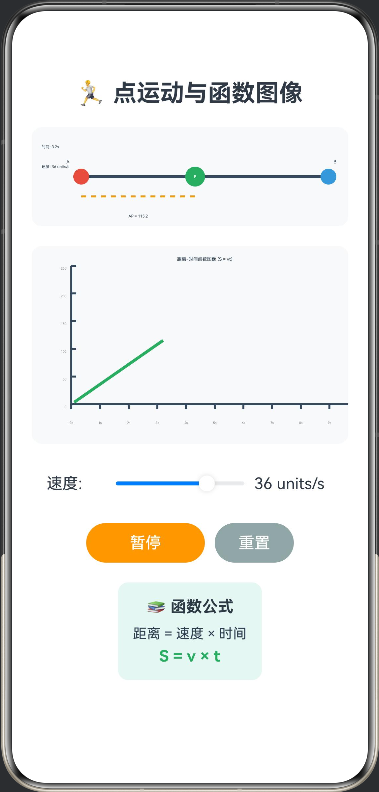
功能:点P在线段AB上运动。设置速度v,动画演示点P的运动过程。实时绘制P点到A点距离S与时间t的函数图像(即S=vt),帮助学生从几何运动过渡到函数思维,为初二函数学习做铺垫。
/**
 * 点运动与函数图像演示
 * 知识点:线段运动、距离-时间函数、函数图像
 */

interface MotionPoint {
  position: number
  time: number
  distance: number
}

@Entry
@Component
struct PointMotionFunction {
  // 画布上下文
  private settings: RenderingContextSettings = new RenderingContextSettings(true)
  private context: CanvasRenderingContext2D = new CanvasRenderingContext2D(this.settings)

  private graphSettings: RenderingContextSettings = new RenderingContextSettings(true)
  private graphContext: CanvasRenderingContext2D = new CanvasRenderingContext2D(this.graphSettings)

  // 状态
  @State private posA: number = 50     // 点A位置
  @State private posB: number = 300     // 点B位置
  @State private posP: number = 50      // 点P位置
  @State private speed: number = 2      // 速度 (单位/秒)
  @State private isRunning: boolean = false
  @State private currentTime: number = 0
  @State private timer: number = -1
  @State private motionData: MotionPoint[] = []
  @State private maxTime: number = 10
  @State private maxDistance: number = 0

  // 开始运动
  private startMotion() {
    if (this.isRunning) return

    this.isRunning = true
    this.currentTime = 0
    this.motionData = []
    this.posP = this.posA
    this.maxDistance = this.posB - this.posA

    this.timer = setInterval(() => {
      this.currentTime += 0.1

      // 计算点P位置
      const distance = this.speed * this.currentTime
      this.posP = this.posA + distance

      // 检查是否到达终点
      if (this.posP >= this.posB) {
        this.posP = this.posB
        clearInterval(this.timer)
        this.isRunning = false
      }

      // 记录运动数据
      this.motionData.push({
        position: this.posP,
        time: this.currentTime,
        distance: distance
      })

      // 绘制场景
      this.drawScene()
      this.drawGraph()
    }, 100)
  }

  // 停止运动
  private stopMotion() {
    if (this.timer !== -1) {
      clearInterval(this.timer)
      this.timer = -1
    }
    this.isRunning = false
  }

  // 重置
  private reset() {
    this.stopMotion()
    this.currentTime = 0
    this.posP = this.posA
    this.motionData = []
    this.drawScene()
    this.drawGraph()
  }

  // 绘制场景
  private drawScene() {
    const ctx = this.context
    const width = 350
    const height = 100

    // 清空画布
    ctx.clearRect(0, 0, width, height)

    // 绘制线段AB
    ctx.strokeStyle = '#34495E'
    ctx.lineWidth = 3
    ctx.beginPath()
    ctx.moveTo(this.posA, height/2)
    ctx.lineTo(this.posB, height/2)
    ctx.stroke()

    // 绘制点A
    ctx.fillStyle = '#E74C3C'
    ctx.beginPath()
    ctx.arc(this.posA, height/2, 8, 0, Math.PI * 2)
    ctx.fill()
    ctx.fillStyle = '#2C3E50'
    ctx.font = '14px Arial'
    ctx.fillText('A', this.posA - 15, height/2 - 15)

    // 绘制点B
    ctx.fillStyle = '#3498DB'
    ctx.beginPath()
    ctx.arc(this.posB, height/2, 8, 0, Math.PI * 2)
    ctx.fill()
    ctx.fillStyle = '#2C3E50'
    ctx.font = '14px Arial'
    ctx.fillText('B', this.posB + 5, height/2 - 15)

    // 绘制点P
    ctx.fillStyle = '#27AE60'
    ctx.beginPath()
    ctx.arc(this.posP, height/2, 10, 0, Math.PI * 2)
    ctx.fill()
    ctx.fillStyle = '#FFF'
    ctx.font = 'bold 12px Arial'
    ctx.textAlign = 'center'
    ctx.textBaseline = 'middle'
    ctx.fillText('P', this.posP, height/2)

    // 绘制距离AP
    const distanceAP = this.posP - this.posA
    ctx.strokeStyle = '#F39C12'
    ctx.lineWidth = 2
    ctx.setLineDash([5, 5])
    ctx.beginPath()
    ctx.moveTo(this.posA, height/2 + 20)
    ctx.lineTo(this.posP, height/2 + 20)
    ctx.stroke()
    ctx.setLineDash([])

    // 绘制距离标签
    ctx.fillStyle = '#2C3E50'
    ctx.font = '12px Arial'
    ctx.textAlign = 'center'
    ctx.fillText(`AP = ${distanceAP.toFixed(1)}`, (this.posA + this.posP)/2, height/2 + 40)

    // 绘制时间和速度
    ctx.fillStyle = '#2C3E50'
    ctx.font = '12px Arial'
    ctx.textAlign = 'left'
    ctx.fillText(`时间: ${this.currentTime.toFixed(1)}s`, 10, 20)
    ctx.fillText(`速度: ${this.speed} units/s`, 10, 40)
  }

  // 绘制函数图像
  private drawGraph() {
    const ctx = this.graphContext
    const width = 350
    const height = 200

    // 清空画布
    ctx.clearRect(0, 0, width, height)

    // 绘制坐标轴
    ctx.strokeStyle = '#34495E'
    ctx.lineWidth = 2

    // X轴 (时间)
    ctx.beginPath()
    ctx.moveTo(40, height - 40)
    ctx.lineTo(width - 20, height - 40)
    ctx.stroke()

    // Y轴 (距离)
    ctx.beginPath()
    ctx.moveTo(40, height - 40)
    ctx.lineTo(40, 20)
    ctx.stroke()

    // 绘制刻度
    ctx.fillStyle = '#7F8C8D'
    ctx.font = '10px Arial'
    ctx.textAlign = 'center'

    // X轴刻度
    for (let i = 0; i <= 10; i++) {
      const x = 40 + (width - 60) * i / 10
      ctx.beginPath()
      ctx.moveTo(x, height - 40)
      ctx.lineTo(x, height - 35)
      ctx.stroke()
      ctx.fillText(`${i}s`, x, height - 20)
    }

    // Y轴刻度
    ctx.textAlign = 'right'
    for (let i = 0; i <= 5; i++) {
      const y = height - 40 - (height - 60) * i / 5
      ctx.beginPath()
      ctx.moveTo(40, y)
      ctx.lineTo(45, y)
      ctx.stroke()
      const distance = (this.maxDistance * i / 5).toFixed(0)
      ctx.fillText(`${distance}`, 35, y + 4)
    }

    // 绘制函数图像
    if (this.motionData.length > 1) {
      ctx.strokeStyle = '#27AE60'
      ctx.lineWidth = 3
      ctx.beginPath()

      for (let i = 0; i < this.motionData.length; i++) {
        const data = this.motionData[i]
        const x = 40 + (width - 60) * data.time / this.maxTime
        const y = height - 40 - (height - 60) * data.distance / this.maxDistance

        if (i === 0) {
          ctx.moveTo(x, y)
        } else {
          ctx.lineTo(x, y)
        }
      }

      ctx.stroke()
    }

    // 绘制标题
    ctx.fillStyle = '#2C3E50'
    ctx.font = '14px Arial'
    ctx.textAlign = 'center'
    ctx.fillText('距离-时间函数图像 (S = vt)', width/2, 15)
  }

  build() {
    Column() {
      Text('🏃 点运动与函数图像')
        .fontSize(24).fontWeight(FontWeight.Bold).margin({ top: 10, bottom: 20 })

      // 运动场景
      Canvas(this.context)
        .width('100%')
        .height(100)
        .backgroundColor('#F8F9FA')
        .borderRadius(10)
        .onReady(() => {
          this.drawScene()
        })
        .margin({ bottom: 20 })

      // 函数图像
      Canvas(this.graphContext)
        .width('100%')
        .height(200)
        .backgroundColor('#F8F9FA')
        .borderRadius(10)
        .onReady(() => {
          this.drawGraph()
        })
        .margin({ bottom: 20 })

      // 速度设置
      Row() {
        Text('速度:').width(60)
        Slider({ value: this.speed, min: 1, max: 50, step: 5 })
          .width(150)
          .onChange((val: number) => {
            this.speed = val
          })
        Text(`${this.speed} units/s`).width(80)
      }
      .margin({ bottom: 20 })

      // 控制按钮
      Row() {
        Button(this.isRunning ? '暂停' : '开始运动')
          .backgroundColor(this.isRunning ? '#F39C12' : '#27AE60')
          .fontColor('#FFF')
          .width(120)
          .onClick(() => {
            if (this.isRunning) {
              this.stopMotion()
            } else {
              this.startMotion()
            }
          })

        Button('重置')
          .margin({ left: 10 })
          .backgroundColor('#95A5A6')
          .fontColor('#FFF')
          .width(80)
          .onClick(() => this.reset())
      }
      .margin({ bottom: 20 })

      // 函数公式
      Column() {
        Text('📚 函数公式')
          .fontSize(16).fontWeight(FontWeight.Bold).margin({ bottom: 10 })

        Text(`距离 = 速度 × 时间`)
          .fontSize(14).fontColor('#2C3E50').margin({ bottom: 5 })
        Text(`S = v × t`)
          .fontSize(16).fontWeight(FontWeight.Bold).fontColor('#27AE60')
      }
      .padding(15)
      .backgroundColor('#E8F6F3')
      .borderRadius(10)
    }
    .width('100%')
    .height('100%')
    .padding(20)
    .justifyContent(FlexAlign.Start)
  }
}

讨论HarmonyOS开发技术,专注于API与组件、DevEco Studio、测试、元服务和应用上架分发等。
更多推荐


 3
3 0
0- 0


 已为社区贡献402条内容

所有评论(0)