Harmonyos应用实例153:最短路径“蜘蛛捕虫”
·
应用实例三:最短路径“蜘蛛捕虫”
知识点:第十七章《勾股定理》—— 勾股定理的应用(立体图形最短路径)。
功能:展示一个圆柱体(或长方体)。一只蜘蛛在A点,虫子在B点。学生需要在展开图上画出路径,系统计算直线距离,验证“两点之间线段最短”在立体表面展开的应用。
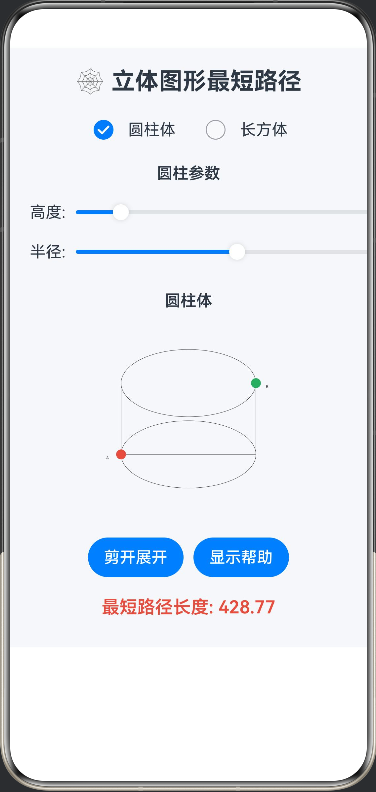
@Entry
@Component
struct SpiderProblem {
  @State private pathLength: number = 0
  @State private isUnfolded: boolean = false
  @State private shapeType: string = 'cylinder' // cylinder or cuboid
  @State private cylinderHeight: number = 100
  @State private cylinderRadius: number = 50
  @State private cuboidLength: number = 120
  @State private cuboidWidth: number = 80
  @State private cuboidHeight: number = 60
  @State private showHelp: boolean = false

  build() {
    Column() {
      Text('🕸️ 立体图形最短路径')
        .fontSize(24)
        .fontWeight(700)
        .margin({ bottom: 20 })

      // 形状选择
      Row() {
        Radio({ value: 'cylinder', group: 'shape' })
          .checked(this.shapeType === 'cylinder')
          .onChange((isChecked: boolean) => {
            if (isChecked) this.shapeType = 'cylinder'
          })
        Text('圆柱体')
          .margin({ left: 10 })
        Radio({ value: 'cuboid', group: 'shape' })
          .checked(this.shapeType === 'cuboid')
          .margin({ left: 30 })
          .onChange((isChecked: boolean) => {
            if (isChecked) this.shapeType = 'cuboid'
          })
        Text('长方体')
          .margin({ left: 10 })
      }
      .margin({ bottom: 20 })

      // 参数设置
      if (this.shapeType === 'cylinder') {
        Column() {
          Text('圆柱参数')
            .fontSize(16)
            .fontWeight(600)
            .margin({ bottom: 10 })
          Row() {
            Text('高度:')
            Slider({
              min: 50,
              max: 200,
              value: this.cylinderHeight
            })
              .onChange((value: number) => this.cylinderHeight = value)
            Text(`${this.cylinderHeight.toFixed(0)}`)
          }
          Row() {
            Text('半径:')
            Slider({
              min: 30,
              max: 100,
              value: this.cylinderRadius
            })
              .onChange((value: number) => this.cylinderRadius = value)
            Text(`${this.cylinderRadius.toFixed(0)}`)
          }
        }
        .margin({ bottom: 20 })
      } else {
        Column() {
          Text('长方体参数')
            .fontSize(16)
            .fontWeight(600)
            .margin({ bottom: 10 })
          Row() {
            Text('长:')
            Slider({
              min: 80,
              max: 200,
              value: this.cuboidLength
            })
              .onChange((value: number) => this.cuboidLength = value)
            Text(`${this.cuboidLength.toFixed(0)}`)
          }
          Row() {
            Text('宽:')
            Slider({
              min: 50,
              max: 150,
              value: this.cuboidWidth
            })
              .onChange((value: number) => this.cuboidWidth = value)
            Text(`${this.cuboidWidth.toFixed(0)}`)
          }
          Row() {
            Text('高:')
            Slider({
              min: 40,
              max: 120,
              value: this.cuboidHeight
            })
              .onChange((value: number) => this.cuboidHeight = value)
            Text(`${this.cuboidHeight.toFixed(0)}`)
          }
        }
        .margin({ bottom: 20 })
      }

      // 立体图和展开图
      Stack() {
        if (!this.isUnfolded) {
          // 绘制立体图
          Column() {
            Text(this.shapeType === 'cylinder' ? '圆柱体' : '长方体')
              .fontSize(16)
              .fontWeight(600)
              .margin({ bottom: 10 })
            Canvas(this.context)
              .width(300)
              .height(200)
              .onReady(() => this.draw3DShape())
          }
        } else {
          // 绘制展开图
          Column() {
            Text(this.shapeType === 'cylinder' ? '圆柱展开图 (矩形)' : '长方体展开图')
              .fontSize(16)
              .fontWeight(600)
              .margin({ bottom: 10 })
            Canvas(this.context)
              .width(300)
              .height(200)
              .onReady(() => this.drawUnfoldedPath())
          }
        }
      }
      .margin({ bottom: 20 })

      // 控制按钮
      Row() {
        Button(this.isUnfolded ? '恢复立体' : '剪开展开')
          .onClick(() => {
            this.isUnfolded = !this.isUnfolded
          })
        Button('显示帮助')
          .margin({ left: 10 })
          .onClick(() => {
            this.showHelp = !this.showHelp
          })
      }
      .margin({ bottom: 20 })

      // 结果显示
      Text(`最短路径长度: ${this.pathLength.toFixed(2)}`)
        .fontSize(18)
        .fontColor('#E74C3C')
        .fontWeight(600)
        .margin({ bottom: 10 })

      // 帮助信息
      if (this.showHelp) {
        Column() {
          Text('📝 操作说明')
            .fontSize(16)
            .fontWeight(600)
            .margin({ bottom: 10 })
          Text('1. 选择立体图形类型')
          Text('2. 调整图形参数')
          Text('3. 点击"剪开展开"查看展开图')
          Text('4. 系统会自动计算最短路径')
          Text('5. 原理:将立体表面展开为平面,两点之间线段最短')
        }
        .padding(15)
        .backgroundColor('#F0F8FF')
        .borderRadius(10)
        .margin({ top: 10 })
      }
    }
    .width('100%')
    .padding(20)
    .backgroundColor('#F5F7FA')
  }

  private settings: RenderingContextSettings = new RenderingContextSettings(true)
  private context: CanvasRenderingContext2D = new CanvasRenderingContext2D(this.settings)

  private draw3DShape() {
    const ctx = this.context
    ctx.clearRect(0, 0, 300, 200)

    if (this.shapeType === 'cylinder') {
      // 绘制圆柱体
      const centerX = 150
      const centerY = 100
      const height = this.cylinderHeight
      const radius = this.cylinderRadius

      // 绘制侧面
      ctx.strokeStyle = '#333'
      ctx.beginPath()
      ctx.moveTo(centerX - radius, centerY - height/2)
      ctx.lineTo(centerX - radius, centerY + height/2)
      ctx.lineTo(centerX + radius, centerY + height/2)
      ctx.lineTo(centerX + radius, centerY - height/2)
      ctx.stroke()

      // 绘制顶面和底面椭圆
      ctx.beginPath()
      ctx.ellipse(centerX, centerY - height/2, radius, radius/2, 0, 0, 2 * Math.PI)
      ctx.stroke()
      ctx.beginPath()
      ctx.ellipse(centerX, centerY + height/2, radius, radius/2, 0, 0, 2 * Math.PI)
      ctx.stroke()

      // 标记A点和B点
      const aX = centerX - radius
      const aY = centerY + height/2
      const bX = centerX + radius
      const bY = centerY - height/2

      ctx.fillStyle = '#E74C3C'
      ctx.beginPath(); ctx.arc(aX, aY, 5, 0, 360); ctx.fill() // A
      ctx.fillStyle = '#27AE60'
      ctx.beginPath(); ctx.arc(bX, bY, 5, 0, 360); ctx.fill() // B

      ctx.fillStyle = '#333'
      ctx.font = '12px Arial'
      ctx.fillText('A', aX - 15, aY + 5)
      ctx.fillText('B', bX + 10, bY + 5)
    } else {
      // 绘制长方体
      const centerX = 150
      const centerY = 100
      const length = this.cuboidLength
      const width = this.cuboidWidth
      const height = this.cuboidHeight

      // 绘制长方体的三个面
      const x1 = centerX - length/2
      const y1 = centerY - height/2

      // 前面
      ctx.strokeStyle = '#333'
      ctx.beginPath()
      ctx.moveTo(x1, y1)
      ctx.lineTo(x1 + length, y1)
      ctx.lineTo(x1 + length, y1 + height)
      ctx.lineTo(x1, y1 + height)
      ctx.closePath()
      ctx.stroke()

      // 侧面
      ctx.beginPath()
      ctx.moveTo(x1 + length, y1)
      ctx.lineTo(x1 + length + width/2, y1 - width/2)
      ctx.lineTo(x1 + length + width/2, y1 + height - width/2)
      ctx.lineTo(x1 + length, y1 + height)
      ctx.closePath()
      ctx.stroke()

      // 顶面
      ctx.beginPath()
      ctx.moveTo(x1, y1)
      ctx.lineTo(x1 + length, y1)
      ctx.lineTo(x1 + length + width/2, y1 - width/2)
      ctx.lineTo(x1 + width/2, y1 - width/2)
      ctx.closePath()
      ctx.stroke()

      // 标记A点和B点
      const aX = x1
      const aY = y1 + height
      const bX = x1 + length + width/2
      const bY = y1 - width/2

      ctx.fillStyle = '#E74C3C'
      ctx.beginPath(); ctx.arc(aX, aY, 5, 0, 360); ctx.fill() // A
      ctx.fillStyle = '#27AE60'
      ctx.beginPath(); ctx.arc(bX, bY, 5, 0, 360); ctx.fill() // B

      ctx.fillStyle = '#333'
      ctx.font = '12px Arial'
      ctx.fillText('A', aX - 15, aY + 5)
      ctx.fillText('B', bX + 10, bY + 5)
    }
  }

  private drawUnfoldedPath() {
    const ctx = this.context
    ctx.clearRect(0, 0, 300, 200)

    if (this.shapeType === 'cylinder') {
      // 绘制圆柱展开图(矩形)
      const width = 2 * Math.PI * this.cylinderRadius
      const height = this.cylinderHeight
      const scale = 280 / Math.max(width, height)
      const scaledWidth = width * scale
      const scaledHeight = height * scale
      const offsetX = (300 - scaledWidth) / 2
      const offsetY = (200 - scaledHeight) / 2

      // 绘制矩形
      ctx.strokeStyle = '#333'
      ctx.strokeRect(offsetX, offsetY, scaledWidth, scaledHeight)

      // 标记A点和B点
      const aX = offsetX
      const aY = offsetY + scaledHeight
      const bX = offsetX + scaledWidth
      const bY = offsetY + scaledHeight / 2

      ctx.fillStyle = '#E74C3C'
      ctx.beginPath(); ctx.arc(aX, aY, 5, 0, 360); ctx.fill() // A
      ctx.fillStyle = '#27AE60'
      ctx.beginPath(); ctx.arc(bX, bY, 5, 0, 360); ctx.fill() // B

      // 绘制最短路径
      ctx.strokeStyle = '#3498DB'
      ctx.lineWidth = 2
      ctx.beginPath()
      ctx.moveTo(aX, aY)
      ctx.lineTo(bX, bY)
      ctx.stroke()

      // 计算路径长度
      const dx = scaledWidth
      const dy = scaledHeight / 2
      this.pathLength = Math.sqrt(dx*dx + dy*dy) / scale

      // 添加标签
      ctx.fillStyle = '#333'
      ctx.font = '12px Arial'
      ctx.fillText('A', aX - 15, aY + 5)
      ctx.fillText('B', bX + 10, bY + 5)
      ctx.fillText('展开图', offsetX + 10, offsetY - 5)
    } else {
      // 绘制长方体展开图
      const length = this.cuboidLength
      const width = this.cuboidWidth
      const height = this.cuboidHeight
      const scale = 280 / (length + 2 * width)
      const scaledLength = length * scale
      const scaledWidth = width * scale
      const scaledHeight = height * scale
      const offsetX = (300 - (scaledLength + 2 * scaledWidth)) / 2
      const offsetY = (200 - (scaledHeight + scaledWidth)) / 2

      // 绘制展开图
      ctx.strokeStyle = '#333'

      // 前面
      ctx.strokeRect(offsetX + scaledWidth, offsetY, scaledLength, scaledHeight)
      // 上面
      ctx.strokeRect(offsetX + scaledWidth, offsetY - scaledWidth, scaledLength, scaledWidth)
      // 后面
      ctx.strokeRect(offsetX + scaledWidth, offsetY + scaledHeight, scaledLength, scaledHeight)
      // 下面
      ctx.strokeRect(offsetX + scaledWidth, offsetY + scaledHeight + scaledWidth, scaledLength, scaledWidth)
      // 左侧面
      ctx.strokeRect(offsetX, offsetY, scaledWidth, scaledHeight)
      // 右侧面
      ctx.strokeRect(offsetX + scaledWidth + scaledLength, offsetY, scaledWidth, scaledHeight)

      // 标记A点和B点
      const aX = offsetX + scaledWidth
      const aY = offsetY + scaledHeight
      const bX = offsetX + scaledWidth + scaledLength + scaledWidth
      const bY = offsetY

      ctx.fillStyle = '#E74C3C'
      ctx.beginPath(); ctx.arc(aX, aY, 5, 0, 360); ctx.fill() // A
      ctx.fillStyle = '#27AE60'
      ctx.beginPath(); ctx.arc(bX, bY, 5, 0, 360); ctx.fill() // B

      // 绘制最短路径
      ctx.strokeStyle = '#3498DB'
      ctx.lineWidth = 2
      ctx.beginPath()
      ctx.moveTo(aX, aY)
      ctx.lineTo(bX, bY)
      ctx.stroke()

      // 计算路径长度
      const dx = scaledLength + 2 * scaledWidth
      const dy = scaledHeight
      this.pathLength = Math.sqrt(dx*dx + dy*dy) / scale

      // 添加标签
      ctx.fillStyle = '#333'
      ctx.font = '12px Arial'
      ctx.fillText('A', aX - 15, aY + 5)
      ctx.fillText('B', bX + 10, bY + 5)
      ctx.fillText('展开图', offsetX + 10, offsetY - 5)
    }
  }
}

讨论HarmonyOS开发技术,专注于API与组件、DevEco Studio、测试、元服务和应用上架分发等。
更多推荐


 5
5 0
0- 0


 已为社区贡献402条内容

所有评论(0)