HARMONYOS应用实例271:斐波那契数列螺旋
·
模块五:数学文化与趣味 (38-42)
- 斐波那契数列螺旋
- 功能:根据斐波那契数列绘制正方形拼接图及黄金螺旋线,展示自然界的数学规律。
斐波那契数列螺旋应用根据斐波那契数列绘制正方形拼接图及黄金螺旋线,展示自然界的数学规律。斐波那契数列是自然界中最常见的数学模式之一,从向日葵种子排列到鹦鹉螺壳的螺旋,都遵循这一规律。本应用通过可视化方式展示斐波那契数列的几何特性,包括正方形拼接图和黄金螺旋线,帮助用户直观理解这一神奇的数学规律。
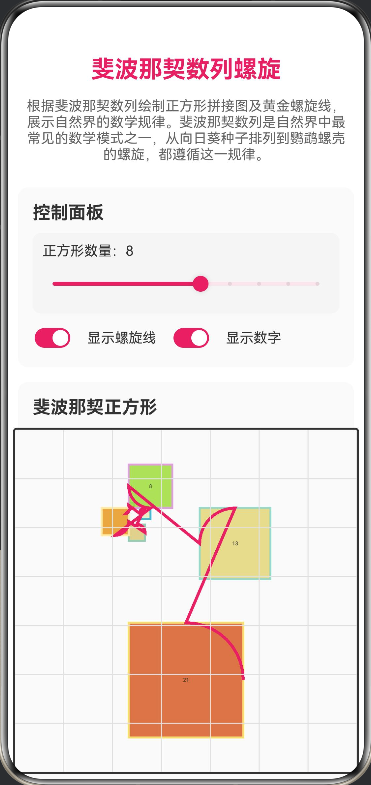
- 功能:根据斐波那契数列绘制正方形拼接图及黄金螺旋线,展示自然界的数学规律。
// 斐波那契数列螺旋
// 功能:根据斐波那契数列绘制正方形拼接图及黄金螺旋线,展示自然界的数学规律。
// 斐波那契数列是自然界中最常见的数学模式之一,从向日葵种子排列到鹦鹉螺壳的螺旋,
// 都遵循这一规律。本应用通过可视化方式展示斐波那契数列的几何特性,
// 包括正方形拼接图和黄金螺旋线,帮助用户直观理解这一神奇的数学规律。

// 正方形数据接口
interface SquareData {
  x: number;
  y: number;
  size: number;
  value: number;
  color: string;
}

// 螺旋线点接口
interface SpiralPoint {
  x: number;
  y: number;
}

// 边界接口
interface Bounds {
  minX: number;
  minY: number;
  maxX: number;
  maxY: number;
}

@Entry
@Component
struct FibonacciSpiral {
  @State fibonacciNumbers: number[] = [1, 1, 2, 3, 5, 8, 13, 21];
  @State maxSquares: number = 8;
  @State showSpiral: boolean = true;
  @State showNumbers: boolean = true;
  @State animationProgress: number = 0;
  @State isAnimating: boolean = false;
  @State canvasWidth: number = 350;
  @State canvasHeight: number = 350;
  @State drawScale: number = 1;
  @State offsetX: number = 0;
  @State offsetY: number = 0;

  private canvasContext: CanvasRenderingContext2D = new CanvasRenderingContext2D();
  private colors: string[] = ['#FF6B6B', '#4ECDC4', '#45B7D1', '#96CEB4', '#FFEAA7', '#DDA0DD', '#98D8C8', '#F7DC6F'];

  private calculateFibonacci(n: number): number[] {
    const fib: number[] = [1, 1];
    for (let i = 2; i < n; i++) {
      fib.push(fib[i - 1] + fib[i - 2]);
    }
    return fib;
  }

  private generateSquares(): SquareData[] {
    const fib = this.calculateFibonacci(this.maxSquares);
    const squares: SquareData[] = [];

    let x = 0;
    let y = 0;
    let direction = 0;

    for (let i = 0; i < fib.length; i++) {
      const size = fib[i];
      squares.push({
        x: x,
        y: y,
        size: size,
        value: size,
        color: this.colors[i % this.colors.length]
      });

      switch (direction % 4) {
        case 0:
          x += size;
          y -= fib[i + 1] || 0;
          break;
        case 1:
          x += fib[i + 1] || 0;
          y += size;
          break;
        case 2:
          x -= size;
          y += fib[i + 1] || 0;
          break;
        case 3:
          x -= fib[i + 1] || 0;
          y -= size;
          break;
      }
      direction++;
    }

    return squares;
  }

  private calculateBounds(squares: SquareData[]): Bounds {
    let minX = 0, minY = 0, maxX = 0, maxY = 0;

    squares.forEach(square => {
      minX = Math.min(minX, square.x);
      minY = Math.min(minY, square.y);
      maxX = Math.max(maxX, square.x + square.size);
      maxY = Math.max(maxY, square.y + square.size);
    });

    return { minX, minY, maxX, maxY };
  }

  private generateSpiralPoints(squares: SquareData[]): SpiralPoint[] {
    const points: SpiralPoint[] = [];

    squares.forEach((square, index) => {
      const centerX = square.x + square.size / 2;
      const centerY = square.y + square.size / 2;
      const radius = square.size / 2;

      const startAngle = (index * Math.PI) / 2;
      const endAngle = startAngle + Math.PI / 2;

      for (let t = 0; t <= 1; t += 0.1) {
        const angle = startAngle + (endAngle - startAngle) * t;
        const x = centerX + radius * Math.cos(angle);
        const y = centerY + radius * Math.sin(angle);
        points.push({ x, y });
      }
    });

    return points;
  }

  private drawCanvas() {
    const ctx = this.canvasContext;
    const width = this.canvasWidth;
    const height = this.canvasHeight;

    ctx.clearRect(0, 0, width, height);

    ctx.fillStyle = '#FAFAFA';
    ctx.fillRect(0, 0, width, height);

    const squares = this.generateSquares();
    const bounds = this.calculateBounds(squares);

    const contentWidth = bounds.maxX - bounds.minX;
    const contentHeight = bounds.maxY - bounds.minY;

    const padding = 20;
    const availableWidth = width - 2 * padding;
    const availableHeight = height - 2 * padding;

    this.drawScale = Math.min(availableWidth / contentWidth, availableHeight / contentHeight) * 0.9;

    this.offsetX = padding + (availableWidth - contentWidth * this.drawScale) / 2 - bounds.minX * this.drawScale;
    this.offsetY = padding + (availableHeight - contentHeight * this.drawScale) / 2 - bounds.minY * this.drawScale;

    const visibleSquares = Math.floor(squares.length * this.animationProgress);

    for (let i = 0; i < visibleSquares; i++) {
      const square = squares[i];
      this.drawSquare(ctx, square);
    }

    if (this.showSpiral && visibleSquares > 1) {
      const visibleSpiralSquares = squares.slice(0, visibleSquares);
      this.drawSpiral(ctx, visibleSpiralSquares);
    }

    this.drawGrid(ctx);
  }

  private drawSquare(ctx: CanvasRenderingContext2D, square: SquareData) {
    const x = this.offsetX + square.x * this.drawScale;
    const y = this.offsetY + square.y * this.drawScale;
    const size = square.size * this.drawScale;

    ctx.fillStyle = square.color + '40';
    ctx.fillRect(x, y, size, size);

    ctx.strokeStyle = square.color;
    ctx.lineWidth = 2;
    ctx.strokeRect(x, y, size, size);

    if (this.showNumbers && size > 30) {
      ctx.fillStyle = '#333';
      ctx.font = `${Math.min(16, size / 3)}px sans-serif`;
      ctx.textAlign = 'center';
      ctx.textBaseline = 'middle';
      ctx.fillText(square.value.toString(), x + size / 2, y + size / 2);
    }
  }

  private drawSpiral(ctx: CanvasRenderingContext2D, squares: SquareData[]) {
    const points = this.generateSpiralPoints(squares);

    if (points.length < 2) return;

    ctx.strokeStyle = '#E91E63';
    ctx.lineWidth = 3;
    ctx.beginPath();

    const startX = this.offsetX + points[0].x * this.drawScale;
    const startY = this.offsetY + points[0].y * this.drawScale;
    ctx.moveTo(startX, startY);

    for (let i = 1; i < points.length; i++) {
      const x = this.offsetX + points[i].x * this.drawScale;
      const y = this.offsetY + points[i].y * this.drawScale;
      ctx.lineTo(x, y);
    }

    ctx.stroke();
  }

  private drawGrid(ctx: CanvasRenderingContext2D) {
    ctx.strokeStyle = '#E0E0E0';
    ctx.lineWidth = 1;

    for (let x = 0; x <= this.canvasWidth; x += 50) {
      ctx.beginPath();
      ctx.moveTo(x, 0);
      ctx.lineTo(x, this.canvasHeight);
      ctx.stroke();
    }

    for (let y = 0; y <= this.canvasHeight; y += 50) {
      ctx.beginPath();
      ctx.moveTo(0, y);
      ctx.lineTo(this.canvasWidth, y);
      ctx.stroke();
    }
  }

  private startAnimation() {
    if (this.isAnimating) return;

    this.isAnimating = true;
    this.animationProgress = 0;

    const duration = 2000;
    const startTime = Date.now();

    const animate = () => {
      const elapsed = Date.now() - startTime;
      this.animationProgress = Math.min(1, elapsed / duration);
      this.drawCanvas();

      if (this.animationProgress < 1) {
        setTimeout(animate, 16);
      } else {
        this.isAnimating = false;
      }
    };

    animate();
  }

  private reset() {
    this.isAnimating = false;
    this.animationProgress = 1;
    this.drawCanvas();
  }

  private updateMaxSquares(value: number) {
    this.maxSquares = value;
    this.fibonacciNumbers = this.calculateFibonacci(value);
    this.reset();
  }

  build() {
    Column({ space: 15 }) {
      Text('斐波那契数列螺旋')
        .fontSize(24)
        .fontWeight(FontWeight.Bold)
        .fontColor('#E91E63')
        .margin({ top: 10 })

      Text('根据斐波那契数列绘制正方形拼接图及黄金螺旋线,展示自然界的数学规律。斐波那契数列是自然界中最常见的数学模式之一,从向日葵种子排列到鹦鹉螺壳的螺旋,都遵循这一规律。')
        .fontSize(14)
        .fontColor('#666')
        .textAlign(TextAlign.Center)
        .padding({ left: 15, right: 15 })

      Scroll() {
        Column({ space: 15 }) {
          Column({ space: 10 }) {
            Text('控制面板')
              .fontSize(18)
              .fontWeight(FontWeight.Bold)
              .fontColor('#333')
              .width('100%')

            Column({ space: 5 }) {
              Text(`正方形数量:${this.maxSquares}`)
                .fontSize(14)
                .fontColor('#333')
                .width('100%')

              Slider({
                value: this.maxSquares,
                min: 3,
                max: 12,
                step: 1,
                style: SliderStyle.OutSet
              })
                .width('100%')
                .blockColor('#E91E63')
                .trackColor('#FCE4EC')
                .selectedColor('#E91E63')
                .showSteps(true)
                .onChange((value: number) => {
                  this.updateMaxSquares(value)
                })
            }
            .width('100%')
            .padding(10)
            .backgroundColor('#F5F5F5')
            .borderRadius(8)

            Row({ space: 15 }) {
              Toggle({ type: ToggleType.Switch, isOn: this.showSpiral })
                .selectedColor('#E91E63')
                .onChange((isOn: boolean) => {
                  this.showSpiral = isOn;
                  this.drawCanvas();
                })

              Text('显示螺旋线')
                .fontSize(14)
                .fontColor('#333')

              Toggle({ type: ToggleType.Switch, isOn: this.showNumbers })
                .selectedColor('#E91E63')
                .onChange((isOn: boolean) => {
                  this.showNumbers = isOn;
                  this.drawCanvas();
                })

              Text('显示数字')
                .fontSize(14)
                .fontColor('#333')
            }
            .width('100%')
            .justifyContent(FlexAlign.Start)
          }
          .width('100%')
          .padding(15)
          .backgroundColor('#FAFAFA')
          .borderRadius(10)

          Column({ space: 10 }) {
            Text('斐波那契正方形')
              .fontSize(18)
              .fontWeight(FontWeight.Bold)
              .fontColor('#333')
              .width('100%')

            Canvas(this.canvasContext)
              .width(this.canvasWidth)
              .height(this.canvasHeight)
              .backgroundColor('#FFFFFF')
              .border({ width: 2, color: '#333' })
              .borderRadius(4)
              .onReady(() => {
                this.reset();
              })
          }
          .width('100%')
          .padding(15)
          .backgroundColor('#FAFAFA')
          .borderRadius(10)

          Row({ space: 10 }) {
            Button(this.isAnimating ? '动画中...' : '开始动画')
              .width('50%')
              .height(50)
              .backgroundColor(this.isAnimating ? '#9E9E9E' : '#E91E63')
              .fontSize(16)
              .enabled(!this.isAnimating)
              .onClick(() => {
                this.startAnimation();
              })

            Button('重置')
              .width('50%')
              .height(50)
              .backgroundColor('#FF9800')
              .fontSize(16)
              .onClick(() => {
                this.reset();
              })
          }
          .width('100%')

          Column({ space: 10 }) {
            Text('斐波那契数列')
              .fontSize(18)
              .fontWeight(FontWeight.Bold)
              .fontColor('#333')
              .width('100%')

            Flex({ direction: FlexDirection.Row, wrap: FlexWrap.Wrap, justifyContent: FlexAlign.SpaceBetween }) {
              ForEach(this.fibonacciNumbers, (num: number, index: number) => {
                Column() {
                  Text(num.toString())
                    .fontSize(16)
                    .fontWeight(FontWeight.Bold)
                    .fontColor('#FFFFFF')
                }
                .width(60)
                .height(40)
                .backgroundColor(this.colors[index % this.colors.length])
                .borderRadius(8)
                .justifyContent(FlexAlign.Center)
                .margin(5)
              })
            }
            .width('100%')
          }
          .width('100%')
          .padding(15)
          .backgroundColor('#FAFAFA')
          .borderRadius(10)

          Column({ space: 5 }) {
            Text('数学原理')
              .fontSize(16)
              .fontWeight(FontWeight.Bold)
              .fontColor('#E91E63')

            Text('• 斐波那契数列:F(n) = F(n-1) + F(n-2),从1, 1开始')
              .fontSize(12)
              .fontColor('#666')
              .width('100%')

            Text('• 黄金比例:当n趋近于无穷大时,F(n)/F(n-1) ≈ 1.618')
              .fontSize(12)
              .fontColor('#666')
              .width('100%')

            Text('• 自然界应用:向日葵种子排列、鹦鹉螺壳、松果鳞片等')
              .fontSize(12)
              .fontColor('#666')
              .width('100%')

            Text('• 黄金螺旋:以斐波那契正方形为基准绘制的对数螺旋线')
              .fontSize(12)
              .fontColor('#666')
              .width('100%')
          }
          .width('100%')
          .padding(15)
          .backgroundColor('#FCE4EC')
          .borderRadius(10)
        }
        .width('100%')
        .padding(10)
      }
      .width('100%')
      .height('100%')
    }
    .width('100%')
    .height('100%')
    .backgroundColor('#FFFFFF')
  }
}

讨论HarmonyOS开发技术,专注于API与组件、DevEco Studio、测试、元服务和应用上架分发等。
更多推荐


 6
6 0
0- 0


 已为社区贡献402条内容

所有评论(0)