HARMONYOS应用实例250:点与圆的位置关系
·
17. 点与圆的位置关系
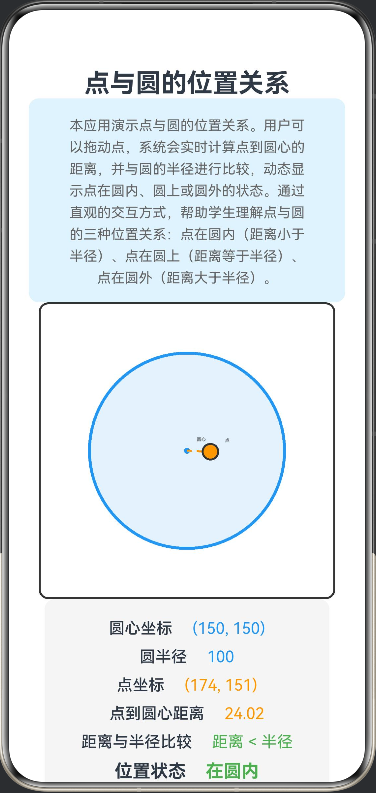
- 功能:拖动点,比较点到圆心的距离与半径,动态显示“在圆上、圆内、圆外”的状态。
核心功能:
拖动点在画布上自由移动
实时计算点到圆心的距离
动态比较距离与圆半径
自动判断并显示位置状态:在圆内、圆上、圆外
交互设计:
使用PanGesture手势实现流畅的拖拽体验
实时更新所有数值显示
不同位置状态用不同颜色标识(绿色-圆内、黄色-圆上、红色-圆外)
信息展示:
圆心坐标和圆半径
点的实时坐标
点到圆心的精确距离
距离与半径的比较关系
当前位置状态
@Entry
@Component
struct PointCircleRelation {
  @State pointX: number = 150
  @State pointY: number = 150
  @State circleRadius: number = 100
  @State centerX: number = 150
  @State centerY: number = 150
  @State distance: number = 0
  @State positionStatus: string = ''
  @State isDragging: boolean = false

  build() {
    Column() {
      Text('点与圆的位置关系')
        .fontSize(26)
        .fontWeight(FontWeight.Bold)

      Column() {
        Text('本应用演示点与圆的位置关系。用户可以拖动点,系统会实时计算点到圆心的距离,并与圆的半径进行比较,动态显示点在圆内、圆上或圆外的状态。通过直观的交互方式,帮助学生理解点与圆的三种位置关系:点在圆内(距离小于半径)、点在圆上(距离等于半径)、点在圆外(距离大于半径)。')
          .fontSize(14)
          .fontColor('#666666')
          .textAlign(TextAlign.Center)
          .lineHeight(22)
          .padding({ left: 20, right: 20 })
      }
      .width('100%')
      .backgroundColor('#E3F2FD')
      .borderRadius(10)
      .padding(15)

      Canvas(this.canvasContext)
        .width(300)
        .height(300)
        .backgroundColor('#FFFFFF')
        .border({ width: 2, color: '#333' })
        .borderRadius(10)
        .onReady(() => {
          this.draw()
        })
        .gesture(
          PanGesture()
            .onActionStart((event) => {
              this.isDragging = true
            })
            .onActionUpdate((event) => {
              if (this.isDragging) {
                this.pointX = event.fingerList[0].localX
                this.pointY = event.fingerList[0].localY
                this.calculateDistance()
                this.draw()
              }
            })
            .onActionEnd(() => {
              this.isDragging = false
            })
        )

      Column({ space: 10 }) {
        Row({ space: 20 }) {
          Text('圆心坐标')
            .fontSize(16)
            .fontWeight(FontWeight.Medium)
          Text(`(${this.centerX}, ${this.centerY})`)
            .fontSize(16)
            .fontColor('#2196F3')
        }

        Row({ space: 20 }) {
          Text('圆半径')
            .fontSize(16)
            .fontWeight(FontWeight.Medium)
          Text(`${this.circleRadius}`)
            .fontSize(16)
            .fontColor('#2196F3')
        }

        Row({ space: 20 }) {
          Text('点坐标')
            .fontSize(16)
            .fontWeight(FontWeight.Medium)
          Text(`(${Math.round(this.pointX)}, ${Math.round(this.pointY)})`)
            .fontSize(16)
            .fontColor('#FF9800')
        }

        Row({ space: 20 }) {
          Text('点到圆心距离')
            .fontSize(16)
            .fontWeight(FontWeight.Medium)
          Text(`${this.distance.toFixed(2)}`)
            .fontSize(16)
            .fontColor('#FF9800')
        }

        Row({ space: 20 }) {
          Text('距离与半径比较')
            .fontSize(16)
          .fontWeight(FontWeight.Medium)
          Text(this.getComparisonText())
            .fontSize(16)
            .fontColor('#4CAF50')
        }

        Row({ space: 20 }) {
          Text('位置状态')
            .fontSize(18)
            .fontWeight(FontWeight.Bold)
          Text(this.positionStatus)
            .fontSize(18)
            .fontWeight(FontWeight.Bold)
            .fontColor(this.getStatusColor())
        }
      }
      .width('90%')
      .padding(20)
      .backgroundColor('#F5F5F5')
      .borderRadius(10)

      Button('重置位置')
        .width('40%')
        .height(50)
        .fontSize(18)
        .backgroundColor('#2196F3')
        .onClick(() => {
          this.resetPosition()
        })
    }
    .width('100%')
    .height('100%')
    .padding(20)
    .justifyContent(FlexAlign.Start)
  }

  private canvasContext: CanvasRenderingContext2D = new CanvasRenderingContext2D()

  private calculateDistance() {
    const dx = this.pointX - this.centerX
    const dy = this.pointY - this.centerY
    this.distance = Math.sqrt(dx * dx + dy * dy)

    if (Math.abs(this.distance - this.circleRadius) < 2) {
      this.positionStatus = '在圆上'
    } else if (this.distance < this.circleRadius) {
      this.positionStatus = '在圆内'
    } else {
      this.positionStatus = '在圆外'
    }
  }

  private getComparisonText(): string {
    if (Math.abs(this.distance - this.circleRadius) < 2) {
      return '距离 = 半径'
    } else if (this.distance < this.circleRadius) {
      return '距离 < 半径'
    } else {
      return '距离 > 半径'
    }
  }

  private getStatusColor(): string {
    if (Math.abs(this.distance - this.circleRadius) < 2) {
      return '#FFC107'
    } else if (this.distance < this.circleRadius) {
      return '#4CAF50'
    } else {
      return '#F44336'
    }
  }

  private draw() {
    const ctx = this.canvasContext
    ctx.clearRect(0, 0, 300, 300)

    ctx.save()

    ctx.beginPath()
    ctx.arc(this.centerX, this.centerY, this.circleRadius, 0, 2 * Math.PI)
    ctx.fillStyle = '#E3F2FD'
    ctx.fill()
    ctx.strokeStyle = '#2196F3'
    ctx.lineWidth = 3
    ctx.stroke()

    ctx.beginPath()
    ctx.arc(this.centerX, this.centerY, 3, 0, 2 * Math.PI)
    ctx.fillStyle = '#2196F3'
    ctx.fill()

    ctx.beginPath()
    ctx.moveTo(this.centerX, this.centerY)
    ctx.lineTo(this.pointX, this.pointY)
    ctx.strokeStyle = '#FF9800'
    ctx.lineWidth = 2
    ctx.setLineDash([5, 5])
    ctx.stroke()
    ctx.setLineDash([])

    ctx.beginPath()
    ctx.arc(this.pointX, this.pointY, 8, 0, 2 * Math.PI)
    ctx.fillStyle = '#FF9800'
    ctx.fill()
    ctx.strokeStyle = '#333'
    ctx.lineWidth = 2
    ctx.stroke()

    ctx.font = '14px sans-serif'
    ctx.fillStyle = '#333'
    ctx.fillText('圆心', this.centerX + 10, this.centerY - 10)
    ctx.fillText('点', this.pointX + 15, this.pointY - 10)

    ctx.restore()
  }

  private resetPosition() {
    this.pointX = 150
    this.pointY = 150
    this.calculateDistance()
    this.draw()
  }
}

讨论HarmonyOS开发技术,专注于API与组件、DevEco Studio、测试、元服务和应用上架分发等。
更多推荐


 0
0 0
0- 0


 已为社区贡献402条内容

所有评论(0)