14. 家庭电路模拟器
·
3. 家庭电路模拟器
功能介绍:
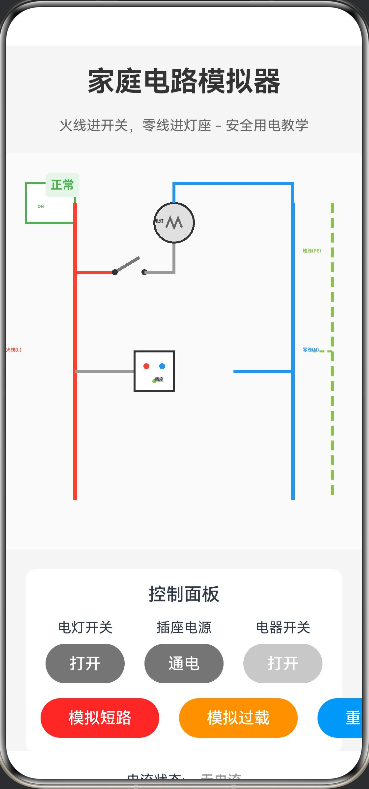
模拟家庭电路中电灯、插座、电器的连接方式。用户可以点击开关来控制灯泡的亮灭,演示“火线进开关,零线进灯座”的正确接法。通过动态电流流动效果,展示电流从火线流向零线的过程,并模拟短路和过载时的跳闸保护机制,是安全用电教学的绝佳工具。
@Entry
@Component
struct HomeCircuitSimulator {
  @State isLightOn: boolean = false
  @State isSocketOn: boolean = false
  @State isApplianceOn: boolean = false
  @State isTripped: boolean = false
  @State currentFlow: number = 0
  @State shortCircuit: boolean = false
  @State overload: boolean = false
  private canvasWidth: number = 380
  private canvasHeight: number = 400
  private animationId: number = -1

  aboutToAppear() {
    this.startAnimation()
  }

  aboutToDisappear() {
    if (this.animationId !== -1) {
      clearInterval(this.animationId)
    }
  }

  startAnimation() {
    this.animationId = setInterval(() => {
      if ((this.isLightOn || this.isApplianceOn) && !this.isTripped) {
        this.currentFlow = (this.currentFlow + 1) % 20
      }
    }, 100)
  }

  build() {
    Column({ space: 20 }) {
      Text('家庭电路模拟器')
        .fontSize(28)
        .fontWeight(FontWeight.Bold)
        .fontColor('#333')

      Text('火线进开关,零线进灯座 - 安全用电教学')
        .fontSize(14)
        .fontColor('#666')

      // 电路画布
      Stack() {
        Canvas(this.canvasContext)
          .width(this.canvasWidth)
          .height(this.canvasHeight)
          .backgroundColor('#FAFAFA')
          .onReady(() => {
            this.drawCircuit()
          })

        // 空气开关状态
        Text(this.isTripped ? '跳闸' : '正常')
          .position({ x: 20, y: 20 })
          .fontSize(12)
          .fontColor(this.isTripped ? '#F44336' : '#4CAF50')
          .fontWeight(FontWeight.Bold)
          .backgroundColor(this.isTripped ? '#FFEBEE' : '#E8F5E9')
          .padding(5)
          .borderRadius(4)
      }
      .width('100%')
      .height(400)

      // 控制面板
      Column({ space: 15 }) {
        Text('控制面板')
          .fontSize(18)
          .fontWeight(FontWeight.Medium)

        Row({ space: 20 }) {
          // 电灯开关
          Column({ space: 8 }) {
            Text('电灯开关')
              .fontSize(14)
            Button(this.isLightOn ? '关闭' : '打开')
              .width(80)
              .height(40)
              .backgroundColor(this.isLightOn ? '#4CAF50' : '#757575')
              .fontColor('#FFFFFF')
              .onClick(() => {
                if (!this.isTripped) {
                  this.isLightOn = !this.isLightOn
                  this.checkOverload()
                }
              })
          }

          // 插座开关
          Column({ space: 8 }) {
            Text('插座电源')
              .fontSize(14)
            Button(this.isSocketOn ? '断电' : '通电')
              .width(80)
              .height(40)
              .backgroundColor(this.isSocketOn ? '#2196F3' : '#757575')
              .fontColor('#FFFFFF')
              .onClick(() => {
                if (!this.isTripped) {
                  this.isSocketOn = !this.isSocketOn
                  if (!this.isSocketOn) {
                    this.isApplianceOn = false
                  }
                  this.checkOverload()
                }
              })
          }

          // 电器开关
          Column({ space: 8 }) {
            Text('电器开关')
              .fontSize(14)
            Button(this.isApplianceOn ? '关闭' : '打开')
              .width(80)
              .height(40)
              .backgroundColor(this.isApplianceOn ? '#FF9800' : '#757575')
              .fontColor('#FFFFFF')
              .enabled(this.isSocketOn && !this.isTripped)
              .onClick(() => {
                if (this.isSocketOn && !this.isTripped) {
                  this.isApplianceOn = !this.isApplianceOn
                  this.checkOverload()
                }
              })
          }
        }

        // 故障模拟
        Row({ space: 20 }) {
          Button('模拟短路')
            .width(120)
            .height(40)
            .backgroundColor('#F44336')
            .fontColor('#FFFFFF')
            .onClick(() => {
              this.shortCircuit = true
              this.isTripped = true
              this.isLightOn = false
              this.isApplianceOn = false
            })

          Button('模拟过载')
            .width(120)
            .height(40)
            .backgroundColor('#FF9800')
            .fontColor('#FFFFFF')
            .onClick(() => {
              this.overload = true
              this.isTripped = true
              this.isLightOn = false
              this.isApplianceOn = false
            })

          Button('重置电路')
            .width(120)
            .height(40)
            .backgroundColor('#2196F3')
            .fontColor('#FFFFFF')
            .onClick(() => {
              this.isTripped = false
              this.shortCircuit = false
              this.overload = false
              this.isLightOn = false
              this.isSocketOn = false
              this.isApplianceOn = false
            })
        }
      }
      .width('100%')
      .padding(15)
      .backgroundColor('#FFFFFF')
      .borderRadius(10)

      // 状态显示
      if (this.isTripped) {
        Column({ space: 10 }) {
          Text(this.shortCircuit ? '⚠️ 短路故障!空气开关已跳闸' : '⚠️ 过载保护!空气开关已跳闸')
            .fontSize(16)
            .fontColor('#F44336')
            .fontWeight(FontWeight.Bold)

          Text('故障原因:' + (this.shortCircuit ? '火线与零线直接接触,电流过大' : '同时使用多个大功率电器,超过额定电流'))
            .fontSize(14)
            .fontColor('#666')
        }
        .padding(15)
        .backgroundColor('#FFEBEE')
        .borderRadius(8)
      }

      // 电流状态
      Row({ space: 15 }) {
        Text('电流状态:')
          .fontSize(14)
        Text(this.getCurrentStatus())
          .fontSize(14)
          .fontColor(this.getCurrentColor())
          .fontWeight(FontWeight.Medium)
      }
    }
    .width('100%')
    .height('100%')
    .padding(20)
    .backgroundColor('#F5F5F5')
  }

  private canvasContext: CanvasRenderingContext2D = new CanvasRenderingContext2D()

  private checkOverload() {
    let load = 0
    if (this.isLightOn) load += 1
    if (this.isApplianceOn) load += 3
    if (load > 3) {
      this.overload = true
      this.isTripped = true
      this.isLightOn = false
      this.isApplianceOn = false
    }
  }

  private getCurrentStatus(): string {
    if (this.isTripped) return '已断开'
    if (this.isLightOn || this.isApplianceOn) return '正常流动'
    return '无电流'
  }

  private getCurrentColor(): string {
    if (this.isTripped) return '#F44336'
    if (this.isLightOn || this.isApplianceOn) return '#4CAF50'
    return '#999'
  }

  private drawCircuit() {
    const ctx = this.canvasContext
    ctx.clearRect(0, 0, this.canvasWidth, this.canvasHeight)

    // 绘制空气开关
    this.drawBreaker(ctx, 30, 30)

    // 绘制火线(红色)
    ctx.beginPath()
    ctx.moveTo(80, 50)
    ctx.lineTo(80, 350)
    ctx.strokeStyle = this.isTripped ? '#999' : '#F44336'
    ctx.lineWidth = 4
    ctx.stroke()

    // 绘制零线(蓝色)
    ctx.beginPath()
    ctx.moveTo(300, 50)
    ctx.lineTo(300, 350)
    ctx.strokeStyle = '#2196F3'
    ctx.lineWidth = 4
    ctx.stroke()

    // 绘制地线(黄绿色)
    ctx.beginPath()
    ctx.moveTo(340, 50)
    ctx.lineTo(340, 350)
    ctx.strokeStyle = '#8BC34A'
    ctx.lineWidth = 3
    ctx.setLineDash([10, 5])
    ctx.stroke()
    ctx.setLineDash([])

    // 绘制电灯支路
    this.drawLightBranch(ctx, 80, 120, 300)

    // 绘制插座支路
    this.drawSocketBranch(ctx, 80, 220, 300, 340)

    // 绘制标签
    this.drawLabels(ctx)

    // 绘制电流流动效果
    if ((this.isLightOn || this.isApplianceOn) && !this.isTripped) {
      this.drawCurrentFlow(ctx)
    }
  }

  private drawBreaker(ctx: CanvasRenderingContext2D, x: number, y: number) {
    // 空气开关外壳
    ctx.fillStyle = '#FFFFFF'
    ctx.strokeStyle = this.isTripped ? '#F44336' : '#4CAF50'
    ctx.lineWidth = 2
    ctx.fillRect(x, y, 50, 40)
    ctx.strokeRect(x, y, 50, 40)

    // 开关状态指示
    ctx.fillStyle = this.isTripped ? '#F44336' : '#4CAF50'
    ctx.font = 'bold 12px sans-serif'
    ctx.fillText(this.isTripped ? 'OFF' : 'ON', x + 12, y + 25)
  }

  private drawLightBranch(ctx: CanvasRenderingContext2D, fireX: number, y: number, zeroX: number) {
    // 火线到开关
    ctx.beginPath()
    ctx.moveTo(fireX, y)
    ctx.lineTo(fireX + 40, y)
    ctx.strokeStyle = this.isTripped ? '#999' : '#F44336'
    ctx.lineWidth = 3
    ctx.stroke()

    // 开关
    this.drawSwitch(ctx, fireX + 40, y, this.isLightOn)

    // 开关到灯
    ctx.beginPath()
    ctx.moveTo(fireX + 70, y)
    ctx.lineTo(fireX + 100, y)
    ctx.lineTo(fireX + 100, y - 30)
    ctx.strokeStyle = (this.isLightOn && !this.isTripped) ? '#F44336' : '#999'
    ctx.lineWidth = 3
    ctx.stroke()

    // 灯泡
    this.drawLightBulb(ctx, fireX + 100, y - 50, this.isLightOn && !this.isTripped)

    // 灯到零线
    ctx.beginPath()
    ctx.moveTo(fireX + 100, y - 70)
    ctx.lineTo(fireX + 100, y - 90)
    ctx.lineTo(zeroX, y - 90)
    ctx.lineTo(zeroX, y - 20)
    ctx.strokeStyle = '#2196F3'
    ctx.lineWidth = 3
    ctx.stroke()
  }

  private drawSocketBranch(ctx: CanvasRenderingContext2D, fireX: number, y: number, zeroX: number, groundX: number) {
    // 火线到插座
    ctx.beginPath()
    ctx.moveTo(fireX, y)
    ctx.lineTo(fireX + 60, y)
    ctx.strokeStyle = (this.isSocketOn && !this.isTripped) ? '#F44336' : '#999'
    ctx.lineWidth = 3
    ctx.stroke()

    // 插座
    this.drawSocket(ctx, fireX + 60, y - 20)

    // 零线到插座
    ctx.beginPath()
    ctx.moveTo(zeroX, y)
    ctx.lineTo(zeroX - 60, y)
    ctx.strokeStyle = '#2196F3'
    ctx.lineWidth = 3
    ctx.stroke()

    // 地线到插座
    ctx.beginPath()
    ctx.moveTo(groundX, y - 20)
    ctx.lineTo(groundX - 20, y - 20)
    ctx.strokeStyle = '#8BC34A'
    ctx.lineWidth = 2
    ctx.setLineDash([5, 3])
    ctx.stroke()
    ctx.setLineDash([])

    // 如果插座通电且电器打开,绘制电器
    if (this.isSocketOn && this.isApplianceOn && !this.isTripped) {
      this.drawAppliance(ctx, fireX + 80, y - 30)
    }
  }

  private drawSwitch(ctx: CanvasRenderingContext2D, x: number, y: number, isOn: boolean) {
    ctx.strokeStyle = isOn ? '#4CAF50' : '#757575'
    ctx.lineWidth = 3
    ctx.beginPath()
    ctx.moveTo(x, y)
    if (isOn) {
      ctx.lineTo(x + 30, y)
    } else {
      ctx.lineTo(x + 25, y - 15)
    }
    ctx.stroke()

    // 开关触点
    ctx.fillStyle = '#333'
    ctx.beginPath()
    ctx.arc(x, y, 3, 0, 2 * Math.PI)
    ctx.fill()
    ctx.beginPath()
    ctx.arc(x + 30, y, 3, 0, 2 * Math.PI)
    ctx.fill()
  }

  private drawLightBulb(ctx: CanvasRenderingContext2D, x: number, y: number, isOn: boolean) {
    // 灯泡外壳
    ctx.fillStyle = isOn ? '#FFEB3B' : '#E0E0E0'
    ctx.strokeStyle = '#333'
    ctx.lineWidth = 2
    ctx.beginPath()
    ctx.arc(x, y, 20, 0, 2 * Math.PI)
    ctx.fill()
    ctx.stroke()

    // 灯丝
    ctx.strokeStyle = isOn ? '#FF5722' : '#666'
    ctx.lineWidth = 2
    ctx.beginPath()
    ctx.moveTo(x - 8, y + 5)
    ctx.lineTo(x - 4, y - 5)
    ctx.lineTo(x, y + 5)
    ctx.lineTo(x + 4, y - 5)
    ctx.lineTo(x + 8, y + 5)
    ctx.stroke()

    // 发光效果
    if (isOn) {
      ctx.fillStyle = 'rgba(255, 235, 59, 0.3)'
      ctx.beginPath()
      ctx.arc(x, y, 30, 0, 2 * Math.PI)
      ctx.fill()
    }
  }

  private drawSocket(ctx: CanvasRenderingContext2D, x: number, y: number) {
    // 插座外壳
    ctx.fillStyle = '#FFFFFF'
    ctx.strokeStyle = '#333'
    ctx.lineWidth = 2
    ctx.fillRect(x, y, 40, 40)
    ctx.strokeRect(x, y, 40, 40)

    // 火线孔
    ctx.fillStyle = '#F44336'
    ctx.beginPath()
    ctx.arc(x + 12, y + 15, 3, 0, 2 * Math.PI)
    ctx.fill()

    // 零线孔
    ctx.fillStyle = '#2196F3'
    ctx.beginPath()
    ctx.arc(x + 28, y + 15, 3, 0, 2 * Math.PI)
    ctx.fill()

    // 地线孔
    ctx.fillStyle = '#8BC34A'
    ctx.beginPath()
    ctx.arc(x + 20, y + 30, 2, 0, 2 * Math.PI)
    ctx.fill()
  }

  private drawAppliance(ctx: CanvasRenderingContext2D, x: number, y: number) {
    // 电器外壳
    ctx.fillStyle = '#E3F2FD'
    ctx.strokeStyle = '#1976D2'
    ctx.lineWidth = 2
    ctx.fillRect(x, y, 50, 40)
    ctx.strokeRect(x, y, 50, 40)

    // 电器指示灯
    ctx.fillStyle = '#4CAF50'
    ctx.beginPath()
    ctx.arc(x + 25, y + 20, 5, 0, 2 * Math.PI)
    ctx.fill()

    // 电器标签
    ctx.fillStyle = '#333'
    ctx.font = '10px sans-serif'
    ctx.fillText('电器', x + 15, y + 35)
  }

  private drawLabels(ctx: CanvasRenderingContext2D) {
    ctx.font = 'bold 14px sans-serif'

    // 火线标签
    ctx.fillStyle = '#F44336'
    ctx.fillText('火线(L)', 10, 200)

    // 零线标签
    ctx.fillStyle = '#2196F3'
    ctx.fillText('零线(N)', 310, 200)

    // 地线标签
    ctx.fillStyle = '#8BC34A'
    ctx.fillText('地线(PE)', 310, 100)

    // 电灯标签
    ctx.fillStyle = '#333'
    ctx.fillText('电灯', 160, 70)

    // 插座标签
    ctx.fillText('插座', 160, 230)
  }

  private drawCurrentFlow(ctx: CanvasRenderingContext2D) {
    const offset = this.currentFlow
    ctx.fillStyle = '#FFEB3B'

    // 火线上的电流粒子
    for (let i = 0; i < 5; i++) {
      const y = 60 + (i * 60 + offset * 3) % 280
      ctx.beginPath()
      ctx.arc(80, y, 4, 0, 2 * Math.PI)
      ctx.fill()
    }

    // 零线上的电流粒子
    for (let i = 0; i < 5; i++) {
      const y = 340 - (i * 60 + offset * 3) % 280
      ctx.beginPath()
      ctx.arc(300, y, 4, 0, 2 * Math.PI)
      ctx.fill()
    }
  }
}

讨论HarmonyOS开发技术,专注于API与组件、DevEco Studio、测试、元服务和应用上架分发等。
更多推荐

 0
0 0
0- 0


 已为社区贡献402条内容

所有评论(0)