Harmonyos应用实例206:抛物线的光学性质
·
8. 抛物线的光学性质
对应章节:3.3 抛物线
功能简介:
展示抛物线 y2=2pxy^2 = 2pxy2=2px。从焦点 FFF 发出一束光线(射线),射向抛物线上的任意一点 PPP。系统根据切线法线计算反射路径,验证所有反射光线均平行于 xxx 轴射出。这是抛物线天线原理的直观演示。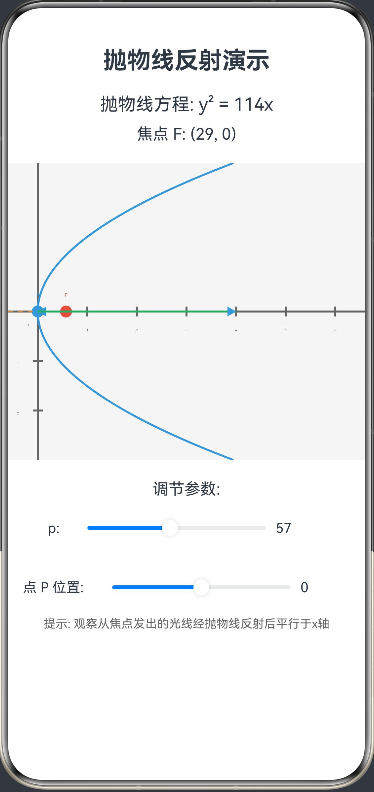
interface TangentNormalResult {
  tangentSlope: number
  normalSlope: number
}

interface ReflectedRayResult {
  reflectX1: number
  reflectY1: number
  reflectX2: number
  reflectY2: number
}

@Entry
@Component
struct ParabolaOptics {
  @State p: number = 50 // 抛物线参数 p
  @State pointY: number = 0 // 抛物线上点的 y 坐标
  private settings: RenderingContextSettings = new RenderingContextSettings(true)
  private context: CanvasRenderingContext2D = new CanvasRenderingContext2D(this.settings)

  build() {
    Column() {
      Text('抛物线反射演示')
        .fontSize(24).fontWeight(FontWeight.Bold).margin({ bottom: 20 })

      Text(`抛物线方程: y² = ${(2 * this.p).toFixed(0)}x`)
        .fontSize(18).margin({ bottom: 10 })

      Text(`焦点 F: (${(this.p/2).toFixed(0)}, 0)`)
        .fontSize(16).margin({ bottom: 20 })

      Stack() {
        Canvas(this.context)
          .width(400)
          .height(300)
          .onReady(() => this.draw())
      }
      .margin({ bottom: 20 })

      // 控制区域
      Column() {
        Text('调节参数:')
          .fontSize(16).margin({ bottom: 10 })

        Row() {
          Text('p:')
            .width(30).fontSize(14)
          Slider({
            value: this.p,
            min: 20,
            max: 100,
            step: 1
          })
            .width(200)
            .onChange((value: number) => {
              this.p = value
              this.draw()
            })
          Text(this.p.toFixed(0))
            .width(50).fontSize(14)
        }
        .margin({ bottom: 20 })

        Row() {
          Text('点 P 位置:')
            .width(80).fontSize(14)
          Slider({
            value: this.pointY,
            min: -100,
            max: 100,
            step: 1
          })
            .width(200)
            .onChange((value: number) => {
              this.pointY = value
              this.draw()
            })
          Text(this.pointY.toFixed(0))
            .width(50).fontSize(14)
        }
      }

      Text('提示: 观察从焦点发出的光线经抛物线反射后平行于x轴')
        .fontSize(12).fontColor('#666')
        .margin({ top: 10 })
    }
  }

  private draw() {
    const width = 400
    const height = 300
    const centerX = 50 // 抛物线顶点位置
    const centerY = height / 2 // y轴位置

    // 清空画布
    this.context.clearRect(0, 0, width, height)
    this.context.fillStyle = '#F5F5F5'
    this.context.fillRect(0, 0, width, height)

    // 绘制坐标轴
    this.drawAxes(centerX, centerY, width, height)

    // 绘制抛物线
    this.drawParabola(centerX, centerY, width, height)

    // 计算焦点位置
    const focusX = centerX + this.p / 2
    const focusY = centerY

    // 绘制焦点
    this.drawFocus(focusX, focusY)

    // 计算抛物线上的点 P
    const pointX = centerX + (this.pointY * this.pointY) / (2 * this.p)
    const pointY = centerY + this.pointY

    // 绘制点 P
    this.drawPoint(pointX, pointY)

    // 计算切线和法线
    const tangentNormalResult = this.calculateTangentAndNormal(pointX, pointY, centerX, centerY)
    const tangentSlope = tangentNormalResult.tangentSlope
    const normalSlope = tangentNormalResult.normalSlope

    // 绘制切线和法线
    this.drawTangentAndNormal(pointX, pointY, tangentSlope, normalSlope, width, height)

    // 绘制入射光线(从焦点到点 P)
    this.drawIncidentRay(focusX, focusY, pointX, pointY)

    // 计算反射光线
    const reflectedRayResult = this.calculateReflectedRay(pointX, pointY, normalSlope)
    const reflectX1 = reflectedRayResult.reflectX1
    const reflectY1 = reflectedRayResult.reflectY1
    const reflectX2 = reflectedRayResult.reflectX2
    const reflectY2 = reflectedRayResult.reflectY2

    // 绘制反射光线
    this.drawReflectedRay(reflectX1, reflectY1, reflectX2, reflectY2)
  }

  private drawAxes(centerX: number, centerY: number, width: number, height: number) {
    // 绘制坐标轴
    this.context.strokeStyle = '#666666'
    this.context.lineWidth = 2

    // X轴
    this.context.beginPath()
    this.context.moveTo(0, centerY)
    this.context.lineTo(width, centerY)
    this.context.stroke()

    // Y轴
    this.context.beginPath()
    this.context.moveTo(centerX, 0)
    this.context.lineTo(centerX, height)
    this.context.stroke()

    // 绘制刻度
    this.context.font = '10px sans-serif'
    this.context.fillStyle = '#666666'
    this.context.textAlign = 'center'

    // X轴刻度
    for (let x = centerX; x < width; x += 50) {
      this.context.beginPath()
      this.context.moveTo(x, centerY - 5)
      this.context.lineTo(x, centerY + 5)
      this.context.stroke()
      if (x !== centerX) {
        this.context.fillText(((x - centerX) / 50).toString(), x, centerY + 20)
      }
    }

    // Y轴刻度
    for (let y = centerY; y < height; y += 50) {
      this.context.beginPath()
      this.context.moveTo(centerX - 5, y)
      this.context.lineTo(centerX + 5, y)
      this.context.stroke()
      if (y !== centerY) {
        this.context.fillText(((y - centerY) / 50).toString(), centerX - 20, y + 4)
      }
    }

    // 绘制原点
    this.context.fillText('O', centerX - 10, centerY + 15)
  }

  private drawParabola(centerX: number, centerY: number, width: number, height: number) {
    // 绘制抛物线 y² = 2px
    this.context.strokeStyle = '#3498DB'
    this.context.lineWidth = 2
    this.context.beginPath()

    // 从顶点开始绘制
    this.context.moveTo(centerX, centerY)

    // 绘制上半部分
    for (let y = 0; y <= height - centerY; y += 1) {
      const x = centerX + (y * y) / (2 * this.p)
      if (x < width) {
        this.context.lineTo(x, centerY + y)
      }
    }

    // 绘制下半部分
    this.context.moveTo(centerX, centerY)
    for (let y = 0; y <= centerY; y += 1) {
      const x = centerX + (y * y) / (2 * this.p)
      if (x < width) {
        this.context.lineTo(x, centerY - y)
      }
    }

    this.context.stroke()
  }

  private drawFocus(focusX: number, focusY: number) {
    // 绘制焦点
    this.context.fillStyle = '#E74C3C'
    this.context.beginPath()
    this.context.arc(focusX, focusY, 6, 0, 2 * Math.PI)
    this.context.fill()

    // 绘制焦点标签
    this.context.fillStyle = '#E74C3C'
    this.context.font = '14px sans-serif'
    this.context.textAlign = 'center'
    this.context.fillText('F', focusX, focusY - 15)
  }

  private drawPoint(x: number, y: number) {
    // 绘制点 P
    this.context.fillStyle = '#3498DB'
    this.context.beginPath()
    this.context.arc(x, y, 6, 0, 2 * Math.PI)
    this.context.fill()

    // 绘制点标签
    this.context.fillStyle = '#3498DB'
    this.context.font = '14px sans-serif'
    this.context.textAlign = 'center'
    this.context.fillText('P', x, y - 15)
  }

  private calculateTangentAndNormal(pointX: number, pointY: number, centerX: number, centerY: number): TangentNormalResult {
    // 计算抛物线在点 P 处的切线斜率
    // 对于抛物线 y² = 2px,导数为 dy/dx = p/y
    const relativeY = pointY - centerY
    const tangentSlope = this.p / relativeY

    // 法线斜率为切线斜率的负倒数
    const normalSlope = -1 / tangentSlope

    return { tangentSlope, normalSlope }
  }

  private calculateReflectedRay(pointX: number, pointY: number, normalSlope: number): ReflectedRayResult {
    // 计算反射光线
    // 对于抛物线,反射光线应该平行于 x 轴
    const reflectX1 = pointX
    const reflectY1 = pointY
    const reflectX2 = pointX + 200 // 向右延伸
    const reflectY2 = pointY // 保持 y 坐标不变,平行于 x 轴

    return { reflectX1, reflectY1, reflectX2, reflectY2 }
  }

  private drawTangentAndNormal(pointX: number, pointY: number, tangentSlope: number, normalSlope: number, width: number, height: number) {
    // 绘制切线
    this.context.strokeStyle = '#95A5A6'
    this.context.lineWidth = 1
    this.context.setLineDash([5, 5])

    // 计算切线上的两个点
    const tangentX1 = Math.max(0, pointX - 100)
    const tangentY1 = pointY - 100 * tangentSlope
    const tangentX2 = Math.min(width, pointX + 100)
    const tangentY2 = pointY + 100 * tangentSlope

    this.context.beginPath()
    this.context.moveTo(tangentX1, tangentY1)
    this.context.lineTo(tangentX2, tangentY2)
    this.context.stroke()

    // 绘制法线
    this.context.strokeStyle = '#E67E22'
    this.context.lineWidth = 1

    // 计算法线上的两个点
    const normalX1 = Math.max(0, pointX - 50)
    const normalY1 = pointY - 50 * normalSlope
    const normalX2 = Math.min(width, pointX + 50)
    const normalY2 = pointY + 50 * normalSlope

    this.context.beginPath()
    this.context.moveTo(normalX1, normalY1)
    this.context.lineTo(normalX2, normalY2)
    this.context.stroke()

    this.context.setLineDash([])
  }

  private drawIncidentRay(focusX: number, focusY: number, pointX: number, pointY: number) {
    // 绘制入射光线(从焦点到点 P)
    this.context.strokeStyle = '#9B59B6'
    this.context.lineWidth = 2
    this.context.setLineDash([3, 3])

    this.context.beginPath()
    this.context.moveTo(focusX, focusY)
    this.context.lineTo(pointX, pointY)
    this.context.stroke()

    // 绘制箭头
    this.drawArrow(focusX, focusY, pointX, pointY)

    this.context.setLineDash([])
  }

  private drawReflectedRay(x1: number, y1: number, x2: number, y2: number) {
    // 绘制反射光线
    this.context.strokeStyle = '#27AE60'
    this.context.lineWidth = 2

    this.context.beginPath()
    this.context.moveTo(x1, y1)
    this.context.lineTo(x2, y2)
    this.context.stroke()

    // 绘制箭头
    this.drawArrow(x1, y1, x2, y2)
  }

  private drawArrow(fromX: number, fromY: number, toX: number, toY: number) {
    // 绘制箭头
    const headLength = 10
    const angle = Math.atan2(toY - fromY, toX - fromX)

    this.context.beginPath()
    this.context.moveTo(toX, toY)
    this.context.lineTo(
      toX - headLength * Math.cos(angle - Math.PI / 6),
      toY - headLength * Math.sin(angle - Math.PI / 6)
    )
    this.context.lineTo(
      toX - headLength * Math.cos(angle + Math.PI / 6),
      toY - headLength * Math.sin(angle + Math.PI / 6)
    )
    this.context.closePath()
    this.context.fill()
  }
}

讨论HarmonyOS开发技术,专注于API与组件、DevEco Studio、测试、元服务和应用上架分发等。
更多推荐


 4
4 0
0- 0


 已为社区贡献400条内容

所有评论(0)