HARMONYOS应用实例246:互动七巧板拼图
·
项目二:互动七巧板拼图
功能介绍:
本应用模拟了中国传统智力玩具七巧板。屏幕上展示7块几何形状(三角形、正方形、平行四边形),支持拖动平移和点击旋转操作。用户可以自由拼接图形,拼出各种造型。该应用帮助学生直观理解图形的平移、旋转、对称等几何变换,以及面积守恒原理,是培养空间想象力的绝佳工具。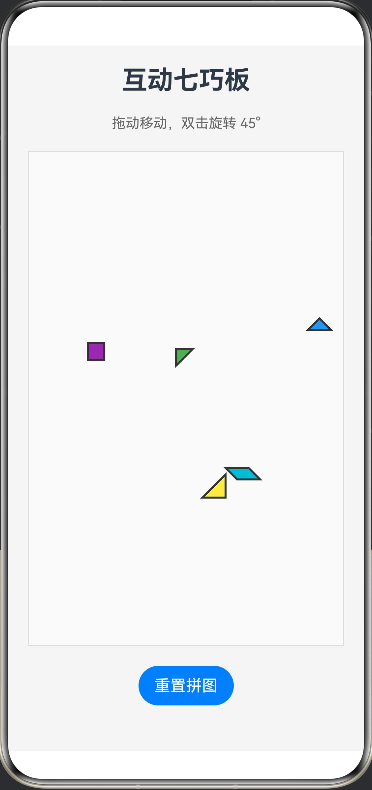
完整代码:
@Entry
@Component
struct TangramPuzzle {
  // 七巧板数据结构
  @State pieces: Piece[] = [
    { id: 0, points: this.getTrianglePoints(100), color: '#FF5722', x: 50, y: 50, rotation: 0 },   // 大三角1
    { id: 1, points: this.getTrianglePoints(100), color: '#FF9800', x: 180, y: 50, rotation: 90 },  // 大三角2
    { id: 2, points: this.getTrianglePoints(70), color: '#FFEB3B', x: 50, y: 200, rotation: 180 },  // 中三角
    { id: 3, points: this.getTrianglePoints(50), color: '#4CAF50', x: 150, y: 200, rotation: 0 },   // 小三角1
    { id: 4, points: this.getTrianglePoints(50), color: '#2196F3', x: 220, y: 200, rotation: 45 },  // 小三角2
    { id: 5, points: this.getSquarePoints(50), color: '#9C27B0', x: 100, y: 320, rotation: 0 },     // 正方形
    { id: 6, points: this.getParallelogramPoints(70, 35), color: '#00BCD4', x: 200, y: 320, rotation: 0 } // 平行四边形
  ]

  // 选中的拼图
  @State activeId: number = -1

  build() {
    Column({ space: 20 }) {
      Text('互动七巧板')
        .fontSize(26)
        .fontWeight(FontWeight.Bold)

      Text('拖动移动,双击旋转 45°')
        .fontSize(14)
        .fontColor('#666')

      // 游戏区域
      Stack() {
        // 背景网格
        Canvas(this.drawGridContext())
          .width('100%')
          .height(500)
          .backgroundColor('#FAFAFA')

        // 拼图图层
        ForEach(this.pieces, (piece: Piece) => {
          Stack() {
            Path()
              .width(150).height(150) // 足够大的容器
              .commands(this.getCommands(piece.points))
              .fill(piece.color)
              .stroke('#333')
              .strokeWidth(2)
          }
          .width(150)
          .height(150)
          .position({ x: piece.x, y: piece.y })
          .rotate({ angle: piece.rotation })
          .zIndex(this.activeId === piece.id ? 10 : 1) // 选中的在最上层
          .gesture(
            GestureGroup(GestureMode.Exclusive,
              // 拖动
              PanGesture()
                .onActionStart(() => { this.activeId = piece.id })
                .onActionUpdate((e) => {
                  piece.x += e.offsetX
                  piece.y += e.offsetY
                }),
              // 双击旋转
              TapGesture({ count: 2 })
                .onAction(() => {
                  piece.rotation += 45
                })
            )
          )
        })
      }
      .width('100%')
      .height(500)
      .border({ width: 1, color: '#DDD' })

      Button('重置拼图')
        .onClick(() => {
          // 简单的重置逻辑
          this.pieces = [...this.pieces] // 触发UI刷新,实际应重置坐标
        })
    }
    .width('100%')
    .height('100%')
    .padding(20)
    .backgroundColor('#F5F5F5')
  }

  // 绘制背景网格(辅助对齐)
  private drawGridContext() {
    // 简化处理,实际可在Canvas onReady中绘制网格
    return null
  }

  // 将点数组转换为Path命令
  private getCommands(points: Point[]): string {
    if (points.length < 2) return ''
    let cmd = `M ${points[0].x} ${points[0].y} `
    for (let i = 1; i < points.length; i++) {
      cmd += `L ${points[i].x} ${points[i].y} `
    }
    cmd += 'Z'
    return cmd
  }

  // 标准三角形点生成 (等腰直角)
  private getTrianglePoints(size: number): Point[] {
    return [
      { x: 0, y: 0 },
      { x: size, y: 0 },
      { x: 0, y: size }
    ]
  }

  // 正方形点生成
  private getSquarePoints(size: number): Point[] {
    return [
      { x: 0, y: 0 },
      { x: size, y: 0 },
      { x: size, y: size },
      { x: 0, y: size }
    ]
  }

  // 平行四边形点生成
  private getParallelogramPoints(width: number, height: number): Point[] {
    return [
      { x: 0, y: 0 },
      { x: width, y: 0 },
      { x: width + height, y: height },
      { x: height, y: height }
    ]
  }
}

// 数据模型
interface Piece {
  id: number
  points: Point[]
  color: string
  x: number
  y: number
  rotation: number
}

interface Point {
  x: number
  y: number
}

讨论HarmonyOS开发技术,专注于API与组件、DevEco Studio、测试、元服务和应用上架分发等。
更多推荐


 0
0 0
0- 0


 已为社区贡献400条内容

所有评论(0)