HARMONYOS应用实例268:列表法求概率
·
- 列表法求概率
- 功能:对于两个变量的随机事件,自动生成表格,高亮显示所有等可能结果。
对于两个变量的随机事件,自动生成结果表格
高亮显示所有等可能结果(黄色背景)
自动计算所有可能结果数
自动计算符合条件的结果数
自动计算概率值(小数和分数形式)
支持自定义事件名称(如:第一个骰子、第二个骰子)
支持添加和删除事件的可能结果
支持输入条件来筛选和高亮匹配的结果
显示所有符合条件的结果列表
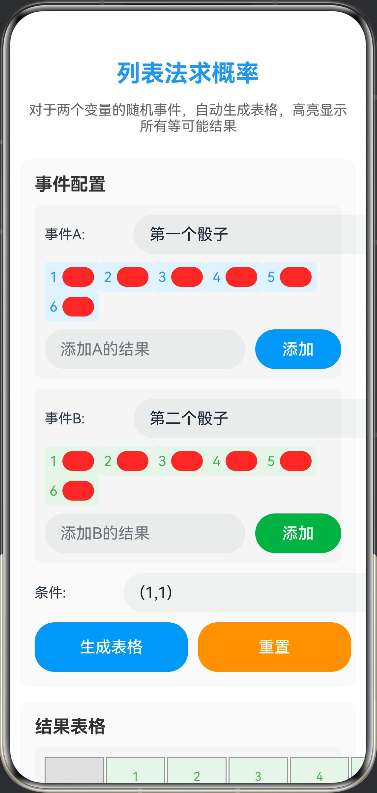
// 列表法求概率
// 功能:对于两个变量的随机事件,自动生成表格,高亮显示所有等可能结果,计算概率值
// 列表事件配置接口
interface ListEventConfig {
eventA: string;
eventB: string;
outcomesA: string[];
outcomesB: string[];
condition: string;
}
// 结果单元格接口
interface ResultCell {
outcome: string;
isHighlighted: boolean;
}
@Entry
@Component
struct ListProbability {
@State canvasWidth: number = 350;
@State canvasHeight: number = 300;
@State eventConfig: ListEventConfig = {
eventA: '第一个骰子',
eventB: '第二个骰子',
outcomesA: ['1', '2', '3', '4', '5', '6'],
outcomesB: ['1', '2', '3', '4', '5', '6'],
condition: '(1,1)'
};
@State resultTable: ResultCell[][] = [];
@State allResults: string[] = [];
@State matchingResults: string[] = [];
@State totalCount: number = 0;
@State matchingCount: number = 0;
@State probability: string = '0';
@State newOutcomeA: string = '';
@State newOutcomeB: string = '';
aboutToAppear() {
this.generateTable()
}
private generateTable() {
this.resultTable = []
this.allResults = []
this.matchingResults = []
for (let i = 0; i < this.eventConfig.outcomesA.length; i++) {
const row: ResultCell[] = []
for (let j = 0; j < this.eventConfig.outcomesB.length; j++) {
const outcomeA = this.eventConfig.outcomesA[i]
const outcomeB = this.eventConfig.outcomesB[j]
const outcome = `(${outcomeA},${outcomeB})`
const isHighlighted = this.eventConfig.condition === outcome ||
this.eventConfig.condition === '' ||
this.eventConfig.condition === outcomeA ||
this.eventConfig.condition === outcomeB ||
outcome.includes(this.eventConfig.condition)
row.push({
outcome: outcome,
isHighlighted: isHighlighted
})
this.allResults.push(outcome)
if (isHighlighted) {
this.matchingResults.push(outcome)
}
}
this.resultTable.push(row)
}
this.totalCount = this.allResults.length
this.matchingCount = this.matchingResults.length
if (this.totalCount > 0) {
const prob = this.matchingCount / this.totalCount
this.probability = prob.toFixed(4)
} else {
this.probability = '0'
}
}
private addOutcomeA() {
if (this.newOutcomeA.trim() !== '') {
this.eventConfig.outcomesA.push(this.newOutcomeA.trim())
this.newOutcomeA = ''
this.generateTable()
}
}
private addOutcomeB() {
if (this.newOutcomeB.trim() !== '') {
this.eventConfig.outcomesB.push(this.newOutcomeB.trim())
this.newOutcomeB = ''
this.generateTable()
}
}
private removeOutcomeA(index: number) {
if (this.eventConfig.outcomesA.length > 1) {
this.eventConfig.outcomesA.splice(index, 1)
this.generateTable()
}
}
private removeOutcomeB(index: number) {
if (this.eventConfig.outcomesB.length > 1) {
this.eventConfig.outcomesB.splice(index, 1)
this.generateTable()
}
}
private reset() {
this.eventConfig = {
eventA: '第一个骰子',
eventB: '第二个骰子',
outcomesA: ['1', '2', '3', '4', '5', '6'],
outcomesB: ['1', '2', '3', '4', '5', '6'],
condition: '(1,1)'
}
this.newOutcomeA = ''
this.newOutcomeB = ''
this.generateTable()
}
build() {
Column({ space: 15 }) {
Text('列表法求概率')
.fontSize(24)
.fontWeight(FontWeight.Bold)
.fontColor('#2196F3')
.margin({ top: 10 })
Text('对于两个变量的随机事件,自动生成表格,高亮显示所有等可能结果')
.fontSize(14)
.fontColor('#666')
.textAlign(TextAlign.Center)
.padding({ left: 15, right: 15 })
Scroll() {
Column({ space: 15 }) {
Column({ space: 10 }) {
Text('事件配置')
.fontSize(18)
.fontWeight(FontWeight.Bold)
.fontColor('#333')
.width('100%')
Column({ space: 8 }) {
Row({ space: 10 }) {
Text('事件A:')
.fontSize(14)
.width(80)
TextInput({ text: this.eventConfig.eventA, placeholder: '输入事件A名称' })
.width('100%')
.height(40)
.onChange((value: string) => {
this.eventConfig.eventA = value
})
}
.width('100%')
if (this.eventConfig.outcomesA.length > 0) {
Flex({
direction: FlexDirection.Row,
wrap: FlexWrap.Wrap,
justifyContent: FlexAlign.Start
}) {
ForEach(this.eventConfig.outcomesA, (outcome: string, index: number) => {
Row({ space: 5 }) {
Text(outcome)
.fontSize(14)
.fontColor('#2196F3')
Button('×')
.width(20)
.height(20)
.fontSize(12)
.backgroundColor('#F44336')
.onClick(() => {
this.removeOutcomeA(index)
})
}
.padding(5)
.backgroundColor('#E3F2FD')
.borderRadius(4)
})
}
.width('100%')
}
Row({ space: 10 }) {
TextInput({ text: this.newOutcomeA, placeholder: '添加A的结果' })
.width('70%')
.height(40)
.onChange((value: string) => {
this.newOutcomeA = value
})
Button('添加')
.width('30%')
.height(40)
.backgroundColor('#2196F3')
.onClick(() => {
this.addOutcomeA()
})
}
.width('100%')
}
.width('100%')
.padding(10)
.backgroundColor('#F5F5F5')
.borderRadius(8)
Column({ space: 8 }) {
Row({ space: 10 }) {
Text('事件B:')
.fontSize(14)
.width(80)
TextInput({ text: this.eventConfig.eventB, placeholder: '输入事件B名称' })
.width('100%')
.height(40)
.onChange((value: string) => {
this.eventConfig.eventB = value
})
}
.width('100%')
if (this.eventConfig.outcomesB.length > 0) {
Flex({
direction: FlexDirection.Row,
wrap: FlexWrap.Wrap,
justifyContent: FlexAlign.Start
}) {
ForEach(this.eventConfig.outcomesB, (outcome: string, index: number) => {
Row({ space: 5 }) {
Text(outcome)
.fontSize(14)
.fontColor('#4CAF50')
Button('×')
.width(20)
.height(20)
.fontSize(12)
.backgroundColor('#F44336')
.onClick(() => {
this.removeOutcomeB(index)
})
}
.padding(5)
.backgroundColor('#E8F5E9')
.borderRadius(4)
})
}
.width('100%')
}
Row({ space: 10 }) {
TextInput({ text: this.newOutcomeB, placeholder: '添加B的结果' })
.width('70%')
.height(40)
.onChange((value: string) => {
this.newOutcomeB = value
})
Button('添加')
.width('30%')
.height(40)
.backgroundColor('#4CAF50')
.onClick(() => {
this.addOutcomeB()
})
}
.width('100%')
}
.width('100%')
.padding(10)
.backgroundColor('#F5F5F5')
.borderRadius(8)
Row({ space: 10 }) {
Text('条件:')
.fontSize(14)
.width(80)
TextInput({ text: this.eventConfig.condition, placeholder: '输入条件(如(1,1)或1)' })
.width('100%')
.height(40)
.onChange((value: string) => {
this.eventConfig.condition = value
this.generateTable()
})
}
.width('100%')
Row({ space: 10 }) {
Button('生成表格')
.width('50%')
.height(50)
.backgroundColor('#2196F3')
.fontSize(16)
.onClick(() => {
this.generateTable()
})
Button('重置')
.width('50%')
.height(50)
.backgroundColor('#FF9800')
.fontSize(16)
.onClick(() => {
this.reset()
})
}
.width('100%')
}
.width('100%')
.padding(15)
.backgroundColor('#FAFAFA')
.borderRadius(10)
Column({ space: 10 }) {
Text('结果表格')
.fontSize(18)
.fontWeight(FontWeight.Bold)
.fontColor('#333')
.width('100%')
if (this.resultTable.length > 0) {
Column({ space: 2 }) {
Row({ space: 2 }) {
Text('')
.width(60)
.height(40)
.backgroundColor('#E0E0E0')
.textAlign(TextAlign.Center)
.fontSize(12)
.border({ width: 1, color: '#999' })
ForEach(this.eventConfig.outcomesB, (outcomeB: string) => {
Text(outcomeB)
.width(60)
.height(40)
.backgroundColor('#E8F5E9')
.textAlign(TextAlign.Center)
.fontSize(12)
.fontColor('#4CAF50')
.border({ width: 1, color: '#999' })
})
}
ForEach(this.resultTable, (row: ResultCell[], rowIndex: number) => {
Row({ space: 2 }) {
Text(this.eventConfig.outcomesA[rowIndex])
.width(60)
.height(40)
.backgroundColor('#E3F2FD')
.textAlign(TextAlign.Center)
.fontSize(12)
.fontColor('#2196F3')
.border({ width: 1, color: '#999' })
ForEach(row, (cell: ResultCell) => {
Text(cell.outcome)
.width(60)
.height(40)
.backgroundColor(cell.isHighlighted ? '#FFEB3B' : '#FFF')
.textAlign(TextAlign.Center)
.fontSize(10)
.border({ width: 1, color: '#999' })
})
}
})
}
.width('100%')
.padding(10)
.backgroundColor('#F5F5F5')
.borderRadius(8)
}
}
.width('100%')
.padding(15)
.backgroundColor('#FAFAFA')
.borderRadius(10)
Column({ space: 10 }) {
Text('计算结果')
.fontSize(18)
.fontWeight(FontWeight.Bold)
.fontColor('#333')
.width('100%')
Column({ space: 8 }) {
Row({ space: 10 }) {
Text('所有可能结果数:')
.fontSize(14)
.fontColor('#333')
Text(this.totalCount.toString())
.fontSize(16)
.fontWeight(FontWeight.Bold)
.fontColor('#2196F3')
}
.width('100%')
Row({ space: 10 }) {
Text('符合条件结果数:')
.fontSize(14)
.fontColor('#333')
Text(this.matchingCount.toString())
.fontSize(16)
.fontWeight(FontWeight.Bold)
.fontColor('#4CAF50')
}
.width('100%')
Row({ space: 10 }) {
Text('概率值:')
.fontSize(14)
.fontColor('#333')
Text(this.probability)
.fontSize(16)
.fontWeight(FontWeight.Bold)
.fontColor('#FF9800')
}
.width('100%')
if (this.totalCount > 0) {
Row({ space: 10 }) {
Text('分数形式:')
.fontSize(14)
.fontColor('#333')
Text(`${this.matchingCount}/${this.totalCount}`)
.fontSize(16)
.fontWeight(FontWeight.Bold)
.fontColor('#9C27B0')
}
.width('100%')
}
}
.width('100%')
.padding(15)
.backgroundColor('#F5F5F5')
.borderRadius(8)
if (this.matchingResults.length > 0) {
Column({ space: 5 }) {
Text('符合条件的结果:')
.fontSize(14)
.fontColor('#333')
.width('100%')
Flex({
direction: FlexDirection.Row,
wrap: FlexWrap.Wrap,
justifyContent: FlexAlign.Start
}) {
ForEach(this.matchingResults, (result: string) => {
Text(result)
.fontSize(12)
.padding(5)
.backgroundColor('#FFEB3B')
.borderRadius(4)
})
}
.width('100%')
}
.width('100%')
.padding(10)
.backgroundColor('#FFF9C4')
.borderRadius(8)
}
}
.width('100%')
.padding(15)
.backgroundColor('#FAFAFA')
.borderRadius(10)
Column({ space: 5 }) {
Text('使用说明')
.fontSize(16)
.fontWeight(FontWeight.Bold)
.fontColor('#333')
Text('1. 输入两个事件的名称(如:第一个骰子、第二个骰子)')
.fontSize(12)
.fontColor('#666')
.width('100%')
Text('2. 添加每个事件的可能结果(如:1、2、3、4、5、6)')
.fontSize(12)
.fontColor('#666')
.width('100%')
Text('3. 输入条件(如:(1,1) 或 1),系统会高亮匹配的结果')
.fontSize(12)
.fontColor('#666')
.width('100%')
Text('4. 点击"生成表格"查看结果表格和概率计算')
.fontSize(12)
.fontColor('#666')
.width('100%')
Text('5. 黄色高亮的单元格表示符合条件的等可能结果')
.fontSize(12)
.fontColor('#666')
.width('100%')
}
.width('100%')
.padding(15)
.backgroundColor('#E3F2FD')
.borderRadius(10)
}
.width('100%')
.padding(10)
}
.width('100%')
.height('100%')
}
.width('100%')
.height('100%')
.backgroundColor('#FFFFFF')
}
}

讨论HarmonyOS开发技术,专注于API与组件、DevEco Studio、测试、元服务和应用上架分发等。
更多推荐

 0
0 0
0- 0


 已为社区贡献402条内容

所有评论(0)