HARMONYOS应用实例255:视图还原大师
·
- 视图还原大师
- 功能:给出三个视图,用户在3D空间搭建对应的小正方体组合,训练空间想象力。
应用功能:
显示三个目标视图(主视图、俯视图、侧视图)
提供3D搭建区域,用户可以点击格子放置或移除小正方体
检查答案功能,验证用户搭建的3D结构是否与目标视图匹配
多关卡设计,提供不同难度的挑战
提示功能,帮助用户理解如何使用应用
清空和重置功能,方便用户重新开始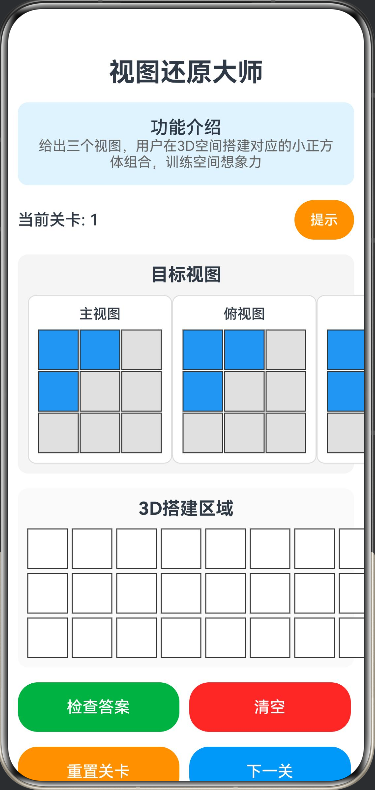
- 功能:给出三个视图,用户在3D空间搭建对应的小正方体组合,训练空间想象力。
// 视图还原大师
// 功能:给出三个视图,用户在3D空间搭建对应的小正方体组合,训练空间想象力
// 小正方体位置
interface CubePosition {
  x: number;
  y: number;
  z: number;
}

// 视图数据
interface ViewData {
  front: number[][];
  top: number[][];
  side: number[][];
}

@Entry
@Component
struct ViewRestorationMaster {
  @State gridSize: number = 3;
  @State cubeSize: number = 40;
  @State userCubes: Array<CubePosition> = [];
  @State targetView: ViewData = {
    front: [[1, 1, 0], [1, 0, 0], [0, 0, 0]],
    top: [[1, 1, 0], [1, 0, 0], [0, 0, 0]],
    side: [[1, 1, 0], [1, 0, 0], [0, 0, 0]]
  };
  @State currentLevel: number = 1;
  @State showResult: boolean = false;
  @State isCorrect: boolean = false;
  @State showHint: boolean = false;

  build() {
    Column({ space: 15 }) {
      Text('视图还原大师')
        .fontSize(26)
        .fontWeight(FontWeight.Bold)
        .textAlign(TextAlign.Center)

      Column() {
        Text('功能介绍')
          .fontSize(18)
          .fontWeight(FontWeight.Medium)
        Text('给出三个视图,用户在3D空间搭建对应的小正方体组合,训练空间想象力')
          .fontSize(14)
          .fontColor('#666666')
          .textAlign(TextAlign.Center)
      }
      .width('100%')
      .backgroundColor('#E3F2FD')
      .borderRadius(10)
      .padding(15)

      Row({ space: 10 }) {
        Text(`当前关卡: ${this.currentLevel}`)
          .fontSize(16)
          .fontWeight(FontWeight.Medium)

        Button('提示')
          .fontSize(14)
          .backgroundColor('#FF9800')
          .onClick(() => {
            this.showHint = !this.showHint
          })
      }
      .width('100%')
      .justifyContent(FlexAlign.SpaceBetween)

      Column({ space: 10 }) {
        Text('目标视图')
          .fontSize(18)
          .fontWeight(FontWeight.Bold)
          .width('100%')
          .textAlign(TextAlign.Center)

        Row({ space: 10 }) {
          this.ViewDisplay('主视图', this.targetView.front)
          this.ViewDisplay('俯视图', this.targetView.top)
          this.ViewDisplay('侧视图', this.targetView.side)
        }
        .width('100%')
        .justifyContent(FlexAlign.SpaceAround)
      }
      .width('100%')
      .padding(10)
      .backgroundColor('#F5F5F5')
      .borderRadius(10)

      Column({ space: 10 }) {
        Text('3D搭建区域')
          .fontSize(18)
          .fontWeight(FontWeight.Bold)
          .width('100%')
          .textAlign(TextAlign.Center)

        Column({ space: 5 }) {
          ForEach([0, 1, 2], (z: number) => {
            Row({ space: 5 }) {
              ForEach([0, 1, 2], (y: number) => {
                Row({ space: 5 }) {
                  ForEach([0, 1, 2], (x: number) => {
                    this.CubeCell(x, y, z)
                  })
                }
              })
            }
          })
        }
      }
      .width('100%')
      .padding(10)
      .backgroundColor('#FAFAFA')
      .borderRadius(10)

      if (this.showHint) {
        Column({ space: 8 }) {
          Text('提示')
            .fontSize(16)
            .fontWeight(FontWeight.Bold)

          Text('• 点击格子放置或移除小正方体')
            .fontSize(14)
            .fontColor('#666666')

          Text('• 主视图显示从前面看到的形状')
            .fontSize(14)
            .fontColor('#666666')

          Text('• 俯视图显示从上面看到的形状')
            .fontSize(14)
            .fontColor('#666666')

          Text('• 侧视图显示从侧面看到的形状')
            .fontSize(14)
            .fontColor('#666666')
        }
        .width('95%')
        .padding(12)
        .backgroundColor('#FFF3E0')
        .borderRadius(10)
      }

      Row({ space: 10 }) {
        Button('检查答案')
          .width('48%')
          .height(50)
          .fontSize(16)
          .backgroundColor('#4CAF50')
          .onClick(() => {
            this.checkAnswer()
          })

        Button('清空')
          .width('48%')
          .height(50)
          .fontSize(16)
          .backgroundColor('#F44336')
          .onClick(() => {
            this.userCubes = []
          })
      }
      .width('100%')

      Row({ space: 10 }) {
        Button('重置关卡')
          .width('48%')
          .height(50)
          .fontSize(16)
          .backgroundColor('#FF9800')
          .onClick(() => {
            this.resetLevel()
          })

        Button('下一关')
          .width('48%')
          .height(50)
          .fontSize(16)
          .backgroundColor('#2196F3')
          .onClick(() => {
            this.nextLevel()
          })
      }
      .width('100%')

      if (this.showResult) {
        Column({ space: 10 }) {
          Text(this.isCorrect ? '恭喜!答案正确!' : '答案错误,请继续努力!')
            .fontSize(20)
            .fontWeight(FontWeight.Bold)
            .fontColor(this.isCorrect ? '#4CAF50' : '#F44336')

          if (this.isCorrect) {
            Text('你的空间想象力很棒!')
              .fontSize(16)
              .fontColor('#666666')
          } else {
            Text('请仔细观察三个视图,重新搭建')
              .fontSize(16)
              .fontColor('#666666')
          }
        }
        .width('90%')
        .padding(20)
        .backgroundColor(this.isCorrect ? '#E8F5E9' : '#FFEBEE')
        .borderRadius(10)
        .border({ width: 2, color: this.isCorrect ? '#4CAF50' : '#F44336' })
      }
    }
    .width('100%')
    .height('100%')
    .padding(10)
    .justifyContent(FlexAlign.Start)
  }

  @Builder
  ViewDisplay(title: string, viewData: number[][]) {
    Column({ space: 8 }) {
      Text(title)
        .fontSize(14)
        .fontWeight(FontWeight.Medium)

      Column({ space: 2 }) {
        ForEach(viewData, (row: number[]) => {
          Row({ space: 2 }) {
            ForEach(row, (cell: number) => {
              Rect()
                .width(this.cubeSize)
                .height(this.cubeSize)
                .fill(cell === 1 ? '#2196F3' : '#E0E0E0')
                .stroke('#333')
                .strokeWidth(1)
            })
          }
        })
      }
    }
    .padding(10)
    .backgroundColor('#FFFFFF')
    .borderRadius(8)
    .border({ width: 1, color: '#DDD' })
  }

  @Builder
  CubeCell(x: number, y: number, z: number) {
    Stack() {
      Rect()
        .width(this.cubeSize)
        .height(this.cubeSize)
        .fill(this.hasCubeAt(x, y, z) ? '#FF5722' : '#FFFFFF')
        .stroke('#333')
        .strokeWidth(1)

      if (this.hasCubeAt(x, y, z)) {
        Text('●')
          .fontSize(20)
          .fontColor('#FFFFFF')
      }
    }
    .onClick(() => {
      this.toggleCube(x, y, z)
    })
  }

  private hasCubeAt(x: number, y: number, z: number): boolean {
    return this.userCubes.some(cube => cube.x === x && cube.y === y && cube.z === z)
  }

  private toggleCube(x: number, y: number, z: number) {
    const index = this.userCubes.findIndex(cube => cube.x === x && cube.y === y && cube.z === z)
    if (index >= 0) {
      this.userCubes.splice(index, 1)
    } else {
      this.userCubes.push({ x, y, z })
    }
    this.showResult = false
  }

  private checkAnswer() {
    const userFront = this.generateFrontView()
    const userTop = this.generateTopView()
    const userSide = this.generateSideView()

    this.isCorrect = this.compareViews(userFront, this.targetView.front) &&
                    this.compareViews(userTop, this.targetView.top) &&
                    this.compareViews(userSide, this.targetView.side)
    this.showResult = true
  }

  private generateFrontView(): number[][] {
    const view: number[][] = [[0, 0, 0], [0, 0, 0], [0, 0, 0]]
    for (const cube of this.userCubes) {
      if (view[cube.y][cube.x] === 0) {
        view[cube.y][cube.x] = 1
      }
    }
    return view
  }

  private generateTopView(): number[][] {
    const view: number[][] = [[0, 0, 0], [0, 0, 0], [0, 0, 0]]
    for (const cube of this.userCubes) {
      if (view[cube.z][cube.x] === 0) {
        view[cube.z][cube.x] = 1
      }
    }
    return view
  }

  private generateSideView(): number[][] {
    const view: number[][] = [[0, 0, 0], [0, 0, 0], [0, 0, 0]]
    for (const cube of this.userCubes) {
      if (view[cube.y][cube.z] === 0) {
        view[cube.y][cube.z] = 1
      }
    }
    return view
  }

  private compareViews(view1: number[][], view2: number[][]): boolean {
    for (let i = 0; i < 3; i++) {
      for (let j = 0; j < 3; j++) {
        if (view1[i][j] !== view2[i][j]) {
          return false
        }
      }
    }
    return true
  }

  private resetLevel() {
    this.userCubes = []
    this.showResult = false
  }

  private nextLevel() {
    this.currentLevel++
    this.userCubes = []
    this.showResult = false
    this.generateNewLevel()
  }

  private generateNewLevel() {
    const levels: ViewData[] = [
      {
        front: [[1, 1, 0], [1, 0, 0], [0, 0, 0]],
        top: [[1, 1, 0], [1, 0, 0], [0, 0, 0]],
        side: [[1, 1, 0], [1, 0, 0], [0, 0, 0]]
      },
      {
        front: [[1, 1, 1], [0, 1, 0], [0, 0, 0]],
        top: [[1, 1, 1], [0, 1, 0], [0, 0, 0]],
        side: [[1, 1, 1], [0, 1, 0], [0, 0, 0]]
      },
      {
        front: [[1, 0, 1], [0, 1, 0], [1, 0, 1]],
        top: [[1, 0, 1], [0, 1, 0], [1, 0, 1]],
        side: [[1, 0, 1], [0, 1, 0], [1, 0, 1]]
      },
      {
        front: [[1, 1, 0], [1, 1, 0], [0, 0, 0]],
        top: [[1, 1, 0], [1, 1, 0], [0, 0, 0]],
        side: [[1, 1, 0], [1, 1, 0], [0, 0, 0]]
      },
      {
        front: [[1, 1, 1], [1, 1, 1], [1, 1, 1]],
        top: [[1, 1, 1], [1, 1, 1], [1, 1, 1]],
        side: [[1, 1, 1], [1, 1, 1], [1, 1, 1]]
      }
    ]

    const levelIndex = (this.currentLevel - 1) % levels.length
    this.targetView = levels[levelIndex]
  }
}

讨论HarmonyOS开发技术,专注于API与组件、DevEco Studio、测试、元服务和应用上架分发等。
更多推荐


 4
4 0
0- 0


 已为社区贡献400条内容

所有评论(0)