Harmonyos应用实例212:双曲线性质探索
·
4. 双曲线性质探索
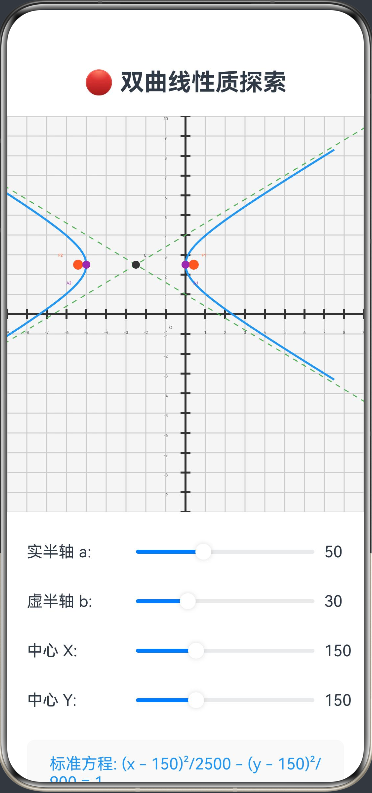
功能简介:通过调整双曲线的实轴、虚轴、中心坐标,实时展示双曲线的标准方程、离心率、渐近线方程,支持观察双曲线的开口方向变化。帮助学生理解双曲线的几何性质和参数关系。
ArkTS代码:
@Entry
@Component
struct HyperbolaExplorer {
  @State private a: number = 50 // 实半轴
  @State private b: number = 30 // 虚半轴
  @State private centerX: number = 150 // 中心X坐标
  @State private centerY: number = 150 // 中心Y坐标
  @State private equation: string = ''
  @State private asymptoteEquation: string = ''
  @State private eccentricity: number = 0 // 离心率
  @State private focusDistance: number = 0 // 焦距c
  private settings: RenderingContextSettings = new RenderingContextSettings(true)
  private context: CanvasRenderingContext2D = new CanvasRenderingContext2D(this.settings)

  aboutToAppear() {
    this.updateEquation()
  }

  build() {
    Column() {
      Text('🔴 双曲线性质探索')
        .fontSize(24)
        .fontWeight(FontWeight.Bold)
        .margin({ bottom: 20 })

      Canvas(this.context)
        .width(400)
        .height(400)
        .backgroundColor('#f5f5f5')
        .onReady(() => this.drawHyperbola())

      // 参数调整区域
      Column() {
        // 实半轴调整
        Row() {
          Text('实半轴 a: ')
            .width(100)
          Slider({ value: this.a, min: 20, max: 100 })
            .width(200)
            .onChange((val: number) => {
              this.a = val
              this.updateEquation()
            })
          Text(this.a.toFixed(0))
            .width(40)
        }
        .margin({ bottom: 10 })

        // 虚半轴调整
        Row() {
          Text('虚半轴 b: ')
            .width(100)
          Slider({ value: this.b, min: 10, max: 80 })
            .width(200)
            .onChange((val: number) => {
              this.b = val
              this.updateEquation()
            })
          Text(this.b.toFixed(0))
            .width(40)
        }
        .margin({ bottom: 10 })

        // 中心X坐标调整
        Row() {
          Text('中心 X: ')
            .width(100)
          Slider({ value: this.centerX, min: 50, max: 350 })
            .width(200)
            .onChange((val: number) => {
              this.centerX = val
              this.updateEquation()
            })
          Text(this.centerX.toFixed(0))
            .width(40)
        }
        .margin({ bottom: 10 })

        // 中心Y坐标调整
        Row() {
          Text('中心 Y: ')
            .width(100)
          Slider({ value: this.centerY, min: 50, max: 350 })
            .width(200)
            .onChange((val: number) => {
              this.centerY = val
              this.updateEquation()
            })
          Text(this.centerY.toFixed(0))
            .width(40)
        }
      }
      .margin({ top: 20, bottom: 20 })

      // 双曲线信息显示
      Column() {
        Text(this.equation)
          .fontSize(16)
          .fontColor('#2196F3')
          .margin({ bottom: 10 })

        Text(`离心率 e = ${this.eccentricity.toFixed(3)}`)
          .fontSize(14)
          .fontColor('#FF5722')
          .margin({ bottom: 10 })

        Text(`焦距 c = ${this.focusDistance.toFixed(1)}`)
          .fontSize(14)
          .fontColor('#666')
          .margin({ bottom: 10 })

        Text(this.asymptoteEquation)
          .fontSize(14)
          .fontColor('#4CAF50')
      }
      .padding(15)
      .backgroundColor('#f9f9f9')
      .borderRadius(8)
      .width('100%')
    }
    .padding(20)
    .width('100%')
    .height('100%')
  }

  private updateEquation() {
    // 计算焦距 c = √(a² + b²)
    this.focusDistance = Math.sqrt(this.a * this.a + this.b * this.b)

    // 计算离心率 e = c/a
    this.eccentricity = this.focusDistance / this.a

    // 更新标准方程
    this.equation = `标准方程: (x - ${this.centerX.toFixed(0)})²/${(this.a * this.a).toFixed(0)} - (y - ${this.centerY.toFixed(0)})²/${(this.b * this.b).toFixed(0)} = 1`

    // 更新渐近线方程 y - k = ±(b/a)(x - h)
    const slope = this.b / this.a
    this.asymptoteEquation = `渐近线: y - ${this.centerY.toFixed(0)} = ±${slope.toFixed(2)}(x - ${this.centerX.toFixed(0)})`

    this.drawHyperbola()
  }

  private drawHyperbola() {
    const ctx = this.context
    const width = 400
    const height = 400

    // 清空画布
    ctx.clearRect(0, 0, width, height)

    // 绘制坐标系
    this.drawCoordinateSystem(ctx, width, height)

    // 绘制双曲线
    this.drawHyperbolaCurve(ctx)

    // 绘制渐近线
    this.drawAsymptotes(ctx)

    // 绘制焦点
    this.drawFoci(ctx)

    // 绘制顶点
    this.drawVertices(ctx)

    // 绘制中心
    this.drawCenter(ctx)
  }

  private drawCoordinateSystem(ctx: CanvasRenderingContext2D, width: number, height: number) {
    ctx.strokeStyle = '#ccc'
    ctx.lineWidth = 1

    // 绘制网格
    for (let i = 0; i <= width; i += 20) {
      ctx.beginPath()
      ctx.moveTo(i, 0)
      ctx.lineTo(i, height)
      ctx.stroke()
    }
    for (let i = 0; i <= height; i += 20) {
      ctx.beginPath()
      ctx.moveTo(0, i)
      ctx.lineTo(width, i)
      ctx.stroke()
    }

    // 绘制坐标轴
    ctx.strokeStyle = '#333'
    ctx.lineWidth = 2

    // X轴
    ctx.beginPath()
    ctx.moveTo(0, height / 2)
    ctx.lineTo(width, height / 2)
    ctx.stroke()

    // Y轴
    ctx.beginPath()
    ctx.moveTo(width / 2, 0)
    ctx.lineTo(width / 2, height)
    ctx.stroke()

    // 绘制刻度
    ctx.fillStyle = '#666'
    ctx.font = '12px Arial'
    ctx.textAlign = 'center'

    for (let i = -10; i <= 10; i++) {
      if (i === 0) continue
      const x = width / 2 + i * 20
      const y = height / 2

      ctx.beginPath()
      ctx.moveTo(x, y - 5)
      ctx.lineTo(x, y + 5)
      ctx.stroke()

      ctx.fillText(i.toString(), x, y + 20)
    }

    for (let i = -10; i <= 10; i++) {
      if (i === 0) continue
      const x = width / 2
      const y = height / 2 - i * 20

      ctx.beginPath()
      ctx.moveTo(x - 5, y)
      ctx.lineTo(x + 5, y)
      ctx.stroke()

      ctx.fillText(i.toString(), x - 20, y + 4)
    }

    // 原点
    ctx.fillText('O', width / 2 - 15, height / 2 + 15)
  }

  private drawHyperbolaCurve(ctx: CanvasRenderingContext2D) {
    ctx.strokeStyle = '#2196F3'
    ctx.lineWidth = 2

    // 绘制右支
    ctx.beginPath()
    for (let x = this.a; x <= 200; x += 1) {
      const relativeX = x
      const relativeY = this.b * Math.sqrt((relativeX * relativeX) / (this.a * this.a) - 1)

      const screenX = this.centerX + relativeX
      const screenY = this.centerY - relativeY

      if (x === this.a) {
        ctx.moveTo(screenX, screenY)
      } else {
        ctx.lineTo(screenX, screenY)
      }
    }
    ctx.stroke()

    // 绘制右支下半部分
    ctx.beginPath()
    for (let x = this.a; x <= 200; x += 1) {
      const relativeX = x
      const relativeY = -this.b * Math.sqrt((relativeX * relativeX) / (this.a * this.a) - 1)

      const screenX = this.centerX + relativeX
      const screenY = this.centerY - relativeY

      if (x === this.a) {
        ctx.moveTo(screenX, screenY)
      } else {
        ctx.lineTo(screenX, screenY)
      }
    }
    ctx.stroke()

    // 绘制左支
    ctx.beginPath()
    for (let x = -200; x <= -this.a; x += 1) {
      const relativeX = x
      const relativeY = this.b * Math.sqrt((relativeX * relativeX) / (this.a * this.a) - 1)

      const screenX = this.centerX + relativeX
      const screenY = this.centerY - relativeY

      if (x === -200) {
        ctx.moveTo(screenX, screenY)
      } else {
        ctx.lineTo(screenX, screenY)
      }
    }
    ctx.stroke()

    // 绘制左支下半部分
    ctx.beginPath()
    for (let x = -200; x <= -this.a; x += 1) {
      const relativeX = x
      const relativeY = -this.b * Math.sqrt((relativeX * relativeX) / (this.a * this.a) - 1)

      const screenX = this.centerX + relativeX
      const screenY = this.centerY - relativeY

      if (x === -200) {
        ctx.moveTo(screenX, screenY)
      } else {
        ctx.lineTo(screenX, screenY)
      }
    }
    ctx.stroke()
  }

  private drawAsymptotes(ctx: CanvasRenderingContext2D) {
    ctx.strokeStyle = '#4CAF50'
    ctx.lineWidth = 1
    ctx.setLineDash([5, 5])

    const slope = this.b / this.a

    // 渐近线1: y - centerY = slope * (x - centerX)
    ctx.beginPath()
    ctx.moveTo(0, this.centerY - slope * (0 - this.centerX))
    ctx.lineTo(400, this.centerY - slope * (400 - this.centerX))
    ctx.stroke()

    // 渐近线2: y - centerY = -slope * (x - centerX)
    ctx.beginPath()
    ctx.moveTo(0, this.centerY + slope * (0 - this.centerX))
    ctx.lineTo(400, this.centerY + slope * (400 - this.centerX))
    ctx.stroke()

    ctx.setLineDash([])
  }

  private drawFoci(ctx: CanvasRenderingContext2D) {
    const c = this.focusDistance

    // 焦点1 (centerX + c, centerY)
    ctx.fillStyle = '#FF5722'
    ctx.beginPath()
    ctx.arc(this.centerX + c, this.centerY, 5, 0, 2 * Math.PI)
    ctx.fill()

    // 焦点2 (centerX - c, centerY)
    ctx.beginPath()
    ctx.arc(this.centerX - c, this.centerY, 5, 0, 2 * Math.PI)
    ctx.fill()

    // 标注焦点
    ctx.fillStyle = '#FF5722'
    ctx.font = '12px Arial'
    ctx.textAlign = 'left'
    ctx.fillText('F1', this.centerX + c + 8, this.centerY - 8)
    ctx.fillText('F2', this.centerX - c - 20, this.centerY - 8)
  }

  private drawVertices(ctx: CanvasRenderingContext2D) {
    // 顶点1 (centerX + a, centerY)
    ctx.fillStyle = '#9C27B0'
    ctx.beginPath()
    ctx.arc(this.centerX + this.a, this.centerY, 4, 0, 2 * Math.PI)
    ctx.fill()

    // 顶点2 (centerX - a, centerY)
    ctx.beginPath()
    ctx.arc(this.centerX - this.a, this.centerY, 4, 0, 2 * Math.PI)
    ctx.fill()

    // 标注顶点
    ctx.fillStyle = '#9C27B0'
    ctx.font = '12px Arial'
    ctx.textAlign = 'left'
    ctx.fillText('A1', this.centerX + this.a + 8, this.centerY + 20)
    ctx.fillText('A2', this.centerX - this.a - 20, this.centerY + 20)
  }

  private drawCenter(ctx: CanvasRenderingContext2D) {
    ctx.fillStyle = '#333'
    ctx.beginPath()
    ctx.arc(this.centerX, this.centerY, 4, 0, 2 * Math.PI)
    ctx.fill()

    ctx.fillStyle = '#333'
    ctx.font = '12px Arial'
    ctx.textAlign = 'left'
    ctx.fillText('C', this.centerX + 8, this.centerY - 8)
  }
}

讨论HarmonyOS开发技术,专注于API与组件、DevEco Studio、测试、元服务和应用上架分发等。
更多推荐

 0
0 0
0- 0


 已为社区贡献402条内容

所有评论(0)