HARMONYOS应用实例275:黄金分割比例寻找
·
- 黄金分割比例寻找
- 功能:拍摄或上传照片,叠加黄金分割辅助线,辅助分析建筑和名画中的美学比例。
黄金分割比例寻找应用通过拍摄或上传照片,叠加黄金分割辅助线,辅助分析建筑和名画中的美学比例。黄金分割比例(1:1.618)是自然界中最和谐的比例,广泛应用于艺术、建筑和设计领域。本应用通过交互式方式帮助用户发现和分析美学比例,培养对和谐比例的感知能力。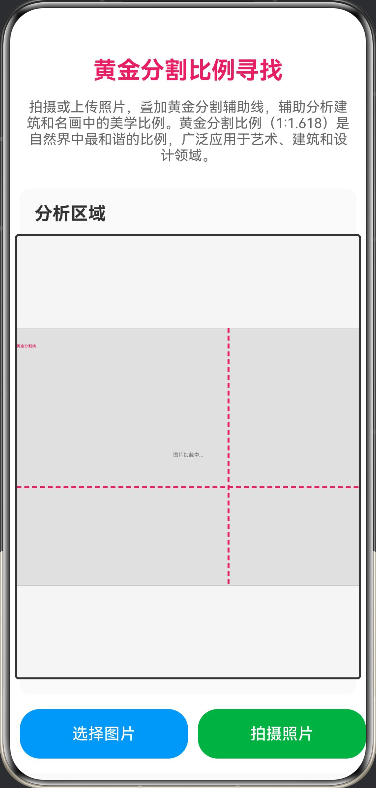
// 黄金分割比例寻找
// 功能:拍摄或上传照片,叠加黄金分割辅助线,辅助分析建筑和名画中的美学比例。
// 黄金分割比例(1:1.618)是自然界中最和谐的比例,广泛应用于艺术、建筑和设计领域。
// 本应用通过在照片上叠加黄金分割辅助线,帮助用户发现和分析美学比例,
// 培养对和谐比例的感知能力。

// 黄金分割常量
const GOLDEN_RATIO: number = (1 + Math.sqrt(5)) / 2; // 约1.618

@Entry
@Component
struct GoldenRatioFinder {
  @State imageUrl: string = '';
  @State showLines: boolean = true;
  @State showGrid: boolean = false;
  @State showCircles: boolean = false;
  @State imageWidth: number = 0;
  @State imageHeight: number = 0;
  @State canvasWidth: number = 350;
  @State canvasHeight: number = 450;
  @State selectedTool: string = 'golden';
  @State showInfo: boolean = true;

  private canvasContext: CanvasRenderingContext2D = new CanvasRenderingContext2D();
  private image: string = '';
  private imageLoaded: boolean = false;

  private async loadImage(url: string) {
    try {
      this.image = url;
      this.imageLoaded = true;
      // 模拟图片加载完成,实际应用中可以使用Image组件的onLoad事件
      setTimeout(() => {
        this.drawCanvas();
      }, 100);
    } catch (error) {
      console.error('加载图片失败:', error);
    }
  }

  private drawCanvas() {
    const ctx = this.canvasContext;
    const width = this.canvasWidth;
    const height = this.canvasHeight;

    ctx.clearRect(0, 0, width, height);

    if (this.image && this.imageLoaded) {
      // 模拟图片尺寸,实际应用中需要从Image组件获取
      const imgWidth = 800;
      const imgHeight = 600;

      const scale = Math.min(width / imgWidth, height / imgHeight);
      const scaledWidth = imgWidth * scale;
      const scaledHeight = imgHeight * scale;
      const offsetX = (width - scaledWidth) / 2;
      const offsetY = (height - scaledHeight) / 2;

      // 绘制占位符,实际应用中需要使用Canvas的drawImage方法
      ctx.fillStyle = '#E0E0E0';
      ctx.fillRect(offsetX, offsetY, scaledWidth, scaledHeight);
      ctx.strokeStyle = '#9E9E9E';
      ctx.strokeRect(offsetX, offsetY, scaledWidth, scaledHeight);
      ctx.fillStyle = '#757575';
      ctx.font = '16px sans-serif';
      ctx.textAlign = 'center';
      ctx.fillText('图片加载中...', offsetX + scaledWidth / 2, offsetY + scaledHeight / 2);

      if (this.showLines) {
        this.drawGoldenRatioLines(ctx, offsetX, offsetY, scaledWidth, scaledHeight);
      }

      if (this.showGrid) {
        this.drawGrid(ctx, offsetX, offsetY, scaledWidth, scaledHeight);
      }

      if (this.showCircles) {
        this.drawGoldenCircles(ctx, offsetX, offsetY, scaledWidth, scaledHeight);
      }
    }
  }

  private drawGoldenRatioLines(ctx: CanvasRenderingContext2D, offsetX: number, offsetY: number, width: number, height: number) {
    ctx.strokeStyle = '#E91E63';
    ctx.lineWidth = 2;
    ctx.setLineDash([5, 3]);

    const goldenX = width / GOLDEN_RATIO;
    const goldenY = height / GOLDEN_RATIO;

    ctx.beginPath();
    ctx.moveTo(offsetX + goldenX, offsetY);
    ctx.lineTo(offsetX + goldenX, offsetY + height);
    ctx.stroke();

    ctx.beginPath();
    ctx.moveTo(offsetX, offsetY + goldenY);
    ctx.lineTo(offsetX + width, offsetY + goldenY);
    ctx.stroke();

    ctx.setLineDash([]);

    ctx.fillStyle = '#E91E63';
    ctx.font = '12px sans-serif';
    ctx.fillText('黄金分割线', offsetX + 10, offsetY + 20);
  }

  private drawGrid(ctx: CanvasRenderingContext2D, offsetX: number, offsetY: number, width: number, height: number) {
    ctx.strokeStyle = '#4CAF50';
    ctx.lineWidth = 1;
    ctx.setLineDash([3, 2]);

    const stepX = width / 8;
    const stepY = height / 8;

    for (let i = 1; i < 8; i++) {
      ctx.beginPath();
      ctx.moveTo(offsetX + i * stepX, offsetY);
      ctx.lineTo(offsetX + i * stepX, offsetY + height);
      ctx.stroke();

      ctx.beginPath();
      ctx.moveTo(offsetX, offsetY + i * stepY);
      ctx.lineTo(offsetX + width, offsetY + i * stepY);
      ctx.stroke();
    }

    ctx.setLineDash([]);
  }

  private drawGoldenCircles(ctx: CanvasRenderingContext2D, offsetX: number, offsetY: number, width: number, height: number) {
    ctx.strokeStyle = '#2196F3';
    ctx.lineWidth = 2;
    ctx.setLineDash([4, 4]);

    const centerX = offsetX + width / 2;
    const centerY = offsetY + height / 2;
    const radius = Math.min(width, height) / 3;

    ctx.beginPath();
    ctx.arc(centerX, centerY, radius, 0, 2 * Math.PI);
    ctx.stroke();

    const goldenRadius = radius / GOLDEN_RATIO;
    ctx.beginPath();
    ctx.arc(centerX, centerY, goldenRadius, 0, 2 * Math.PI);
    ctx.stroke();

    ctx.setLineDash([]);
  }

  private selectImage() {
    // 模拟图片选择,实际应用中使用 @ohos.file.picker
    this.imageUrl = 'https://trae-api-cn.mchost.guru/api/ide/v1/text_to_image?prompt=beautiful%20architecture%20building%20with%20golden%20ratio&image_size=landscape_4_3';
    this.loadImage(this.imageUrl);
  }

  private takePhoto() {
    // 模拟拍照,实际应用中使用 @ohos.camera
    this.imageUrl = 'https://trae-api-cn.mchost.guru/api/ide/v1/text_to_image?prompt=painting%20with%20golden%20ratio%20composition&image_size=landscape_4_3';
    this.loadImage(this.imageUrl);
  }

  build() {
    Column({ space: 15 }) {
      Text('黄金分割比例寻找')
        .fontSize(24)
        .fontWeight(FontWeight.Bold)
        .fontColor('#E91E63')
        .margin({ top: 10 })

      Text('拍摄或上传照片,叠加黄金分割辅助线,辅助分析建筑和名画中的美学比例。黄金分割比例(1:1.618)是自然界中最和谐的比例,广泛应用于艺术、建筑和设计领域。')
        .fontSize(14)
        .fontColor('#666')
        .textAlign(TextAlign.Center)
        .padding({ left: 15, right: 15 })

      Scroll() {
        Column({ space: 15 }) {
          Column({ space: 10 }) {
            Text('分析区域')
              .fontSize(18)
              .fontWeight(FontWeight.Bold)
              .fontColor('#333')
              .width('100%')

            Canvas(this.canvasContext)
              .width(this.canvasWidth)
              .height(this.canvasHeight)
              .backgroundColor('#F5F5F5')
              .border({ width: 2, color: '#333' })
              .borderRadius(4)
              .onReady(() => {
                this.drawCanvas();
              })
          }
          .width('100%')
          .padding(15)
          .backgroundColor('#FAFAFA')
          .borderRadius(10)

          Row({ space: 10 }) {
            Button('选择图片')
              .width('50%')
              .height(50)
              .backgroundColor('#2196F3')
              .fontSize(16)
              .onClick(() => {
                this.selectImage();
              })

            Button('拍摄照片')
              .width('50%')
              .height(50)
              .backgroundColor('#4CAF50')
              .fontSize(16)
              .onClick(() => {
                this.takePhoto();
              })
          }
          .width('100%')

          Column({ space: 10 }) {
            Text('辅助线设置')
              .fontSize(18)
              .fontWeight(FontWeight.Bold)
              .fontColor('#333')
              .width('100%')

            Row({ space: 15 }) {
              Toggle({ type: ToggleType.Switch, isOn: this.showLines })
                .selectedColor('#E91E63')
                .onChange((isOn: boolean) => {
                  this.showLines = isOn;
                  this.drawCanvas();
                })

              Text('黄金分割线')
                .fontSize(14)
                .fontColor('#333')

              Toggle({ type: ToggleType.Switch, isOn: this.showGrid })
                .selectedColor('#4CAF50')
                .onChange((isOn: boolean) => {
                  this.showGrid = isOn;
                  this.drawCanvas();
                })

              Text('网格线')
                .fontSize(14)
                .fontColor('#333')

              Toggle({ type: ToggleType.Switch, isOn: this.showCircles })
                .selectedColor('#2196F3')
                .onChange((isOn: boolean) => {
                  this.showCircles = isOn;
                  this.drawCanvas();
                })

              Text('黄金圆')
                .fontSize(14)
                .fontColor('#333')
            }
            .width('100%')
            .justifyContent(FlexAlign.Start)
          }
          .width('100%')
          .padding(15)
          .backgroundColor('#FAFAFA')
          .borderRadius(10)

          Column({ space: 10 }) {
            Text('黄金分割原理')
              .fontSize(18)
              .fontWeight(FontWeight.Bold)
              .fontColor('#333')
              .width('100%')

            Column({ space: 5 }) {
              Text(`• 黄金比例:φ = (1 + √5)/2 ≈ 1.6180339887`)
                .fontSize(14)
                .fontColor('#666')
                .width('100%')

              Text('• 几何定义:线段被分成两部分,较长部分与整体的比等于较短部分与较长部分的比')
                .fontSize(14)
                .fontColor('#666')
                .width('100%')

              Text('• 数学公式:(a + b)/a = a/b = φ')
                .fontSize(14)
                .fontColor('#666')
                .width('100%')

              Text('• 收敛性质:黄金比例是连分数展开中最简单的无理数')
                .fontSize(14)
                .fontColor('#666')
                .width('100%')
            }
            .width('100%')
            .padding(10)
            .backgroundColor('#F5F5F5')
            .borderRadius(8)
          }
          .width('100%')
          .padding(15)
          .backgroundColor('#FAFAFA')
          .borderRadius(10)

          Column({ space: 10 }) {
            Text('应用领域')
              .fontSize(18)
              .fontWeight(FontWeight.Bold)
              .fontColor('#333')
              .width('100%')

            Column({ space: 5 }) {
              Text('• 艺术:达芬奇的《蒙娜丽莎》、米开朗基罗的《大卫》等作品都运用了黄金比例')
                .fontSize(14)
                .fontColor('#666')
                .width('100%')

              Text('• 建筑:雅典帕特农神庙、埃及金字塔等建筑中都体现了黄金比例')
                .fontSize(14)
                .fontColor('#666')
                .width('100%')

              Text('• 设计:现代设计中,黄金比例被广泛应用于排版、网页设计和产品设计')
                .fontSize(14)
                .fontColor('#666')
                .width('100%')

              Text('• 自然界:向日葵种子排列、海螺贝壳的螺旋等自然现象都遵循黄金比例')
                .fontSize(14)
                .fontColor('#666')
                .width('100%')
            }
            .width('100%')
            .padding(10)
            .backgroundColor('#F5F5F5')
            .borderRadius(8)
          }
          .width('100%')
          .padding(15)
          .backgroundColor('#FAFAFA')
          .borderRadius(10)

          Column({ space: 5 }) {
            Text('使用指南')
              .fontSize(16)
              .fontWeight(FontWeight.Bold)
              .fontColor('#E91E63')

            Text('1. 点击"选择图片"上传一张照片,或点击"拍摄照片"拍摄新照片')
              .fontSize(12)
              .fontColor('#666')
              .width('100%')

            Text('2. 开启"黄金分割线"查看黄金分割比例的位置')
              .fontSize(12)
              .fontColor('#666')
              .width('100%')

            Text('3. 开启"网格线"帮助对齐和分析')
              .fontSize(12)
              .fontColor('#666')
              .width('100%')

            Text('4. 开启"黄金圆"查看基于黄金比例的圆形构图')
              .fontSize(12)
              .fontColor('#666')
              .width('100%')

            Text('5. 观察照片中的重要元素是否位于黄金分割点上')
              .fontSize(12)
              .fontColor('#666')
              .width('100%')
          }
          .width('100%')
          .padding(15)
          .backgroundColor('#FCE4EC')
          .borderRadius(10)
        }
        .width('100%')
        .padding(10)
      }
      .width('100%')
      .height('100%')
    }
    .width('100%')
    .height('100%')
    .backgroundColor('#FFFFFF')
  }
}

讨论HarmonyOS开发技术,专注于API与组件、DevEco Studio、测试、元服务和应用上架分发等。
更多推荐


 0
0 0
0- 0


 已为社区贡献400条内容

所有评论(0)