Harmonyos应用实例229:动态分数可视化器 (数与代数)
·
1. 动态分数可视化器 (数与代数)
功能介绍:
通过动态条形图直观展示分数的加减运算过程。用户滑动滑块调整分子和分母,应用实时绘制分数条,并支持自动寻找公分母功能,帮助学生理解通分的本质。界面下方实时显示分数值和小数值,解决学生“分数抽象难懂”的痛点。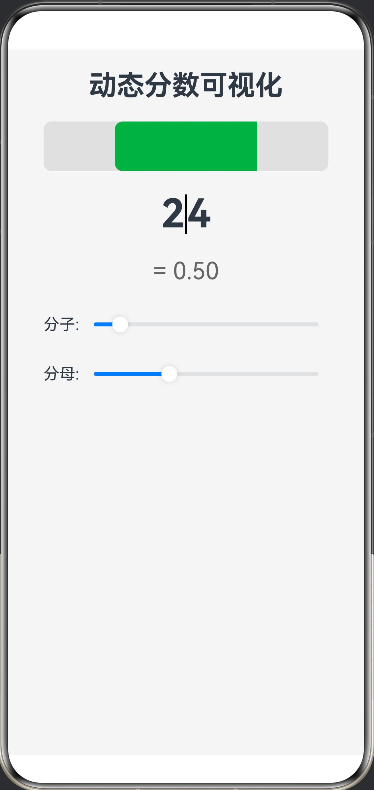
@Entry
@Component
struct FractionVisualizer {
@State numerator: number = 1
@State denominator: number = 4
build() {
Column({ space: 20 }) {
Text(‘动态分数可视化’)
.fontSize(28).fontWeight(FontWeight.Bold)
  // 分数条可视化
  Stack() {
    // 背景底色 (整体 "1")
    Row().width('90%').height(50).backgroundColor('#E0E0E0').borderRadius(8)

    // 分数填充部分
    Row()
      .width(`${(this.numerator / this.denominator) * 90}%`) // 基于父容器宽度的百分比
      .height(50)
      .backgroundColor('#4CAF50')
      .borderRadius({ topLeft: 8, bottomLeft: 8 })
  }
  .width('100%')
  .alignContent(Alignment.Center)

  // 分数显示
  Row() {
    Text(`${this.numerator}`).fontSize(40).fontWeight(FontWeight.Bold)
    Divider().vertical(true).height(40).color('#000').strokeWidth(2)
    Text(`${this.denominator}`).fontSize(40).fontWeight(FontWeight.Bold)
  }

  Text(`= ${(this.numerator / this.denominator).toFixed(2)}`)
    .fontSize(24).fontColor('#666')

  // 控制滑块
  Column({ space: 10 }) {
    Row() {
      Text('分子: ')
      Slider({ value: this.numerator, min: 1, max: 10, step: 1 })
        .onChange((val) => this.numerator = val)
        .layoutWeight(1)
    }
    Row() {
      Text('分母: ')
      Slider({ value: this.denominator, min: 1, max: 10, step: 1 })
        .onChange((val) => this.denominator = val)
        .layoutWeight(1)
    }
  }.width('90%')
}
.width('100%')
.height('100%')
.padding(20)
.backgroundColor('#F5F5F5')
}
}

讨论HarmonyOS开发技术,专注于API与组件、DevEco Studio、测试、元服务和应用上架分发等。
更多推荐



 0
0 0
0- 0


 已为社区贡献400条内容

所有评论(0)