HARMONYOS应用实例264:数据统计图表生成器
·
模块四:统计与概率 (31-37)
- 数据统计图表生成器
- 功能:输入班级成绩数据,一键生成条形图、折线图、扇形图,并自动计算平均数、中位数。
输入班级成绩数据(姓名和成绩)
一键生成三种类型的统计图表:条形图、折线图、扇形图
自动计算并显示统计结果:平均数、中位数、最高分、最低分、人数
支持添加、删除和清空成绩数据
提供显示选项控制(网格、标签)
可视化展示成绩分布情况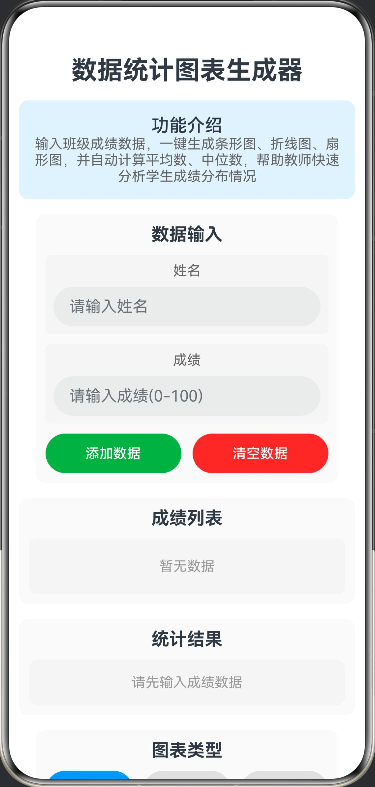
- 功能:输入班级成绩数据,一键生成条形图、折线图、扇形图,并自动计算平均数、中位数。
// 数据统计图表生成器
// 功能:输入班级成绩数据,一键生成条形图、折线图、扇形图,并自动计算平均数、中位数

// 成绩数据接口
interface ScoreData {
  id: number;
  name: string;
  score: number;
}

// 统计结果接口
interface StatisticsResult {
  average: number;
  median: number;
  max: number;
  min: number;
  count: number;
}

// 分数段数据接口
interface ScoreRange {
  range: string;
  count: number;
  color: string;
}

@Entry
@Component
struct StatisticsChartGenerator {
  @State canvasWidth: number = 350;
  @State canvasHeight: number = 350;
  @State chartType: 'bar' | 'line' | 'pie' = 'bar';
  @State showGrid: boolean = true;
  @State showLabels: boolean = true;
  @State scoreData: ScoreData[] = [];
  @State statistics: StatisticsResult = {
    average: 0,
    median: 0,
    max: 0,
    min: 0,
    count: 0
  };
  @State inputName: string = '';
  @State inputScore: string = '';
  @State editingId: number | null = null;

  build() {
    Column({ space: 15 }) {
      Text('数据统计图表生成器')
        .fontSize(26)
        .fontWeight(FontWeight.Bold)
        .textAlign(TextAlign.Center)

      Column() {
        Text('功能介绍')
          .fontSize(18)
          .fontWeight(FontWeight.Medium)
        Text('输入班级成绩数据,一键生成条形图、折线图、扇形图,并自动计算平均数、中位数,帮助教师快速分析学生成绩分布情况')
          .fontSize(14)
          .fontColor('#666666')
          .textAlign(TextAlign.Center)
      }
      .width('100%')
      .backgroundColor('#E3F2FD')
      .borderRadius(10)
      .padding(15)

      Column({ space: 10 }) {
        Text('数据输入')
          .fontSize(18)
          .fontWeight(FontWeight.Bold)
          .width('100%')
          .textAlign(TextAlign.Center)

        Column({ space: 8 }) {
          Text('姓名')
            .fontSize(14)
            .fontColor('#666666')

          TextInput({ placeholder: '请输入姓名' })
            .width('100%')
            .height(40)
            .fontSize(14)
            .onChange((value: string) => {
              this.inputName = value
            })
        }
        .width('100%')
        .padding(8)
        .backgroundColor('#F5F5F5')
        .borderRadius(6)

        Column({ space: 8 }) {
          Text('成绩')
            .fontSize(14)
            .fontColor('#666666')

          TextInput({ placeholder: '请输入成绩(0-100)' })
            .width('100%')
            .height(40)
            .fontSize(14)
            .type(InputType.Number)
            .onChange((value: string) => {
              this.inputScore = value
            })
        }
        .width('100%')
        .padding(8)
        .backgroundColor('#F5F5F5')
        .borderRadius(6)

        Row({ space: 10 }) {
          Button('添加数据')
            .width('48%')
            .height(40)
            .fontSize(14)
            .backgroundColor('#4CAF50')
            .onClick(() => {
              this.addData()
            })

          Button('清空数据')
            .width('48%')
            .height(40)
            .fontSize(14)
            .backgroundColor('#F44336')
            .onClick(() => {
              this.clearData()
            })
        }
        .width('100%')
        .justifyContent(FlexAlign.SpaceBetween)
      }
      .width('90%')
      .padding(10)
      .backgroundColor('#FAFAFA')
      .borderRadius(10)

      Column({ space: 10 }) {
        Text('成绩列表')
          .fontSize(18)
          .fontWeight(FontWeight.Bold)
          .width('100%')
          .textAlign(TextAlign.Center)

        if (this.scoreData.length > 0) {
          Column({ space: 5 }) {
            ForEach(this.scoreData, (data: ScoreData, index: number) => {
              Row({ space: 10 }) {
                Text(`${index + 1}. ${data.name}`)
                  .fontSize(14)
                  .width('40%')

                Text(`${data.score}分`)
                  .fontSize(14)
                  .fontColor('#2196F3')
                  .width('30%')

                Button('删除')
                  .width('25%')
                  .height(30)
                  .fontSize(12)
                  .backgroundColor('#F44336')
                  .onClick(() => {
                    this.deleteData(index)
                  })
              }
              .width('100%')
              .padding(8)
              .backgroundColor('#FFFFFF')
              .borderRadius(6)
              .border({ width: 1, color: '#E0E0E0' })
            })
          }
          .width('100%')
          .padding(10)
          .backgroundColor('#F5F5F5')
          .borderRadius(8)
        } else {
          Column() {
            Text('暂无数据')
              .fontSize(14)
              .fontColor('#999999')
          }
          .width('100%')
          .padding(20)
          .backgroundColor('#F5F5F5')
          .borderRadius(8)
        }
      }
      .width('100%')
      .padding(10)
      .backgroundColor('#FAFAFA')
      .borderRadius(10)

      Column({ space: 10 }) {
        Text('统计结果')
          .fontSize(18)
          .fontWeight(FontWeight.Bold)
          .width('100%')
          .textAlign(TextAlign.Center)

        if (this.scoreData.length > 0) {
          Column({ space: 8 }) {
            Row({ space: 10 }) {
              Text(`平均数: ${this.statistics.average.toFixed(2)}`)
                .fontSize(14)
                .fontColor('#2196F3')

              Text(`中位数: ${this.statistics.median.toFixed(2)}`)
                .fontSize(14)
                .fontColor('#4CAF50')
            }
            .width('100%')
            .justifyContent(FlexAlign.SpaceAround)

            Row({ space: 10 }) {
              Text(`最高分: ${this.statistics.max}`)
                .fontSize(14)
                .fontColor('#FF9800')

              Text(`最低分: ${this.statistics.min}`)
                .fontSize(14)
                .fontColor('#F44336')

              Text(`人数: ${this.statistics.count}`)
                .fontSize(14)
                .fontColor('#9C27B0')
            }
            .width('100%')
            .justifyContent(FlexAlign.SpaceAround)
          }
          .width('100%')
          .padding(15)
          .backgroundColor('#E8F5E9')
          .borderRadius(10)
        } else {
          Column() {
            Text('请先输入成绩数据')
              .fontSize(14)
              .fontColor('#999999')
          }
          .width('100%')
          .padding(15)
          .backgroundColor('#F5F5F5')
          .borderRadius(10)
        }
      }
      .width('100%')
      .padding(10)
      .backgroundColor('#FAFAFA')
      .borderRadius(10)

      Column({ space: 10 }) {
        Text('图表类型')
          .fontSize(18)
          .fontWeight(FontWeight.Bold)
          .width('100%')
          .textAlign(TextAlign.Center)

        Row({ space: 10 }) {
          Button('条形图')
            .width('31%')
            .height(40)
            .fontSize(14)
            .backgroundColor(this.chartType === 'bar' ? '#2196F3' : '#E0E0E0')
            .onClick(() => {
              this.chartType = 'bar'
              this.drawChart()
            })

          Button('折线图')
            .width('31%')
            .height(40)
            .fontSize(14)
            .backgroundColor(this.chartType === 'line' ? '#2196F3' : '#E0E0E0')
            .onClick(() => {
              this.chartType = 'line'
              this.drawChart()
            })

          Button('扇形图')
            .width('31%')
            .height(40)
            .fontSize(14)
            .backgroundColor(this.chartType === 'pie' ? '#2196F3' : '#E0E0E0')
            .onClick(() => {
              this.chartType = 'pie'
              this.drawChart()
            })
        }
        .width('100%')
        .justifyContent(FlexAlign.SpaceBetween)
      }
      .width('90%')
      .padding(10)
      .backgroundColor('#FAFAFA')
      .borderRadius(10)

      Column({ space: 10 }) {
        Text('统计图表')
          .fontSize(18)
          .fontWeight(FontWeight.Bold)
          .width('100%')
          .textAlign(TextAlign.Center)

        Canvas(this.canvasContext)
          .width(this.canvasWidth)
          .height(this.canvasHeight)
          .backgroundColor('#FFFFFF')
          .border({ width: 2, color: '#333' })
          .borderRadius(10)
          .onReady(() => {
            this.drawChart()
          })
      }
      .width('100%')
      .padding(10)
      .backgroundColor('#FAFAFA')
      .borderRadius(10)

      Column({ space: 8 }) {
        Text('显示选项')
          .fontSize(16)
          .fontWeight(FontWeight.Medium)

        Row({ space: 10 }) {
          Row({ space: 5 }) {
            Text('显示网格')
              .fontSize(14)
            Text(this.showGrid ? '✓' : '✗')
              .fontSize(14)
              .fontColor(this.showGrid ? '#4CAF50' : '#F44336')
          }
          .onClick(() => {
            this.showGrid = !this.showGrid
            this.drawChart()
          })

          Row({ space: 5 }) {
            Text('显示标签')
              .fontSize(14)
            Text(this.showLabels ? '✓' : '✗')
              .fontSize(14)
              .fontColor(this.showLabels ? '#4CAF50' : '#F44336')
          }
          .onClick(() => {
            this.showLabels = !this.showLabels
            this.drawChart()
          })
        }
        .width('100%')
        .justifyContent(FlexAlign.SpaceAround)
      }
      .width('90%')
      .padding(10)
      .backgroundColor('#F5F5F5')
      .borderRadius(8)

      Column({ space: 8 }) {
        Text('使用说明')
          .fontSize(16)
          .fontWeight(FontWeight.Bold)

        Text('• 输入学生姓名和成绩')
          .fontSize(14)
          .fontColor('#666666')

        Text('• 点击"添加数据"保存成绩')
          .fontSize(14)
          .fontColor('#666666')

        Text('• 选择图表类型查看统计')
          .fontSize(14)
          .fontColor('#666666')

        Text('• 查看平均数、中位数等统计结果')
          .fontSize(14)
          .fontColor('#666666')

        Text('• 使用"清空数据"重新开始')
          .fontSize(14)
          .fontColor('#666666')
      }
      .width('95%')
      .padding(12)
      .backgroundColor('#FFF3E0')
      .borderRadius(10)
    }
    .width('100%')
    .height('100%')
    .padding(10)
    .justifyContent(FlexAlign.Start)
  }

  private canvasContext: CanvasRenderingContext2D = new CanvasRenderingContext2D();

  private addData() {
    if (this.inputName.trim() === '' || this.inputScore.trim() === '') {
      return
    }

    const score = parseFloat(this.inputScore)
    if (isNaN(score) || score < 0 || score > 100) {
      return
    }

    const newData: ScoreData = {
      id: Date.now(),
      name: this.inputName,
      score: score
    }

    this.scoreData.push(newData)
    this.inputName = ''
    this.inputScore = ''

    this.calculateStatistics()
    this.drawChart()
  }

  private deleteData(index: number) {
    this.scoreData.splice(index, 1)
    this.calculateStatistics()
    this.drawChart()
  }

  private clearData() {
    this.scoreData = []
    this.inputName = ''
    this.inputScore = ''
    this.calculateStatistics()
    this.drawChart()
  }

  private calculateStatistics() {
    if (this.scoreData.length === 0) {
      this.statistics = {
        average: 0,
        median: 0,
        max: 0,
        min: 0,
        count: 0
      }
      return
    }

    const scores = this.scoreData.map((data: ScoreData) => data.score)
    const sum = scores.reduce((acc: number, val: number) => acc + val, 0)
    const average = sum / scores.length

    const sortedScores = [...scores].sort((a: number, b: number) => a - b)
    const median = sortedScores.length % 2 === 0
      ? (sortedScores[sortedScores.length / 2 - 1] + sortedScores[sortedScores.length / 2]) / 2
      : sortedScores[Math.floor(sortedScores.length / 2)]

    const max = Math.max(...scores)
    const min = Math.min(...scores)
    const count = scores.length

    this.statistics = {
      average,
      median,
      max,
      min,
      count
    }
  }

  private drawChart() {
    const ctx = this.canvasContext
    ctx.clearRect(0, 0, this.canvasWidth, this.canvasHeight)

    if (this.scoreData.length === 0) {
      ctx.fillStyle = '#999999'
      ctx.font = '16px sans-serif'
      ctx.fillText('请先添加成绩数据', this.canvasWidth / 2 - 80, this.canvasHeight / 2)
      return
    }

    switch (this.chartType) {
      case 'bar':
        this.drawBarChart(ctx)
        break
      case 'line':
        this.drawLineChart(ctx)
        break
      case 'pie':
        this.drawPieChart(ctx)
        break
    }
  }

  private drawBarChart(ctx: CanvasRenderingContext2D) {
    const padding = 60
    const chartWidth = this.canvasWidth - 2 * padding
    const chartHeight = this.canvasHeight - 2 * padding
    const barWidth = chartWidth / this.scoreData.length - 10
    const maxScore = 100

    if (this.showGrid) {
      this.drawGrid(ctx, padding, chartWidth, chartHeight)
    }

    this.drawAxes(ctx, padding, chartWidth, chartHeight)

    const colors = ['#2196F3', '#4CAF50', '#FF9800', '#9C27B0', '#F44336', '#00BCD4', '#8BC34A', '#FF5722']

    this.scoreData.forEach((data: ScoreData, index: number) => {
      const barHeight = (data.score / maxScore) * chartHeight
      const x = padding + index * (barWidth + 10) + 5
      const y = padding + chartHeight - barHeight

      ctx.fillStyle = colors[index % colors.length]
      ctx.fillRect(x, y, barWidth, barHeight)

      if (this.showLabels) {
        ctx.fillStyle = '#333'
        ctx.font = '10px sans-serif'
        ctx.fillText(data.score.toString(), x + barWidth / 2 - 10, y - 5)

        ctx.font = '8px sans-serif'
        ctx.fillText(data.name.substring(0, 3), x + barWidth / 2 - 10, padding + chartHeight + 15)
      }
    })
  }

  private drawLineChart(ctx: CanvasRenderingContext2D) {
    const padding = 60
    const chartWidth = this.canvasWidth - 2 * padding
    const chartHeight = this.canvasHeight - 2 * padding
    const maxScore = 100

    if (this.showGrid) {
      this.drawGrid(ctx, padding, chartWidth, chartHeight)
    }

    this.drawAxes(ctx, padding, chartWidth, chartHeight)

    const pointSpacing = chartWidth / (this.scoreData.length - 1 || 1)

    ctx.strokeStyle = '#2196F3'
    ctx.lineWidth = 2
    ctx.beginPath()

    this.scoreData.forEach((data: ScoreData, index: number) => {
      const x = padding + index * pointSpacing
      const y = padding + chartHeight - (data.score / maxScore) * chartHeight

      if (index === 0) {
        ctx.moveTo(x, y)
      } else {
        ctx.lineTo(x, y)
      }
    })
    ctx.stroke()

    this.scoreData.forEach((data: ScoreData, index: number) => {
      const x = padding + index * pointSpacing
      const y = padding + chartHeight - (data.score / maxScore) * chartHeight

      ctx.fillStyle = '#2196F3'
      ctx.beginPath()
      ctx.arc(x, y, 5, 0, 2 * Math.PI)
      ctx.fill()

      if (this.showLabels) {
        ctx.fillStyle = '#333'
        ctx.font = '10px sans-serif'
        ctx.fillText(data.score.toString(), x - 10, y - 10)

        ctx.font = '8px sans-serif'
        ctx.fillText(data.name.substring(0, 3), x - 10, padding + chartHeight + 15)
      }
    })
  }

  private drawPieChart(ctx: CanvasRenderingContext2D) {
    const centerX = this.canvasWidth / 2
    const centerY = this.canvasHeight / 2
    const radius = Math.min(centerX, centerY) - 40

    const scoreRanges: ScoreRange[] = [
      { range: '90-100', count: 0, color: '#4CAF50' },
      { range: '80-89', count: 0, color: '#2196F3' },
      { range: '70-79', count: 0, color: '#FF9800' },
      { range: '60-69', count: 0, color: '#9C27B0' },
      { range: '0-59', count: 0, color: '#F44336' }
    ]

    this.scoreData.forEach((data: ScoreData) => {
      if (data.score >= 90) {
        scoreRanges[0].count++
      } else if (data.score >= 80) {
        scoreRanges[1].count++
      } else if (data.score >= 70) {
        scoreRanges[2].count++
      } else if (data.score >= 60) {
        scoreRanges[3].count++
      } else {
        scoreRanges[4].count++
      }
    })

    let startAngle = -Math.PI / 2

    scoreRanges.forEach((range: ScoreRange) => {
      if (range.count > 0) {
        const sliceAngle = (range.count / this.scoreData.length) * 2 * Math.PI

        ctx.fillStyle = range.color
        ctx.beginPath()
        ctx.moveTo(centerX, centerY)
        ctx.arc(centerX, centerY, radius, startAngle, startAngle + sliceAngle)
        ctx.closePath()
        ctx.fill()

        if (this.showLabels) {
          const labelAngle = startAngle + sliceAngle / 2
          const labelX = centerX + (radius * 0.7) * Math.cos(labelAngle)
          const labelY = centerY + (radius * 0.7) * Math.sin(labelAngle)

          ctx.fillStyle = '#FFFFFF'
          ctx.font = '12px sans-serif'
          ctx.fillText(`${range.range}: ${range.count}人`, labelX - 30, labelY)
        }

        startAngle += sliceAngle
      }
    })
  }

  private drawGrid(ctx: CanvasRenderingContext2D, padding: number, chartWidth: number, chartHeight: number) {
    ctx.strokeStyle = '#E0E0E0'
    ctx.lineWidth = 1

    for (let i = 0; i <= 10; i++) {
      const y = padding + (chartHeight / 10) * i
      ctx.beginPath()
      ctx.moveTo(padding, y)
      ctx.lineTo(padding + chartWidth, y)
      ctx.stroke()
    }
  }

  private drawAxes(ctx: CanvasRenderingContext2D, padding: number, chartWidth: number, chartHeight: number) {
    ctx.strokeStyle = '#333'
    ctx.lineWidth = 2

    ctx.beginPath()
    ctx.moveTo(padding, padding)
    ctx.lineTo(padding, padding + chartHeight)
    ctx.lineTo(padding + chartWidth, padding + chartHeight)
    ctx.stroke()

    ctx.fillStyle = '#333'
    ctx.font = '12px sans-serif'
    ctx.fillText('成绩', padding - 20, padding - 10)
    ctx.fillText('学生', padding + chartWidth - 20, padding + chartHeight + 20)

    for (let i = 0; i <= 10; i++) {
      const y = padding + (chartHeight / 10) * i
      ctx.fillText((100 - i * 10).toString(), padding - 25, y + 4)
    }
  }
}

讨论HarmonyOS开发技术,专注于API与组件、DevEco Studio、测试、元服务和应用上架分发等。
更多推荐



 0
0 0
0- 0


 已为社区贡献400条内容

所有评论(0)