HARMONYOS应用实例241:一元一次方程求解器
·
- 一元一次方程求解器
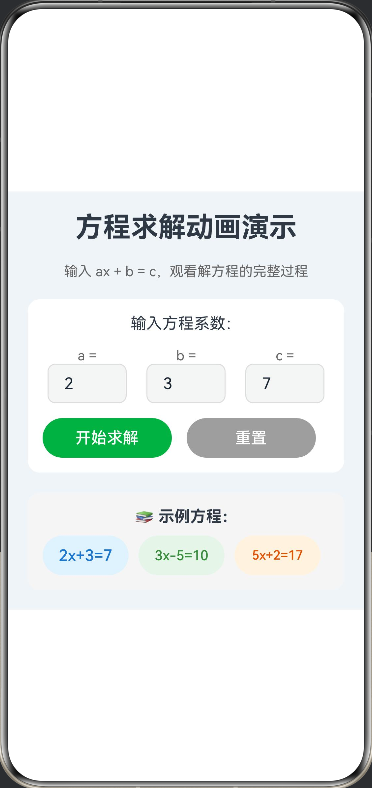
- 功能:输入 ax+b=cax+b=cax+b=c,动画演示移项、合并同类项、系数化为1的全过程。这是一个基于 HarmonyOS ArkTS 开发的交互式方程求解工具,用户可以输入一元一次方程 ax + b = c 的系数,系统会通过动画演示完整的求解过程,包括移项、合并同类项和系数化为1的步骤。工具通过可视化动画和详细的步骤说明,帮助学生理解解方程的基本原理和操作方法。
@Entry
@Component
struct EquationSolver {
  // 状态变量
  @State a: string = '2'
  @State b: string = '3'
  @State c: string = '7'
  @State solution: string = ''
  @State steps: Step[] = []
  @State currentStep: number = -1
  @State isAnimating: boolean = false
  @State isSolved: boolean = false

  // Canvas 上下文
  private settings: RenderingContextSettings = new RenderingContextSettings(true)
  private context: CanvasRenderingContext2D = new CanvasRenderingContext2D(this.settings)

  build() {
    Scroll() {
      Column({ space: 20 }) {
        // 标题区
        Text('方程求解动画演示')
          .fontSize(28)
          .fontWeight(FontWeight.Bold)

        Text('输入 ax + b = c,观看解方程的完整过程')
          .fontSize(14)
          .fontColor('#666')

        // 方程输入区
        Column() {
          Text('输入方程系数:')
            .fontSize(16)
            .margin({ bottom: 15 })

          Row({ space: 20 }) {
            Column() {
              Text('a =')
                .fontSize(14)
                .fontColor('#666')
              TextInput({
                placeholder: '系数',
                text: this.a
              })
                .width(80)
                .height(40)
                .borderRadius(8)
                .border({ width: 1, color: '#DDDDDD' })
                .onChange((value: string) => {
                  this.a = value
                })
            }

            Column() {
              Text('b =')
                .fontSize(14)
                .fontColor('#666')
              TextInput({
                placeholder: '常数',
                text: this.b
              })
                .width(80)
                .height(40)
                .borderRadius(8)
                .border({ width: 1, color: '#DDDDDD' })
                .onChange((value: string) => {
                  this.b = value
                })
            }

            Column() {
              Text('c =')
                .fontSize(14)
                .fontColor('#666')
              TextInput({
                placeholder: '结果',
                text: this.c
              })
                .width(80)
                .height(40)
                .borderRadius(8)
                .border({ width: 1, color: '#DDDDDD' })
                .onChange((value: string) => {
                  this.c = value
                })
            }
          }
          .width('100%')
          .justifyContent(FlexAlign.Center)

          Row({ space: 15 }) {
            Button('开始求解')
              .width('45%')
              .height(40)
              .backgroundColor('#4CAF50')
              .onClick(() => {
                this.solveEquation()
              })

            Button('重置')
              .width('45%')
              .height(40)
              .backgroundColor('#9E9E9E')
              .onClick(() => {
                this.reset()
              })
          }
          .width('100%')
          .margin({ top: 15 })
        }
        .width('100%')
        .padding(15)
        .backgroundColor('#FFFFFF')
        .borderRadius(12)

        // 方程显示区
        if (this.steps.length > 0) {
          Column() {
            Text('方程:')
              .fontSize(16)
              .fontWeight(FontWeight.Bold)

            Text(`${this.a}x + ${this.b} = ${this.c}`)
              .fontSize(24)
              .fontWeight(FontWeight.Bold)
              .fontColor('#2196F3')

            if (this.solution) {
              Text(`解:x = ${this.solution}`)
                .fontSize(20)
                .fontWeight(FontWeight.Bold)
                .fontColor('#4CAF50')
                .margin({ top: 10 })
            }
          }
          .width('100%')
          .padding(15)
          .backgroundColor('#FFFFFF')
          .borderRadius(12)
        }

        // 动画演示区
        if (this.steps.length > 0) {
          Column({ space: 10 }) {
            Text('解方程步骤:')
              .fontSize(16)
              .fontWeight(FontWeight.Bold)

            Canvas(this.context)
              .width('100%')
              .height(300)
              .backgroundColor('#F8F9FA')
              .borderRadius(8)
              .onReady(() => {
                this.drawAnimation()
              })

            Row({ space: 10 }) {
              Button('上一步')
                .width('30%')
                .height(40)
                .backgroundColor(this.currentStep > 0 ? '#2196F3' : '#CCCCCC')
                .enabled(this.currentStep > 0)
                .onClick(() => {
                  if (this.currentStep > 0) {
                    this.currentStep--
                    this.drawAnimation()
                  }
                })

              Button('下一步')
                .width('30%')
                .height(40)
                .backgroundColor(this.currentStep < this.steps.length - 1 ? '#2196F3' : '#CCCCCC')
                .enabled(this.currentStep < this.steps.length - 1)
                .onClick(() => {
                  if (this.currentStep < this.steps.length - 1) {
                    this.currentStep++
                    this.drawAnimation()
                  }
                })

              Button('自动播放')
                .width('30%')
                .height(40)
                .backgroundColor('#FF9800')
                .onClick(() => {
                  this.playAnimation()
                })
            }
            .width('100%')
            .justifyContent(FlexAlign.SpaceAround)
          }
          .width('100%')
          .padding(15)
          .backgroundColor('#FFFFFF')
          .borderRadius(12)
        }

        // 步骤说明
        if (this.steps.length > 0) {
          Column({ space: 10 }) {
            Text('📝 步骤说明:')
              .fontSize(16)
              .fontWeight(FontWeight.Bold)

            ForEach(this.steps, (step: Step, index: number) => {
              Column() {
                Text(`${index + 1}. ${step.description}`)
                  .fontSize(14)
                  .fontColor('#666')
                  .lineHeight(20)
                Text(step.equation)
                  .fontSize(16)
                  .fontWeight(FontWeight.Bold)
                  .fontColor('#333')
                  .margin({ top: 5 })
              }
              .width('100%')
              .padding(10)
              .backgroundColor(index === this.currentStep ? '#E3F2FD' : '#F5F5F5')
              .borderRadius(8)
              .margin({ top: 5 })
            })
          }
          .width('100%')
          .padding(15)
          .backgroundColor('#FFFFFF')
          .borderRadius(12)
        }

        // 示例方程
        Column({ space: 10 }) {
          Text('📚 示例方程:')
            .fontSize(16)
            .fontWeight(FontWeight.Bold)

          Row({ space: 10 }) {
            Button('2x+3=7')
              .width('30%')
              .height(40)
              .backgroundColor('#E3F2FD')
              .fontColor('#1976D2')
              .onClick(() => {
                this.a = '2'
                this.b = '3'
                this.c = '7'
              })

            Button('3x-5=10')
              .width('30%')
              .height(40)
              .backgroundColor('#E8F5E9')
              .fontColor('#388E3C')
              .onClick(() => {
                this.a = '3'
                this.b = '-5'
                this.c = '10'
              })

            Button('5x+2=17')
              .width('30%')
              .height(40)
              .backgroundColor('#FFF3E0')
              .fontColor('#E65100')
              .onClick(() => {
                this.a = '5'
                this.b = '2'
                this.c = '17'
              })
          }
          .width('100%')
        }
        .width('100%')
        .padding(15)
        .backgroundColor('#F5F5F5')
        .borderRadius(12)

      }
      .width('100%')
      .padding(20)
      .backgroundColor('#F0F4F8')
    }
    .width('100%')
    .height('100%')
  }

  // 解方程
  private solveEquation() {
    const a = parseFloat(this.a)
    const b = parseFloat(this.b)
    const c = parseFloat(this.c)

    if (isNaN(a) || isNaN(b) || isNaN(c)) {
      // 输入验证
      return
    }

    this.steps = []
    this.currentStep = -1
    this.isSolved = false

    // 步骤1:原始方程
    this.steps.push({
      equation: `${this.a}x + ${this.b} = ${this.c}`,
      description: '原始方程'
    })

    // 步骤2:移项(将b移到右边)
    const newB = -b
    const newC = c - b
    this.steps.push({
      equation: `${this.a}x = ${newC}`,
      description: `移项:将 ${this.b} 移到右边,变为 ${newB}`
    })

    // 步骤3:系数化为1(两边同时除以a)
    const x = newC / a
    this.steps.push({
      equation: `x = ${x.toFixed(2)}`,
      description: `系数化为1:两边同时除以 ${this.a}`
    })

    this.solution = x.toFixed(2)
    this.currentStep = 0
    this.drawAnimation()
  }

  // 绘制动画
  private drawAnimation() {
    if (this.currentStep < 0 || this.currentStep >= this.steps.length) return

    const ctx = this.context
    const width = 340
    const height = 300

    // 清空画布
    ctx.clearRect(0, 0, width, height)

    const step = this.steps[this.currentStep]

    // 绘制步骤标题
    ctx.font = '16px sans-serif'
    ctx.fillStyle = '#333333'
    ctx.textAlign = 'center'
    ctx.fillText(`步骤 ${this.currentStep + 1}:${step.description}`, width / 2, 40)

    // 绘制方程
    ctx.font = '24px sans-serif'
    ctx.fillStyle = '#2196F3'
    ctx.fillText(step.equation, width / 2, 100)

    // 根据步骤绘制不同的动画效果
    if (this.currentStep === 1) {
      // 移项动画
      this.drawMoveTermAnimation(ctx, width, height)
    } else if (this.currentStep === 2) {
      // 系数化为1动画
      this.drawDivideAnimation(ctx, width, height)
    }
  }

  // 绘制移项动画
  private drawMoveTermAnimation(ctx: CanvasRenderingContext2D, width: number, height: number) {
    const centerX = width / 2
    const centerY = 100

    // 绘制箭头
    ctx.strokeStyle = '#F44336'
    ctx.lineWidth = 2
    ctx.setLineDash([5, 5])
    ctx.beginPath()
    ctx.moveTo(centerX - 60, centerY)
    ctx.lineTo(centerX + 60, centerY)
    ctx.stroke()
    ctx.setLineDash([])

    // 绘制箭头头部
    ctx.beginPath()
    ctx.moveTo(centerX + 60, centerY)
    ctx.lineTo(centerX + 50, centerY - 5)
    ctx.lineTo(centerX + 50, centerY + 5)
    ctx.closePath()
    ctx.fillStyle = '#F44336'
    ctx.fill()

    // 绘制说明文字
    ctx.font = '14px sans-serif'
    ctx.fillStyle = '#666666'
    ctx.fillText('移项变号', centerX, 140)
  }

  // 绘制系数化为1动画
  private drawDivideAnimation(ctx: CanvasRenderingContext2D, width: number, height: number) {
    const centerX = width / 2
    const centerY = 100

    // 绘制除法符号
    ctx.strokeStyle = '#4CAF50'
    ctx.lineWidth = 2
    ctx.beginPath()
    ctx.moveTo(centerX - 80, centerY - 20)
    ctx.lineTo(centerX - 40, centerY - 20)
    ctx.stroke()

    ctx.beginPath()
    ctx.moveTo(centerX - 60, centerY - 30)
    ctx.lineTo(centerX - 60, centerY - 10)
    ctx.stroke()

    // 绘制系数
    ctx.font = '16px sans-serif'
    ctx.fillStyle = '#4CAF50'
    ctx.fillText(this.a, centerX - 60, centerY + 20)

    // 绘制说明文字
    ctx.font = '14px sans-serif'
    ctx.fillStyle = '#666666'
    ctx.fillText('两边同时除以系数', centerX, 140)
  }

  // 自动播放动画
  private playAnimation() {
    if (this.isAnimating) return

    this.isAnimating = true
    let step = this.currentStep

    const interval = setInterval(() => {
      step++
      if (step < this.steps.length) {
        this.currentStep = step
        this.drawAnimation()
      } else {
        clearInterval(interval)
        this.isAnimating = false
      }
    }, 1500)
  }

  // 重置
  private reset() {
    this.a = '2'
    this.b = '3'
    this.c = '7'
    this.solution = ''
    this.steps = []
    this.currentStep = -1
    this.isSolved = false
    this.context.clearRect(0, 0, 340, 300)
  }
}

// 步骤接口
interface Step {
  equation: string
  description: string
}

讨论HarmonyOS开发技术,专注于API与组件、DevEco Studio、测试、元服务和应用上架分发等。
更多推荐



 11
11 0
0- 0


 已为社区贡献400条内容

所有评论(0)