HARMONYOS应用实例249:三视图投影仪
·
- 三视图投影仪
- 功能:展示一个3D组合体,用户需选择正确的正视图、俯视图和左视图。
项目功能:
展示 3D 组合体的立体图形
提供正视图、俯视图、左视图的选择选项
实时显示选中状态
提交答案后显示得分
支持切换到下一个组合体
包含详细的功能介绍
技术实现:
使用 ArkTS 语言和 HarmonyOS 开发
3D 效果通过 rotate 和 translate 实现
视图选项使用 Path 组件绘制
响应式布局和状态管理
模块化设计,代码结构清晰
文件结构:
ThreeViewRecognition.ets - 主页面文件
已添加到 main_pages.json 配置中
使用说明:
1.查看 3D 组合体的立体图形
2.为正视图、俯视图、左视图分别选择你认为正确的选项
3.点击"提交答案"按钮检查结果
4.点击"下一题"按钮切换到下一个组合体
这个应用有助于学生建立空间想象能力,提高三视图识别能力,是一个很好的几何学习工具。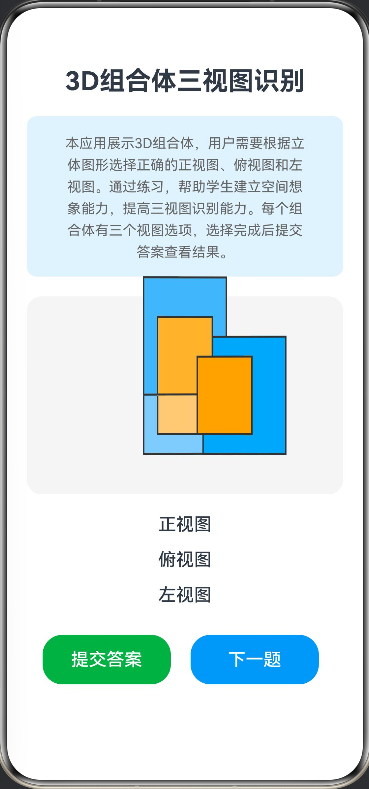
// 问题数据接口
interface QuestionData {
  id: number
  name: string
  correctViews: number[]
  frontViews: string[]
  topViews: string[]
  leftViews: string[]
}

// 视图项接口
interface ViewItem {
  view: string
  index: number
}

@Entry
@Component
struct ThreeViewRecognition {
  @State currentQuestion: number = 0
  @State selectedFront: number = -1
  @State selectedTop: number = -1
  @State selectedLeft: number = -1
  @State isSubmitted: boolean = false
  @State score: number = 0

  // 3D 组合体数据
  private questions: QuestionData[] = [
    {
      id: 1,
      name: "组合体 1",
      correctViews: [0, 1, 2], // 正确答案索引
      frontViews: [
        "M0 0 L100 0 L100 80 L60 80 L60 100 L0 100 Z",
        "M0 0 L100 0 L100 100 L0 100 Z",
        "M0 0 L80 0 L80 80 L100 80 L100 100 L0 100 Z"
      ],
      topViews: [
        "M0 0 L100 0 L100 60 L60 60 L60 100 L0 100 Z",
        "M0 0 L100 0 L100 100 L0 100 Z",
        "M0 0 L80 0 L80 80 L100 80 L100 100 L0 100 Z"
      ],
      leftViews: [
        "M0 0 L80 0 L80 60 L60 60 L60 100 L0 100 Z",
        "M0 0 L100 0 L100 100 L0 100 Z",
        "M0 0 L60 0 L60 80 L80 80 L80 100 L0 100 Z"
      ]
    },
    {
      id: 2,
      name: "组合体 2",
      correctViews: [1, 0, 2],
      frontViews: [
        "M0 0 L100 0 L100 100 L0 100 Z",
        "M0 0 L100 0 L100 60 L60 60 L60 100 L0 100 Z",
        "M0 0 L80 0 L80 80 L100 80 L100 100 L0 100 Z"
      ],
      topViews: [
        "M0 0 L100 0 L100 80 L60 80 L60 100 L0 100 Z",
        "M0 0 L100 0 L100 100 L0 100 Z",
        "M0 0 L80 0 L80 60 L100 60 L100 100 L0 100 Z"
      ],
      leftViews: [
        "M0 0 L100 0 L100 100 L0 100 Z",
        "M0 0 L80 0 L80 100 L0 100 Z",
        "M0 0 L80 0 L80 60 L60 60 L60 100 L0 100 Z"
      ]
    }
  ]

  build() {
    Column({ space: 20 }) {
      // 标题和功能介绍
      Text('3D组合体三视图识别')
        .fontSize(26)
        .fontWeight(FontWeight.Bold)

      Column() {
        Text('本应用展示3D组合体,用户需要根据立体图形选择正确的正视图、俯视图和左视图。通过练习,帮助学生建立空间想象能力,提高三视图识别能力。每个组合体有三个视图选项,选择完成后提交答案查看结果。')
          .fontSize(14)
          .fontColor('#666666')
          .textAlign(TextAlign.Center)
          .lineHeight(22)
          .padding({ left: 20, right: 20 })
      }
      .width('100%')
      .backgroundColor('#E3F2FD')
      .borderRadius(10)
      .padding(15)

      // 3D 组合体展示
      Stack() {
        this.Composite3DView()
      }
      .width('100%')
      .height(200)
      .backgroundColor('#F5F5F5')
      .borderRadius(15)

      // 视图选择区域
      Column({ space: 5 }) {
        // 正视图选择
        this.ViewSelection('正视图', this.frontViews, this.selectedFront, (index) => {
          this.selectedFront = index
        })

        // 俯视图选择
        this.ViewSelection('俯视图', this.topViews, this.selectedTop, (index) => {
          this.selectedTop = index
        })

        // 左视图选择
        this.ViewSelection('左视图', this.leftViews, this.selectedLeft, (index) => {
          this.selectedLeft = index
        })
      }

      // 控制按钮
      Row({ space: 20 }) {
        Button('提交答案')
          .width('45%')
          .height(50)
          .fontSize(18)
          .backgroundColor('#4CAF50')
          .onClick(() => {
            this.checkAnswer()
          })

        Button('下一题')
          .width('45%')
          .height(50)
          .fontSize(18)
          .backgroundColor('#2196F3')
          .onClick(() => {
            this.nextQuestion()
          })
      }
      .width('90%')

      // 得分显示
      if (this.isSubmitted) {
        Text(`得分: ${this.score}`)
          .fontSize(20)
          .fontWeight(FontWeight.Bold)
          .fontColor(this.score > 0 ? '#4CAF50' : '#F44336')
      }
    }
    .width('100%')
    .height('100%')
    .padding(20)
    .justifyContent(FlexAlign.Start)
  }

  // 视图选择组件
  @Builder
  ViewSelection(title: string, views: string[], selectedIndex: number, onSelect: (index: number) => void) {
    Column({ space: 10 }) {
      Text(title)
        .fontSize(18)
        .fontWeight(FontWeight.Medium)

      Row({ space: 15 }) {
        if (views && views.length > 0) {
          ForEach(
            views.map((view, index): ViewItem => ({ view, index })),
            (item: ViewItem) => {
              Stack() {
                Path()
                  .width(80)
                  .height(80)
                  .commands(item.view)
                  .fill('#E0E0E0')
                  .stroke('#333')
                  .strokeWidth(2)

                if (selectedIndex === item.index) {
                  Circle()
                    .width(20)
                    .height(20)
                    .fill('#4CAF50')
                    .position({ x: 70, y: 10 })
                }
              }
              .width(80)
              .height(80)
              .onClick(() => {
                onSelect(item.index)
              })
            },
            (item: ViewItem) => item.index.toString()
          )
        }
      }
    }
  }

  // 3D 组合体视图
  @Builder
  Composite3DView() {
    Column() {
      Stack() {
        // 基础立方体 - 正面
        Row()
          .width(120)
          .height(120)
          .backgroundColor('#90CAF9')
          .border({ width: 2, color: '#333' })
          .rotate({ angle: 45, x: 1, y: 0, z: 0, perspective: 1000 })
          .rotate({ angle: -45, x: 0, y: 1, z: 0, perspective: 1000 })

        // 基础立方体 - 顶面
        Row()
          .width(120)
          .height(120)
          .backgroundColor('#64B5F6')
          .border({ width: 2, color: '#333' })
          .rotate({ angle: 90, x: 1, y: 0, z: 0, perspective: 1000 })
          .rotate({ angle: -45, x: 0, y: 1, z: 0, perspective: 1000 })
          .translate({ y: -60, z: 60 })

        // 基础立方体 - 侧面
        Row()
          .width(120)
          .height(120)
          .backgroundColor('#42A5F5')
          .border({ width: 2, color: '#333' })
          .rotate({ angle: 45, x: 1, y: 0, z: 0, perspective: 1000 })
          .rotate({ angle: 45, x: 0, y: 1, z: 0, perspective: 1000 })
          .translate({ x: 60, z: 60 })

        // 突出部分 - 正面
        Row()
          .width(80)
          .height(80)
          .backgroundColor('#FFCC80')
          .border({ width: 2, color: '#333' })
          .position({ x: 20, y: 20 })
          .rotate({ angle: 45, x: 1, y: 0, z: 0, perspective: 1000 })
          .rotate({ angle: -45, x: 0, y: 1, z: 0, perspective: 1000 })
          .translate({ z: 40 })

        // 突出部分 - 顶面
        Row()
          .width(80)
          .height(80)
          .backgroundColor('#FFB74D')
          .border({ width: 2, color: '#333' })
          .position({ x: 20, y: 20 })
          .rotate({ angle: 90, x: 1, y: 0, z: 0, perspective: 1000 })
          .rotate({ angle: -45, x: 0, y: 1, z: 0, perspective: 1000 })
          .translate({ y: -40, z: 80 })

        // 突出部分 - 侧面
        Row()
          .width(80)
          .height(80)
          .backgroundColor('#FFA726')
          .border({ width: 2, color: '#333' })
          .position({ x: 20, y: 20 })
          .rotate({ angle: 45, x: 1, y: 0, z: 0, perspective: 1000 })
          .rotate({ angle: 45, x: 0, y: 1, z: 0, perspective: 1000 })
          .translate({ x: 40, z: 80 })
      }
      .animation({
        duration: 5000,
        iterations: -1,
        curve: Curve.Linear,
        playMode: PlayMode.Normal
      })
      .rotate({ angle: 360, x: 0, y: 1, z: 0, centerX: '50%', centerY: '50%' })
    }
    .width('100%')
    .height('100%')
    .alignItems(HorizontalAlign.Center)
    .justifyContent(FlexAlign.Center)
  }

  // 获取当前问题的视图数据
  get frontViews(): string[] {
    if (this.questions && this.questions.length > 0 && this.currentQuestion >= 0 && this.currentQuestion < this.questions.length) {
      return this.questions[this.currentQuestion].frontViews || []
    }
    return []
  }

  get topViews(): string[] {
    if (this.questions && this.questions.length > 0 && this.currentQuestion >= 0 && this.currentQuestion < this.questions.length) {
      return this.questions[this.currentQuestion].topViews || []
    }
    return []
  }

  get leftViews(): string[] {
    if (this.questions && this.questions.length > 0 && this.currentQuestion >= 0 && this.currentQuestion < this.questions.length) {
      return this.questions[this.currentQuestion].leftViews || []
    }
    return []
  }

  // 检查答案
  private checkAnswer() {
    if (this.questions && this.questions.length > 0 && this.currentQuestion >= 0 && this.currentQuestion < this.questions.length) {
      const correct = this.questions[this.currentQuestion].correctViews
      if (correct && correct.length >= 3) {
        const isCorrect = this.selectedFront === correct[0] &&
                         this.selectedTop === correct[1] &&
                         this.selectedLeft === correct[2]

        this.score = isCorrect ? 10 : 0
      } else {
        this.score = 0
      }
    } else {
      this.score = 0
    }
    this.isSubmitted = true
  }

  // 下一题
  private nextQuestion() {
    if (this.questions && this.questions.length > 0) {
      this.currentQuestion = (this.currentQuestion + 1) % this.questions.length
    }
    this.selectedFront = -1
    this.selectedTop = -1
    this.selectedLeft = -1
    this.isSubmitted = false
  }
}

讨论HarmonyOS开发技术,专注于API与组件、DevEco Studio、测试、元服务和应用上架分发等。
更多推荐


 0
0 0
0- 0


 已为社区贡献400条内容

所有评论(0)