Harmonyos应用实例209:空间向量运算器
·
1. 空间向量运算器
功能简介:支持空间向量的加减、数乘、点积、叉积运算,通过3D可视化展示向量操作过程,实时计算向量模长、夹角。帮助学生理解空间向量的几何意义和运算规则,适用于空间向量章节的教学。
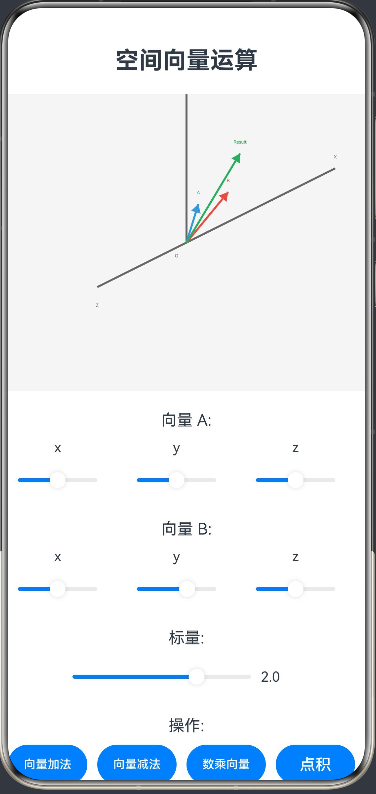
ArkTS代码:
interface Vector3 {
  x: number
  y: number
  z: number
}

@Entry
@Component
struct VectorCalculator {
  @State vectorA: Vector3 = { x: 1, y: 1, z: 1 } // 向量A
  @State vectorB: Vector3 = { x: 2, y: 0, z: 1 } // 向量B
  @State scalar: number = 2 // 标量
  @State operation: string = 'add' // 操作类型
  @State result: Vector3 = { x: 0, y: 0, z: 0 } // 运算结果
  @State showResult: boolean = false // 是否显示结果
  private settings: RenderingContextSettings = new RenderingContextSettings(true)
  private context: CanvasRenderingContext2D = new CanvasRenderingContext2D(this.settings)

  build() {
    Column() {
      Text('空间向量运算')
        .fontSize(24).fontWeight(FontWeight.Bold).margin({ bottom: 20 })

      // 3D可视化区域
      Stack() {
        Canvas(this.context)
          .width(400)
          .height(300)
          .onReady(() => this.draw())
      }
      .margin({ bottom: 20 })

      // 向量输入区域
      Column() {
        Text('向量 A:')
          .fontSize(16).margin({ bottom: 10 })
        Row() {
          Column() {
            Text('x')
              .fontSize(14).margin({ bottom: 5 })
            Slider({
              value: 0,
              min: -5,
              max: 5,
              step: 0.1
            })
              .width(100)
              .onChange((value: number) => { this.vectorA.x = value; this.calculateResult() })
          }
          .margin({ right: 20 })
          Column() {
            Text('y')
              .fontSize(14).margin({ bottom: 5 })
            Slider({
              value: 0,
              min: -5,
              max: 5,
              step: 0.1
            })
              .width(100)
              .onChange((value: number) => { this.vectorA.y = value; this.calculateResult() })
          }
          .margin({ right: 20 })
          Column() {
            Text('z')
              .fontSize(14).margin({ bottom: 5 })
            Slider({
              value: 0,
              min: -5,
              max: 5,
              step: 0.1
            })
              .width(100)
              .onChange((value: number) => { this.vectorA.z = value; this.calculateResult() })
          }
          .margin({ right: 20 })
        }
        .margin({ bottom: 20 })

        Text('向量 B:')
          .fontSize(16).margin({ bottom: 10 })
        Row() {
          Column() {
            Text('x')
              .fontSize(14).margin({ bottom: 5 })
            Slider({
              value: 0,
              min: -5,
              max: 5,
              step: 0.1
            })
              .width(100)
              .onChange((value: number) => { this.vectorB.x = value; this.calculateResult() })
          }
          .margin({ right: 20 })
          Column() {
            Text('y')
              .fontSize(14).margin({ bottom: 5 })
            Slider({
              value: 0,
              min: -5,
              max: 5,
              step: 0.1
            })
              .width(100)
              .onChange((value: number) => { this.vectorB.y = value; this.calculateResult() })
          }
          .margin({ right: 20 })
          Column() {
            Text('z')
              .fontSize(14).margin({ bottom: 5 })
            Slider({
              value: 0,
              min: -5,
              max: 5,
              step: 0.1
            })
              .width(100)
              .onChange((value: number) => { this.vectorB.z = value; this.calculateResult() })
          }
          .margin({ right: 20 })
        }
        .margin({ bottom: 20 })

        Text('标量:')
          .fontSize(16).margin({ bottom: 10 })
        Row() {
          Slider({
            value: this.scalar,
            min: -5,
            max: 5,
            step: 0.1
          })
            .width(200)
            .onChange((value: number) => {
              this.scalar = value
              this.calculateResult()
            })
          Text(this.scalar.toFixed(1))
            .width(50).fontSize(14)
        }
        .margin({ bottom: 20 })

        // 操作选择
        Text('操作:')
          .fontSize(16).margin({ bottom: 10 })
        Row() {
          Button('向量加法')
            .width(80)
            .margin({ right: 10 })
            .onClick(() => {
              this.operation = 'add'
              this.calculateResult()
            })
          Button('向量减法')
            .width(80)
            .margin({ right: 10 })
            .onClick(() => {
              this.operation = 'subtract'
              this.calculateResult()
            })
          Button('数乘向量')
            .width(80)
            .margin({ right: 10 })
            .onClick(() => {
              this.operation = 'multiply'
              this.calculateResult()
            })
          Button('点积')
            .width(80)
            .margin({ right: 10 })
            .onClick(() => {
              this.operation = 'dot'
              this.calculateResult()
            })
          Button('叉积')
            .width(80)
            .margin({ right: 10 })
            .onClick(() => {
              this.operation = 'cross'
              this.calculateResult()
            })
        }
        .margin({ bottom: 20 })

        // 结果显示
        if (this.showResult) {
          Column() {
            Text('运算结果:')
              .fontSize(16).margin({ bottom: 10 })
            if (this.operation === 'dot') {
              Text(`A · B = ${this.calculateDotProduct(this.vectorA, this.vectorB).toFixed(2)}`)
                .fontSize(18)
            } else {
              Text(`(${this.result.x.toFixed(2)}, ${this.result.y.toFixed(2)}, ${this.result.z.toFixed(2)})`)
                .fontSize(18)
            }

            // 向量模长
            Text(`|A| = ${this.calculateMagnitude(this.vectorA).toFixed(2)}`)
              .fontSize(14).margin({ top: 5 })
            Text(`|B| = ${this.calculateMagnitude(this.vectorB).toFixed(2)}`)
              .fontSize(14)
            if (this.operation !== 'dot') {
              Text(`|Result| = ${this.calculateMagnitude(this.result).toFixed(2)}`)
                .fontSize(14)
            }

            // 向量夹角
            Text(`夹角 θ = ${this.calculateAngle(this.vectorA, this.vectorB).toFixed(2)}°`)
              .fontSize(14).margin({ top: 5 })
          }
          .margin({ bottom: 20 })
        }
      }
    }
  }


  private calculateResult() {
    this.showResult = true

    switch (this.operation) {
      case 'add':
        this.result = this.addVectors(this.vectorA, this.vectorB)
        break
      case 'subtract':
        this.result = this.subtractVectors(this.vectorA, this.vectorB)
        break
      case 'multiply':
        this.result = this.multiplyVector(this.vectorA, this.scalar)
        break
      case 'cross':
        this.result = this.crossProduct(this.vectorA, this.vectorB)
        break
      case 'dot':
        // 点积结果是标量,不需要更新result向量
        break
    }

    this.draw()
  }

  private addVectors(a: Vector3, b: Vector3): Vector3 {
    return {
      x: a.x + b.x,
      y: a.y + b.y,
      z: a.z + b.z
    }
  }

  private subtractVectors(a: Vector3, b: Vector3): Vector3 {
    return {
      x: a.x - b.x,
      y: a.y - b.y,
      z: a.z - b.z
    }
  }

  private multiplyVector(v: Vector3, scalar: number): Vector3 {
    return {
      x: v.x * scalar,
      y: v.y * scalar,
      z: v.z * scalar
    }
  }

  private calculateDotProduct(a: Vector3, b: Vector3): number {
    return a.x * b.x + a.y * b.y + a.z * b.z
  }

  private crossProduct(a: Vector3, b: Vector3): Vector3 {
    return {
      x: a.y * b.z - a.z * b.y,
      y: a.z * b.x - a.x * b.z,
      z: a.x * b.y - a.y * b.x
    }
  }

  private calculateMagnitude(v: Vector3): number {
    return Math.sqrt(v.x * v.x + v.y * v.y + v.z * v.z)
  }

  private calculateAngle(a: Vector3, b: Vector3): number {
    const dotProduct = this.calculateDotProduct(a, b)
    const magnitudeA = this.calculateMagnitude(a)
    const magnitudeB = this.calculateMagnitude(b)

    if (magnitudeA === 0 || magnitudeB === 0) {
      return 0
    }

    const cosTheta = dotProduct / (magnitudeA * magnitudeB)
    // 确保cosTheta在[-1, 1]范围内
    const clampedCosTheta = Math.max(-1, Math.min(1, cosTheta))
    return Math.acos(clampedCosTheta) * (180 / Math.PI)
  }

  private draw() {
    const width = 400
    const height = 300
    const centerX = width / 2
    const centerY = height / 2
    const scale = 30 // 缩放因子

    // 清空画布
    this.context.clearRect(0, 0, width, height)
    this.context.fillStyle = '#F5F5F5'
    this.context.fillRect(0, 0, width, height)

    // 绘制3D坐标系
    this.draw3DCoordinateSystem(centerX, centerY, scale)

    // 绘制向量A
    this.drawVector(centerX, centerY, this.vectorA, scale, '#3498DB', 'A')

    // 绘制向量B
    this.drawVector(centerX, centerY, this.vectorB, scale, '#E74C3C', 'B')

    // 绘制结果向量
    if (this.showResult && this.operation !== 'dot') {
      this.drawVector(centerX, centerY, this.result, scale, '#27AE60', 'Result')
    }
  }

  private draw3DCoordinateSystem(centerX: number, centerY: number, scale: number) {
    // 绘制坐标轴
    this.context.strokeStyle = '#666666'
    this.context.lineWidth = 2

    // X轴
    this.context.beginPath()
    this.context.moveTo(centerX, centerY)
    this.context.lineTo(centerX + scale * 5, centerY - scale * 2.5)
    this.context.stroke()

    // Y轴
    this.context.beginPath()
    this.context.moveTo(centerX, centerY)
    this.context.lineTo(centerX, centerY - scale * 5)
    this.context.stroke()

    // Z轴
    this.context.beginPath()
    this.context.moveTo(centerX, centerY)
    this.context.lineTo(centerX - scale * 3, centerY + scale * 1.5)
    this.context.stroke()

    // 绘制坐标轴标签
    this.context.fillStyle = '#666666'
    this.context.font = '14px sans-serif'
    this.context.textAlign = 'center'
    this.context.fillText('X', centerX + scale * 5, centerY - scale * 2.5 - 10)
    this.context.fillText('Y', centerX, centerY - scale * 5 - 10)
    this.context.fillText('Z', centerX - scale * 3, centerY + scale * 1.5 + 20)

    // 绘制原点
    this.context.fillText('O', centerX - 10, centerY + 15)
  }

  private drawVector(centerX: number, centerY: number, vector: Vector3, scale: number, color: string, label: string) {
    // 3D投影到2D
    const projectedX = centerX + vector.x * scale - vector.z * scale * 0.6
    const projectedY = centerY - vector.y * scale - vector.z * scale * 0.3

    // 绘制向量
    this.context.strokeStyle = color
    this.context.lineWidth = 2
    this.context.beginPath()
    this.context.moveTo(centerX, centerY)
    this.context.lineTo(projectedX, projectedY)
    this.context.stroke()

    // 绘制箭头
    this.drawArrow(centerX, centerY, projectedX, projectedY, color)

    // 绘制向量标签
    this.context.fillStyle = color
    this.context.font = '14px sans-serif'
    this.context.textAlign = 'center'
    this.context.fillText(label, projectedX, projectedY - 10)
  }

  private drawArrow(fromX: number, fromY: number, toX: number, toY: number, color: string) {
    // 绘制箭头
    const headLength = 10
    const angle = Math.atan2(toY - fromY, toX - fromX)

    this.context.fillStyle = color
    this.context.beginPath()
    this.context.moveTo(toX, toY)
    this.context.lineTo(
      toX - headLength * Math.cos(angle - Math.PI / 6),
      toY - headLength * Math.sin(angle - Math.PI / 6)
    )
    this.context.lineTo(
      toX - headLength * Math.cos(angle + Math.PI / 6),
      toY - headLength * Math.sin(angle + Math.PI / 6)
    )
    this.context.closePath()
    this.context.fill()
  }
}

讨论HarmonyOS开发技术,专注于API与组件、DevEco Studio、测试、元服务和应用上架分发等。
更多推荐

 0
0 0
0- 0


 已为社区贡献402条内容

所有评论(0)