Harmonyos应用实例233:数独逻辑教练 (综合与实践)
·
5. 数独逻辑教练 (综合与实践)
功能介绍:
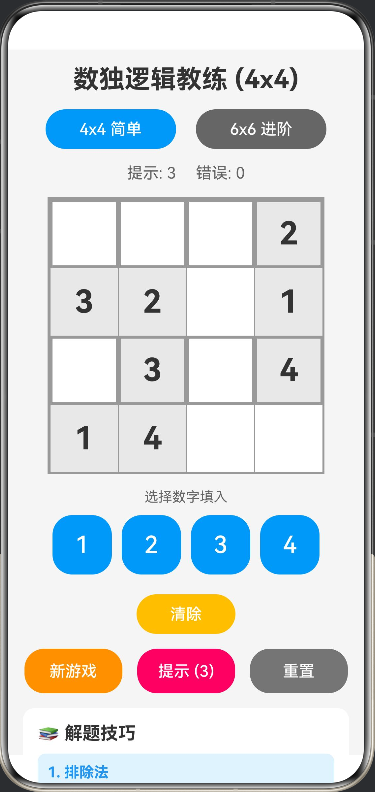
提供一个 4x4 或 6x6 的入门级数独游戏,专为训练逻辑推理设计。系统随机生成题目,用户点击格子填入数字。如果填入错误,系统会给予红色高亮提示。包含“提示”功能,自动填入一个正确数字,帮助学生理解排除法和唯一性原理。
// 数独格子状态接口
interface CellState {
  value: number
  isFixed: boolean
  isError: boolean
  isHint: boolean
}

// 选中格子位置接口
interface CellPosition {
  row: number
  col: number
}

// 颜色配置
interface SudokuColors {
  background: string
  primary: string
  secondary: string
  accent: string
  success: string
  error: string
  warning: string
  textPrimary: string
  textSecondary: string
  cellBackground: string
  cellFixed: string
  cellSelected: string
  cellError: string
  cellHint: string
  gridBorder: string
}

@Entry
@Component
struct SudokuGame {
  // 颜色配置
  private readonly COLORS: SudokuColors = {
    background: '#F5F5F5',
    primary: '#2196F3',
    secondary: '#FF9800',
    accent: '#E91E63',
    success: '#4CAF50',
    error: '#F44336',
    warning: '#FFC107',
    textPrimary: '#333333',
    textSecondary: '#666666',
    cellBackground: '#FFFFFF',
    cellFixed: '#E8E8E8',
    cellSelected: '#BBDEFB',
    cellError: '#FFCDD2',
    cellHint: '#C8E6C9',
    gridBorder: '#999999'
  }

  // 游戏状态
  @State gridSize: number = 4 // 4x4 或 6x6
  @State board: CellState[][] = []
  @State solution: number[][] = []
  @State selectedCell: CellPosition | null = null
  @State hintCount: number = 3 // 剩余提示次数
  @State isComplete: boolean = false
  @State errorCount: number = 0

  // 初始化
  aboutToAppear() {
    this.newGame()
  }

  // 生成新游戏
  private newGame() {
    this.solution = this.generateSolution(this.gridSize)
    this.board = this.createPuzzle(this.solution, this.gridSize)
    this.selectedCell = null
    this.hintCount = 3
    this.isComplete = false
    this.errorCount = 0
  }

  // 生成完整解答
  private generateSolution(size: number): number[][] {
    const solution: number[][] = Array(size).fill(0).map(() => Array(size).fill(0))

    if (size === 4) {
      // 4x4 数独:2x2 宫格
      const base = [
        [1, 2, 3, 4],
        [3, 4, 1, 2],
        [2, 1, 4, 3],
        [4, 3, 2, 1]
      ]
      // 随机变换
      return this.shuffleSudoku(base)
    } else {
      // 6x6 数独:2x3 或 3x2 宫格
      const base = [
        [1, 2, 3, 4, 5, 6],
        [4, 5, 6, 1, 2, 3],
        [2, 3, 4, 5, 6, 1],
        [5, 6, 1, 2, 3, 4],
        [3, 4, 5, 6, 1, 2],
        [6, 1, 2, 3, 4, 5]
      ]
      return this.shuffleSudoku(base)
    }
  }

  // 随机变换数独
  private shuffleSudoku(grid: number[][]): number[][] {
    const size = grid.length
    const result = grid.map(row => [...row])

    // 随机交换数字
    for (let i = 1; i <= size; i++) {
      const swapWith = Math.floor(Math.random() * size) + 1
      if (i !== swapWith) {
        for (let r = 0; r < size; r++) {
          for (let c = 0; c < size; c++) {
            if (result[r][c] === i) result[r][c] = swapWith
            else if (result[r][c] === swapWith) result[r][c] = i
          }
        }
      }
    }

    // 随机交换行(在同一宫内)
    if (size === 4) {
      // 2x2 宫格
      for (let band = 0; band < 2; band++) {
        if (Math.random() > 0.5) {
          const temp = result[band * 2]
          result[band * 2] = result[band * 2 + 1]
          result[band * 2 + 1] = temp
        }
      }
    } else {
      // 6x6: 2行一个宫
      for (let band = 0; band < 3; band++) {
        if (Math.random() > 0.5) {
          const temp = result[band * 2]
          result[band * 2] = result[band * 2 + 1]
          result[band * 2 + 1] = temp
        }
      }
    }

    return result
  }

  // 创建谜题(挖空)
  private createPuzzle(solution: number[][], size: number): CellState[][] {
    const board: CellState[][] = []
    const cellsToRemove = size === 4 ? 8 : 18 // 移除的数字数量

    // 复制解答
    for (let r = 0; r < size; r++) {
      const row: CellState[] = []
      for (let c = 0; c < size; c++) {
        row.push({
          value: solution[r][c],
          isFixed: true,
          isError: false,
          isHint: false
        })
      }
      board.push(row)
    }

    // 随机挖空
    let removed = 0
    while (removed < cellsToRemove) {
      const r = Math.floor(Math.random() * size)
      const c = Math.floor(Math.random() * size)
      if (board[r][c].value !== 0) {
        board[r][c].value = 0
        board[r][c].isFixed = false
        removed++
      }
    }

    return board
  }

  // 检查填入的数字是否正确
  private checkInput(row: number, col: number, num: number): boolean {
    return this.solution[row][col] === num
  }

  // 检查是否完成
  private checkComplete(): boolean {
    for (let r = 0; r < this.gridSize; r++) {
      for (let c = 0; c < this.gridSize; c++) {
        if (this.board[r][c].value === 0 || this.board[r][c].isError) {
          return false
        }
      }
    }
    return true
  }

  // 使用提示
  private useHint() {
    if (this.hintCount <= 0) return

    // 找到所有空格子
    const emptyCells: CellPosition[] = []
    for (let r = 0; r < this.gridSize; r++) {
      for (let c = 0; c < this.gridSize; c++) {
        if (this.board[r][c].value === 0) {
          emptyCells.push({ row: r, col: c })
        }
      }
    }

    if (emptyCells.length === 0) return

    // 随机选择一个空格子填入正确答案
    const randomCell = emptyCells[Math.floor(Math.random() * emptyCells.length)]
    this.board[randomCell.row][randomCell.col].value = this.solution[randomCell.row][randomCell.col]
    this.board[randomCell.row][randomCell.col].isHint = true
    this.board[randomCell.row][randomCell.col].isError = false
    this.hintCount--

    // 检查是否完成
    if (this.checkComplete()) {
      this.isComplete = true
    }
  }

  // 获取格子背景色
  private getCellBackground(row: number, col: number): string {
    const cell = this.board[row][col]
    if (cell.isError) return this.COLORS.cellError
    if (cell.isHint) return this.COLORS.cellHint
    if (cell.isFixed) return this.COLORS.cellFixed
    if (this.selectedCell?.row === row && this.selectedCell?.col === col) return this.COLORS.cellSelected
    return this.COLORS.cellBackground
  }

  // 获取宫格边框样式
  private getCellBorder(row: number, col: number): string {
    const borderWidth = 1
    const thickBorder = 3

    let top = borderWidth
    let right = borderWidth
    let bottom = borderWidth
    let left = borderWidth

    if (this.gridSize === 4) {
      // 2x2 宫格
      if (row % 2 === 0) top = thickBorder
      if (row === 3) bottom = thickBorder
      if (col % 2 === 0) left = thickBorder
      if (col === 3) right = thickBorder
    } else {
      // 6x6: 2行3列宫格
      if (row % 2 === 0) top = thickBorder
      if (row === 5) bottom = thickBorder
      if (col % 3 === 0) left = thickBorder
      if (col === 5) right = thickBorder
    }

    return `${top}vp ${right}vp ${bottom}vp ${left}vp`
  }

  // 生成索引数组(0 到 size-1)
  private getIndexArray(size: number): number[] {
    const arr: number[] = []
    for (let i = 0; i < size; i++) {
      arr.push(i)
    }
    return arr
  }

  // 生成数字数组(1 到 size)
  private getNumberArray(size: number): number[] {
    const arr: number[] = []
    for (let i = 1; i <= size; i++) {
      arr.push(i)
    }
    return arr
  }

  build() {
    Column({ space: 15 }) {
      // 标题
      Text(`数独逻辑教练 (${this.gridSize}x${this.gridSize})`)
        .fontSize(26)
        .fontWeight(FontWeight.Bold)
        .fontColor(this.COLORS.textPrimary)

      // 难度选择
      Row({ space: 20 }) {
        Button('4x4 简单')
          .width('40%')
          .height(40)
          .backgroundColor(this.gridSize === 4 ? this.COLORS.primary : this.COLORS.textSecondary)
          .onClick(() => {
            this.gridSize = 4
            this.newGame()
          })

        Button('6x6 进阶')
          .width('40%')
          .height(40)
          .backgroundColor(this.gridSize === 6 ? this.COLORS.primary : this.COLORS.textSecondary)
          .onClick(() => {
            this.gridSize = 6
            this.newGame()
          })
      }
      .width('100%')
      .justifyContent(FlexAlign.Center)

      // 游戏状态
      Row({ space: 20 }) {
        Text(`提示: ${this.hintCount}`)
          .fontSize(16)
          .fontColor(this.COLORS.textSecondary)

        Text(`错误: ${this.errorCount}`)
          .fontSize(16)
          .fontColor(this.errorCount > 0 ? this.COLORS.error : this.COLORS.textSecondary)

        if (this.isComplete) {
          Text('🎉 完成!')
            .fontSize(16)
            .fontWeight(FontWeight.Bold)
            .fontColor(this.COLORS.success)
        }
      }

      // 数独网格
      Grid() {
        ForEach(this.getIndexArray(this.gridSize), (row: number) => {
          ForEach(this.getIndexArray(this.gridSize), (col: number) => {
            GridItem() {
              Text(this.board[row]?.[col]?.value === 0 ? '' : this.board[row][col].value.toString())
                .width(this.gridSize === 4 ? 70 : 50)
                .height(this.gridSize === 4 ? 70 : 50)
                .fontSize(this.gridSize === 4 ? 32 : 24)
                .fontWeight(this.board[row]?.[col]?.isFixed ? FontWeight.Bold : FontWeight.Normal)
                .fontColor(this.board[row]?.[col]?.isFixed ? this.COLORS.textPrimary :
                          (this.board[row]?.[col]?.isHint ? this.COLORS.success : this.COLORS.primary))
                .textAlign(TextAlign.Center)
                .backgroundColor(this.getCellBackground(row, col))
                .borderWidth(this.getCellBorder(row, col))
                .borderColor(this.COLORS.gridBorder)
                .onClick(() => {
                  if (!this.board[row][col].isFixed) {
                    this.selectedCell = { row, col }
                  }
                })
            }
          })
        })
      }
      .columnsTemplate(this.gridSize === 4 ? '1fr 1fr 1fr 1fr' : '1fr 1fr 1fr 1fr 1fr 1fr')
      .rowsTemplate(this.gridSize === 4 ? '1fr 1fr 1fr 1fr' : '1fr 1fr 1fr 1fr 1fr 1fr')
      .width(this.gridSize === 4 ? 280 : 300)
      .height(this.gridSize === 4 ? 280 : 300)
      .backgroundColor(this.COLORS.gridBorder)
      .padding(2)

      // 数字输入键盘
      Column({ space: 10 }) {
        Text('选择数字填入')
          .fontSize(14)
          .fontColor(this.COLORS.textSecondary)

        Row({ space: 10 }) {
          ForEach(this.getNumberArray(this.gridSize), (num: number) => {
            Button(num.toString())
              .width(this.gridSize === 4 ? 60 : 45)
              .height(this.gridSize === 4 ? 60 : 45)
              .fontSize(this.gridSize === 4 ? 24 : 20)
              .backgroundColor(this.COLORS.primary)
              .onClick(() => {
                if (this.selectedCell && !this.board[this.selectedCell.row][this.selectedCell.col].isFixed) {
                  const isCorrect = this.checkInput(this.selectedCell.row, this.selectedCell.col, num)
                  this.board[this.selectedCell.row][this.selectedCell.col].value = num
                  this.board[this.selectedCell.row][this.selectedCell.col].isError = !isCorrect
                  this.board[this.selectedCell.row][this.selectedCell.col].isHint = false

                  if (!isCorrect) {
                    this.errorCount++
                  }

                  // 检查是否完成
                  if (this.checkComplete()) {
                    this.isComplete = true
                  }
                }
              })
          })
        }

        // 清除按钮
        Button('清除')
          .width(100)
          .height(40)
          .fontSize(16)
          .backgroundColor(this.COLORS.warning)
          .margin({ top: 10 })
          .onClick(() => {
            if (this.selectedCell && !this.board[this.selectedCell.row][this.selectedCell.col].isFixed) {
              this.board[this.selectedCell.row][this.selectedCell.col].value = 0
              this.board[this.selectedCell.row][this.selectedCell.col].isError = false
              this.board[this.selectedCell.row][this.selectedCell.col].isHint = false
            }
          })
      }

      // 功能按钮
      Row({ space: 15 }) {
        Button('新游戏')
          .width('30%')
          .height(45)
          .backgroundColor(this.COLORS.secondary)
          .onClick(() => this.newGame())

        Button(`提示 (${this.hintCount})`)
          .width('30%')
          .height(45)
          .backgroundColor(this.hintCount > 0 ? this.COLORS.accent : this.COLORS.textSecondary)
          .enabled(this.hintCount > 0)
          .onClick(() => this.useHint())

        Button('重置')
          .width('30%')
          .height(45)
          .backgroundColor('#757575')
          .onClick(() => {
            // 重置所有非固定格子
            for (let r = 0; r < this.gridSize; r++) {
              for (let c = 0; c < this.gridSize; c++) {
                if (!this.board[r][c].isFixed) {
                  this.board[r][c].value = 0
                  this.board[r][c].isError = false
                  this.board[r][c].isHint = false
                }
              }
            }
            this.selectedCell = null
            this.errorCount = 0
            this.isComplete = false
          })
      }
      .width('100%')
      .justifyContent(FlexAlign.Center)

      // 教学说明
      this.TeachingSection()
    }
    .width('100%')
    .height('100%')
    .padding(15)
    .backgroundColor(this.COLORS.background)
  }

  // 教学说明部分
  @Builder
  TeachingSection() {
    Column({ space: 10 }) {
      Text('📚 解题技巧')
        .fontSize(18)
        .fontWeight(FontWeight.Bold)
        .width('100%')
        .textAlign(TextAlign.Start)
        .fontColor(this.COLORS.textPrimary)

      // 排除法
      Column({ space: 5 }) {
        Text('1. 排除法')
          .fontSize(15)
          .fontWeight(FontWeight.Bold)
          .width('100%')
          .fontColor(this.COLORS.primary)

        Text('观察某一行、列或宫格中已存在的数字,排除不可能的选择。例如:某行已有1、2、3,则空格只能填4。')
          .fontSize(13)
          .width('100%')
          .fontColor(this.COLORS.textSecondary)
      }
      .width('100%')
      .padding(10)
      .backgroundColor('#E3F2FD')
      .borderRadius(8)

      // 唯一性原理
      Column({ space: 5 }) {
        Text('2. 唯一性原理')
          .fontSize(15)
          .fontWeight(FontWeight.Bold)
          .width('100%')
          .fontColor(this.COLORS.primary)

        Text('如果某个空格只能填一个数字(其他数字都被排除),则该格必定填此数字。')
          .fontSize(13)
          .width('100%')
          .fontColor(this.COLORS.textSecondary)
      }
      .width('100%')
      .padding(10)
      .backgroundColor('#E8F5E9')
      .borderRadius(8)

      // 宫格观察
      Column({ space: 5 }) {
        Text('3. 宫格观察法')
          .fontSize(15)
          .fontWeight(FontWeight.Bold)
          .width('100%')
          .fontColor(this.COLORS.primary)

        Text(this.gridSize === 4
          ? '4x4数独分为4个2x2宫格,每个宫格内必须包含1-4各一次。'
          : '6x6数独分为6个2x3宫格,每个宫格内必须包含1-6各一次。')
          .fontSize(13)
          .width('100%')
          .fontColor(this.COLORS.textSecondary)
      }
      .width('100%')
      .padding(10)
      .backgroundColor('#FFF3E0')
      .borderRadius(8)

      // 游戏规则
      Column({ space: 5 }) {
        Text('🎮 游戏规则')
          .fontSize(15)
          .fontWeight(FontWeight.Bold)
          .width('100%')
          .fontColor(this.COLORS.accent)

        Text('• 每行必须包含1-' + this.gridSize + '各一次')
          .fontSize(13)
          .width('100%')
          .fontColor(this.COLORS.textSecondary)

        Text('• 每列必须包含1-' + this.gridSize + '各一次')
          .fontSize(13)
          .width('100%')
          .fontColor(this.COLORS.textSecondary)

        Text('• 每个宫格必须包含1-' + this.gridSize + '各一次')
          .fontSize(13)
          .width('100%')
          .fontColor(this.COLORS.textSecondary)

        Text('• 填入错误会红色提示,可使用提示功能学习')
          .fontSize(13)
          .width('100%')
          .fontColor(this.COLORS.textSecondary)
      }
      .width('100%')
      .padding(10)
      .backgroundColor('#FCE4EC')
      .borderRadius(8)
    }
    .width('100%')
    .padding(15)
    .backgroundColor(this.COLORS.cellBackground)
    .borderRadius(12)
  }
}

讨论HarmonyOS开发技术,专注于API与组件、DevEco Studio、测试、元服务和应用上架分发等。
更多推荐


 4
4 0
0- 0


 已为社区贡献402条内容

所有评论(0)