Harmonyos应用实例230:函数图像实验室 (图形与几何)
·
2. 函数图像实验室 (图形与几何)
功能介绍:
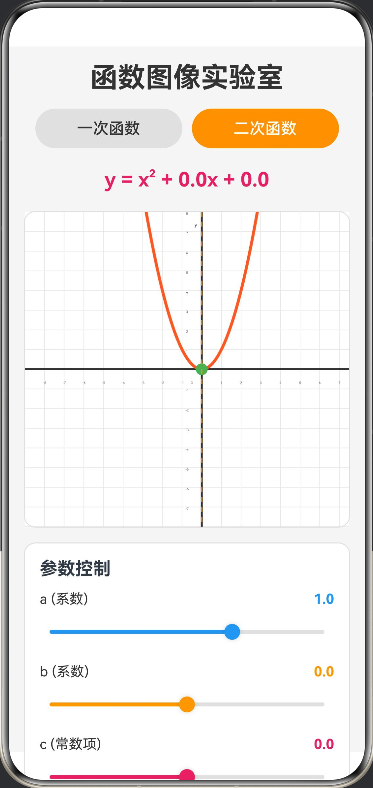
通过滑块实时控制一次函数 y=ax+by = ax + by=ax+b 和二次函数 y=ax2+bx+cy = ax^2 + bx + cy=ax2+bx+c 的系数,观察图像形状随参数变化的动态过程。支持坐标系缩放,帮助学生直观理解 aaa 控制开口方向和大小,bbb 控制顶点位置等性质,是“数形结合”教学的绝佳工具。
// 颜色接口定义
interface ColorPalette {
  white: string
  background: string
  primary: string
  secondary: string
  accent: string
  textPrimary: string
  textSecondary: string
  axis: string
  grid: string
  linearFunction: string
  quadraticFunction: string
  vertex: string
  infoBackground: string
}

@Entry
@Component
struct FunctionLab {
  // 颜色常量
  private readonly COLORS: ColorPalette = {
    white: '#FFFFFF',
    background: '#F5F5F5',
    primary: '#2196F3',
    secondary: '#FF9800',
    accent: '#E91E63',
    textPrimary: '#333333',
    textSecondary: '#666666',
    axis: '#333333',
    grid: '#E0E0E0',
    linearFunction: '#2196F3',
    quadraticFunction: '#FF5722',
    vertex: '#4CAF50',
    infoBackground: '#E3F2FD'
  }

  // 函数类型:'linear' 或 'quadratic'
  @State functionType: string = 'quadratic'

  // 函数参数
  @State a: number = 1
  @State b: number = 0
  @State c: number = 0

  // 坐标系缩放比例(每单位像素数)
  @State scaleFactor: number = 20

  // Canvas 上下文
  private settings: RenderingContextSettings = new RenderingContextSettings(true)
  private context: CanvasRenderingContext2D = new CanvasRenderingContext2D(this.settings)

  // 画布尺寸
  private canvasWidth: number = 360
  private canvasHeight: number = 320

  build() {
    Column({ space: 15 }) {
      // 标题
      Text('函数图像实验室')
        .fontSize(28)
        .fontWeight(FontWeight.Bold)
        .fontColor(this.COLORS.textPrimary)

      // 函数类型切换
      Row({ space: 10 }) {
        Button('一次函数')
          .width('45%')
          .height(40)
          .backgroundColor(this.functionType === 'linear' ? this.COLORS.primary : this.COLORS.grid)
          .fontColor(this.functionType === 'linear' ? this.COLORS.white : this.COLORS.textPrimary)
          .onClick(() => {
            this.functionType = 'linear'
            this.a = 1
            this.b = 0
            this.c = 0
            this.drawGraph()
          })

        Button('二次函数')
          .width('45%')
          .height(40)
          .backgroundColor(this.functionType === 'quadratic' ? this.COLORS.secondary : this.COLORS.grid)
          .fontColor(this.functionType === 'quadratic' ? this.COLORS.white : this.COLORS.textPrimary)
          .onClick(() => {
            this.functionType = 'quadratic'
            this.a = 1
            this.b = 0
            this.c = 0
            this.drawGraph()
          })
      }
      .width('100%')
      .justifyContent(FlexAlign.Center)

      // 函数表达式显示
      Text(this.getFunctionExpression())
        .fontSize(20)
        .fontWeight(FontWeight.Bold)
        .fontColor(this.COLORS.accent)
        .margin({ top: 5, bottom: 5 })

      // Canvas 绘图区域
      Canvas(this.context)
        .width('100%')
        .height(this.canvasHeight)
        .backgroundColor(this.COLORS.white)
        .borderRadius(12)
        .borderWidth(1)
        .borderColor(this.COLORS.grid)
        .onReady(() => {
          this.drawGraph()
        })

      // 参数控制面板
      Column({ space: 12 }) {
        Text('参数控制')
          .fontSize(18)
          .fontWeight(FontWeight.Bold)
          .width('100%')
          .textAlign(TextAlign.Start)

        // 参数 a 控制
        this.ParameterSlider('a (系数)', this.a, -3, 3, 0.1, this.COLORS.primary, (val) => {
          this.a = val
          this.drawGraph()
        })

        // 参数 b 控制
        this.ParameterSlider('b (系数)', this.b, -5, 5, 0.5, this.COLORS.secondary, (val) => {
          this.b = val
          this.drawGraph()
        })

        // 参数 c 控制(仅二次函数显示)
        if (this.functionType === 'quadratic') {
          this.ParameterSlider('c (常数项)', this.c, -5, 5, 0.5, this.COLORS.accent, (val) => {
            this.c = val
            this.drawGraph()
          })
        }

        // 坐标系缩放控制
        this.ParameterSlider('坐标系缩放', this.scaleFactor, 10, 50, 5, this.COLORS.vertex, (val) => {
          this.scaleFactor = val
          this.drawGraph()
        })
      }
      .width('100%')
      .padding(15)
      .backgroundColor(this.COLORS.white)
      .borderRadius(12)
      .borderWidth(1)
      .borderColor(this.COLORS.grid)

      // 特殊点信息(二次函数)
      if (this.functionType === 'quadratic' && this.a !== 0) {
        this.SpecialPointsCard()
      }

      // 教学要点
      this.TeachingPoints()
    }
    .width('100%')
    .height('100%')
    .padding(15)
    .backgroundColor(this.COLORS.background)
  }

  // 参数滑块组件
  @Builder
  ParameterSlider(label: string, value: number, min: number, max: number, step: number, color: string, onChange: (val: number) => void) {
    Column({ space: 5 }) {
      Row() {
        Text(label).fontSize(14).fontColor(this.COLORS.textPrimary)
        Blank()
        Text(value.toFixed(step < 1 ? 1 : 0)).fontSize(14).fontWeight(FontWeight.Bold).fontColor(color)
      }.width('100%')

      Slider({ value: value, min: min, max: max, step: step })
        .blockColor(color)
        .trackColor(this.COLORS.grid)
        .selectedColor(color)
        .onChange(onChange)
    }
  }

  // 特殊点信息卡片
  @Builder
  SpecialPointsCard() {
    Column({ space: 8 }) {
      Text('关键点信息')
        .fontSize(16)
        .fontWeight(FontWeight.Bold)
        .width('100%')
        .textAlign(TextAlign.Start)

      // 顶点坐标
      Text(`顶点: (${this.getVertexX().toFixed(2)}, ${this.getVertexY().toFixed(2)})`)
        .fontSize(14)
        .fontColor(this.COLORS.vertex)

      // 对称轴
      Text(`对称轴: x = ${this.getVertexX().toFixed(2)}`)
        .fontSize(14)
        .fontColor(this.COLORS.secondary)

      // 开口方向
      Text(`开口方向: ${this.a > 0 ? '向上 ↑' : '向下 ↓'}`)
        .fontSize(14)
        .fontColor(this.a > 0 ? this.COLORS.vertex : this.COLORS.accent)
    }
    .width('100%')
    .padding(15)
    .backgroundColor(this.COLORS.white)
    .borderRadius(12)
    .borderWidth(1)
    .borderColor(this.COLORS.grid)
  }

  // 教学要点
  @Builder
  TeachingPoints() {
    Column({ space: 8 }) {
      Text('💡 教学要点')
        .fontSize(16)
        .fontWeight(FontWeight.Bold)
        .width('100%')
        .textAlign(TextAlign.Start)

      if (this.functionType === 'linear') {
        Text('一次函数 y = ax + b:')
          .fontSize(14)
          .fontWeight(FontWeight.Bold)
          .width('100%')
        Text('• a > 0:图像从左向右上升 ↗')
          .fontSize(13)
          .width('100%')
          .margin({ left: 10 })
        Text('• a < 0:图像从左向右下降 ↘')
          .fontSize(13)
          .width('100%')
          .margin({ left: 10 })
        Text('• |a| 越大,图像越陡峭')
          .fontSize(13)
          .width('100%')
          .margin({ left: 10 })
        Text('• b 是与 y 轴的交点纵坐标')
          .fontSize(13)
          .width('100%')
          .margin({ left: 10 })
      } else {
        Text('二次函数 y = ax² + bx + c:')
          .fontSize(14)
          .fontWeight(FontWeight.Bold)
          .width('100%')
        Text('• a > 0:开口向上,有最小值')
          .fontSize(13)
          .width('100%')
          .margin({ left: 10 })
        Text('• a < 0:开口向下,有最大值')
          .fontSize(13)
          .width('100%')
          .margin({ left: 10 })
        Text('• |a| 越大,开口越小(图像越窄)')
          .fontSize(13)
          .width('100%')
          .margin({ left: 10 })
        Text('• 顶点横坐标 x = -b/(2a)')
          .fontSize(13)
          .width('100%')
          .margin({ left: 10 })
        Text('• c 是与 y 轴的交点纵坐标')
          .fontSize(13)
          .width('100%')
          .margin({ left: 10 })
      }
    }
    .width('100%')
    .padding(15)
    .backgroundColor(this.COLORS.infoBackground)
    .borderRadius(12)
  }

  // 获取函数表达式字符串
  private getFunctionExpression(): string {
    if (this.functionType === 'linear') {
      const aStr = this.a === 1 ? '' : (this.a === -1 ? '-' : this.a.toFixed(1))
      const bSign = this.b >= 0 ? '+' : '-'
      return `y = ${aStr}x ${bSign} ${Math.abs(this.b).toFixed(1)}`
    } else {
      const aStr = this.a === 1 ? '' : (this.a === -1 ? '-' : this.a.toFixed(1))
      const bSign = this.b >= 0 ? '+' : '-'
      const cSign = this.c >= 0 ? '+' : '-'
      return `y = ${aStr}x² ${bSign} ${Math.abs(this.b).toFixed(1)}x ${cSign} ${Math.abs(this.c).toFixed(1)}`
    }
  }

  // 计算顶点横坐标
  private getVertexX(): number {
    if (this.a === 0) return 0
    return -this.b / (2 * this.a)
  }

  // 计算顶点纵坐标
  private getVertexY(): number {
    const x = this.getVertexX()
    return this.a * x * x + this.b * x + this.c
  }

  // 绘制函数图像
  private drawGraph() {
    const ctx = this.context
    const w = this.canvasWidth
    const h = this.canvasHeight

    // 清空画布
    ctx.fillStyle = this.COLORS.white
    ctx.fillRect(0, 0, w, h)

    const centerX = w / 2
    const centerY = h / 2

    // 绘制网格
    ctx.strokeStyle = this.COLORS.grid
    ctx.lineWidth = 0.5
    for (let i = -10; i <= 10; i++) {
      // 垂直线
      ctx.beginPath()
      ctx.moveTo(centerX + i * this.scaleFactor, 0)
      ctx.lineTo(centerX + i * this.scaleFactor, h)
      ctx.stroke()

      // 水平线
      ctx.beginPath()
      ctx.moveTo(0, centerY + i * this.scaleFactor)
      ctx.lineTo(w, centerY + i * this.scaleFactor)
      ctx.stroke()
    }

    // 绘制坐标轴
    ctx.strokeStyle = this.COLORS.axis
    ctx.lineWidth = 2
    ctx.beginPath()
    // Y轴
    ctx.moveTo(centerX, 0)
    ctx.lineTo(centerX, h)
    // X轴
    ctx.moveTo(0, centerY)
    ctx.lineTo(w, centerY)
    ctx.stroke()

    // 绘制刻度标记
    ctx.fillStyle = this.COLORS.textSecondary
    ctx.font = '10px sans-serif'
    ctx.textAlign = 'center'

    for (let i = -8; i <= 8; i++) {
      if (i !== 0) {
        // X轴刻度
        ctx.fillText(`${i}`, centerX + i * this.scaleFactor, centerY + 15)
        // Y轴刻度
        ctx.fillText(`${-i}`, centerX - 15, centerY + i * this.scaleFactor + 3)
      }
    }

    // 绘制原点标记
    ctx.fillText('O', centerX - 10, centerY + 15)

    // 绘制函数曲线
    if (this.functionType === 'linear') {
      this.drawLinearFunction(ctx, w, h, centerX, centerY)
    } else {
      this.drawQuadraticFunction(ctx, w, h, centerX, centerY)
    }

    // 绘制坐标轴标签
    ctx.fillStyle = this.COLORS.textPrimary
    ctx.font = 'bold 12px sans-serif'
    ctx.textAlign = 'right'
    ctx.fillText('y', centerX - 5, 15)
    ctx.textAlign = 'left'
    ctx.fillText('x', w - 15, centerY - 5)
  }

  // 绘制一次函数
  private drawLinearFunction(ctx: CanvasRenderingContext2D, w: number, h: number, centerX: number, centerY: number) {
    ctx.strokeStyle = this.COLORS.linearFunction
    ctx.lineWidth = 3
    ctx.beginPath()

    let firstPoint = true
    for (let px = 0; px < w; px++) {
      // 屏幕坐标转数学坐标
      let x = (px - centerX) / this.scaleFactor
      let y = this.a * x + this.b
      // 数学坐标转屏幕坐标
      let py = centerY - y * this.scaleFactor

      if (py >= -10 && py <= h + 10) {
        if (firstPoint) {
          ctx.moveTo(px, py)
          firstPoint = false
        } else {
          ctx.lineTo(px, py)
        }
      }
    }
    ctx.stroke()
  }

  // 绘制二次函数
  private drawQuadraticFunction(ctx: CanvasRenderingContext2D, w: number, h: number, centerX: number, centerY: number) {
    if (this.a === 0) {
      // 退化为一次函数
      this.drawLinearFunction(ctx, w, h, centerX, centerY)
      return
    }

    // 绘制函数曲线
    ctx.strokeStyle = this.COLORS.quadraticFunction
    ctx.lineWidth = 3
    ctx.beginPath()

    for (let px = 0; px < w; px++) {
      // 屏幕坐标转数学坐标
      let x = (px - centerX) / this.scaleFactor
      let y = this.a * x * x + this.b * x + this.c
      // 数学坐标转屏幕坐标
      let py = centerY - y * this.scaleFactor

      if (px === 0) {
        ctx.moveTo(px, py)
      } else {
        ctx.lineTo(px, py)
      }
    }
    ctx.stroke()

    // 绘制顶点
    const vertexX = this.getVertexX()
    const vertexY = this.getVertexY()
    const vertexPx = centerX + vertexX * this.scaleFactor
    const vertexPy = centerY - vertexY * this.scaleFactor

    ctx.fillStyle = this.COLORS.vertex
    ctx.beginPath()
    ctx.arc(vertexPx, vertexPy, 6, 0, Math.PI * 2)
    ctx.fill()

    // 绘制对称轴(虚线)
    ctx.strokeStyle = this.COLORS.secondary
    ctx.lineWidth = 1
    ctx.setLineDash([5, 5])
    ctx.beginPath()
    ctx.moveTo(vertexPx, 0)
    ctx.lineTo(vertexPx, h)
    ctx.stroke()
    ctx.setLineDash([])
  }
}

讨论HarmonyOS开发技术,专注于API与组件、DevEco Studio、测试、元服务和应用上架分发等。
更多推荐



 4
4 0
0- 0


 已为社区贡献402条内容

所有评论(0)