HARMONYOS应用实例240:因式分解配对大师
·
- 因式分解配对
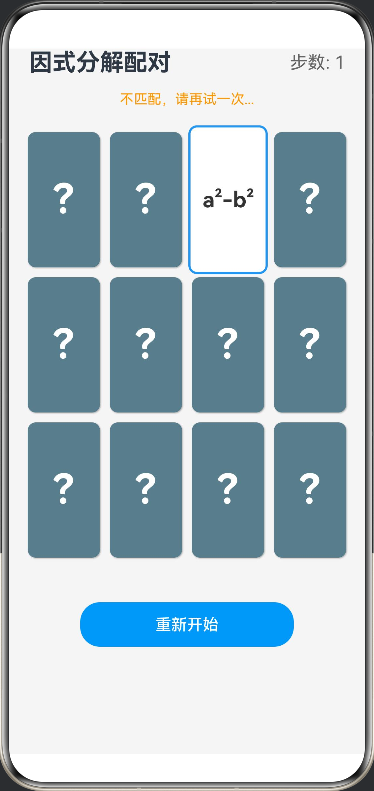
本应用采用经典的“翻牌配对”游戏模式。屏幕上分布着若干背面朝上的卡片,每张卡片背后隐藏着一个多项式——可能是因式分解形式(如 (x+2)(x−3)(x+2)(x-3)(x+2)(x−3))或展开形式(如 x2−x−6x^2-x-6x2−x−6)。玩家需要凭记忆翻开两张卡片,如果两者是数学上的等价关系,则配对成功并消除;否则卡片将翻回。游戏实时计算得分与步数,通过反复试错和记忆,帮助学生熟练掌握平方差公式、完全平方公式及多项式乘法,实现“见到式子能展开,见到形式能分解”的双向思维训练。
完整代码
// 卡片数据接口
interface CardItem {
  id: number,
  content: string,
  type: 'factor' | 'expand', // 因式形式 或 展开形式
  pairId: number, // 配对ID,相同的pairId为一组
  isFlipped: boolean, // 是否翻开
  isMatched: boolean // 是否已匹配
}

// 题库数据接口
interface FactorData {
  factor: string
  expand: string
}

@Entry
@Component
struct FactorizationGame {
  @State cards: CardItem[] = [] // 卡片数组
  @State flippedIndexes: number[] = [] // 当前翻开的卡片索引(最多2个)
  @State moves: number = 0 // 移动步数
  @State isLocked: boolean = false // 防止快速点击
  @State gameMessage: string = "翻开卡片寻找配对公式"

  // 题库数据
  private rawData: FactorData[] = [
    { factor: '(x+1)(x+1)', expand: 'x²+2x+1' },
    { factor: '(x+2)(x-3)', expand: 'x²-x-6' },
    { factor: '(x-1)(x+2)', expand: 'x²+x-2' },
    { factor: '(a+b)(a-b)', expand: 'a²-b²' },
    { factor: '(x-2)²', expand: 'x²-4x+4' },
    { factor: '(x+3)(x-3)', expand: 'x²-9' }
  ]

  aboutToAppear() {
    this.initGame()
  }

  // 初始化游戏
  private initGame() {
    this.moves = 0
    this.flippedIndexes = []
    this.gameMessage = "翻开卡片寻找配对公式"
    let tempCards: CardItem[] = []
    let idCounter = 0

    // 生成卡片对
    this.rawData.forEach((item, index) => {
      // 添加因式卡片
      tempCards.push({
        id: idCounter++,
        content: item.factor,
        type: 'factor',
        pairId: index,
        isFlipped: false,
        isMatched: false
      })
      // 添加展开式卡片
      tempCards.push({
        id: idCounter++,
        content: item.expand,
        type: 'expand',
        pairId: index,
        isFlipped: false,
        isMatched: false
      })
    })

    // 洗牌算法
    for (let i = tempCards.length - 1; i > 0; i--) {
      const j = Math.floor(Math.random() * (i + 1));
      // 使用临时变量交换,避免解构赋值
      const temp = tempCards[i];
      tempCards[i] = tempCards[j];
      tempCards[j] = temp;
    }

    this.cards = tempCards
  }

  build() {
    Column({ space: 15 }) {
      // 标题区
      Row() {
        Text('因式分解配对')
          .fontSize(24)
          .fontWeight(FontWeight.Bold)
        Blank()
        Text(`步数: ${this.moves}`)
          .fontSize(18)
          .fontColor('#666')
      }
      .width('100%')
      .padding({ left: 20, right: 20 })

      // 状态提示
      Text(this.gameMessage)
        .fontSize(14)
        .fontColor(this.gameMessage.includes('成功') ? '#4CAF50' : '#FF9800')

      // 游戏区域
      Grid() {
        ForEach(this.cards, (card: CardItem, index: number) => {
          GridItem() {
            this.CardView(card, index)
          }
        })
      }
      .columnsTemplate('1fr 1fr 1fr 1fr') // 4列布局
      .rowsTemplate('1fr 1fr 1fr')
      .columnsGap(10)
      .rowsGap(10)
      .width('95%')
      .height(450)
      .padding(10)

      // 重置按钮
      Button('重新开始')
        .width('60%')
        .height(45)
        .backgroundColor('#2196F3')
        .onClick(() => this.initGame())
        .margin({ top: 20 })

    }
    .width('100%')
    .height('100%')
    .backgroundColor('#F5F5F5')
  }

  // 单个卡片组件
  @Builder
  CardView(card: CardItem, index: number) {
    Stack() {
      // 背面 (未翻开或未匹配时显示)
      if (!card.isFlipped && !card.isMatched) {
        Column() {
          Text('?')
            .fontSize(40)
            .fontColor('#FFFFFF')
            .fontWeight(FontWeight.Bold)
        }
        .width('100%')
        .height('100%')
        .backgroundColor('#607D8B') // 深灰蓝色背景
        .borderRadius(8)
        .justifyContent(FlexAlign.Center)
        .shadow({ radius: 3, color: '#AAA', offsetX: 2, offsetY: 2 })
      }

      // 正面 (翻开或匹配后显示)
      if (card.isFlipped || card.isMatched) {
        Column() {
          Text(card.content)
            .fontSize(card.content.length > 6 ? 16 : 20) // 根据长度调整字号
            .fontColor(card.isMatched ? '#FFFFFF' : '#333333')
            .fontWeight(FontWeight.Bold)
            .textAlign(TextAlign.Center)
        }
        .width('100%')
        .height('100%')
        .backgroundColor(card.isMatched ? '#4CAF50' : '#FFFFFF') // 匹配成功变绿
        .borderRadius(8)
        .justifyContent(FlexAlign.Center)
        .border({ width: 2, color: card.type === 'factor' ? '#FF5722' : '#2196F3' }) // 边框区分类型
      }
    }
    .width('100%')
    .height('100%')
    .opacity(card.isMatched ? 0.8 : 1)
    .scale({ x: (card.isFlipped || card.isMatched) ? 1.1 : 1, y: (card.isFlipped || card.isMatched) ? 1.1 : 1 }) // 翻转缩放动画效果
    .animation({ duration: 300, curve: Curve.EaseOut }) // 启用动画
    .onClick(() => {
      if (!this.isLocked && !card.isFlipped && !card.isMatched) {
        this.handleCardClick(index)
      }
    })
  }

  // 处理点击逻辑
  private handleCardClick(index: number) {
    // 1. 翻开当前卡片
    const updatedCards = [...this.cards]
    updatedCards[index].isFlipped = true
    this.cards = updatedCards
    this.flippedIndexes.push(index)

    // 2. 检查是否翻开了两张
    if (this.flippedIndexes.length === 2) {
      this.moves++
      this.isLocked = true // 锁定,防止翻第三张

      const firstIndex = this.flippedIndexes[0]
      const secondIndex = this.flippedIndexes[1]
      const card1 = this.cards[firstIndex]
      const card2 = this.cards[secondIndex]

      // 3. 判断是否匹配 (pairId相同且type不同)
      if (card1.pairId === card2.pairId && card1.type !== card2.type) {
        // 匹配成功
        this.gameMessage = "配对成功!太棒了!"

        const matchedCards = [...this.cards]
        matchedCards[firstIndex].isMatched = true
        matchedCards[secondIndex].isMatched = true
        this.cards = matchedCards

        this.flippedIndexes = []
        this.isLocked = false

        // 检查游戏是否结束
        if (this.cards.every(c => c.isMatched)) {
          this.gameMessage = `恭喜通关!总步数:${this.moves}`
        }
      } else {
        // 匹配失败
        this.gameMessage = "不匹配,请再试一次..."
        // 延迟翻回
        setTimeout(() => {
          const resetCards = [...this.cards]
          resetCards[firstIndex].isFlipped = false
          resetCards[secondIndex].isFlipped = false
          this.cards = resetCards

          this.flippedIndexes = []
          this.isLocked = false
        }, 1000)
      }
    }
  }
}

讨论HarmonyOS开发技术,专注于API与组件、DevEco Studio、测试、元服务和应用上架分发等。
更多推荐

 2
2 0
0- 0


 已为社区贡献402条内容

所有评论(0)