HARMONYOS应用实例253:轴对称图案设计
·
- 轴对称图案设计
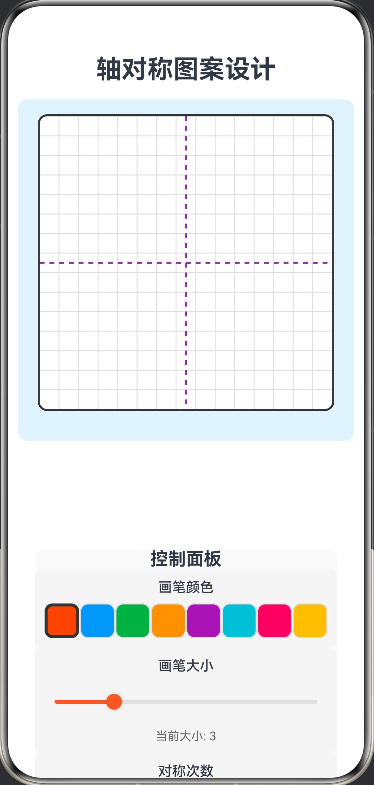
- 功能:在网格一侧画图,系统自动生成轴对称图案,支持多次对称,创作万花筒效果。
核心功能:
在画布上自由绘制,系统自动生成对称图案
支持多次对称(2-12次),可调整图案复杂度
万花筒模式:启用镜像对称,创建更复杂的图案
实时预览绘制效果
// 点数据接口
interface PatternPoint {
  x: number
  y: number
}

@Entry
@Component
struct AxisymmetricPatternDesign {
  @State canvasWidth: number = 300
  @State canvasHeight: number = 300
  @State centerX: number = 150
  @State centerY: number = 150
  @State isDrawing: boolean = false
  @State currentColor: string = '#FF5722'
  @State brushSize: number = 3
  @State symmetryCount: number = 4
  @State showGrid: boolean = true
  @State showAxis: boolean = true
  @State kaleidoscopeMode: boolean = false
  @State drawingHistory: Array<Array<PatternPoint>> = []
  @State currentPath: Array<PatternPoint> = []

  private canvasContext: CanvasRenderingContext2D = new CanvasRenderingContext2D()
  private colors: Array<string> = ['#FF5722', '#2196F3', '#4CAF50', '#FF9800', '#9C27B0', '#00BCD4', '#E91E63', '#FFC107']

  build() {
    Column({ space: 15 }) {
      Text('轴对称图案设计')
        .fontSize(26)
        .fontWeight(FontWeight.Bold)

      Column() {
        Canvas(this.canvasContext)
          .width(this.canvasWidth)
          .height(this.canvasHeight)
          .backgroundColor('#FFFFFF')
          .border({ width: 2, color: '#333' })
          .borderRadius(10)
          .onReady(() => {
            this.drawGrid()
          })
          .gesture(
            GestureGroup(GestureMode.Exclusive,
              PanGesture()
                .onActionStart((event) => {
                  this.isDrawing = true
                  this.currentPath = []
                  this.addPoint(event.fingerList[0].localX, event.fingerList[0].localY)
                })
                .onActionUpdate((event) => {
                  if (this.isDrawing) {
                    this.addPoint(event.fingerList[0].localX, event.fingerList[0].localY)
                  }
                })
                .onActionEnd(() => {
                  this.isDrawing = false
                  if (this.currentPath.length > 0) {
                    this.drawingHistory.push([...this.currentPath])
                  }
                  this.currentPath = []
                })
            )
          )
          .margin({ bottom: 15 })
      }
      .width('100%')
      .backgroundColor('#E3F2FD')
      .borderRadius(10)
      .padding(15)

      Flex({ direction: FlexDirection.Column, wrap: FlexWrap.Wrap, justifyContent: FlexAlign.Center, alignItems: ItemAlign.Center }) {
        Column() {
          Text('控制面板')
            .fontSize(18)
            .fontWeight(FontWeight.Bold)
            .width('100%')
            .textAlign(TextAlign.Center)

          Column({ space: 8 }) {
            Text('画笔颜色')
              .fontSize(14)
              .fontWeight(FontWeight.Medium)

            Flex({ wrap: FlexWrap.Wrap, justifyContent: FlexAlign.SpaceBetween }) {
              ForEach(this.colors, (color: string) => {
                Row()
                  .width(35)
                  .height(35)
                  .backgroundColor(color)
                  .borderRadius(8)
                  .border({ width: this.currentColor === color ? 3 : 1, color: this.currentColor === color ? '#333' : '#DDD' })
                  .onClick(() => {
                    this.currentColor = color
                  })
              })
            }
            .width('100%')
          }
          .width('100%')
          .padding(10)
          .backgroundColor('#F5F5F5')
          .borderRadius(8)

          Column({ space: 8 }) {
            Text('画笔大小')
              .fontSize(14)
              .fontWeight(FontWeight.Medium)

            Slider({
              value: this.brushSize,
              min: 1,
              max: 10,
              step: 1,
              style: SliderStyle.OutSet
            })
              .width('100%')
              .blockColor(this.currentColor)
              .trackColor('#E0E0E0')
              .selectedColor(this.currentColor)
              .onChange((value: number) => {
                this.brushSize = value
              })

            Text(`当前大小: ${this.brushSize}`)
              .fontSize(12)
              .fontColor('#666666')
          }
          .width('100%')
          .padding(10)
          .backgroundColor('#F5F5F5')
          .borderRadius(8)

          Column({ space: 8 }) {
            Text('对称次数')
              .fontSize(14)
              .fontWeight(FontWeight.Medium)

            Slider({
              value: this.symmetryCount,
              min: 2,
              max: 12,
              step: 1,
              style: SliderStyle.OutSet
            })
              .width('100%')
              .blockColor('#2196F3')
              .trackColor('#E0E0E0')
              .selectedColor('#2196F3')
              .onChange((value: number) => {
                this.symmetryCount = Math.round(value)
                this.redrawAll()
              })

            Text(`当前次数: ${this.symmetryCount}`)
              .fontSize(12)
              .fontColor('#666666')
          }
          .width('100%')
          .padding(10)
          .backgroundColor('#F5F5F5')
          .borderRadius(8)

          Column({ space: 8 }) {
            Text('显示选项')
              .fontSize(14)
              .fontWeight(FontWeight.Medium)

            Row({ space: 10 }) {
              Row({ space: 5 }) {
                Checkbox({ name: 'grid', group: 'display' })
                  .select(this.showGrid)
                  .onChange((value: boolean) => {
                    this.showGrid = value
                    this.redrawAll()
                  })
                Text('网格')
                  .fontSize(14)
              }

              Row({ space: 5 }) {
                Checkbox({ name: 'axis', group: 'display' })
                  .select(this.showAxis)
                  .onChange((value: boolean) => {
                    this.showAxis = value
                    this.redrawAll()
                  })
                Text('轴线')
                  .fontSize(14)
              }
            }
            .width('100%')
            .justifyContent(FlexAlign.SpaceBetween)
          }
          .width('100%')
          .padding(10)
          .backgroundColor('#F5F5F5')
          .borderRadius(8)

          Column({ space: 8 }) {
            Text('万花筒模式')
              .fontSize(14)
              .fontWeight(FontWeight.Medium)

            Row({ space: 10 }) {
              Row({ space: 5 }) {
                Checkbox({ name: 'kaleidoscope', group: 'mode' })
                  .select(this.kaleidoscopeMode)
                  .onChange((value: boolean) => {
                    this.kaleidoscopeMode = value
                    this.redrawAll()
                  })
                Text('启用')
                  .fontSize(14)
              }
            }
          }
          .width('100%')
          .padding(10)
          .backgroundColor('#F5F5F5')
          .borderRadius(8)

          Row({ space: 10 }) {
            Button('清空画布')
              .width('48%')
              .height(45)
              .fontSize(16)
              .backgroundColor('#F44336')
              .onClick(() => {
                this.clearCanvas()
              })

            Button('撤销')
              .width('48%')
              .height(45)
              .fontSize(16)
              .backgroundColor('#FF9800')
              .onClick(() => {
                this.undo()
              })
          }
          .width('100%')
        }
        .width('90%')
        .backgroundColor('#FAFAFA')
        .borderRadius(10)
      }

      Column({ space: 8 }) {
        Text('使用说明')
          .fontSize(16)
          .fontWeight(FontWeight.Bold)

        Text('• 在画布上拖动手指进行绘制')
          .fontSize(14)
          .fontColor('#666666')

        Text('• 调整对称次数可改变图案复杂度')
          .fontSize(14)
          .fontColor('#666666')

        Text('• 启用万花筒模式可创建更复杂的图案')
          .fontSize(14)
          .fontColor('#666666')

        Text('• 使用不同颜色创作多彩图案')
          .fontSize(14)
          .fontColor('#666666')
      }
      .width('95%')
      .padding(12)
      .backgroundColor('#FFF3E0')
      .borderRadius(10)
    }
    .width('100%')
    .height('100%')
    .padding(10)
    .justifyContent(FlexAlign.Start)
  }

  private addPoint(x: number, y: number) {
    const point: PatternPoint = { x, y }
    this.currentPath.push(point)
    this.drawSymmetricPattern(x, y)
  }

  private drawSymmetricPattern(x: number, y: number) {
    const ctx = this.canvasContext
    const angleStep = (2 * Math.PI) / this.symmetryCount

    ctx.strokeStyle = this.currentColor
    ctx.lineWidth = this.brushSize
    ctx.lineCap = 'round'
    ctx.lineJoin = 'round'

    for (let i = 0; i < this.symmetryCount; i++) {
      const angle = i * angleStep

      const dx = x - this.centerX
      const dy = y - this.centerY

      const rotatedX = this.centerX + dx * Math.cos(angle) - dy * Math.sin(angle)
      const rotatedY = this.centerY + dx * Math.sin(angle) + dy * Math.cos(angle)

      if (this.currentPath.length > 1) {
        const prevPoint = this.currentPath[this.currentPath.length - 2]
        const prevDx = prevPoint.x - this.centerX
        const prevDy = prevPoint.y - this.centerY

        const prevRotatedX = this.centerX + prevDx * Math.cos(angle) - prevDy * Math.sin(angle)
        const prevRotatedY = this.centerY + prevDx * Math.sin(angle) + prevDy * Math.cos(angle)

        ctx.beginPath()
        ctx.moveTo(prevRotatedX, prevRotatedY)
        ctx.lineTo(rotatedX, rotatedY)
        ctx.stroke()
      }

      if (this.kaleidoscopeMode) {
        const mirrorAngle = angle + Math.PI / this.symmetryCount
        const mirrorRotatedX = this.centerX + dx * Math.cos(mirrorAngle) + dy * Math.sin(mirrorAngle)
        const mirrorRotatedY = this.centerY - dx * Math.sin(mirrorAngle) + dy * Math.cos(mirrorAngle)

        if (this.currentPath.length > 1) {
          const prevPoint = this.currentPath[this.currentPath.length - 2]
          const prevDx = prevPoint.x - this.centerX
          const prevDy = prevPoint.y - this.centerY

          const prevMirrorRotatedX = this.centerX + prevDx * Math.cos(mirrorAngle) + prevDy * Math.sin(mirrorAngle)
          const prevMirrorRotatedY = this.centerY - prevDx * Math.sin(mirrorAngle) + prevDy * Math.cos(mirrorAngle)

          ctx.beginPath()
          ctx.moveTo(prevMirrorRotatedX, prevMirrorRotatedY)
          ctx.lineTo(mirrorRotatedX, mirrorRotatedY)
          ctx.stroke()
        }
      }
    }
  }

  private drawGrid() {
    const ctx = this.canvasContext
    ctx.clearRect(0, 0, this.canvasWidth, this.canvasHeight)

    if (this.showGrid) {
      ctx.strokeStyle = '#E0E0E0'
      ctx.lineWidth = 1

      const gridSize = 20
      for (let i = 0; i <= this.canvasWidth; i += gridSize) {
        ctx.beginPath()
        ctx.moveTo(i, 0)
        ctx.lineTo(i, this.canvasHeight)
        ctx.stroke()
      }

      for (let i = 0; i <= this.canvasHeight; i += gridSize) {
        ctx.beginPath()
        ctx.moveTo(0, i)
        ctx.lineTo(this.canvasWidth, i)
        ctx.stroke()
      }
    }

    if (this.showAxis) {
      ctx.strokeStyle = '#9C27B0'
      ctx.lineWidth = 2
      ctx.setLineDash([5, 5])

      ctx.beginPath()
      ctx.moveTo(this.centerX, 0)
      ctx.lineTo(this.centerX, this.canvasHeight)
      ctx.stroke()

      ctx.beginPath()
      ctx.moveTo(0, this.centerY)
      ctx.lineTo(this.canvasWidth, this.centerY)
      ctx.stroke()

      ctx.setLineDash([])
    }

    this.redrawHistory()
  }

  private redrawHistory() {
    const ctx = this.canvasContext

    for (const path of this.drawingHistory) {
      for (let i = 1; i < path.length; i++) {
        const prevPoint = path[i - 1]
        const currentPoint = path[i]

        const angleStep = (2 * Math.PI) / this.symmetryCount

        for (let j = 0; j < this.symmetryCount; j++) {
          const angle = j * angleStep

          const dx = currentPoint.x - this.centerX
          const dy = currentPoint.y - this.centerY

          const rotatedX = this.centerX + dx * Math.cos(angle) - dy * Math.sin(angle)
          const rotatedY = this.centerY + dx * Math.sin(angle) + dy * Math.cos(angle)

          const prevDx = prevPoint.x - this.centerX
          const prevDy = prevPoint.y - this.centerY

          const prevRotatedX = this.centerX + prevDx * Math.cos(angle) - prevDy * Math.sin(angle)
          const prevRotatedY = this.centerY + prevDx * Math.sin(angle) + prevDy * Math.cos(angle)

          ctx.strokeStyle = this.currentColor
          ctx.lineWidth = this.brushSize
          ctx.lineCap = 'round'
          ctx.lineJoin = 'round'

          ctx.beginPath()
          ctx.moveTo(prevRotatedX, prevRotatedY)
          ctx.lineTo(rotatedX, rotatedY)
          ctx.stroke()

          if (this.kaleidoscopeMode) {
            const mirrorAngle = angle + Math.PI / this.symmetryCount
            const mirrorRotatedX = this.centerX + dx * Math.cos(mirrorAngle) + dy * Math.sin(mirrorAngle)
            const mirrorRotatedY = this.centerY - dx * Math.sin(mirrorAngle) + dy * Math.cos(mirrorAngle)

            const prevMirrorRotatedX = this.centerX + prevDx * Math.cos(mirrorAngle) + prevDy * Math.sin(mirrorAngle)
            const prevMirrorRotatedY = this.centerY - prevDx * Math.sin(mirrorAngle) + prevDy * Math.cos(mirrorAngle)

            ctx.beginPath()
            ctx.moveTo(prevMirrorRotatedX, prevMirrorRotatedY)
            ctx.lineTo(mirrorRotatedX, mirrorRotatedY)
            ctx.stroke()
          }
        }
      }
    }
  }

  private redrawAll() {
    this.drawGrid()
  }

  private clearCanvas() {
    this.drawingHistory = []
    this.currentPath = []
    this.drawGrid()
  }

  private undo() {
    if (this.drawingHistory.length > 0) {
      this.drawingHistory.pop()
      this.redrawAll()
    }
  }
}

讨论HarmonyOS开发技术,专注于API与组件、DevEco Studio、测试、元服务和应用上架分发等。
更多推荐
 0
0 0
0- 0


 已为社区贡献402条内容

所有评论(0)