Harmonyos应用实例232:蒙特卡洛圆周率计算 (统计与概率)
·
4. 蒙特卡洛圆周率计算 (统计与概率)
功能介绍:
利用蒙特卡洛方法模拟计算 π\piπ 值。屏幕上显示一个正方形和内切圆,系统随机向正方形内“撒豆子”,通过统计落在圆内和圆外的点数比例来估算圆周率。实时更新计算结果和误差,生动演示概率统计在数学计算中的应用。
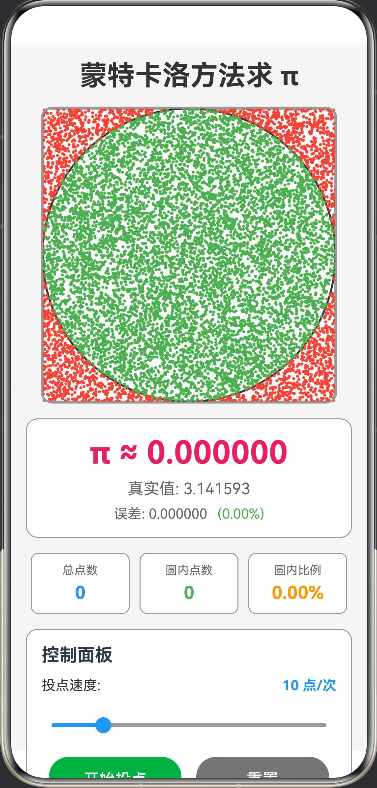
// 投点数据接口
interface PointData {
  x: number
  y: number
  inCircle: boolean
}

// 颜色接口定义
interface ColorPalette {
  white: string
  background: string
  primary: string
  secondary: string
  accent: string
  textPrimary: string
  textSecondary: string
  canvasBackground: string
  circleBorder: string
  pointInCircle: string
  pointOutCircle: string
  squareBorder: string
  infoBackground: string
}

@Entry
@Component
struct MonteCarloPi {
  // 颜色常量
  private readonly COLORS: ColorPalette = {
    white: '#FFFFFF',
    background: '#F5F5F5',
    primary: '#2196F3',
    secondary: '#FF9800',
    accent: '#E91E63',
    textPrimary: '#333333',
    textSecondary: '#666666',
    canvasBackground: '#FAFAFA',
    circleBorder: '#333333',
    pointInCircle: '#4CAF50',
    pointOutCircle: '#F44336',
    squareBorder: '#999999',
    infoBackground: '#E3F2FD'
  }

  // 统计数据
  @State totalPoints: number = 0
  @State inCirclePoints: number = 0
  @State points: PointData[] = []
  @State running: boolean = false
  @State speed: number = 10 // 每次投点数量

  // Canvas 上下文
  private settings: RenderingContextSettings = new RenderingContextSettings(true)
  private context: CanvasRenderingContext2D = new CanvasRenderingContext2D(this.settings)

  // 画布尺寸
  private canvasSize: number = 300

  // 定时器 ID
  private intervalId: number = -1

  // 计算估算的 π 值
  private get estimatedPi(): number {
    if (!this.totalPoints || this.totalPoints === 0) return 0
    return 4 * this.inCirclePoints / this.totalPoints
  }

  // 计算误差
  private get error(): number {
    if (!this.totalPoints || this.totalPoints === 0) return 0
    const pi = this.estimatedPi || 0
    return Math.abs(pi - Math.PI)
  }

  // 计算误差百分比
  private get errorPercent(): number {
    if (!this.totalPoints || this.totalPoints === 0) return 0
    const err = this.error || 0
    return (err / Math.PI) * 100
  }

  // 计算圆内比例
  private get ratio(): number {
    if (!this.totalPoints || this.totalPoints === 0) return 0
    return this.inCirclePoints / this.totalPoints
  }

  build() {
    Column({ space: 15 }) {
      // 标题
      Text('蒙特卡洛方法求 π')
        .fontSize(28)
        .fontWeight(FontWeight.Bold)
        .fontColor(this.COLORS.textPrimary)

      // Canvas 绘图区域
      Canvas(this.context)
        .width(this.canvasSize)
        .height(this.canvasSize)
        .backgroundColor(this.COLORS.canvasBackground)
        .borderRadius(12)
        .borderWidth(2)
        .borderColor(this.COLORS.squareBorder)
        .onReady(() => {
          this.drawCanvas()
        })

      // π 值显示
      Column({ space: 8 }) {
        Text(`π ≈ ${(this.estimatedPi || 0).toFixed(6)}`)
          .fontSize(32)
          .fontWeight(FontWeight.Bold)
          .fontColor(this.COLORS.accent)

        Text(`真实值: ${Math.PI.toFixed(6)}`)
          .fontSize(16)
          .fontColor(this.COLORS.textSecondary)

        // 误差显示
        Row({ space: 10 }) {
          Text(`误差: ${(this.error || 0).toFixed(6)}`)
            .fontSize(14)
            .fontColor(this.COLORS.textSecondary)

          Text(`(${(this.errorPercent || 0).toFixed(2)}%)`)
            .fontSize(14)
            .fontColor((this.errorPercent || 0) < 1 ? this.COLORS.pointInCircle : this.COLORS.pointOutCircle)
        }
      }
      .width('100%')
      .padding(15)
      .backgroundColor(this.COLORS.white)
      .borderRadius(12)
      .borderWidth(1)
      .borderColor(this.COLORS.squareBorder)

      // 统计数据
      Row({ space: 15 }) {
        this.StatCard('总点数', (this.totalPoints || 0).toString(), this.COLORS.primary)
        this.StatCard('圆内点数', (this.inCirclePoints || 0).toString(), this.COLORS.pointInCircle)
        this.StatCard('圆内比例', `${((this.ratio || 0) * 100).toFixed(2)}%`, this.COLORS.secondary)
      }
      .width('100%')
      .justifyContent(FlexAlign.SpaceAround)

      // 控制面板
      Column({ space: 12 }) {
        Text('控制面板')
          .fontSize(18)
          .fontWeight(FontWeight.Bold)
          .width('100%')
          .textAlign(TextAlign.Start)

        // 速度控制
        Row() {
          Text('投点速度:').fontSize(14).fontColor(this.COLORS.textPrimary)
          Blank()
          Text(`${this.speed} 点/次`).fontSize(14).fontWeight(FontWeight.Bold).fontColor(this.COLORS.primary)
        }.width('100%')

        Slider({ value: this.speed, min: 1, max: 50, step: 1 })
          .blockColor(this.COLORS.primary)
          .trackColor(this.COLORS.squareBorder)
          .selectedColor(this.COLORS.primary)
          .onChange((val) => {
            this.speed = val
          })

        // 控制按钮
        Row({ space: 15 }) {
          Button(this.running ? '暂停' : '开始投点')
            .width('45%')
            .height(45)
            .backgroundColor(this.running ? this.COLORS.secondary : this.COLORS.pointInCircle)
            .fontColor(this.COLORS.white)
            .fontSize(16)
            .onClick(() => {
              if (this.running) {
                this.stopSimulation()
              } else {
                this.startSimulation()
              }
            })

          Button('重置')
            .width('45%')
            .height(45)
            .backgroundColor('#757575')
            .fontColor(this.COLORS.white)
            .fontSize(16)
            .onClick(() => {
              this.resetSimulation()
            })
        }
      }
      .width('100%')
      .padding(15)
      .backgroundColor(this.COLORS.white)
      .borderRadius(12)
      .borderWidth(1)
      .borderColor(this.COLORS.squareBorder)

      // 教学说明
      this.TeachingPoints()
    }
    .width('100%')
    .height('100%')
    .padding(15)
    .backgroundColor(this.COLORS.background)
  }

  // 统计卡片组件
  @Builder
  StatCard(label: string, value: string, color: string) {
    Column({ space: 5 }) {
      Text(label)
        .fontSize(12)
        .fontColor(this.COLORS.textSecondary)
      Text(value)
        .fontSize(18)
        .fontWeight(FontWeight.Bold)
        .fontColor(color)
    }
    .layoutWeight(1)
    .padding(10)
    .backgroundColor(this.COLORS.white)
    .borderRadius(8)
    .borderWidth(1)
    .borderColor(this.COLORS.squareBorder)
  }

  // 教学说明
  @Builder
  TeachingPoints() {
    Column({ space: 8 }) {
      Text('💡 蒙特卡洛方法原理')
        .fontSize(16)
        .fontWeight(FontWeight.Bold)
        .width('100%')
        .textAlign(TextAlign.Start)

      Text('基本思想:')
        .fontSize(14)
        .fontWeight(FontWeight.Bold)
        .width('100%')

      Text('• 在正方形内随机撒点')
        .fontSize(13)
        .width('100%')
        .margin({ left: 10 })

      Text('• 统计落在内切圆内的点数')
        .fontSize(13)
        .width('100%')
        .margin({ left: 10 })

      Text('• 利用几何概率估算 π 值')
        .fontSize(13)
        .width('100%')
        .margin({ left: 10 })

      Text('数学原理:')
        .fontSize(14)
        .fontWeight(FontWeight.Bold)
        .width('100%')
        .margin({ top: 8 })

      Text('• 正方形面积 = (2r)² = 4r²')
        .fontSize(13)
        .width('100%')
        .margin({ left: 10 })

      Text('• 圆面积 = πr²')
        .fontSize(13)
        .width('100%')
        .margin({ left: 10 })

      Text('• 概率比 = 圆面积/正方形面积 = π/4')
        .fontSize(13)
        .width('100%')
        .margin({ left: 10 })

      Text('• 因此:π ≈ 4 × (圆内点数/总点数)')
        .fontSize(13)
        .width('100%')
        .margin({ left: 10 })

      Text('特点:')
        .fontSize(14)
        .fontWeight(FontWeight.Bold)
        .width('100%')
        .margin({ top: 8 })

      Text('• 点数越多,估算越准确')
        .fontSize(13)
        .width('100%')
        .margin({ left: 10 })

      Text('• 体现了概率统计的威力')
        .fontSize(13)
        .width('100%')
        .margin({ left: 10 })

      Text('• 广泛应用于复杂计算领域')
        .fontSize(13)
        .width('100%')
        .margin({ left: 10 })
    }
    .width('100%')
    .padding(15)
    .backgroundColor(this.COLORS.infoBackground)
    .borderRadius(12)
  }

  // 开始模拟
  private startSimulation() {
    this.running = true
    this.intervalId = setInterval(() => {
      this.simulate()
    }, 50)
  }

  // 停止模拟
  private stopSimulation() {
    this.running = false
    if (this.intervalId !== -1) {
      clearInterval(this.intervalId)
      this.intervalId = -1
    }
  }

  // 重置模拟
  private resetSimulation() {
    this.stopSimulation()
    this.totalPoints = 0
    this.inCirclePoints = 0
    this.points = []
    this.drawCanvas()
  }

  // 模拟投点
  private simulate() {
    if (!this.running) return

    for (let i = 0; i < this.speed; i++) {
      const x = Math.random()
      const y = Math.random()
      const distance = (x - 0.5) * (x - 0.5) + (y - 0.5) * (y - 0.5)
      const inCircle = distance <= 0.25

      const point: PointData = {
        x: x,
        y: y,
        inCircle: inCircle
      }

      this.points.push(point)
      this.totalPoints++
      if (inCircle) {
        this.inCirclePoints++
      }
    }

    this.drawCanvas()
  }

  // 绘制画布
  private drawCanvas() {
    const ctx = this.context
    const size = this.canvasSize

    // 清空画布
    ctx.fillStyle = this.COLORS.canvasBackground
    ctx.fillRect(0, 0, size, size)

    // 绘制正方形边框
    ctx.strokeStyle = this.COLORS.squareBorder
    ctx.lineWidth = 2
    ctx.strokeRect(0, 0, size, size)

    // 绘制内切圆
    ctx.strokeStyle = this.COLORS.circleBorder
    ctx.lineWidth = 2
    ctx.beginPath()
    ctx.arc(size / 2, size / 2, size / 2, 0, Math.PI * 2)
    ctx.stroke()

    // 绘制所有点
    this.points.forEach((p: PointData) => {
      ctx.fillStyle = p.inCircle ? this.COLORS.pointInCircle : this.COLORS.pointOutCircle
      ctx.beginPath()
      ctx.arc(p.x * size, p.y * size, 1.5, 0, Math.PI * 2)
      ctx.fill()
    })

    // 绘制坐标轴标签
    ctx.fillStyle = this.COLORS.textSecondary
    ctx.font = '12px sans-serif'
    ctx.textAlign = 'center'
    ctx.fillText('0', 10, size - 5)
    ctx.fillText('1', size - 10, size - 5)
    ctx.fillText('0', 5, 15)
    ctx.fillText('1', 5, size - 10)
  }
}

讨论HarmonyOS开发技术,专注于API与组件、DevEco Studio、测试、元服务和应用上架分发等。
更多推荐

 0
0 0
0- 0


 已为社区贡献402条内容

所有评论(0)