HARMONYOS应用实例245:勾股树分形图生成器
·
- 勾股树生成器
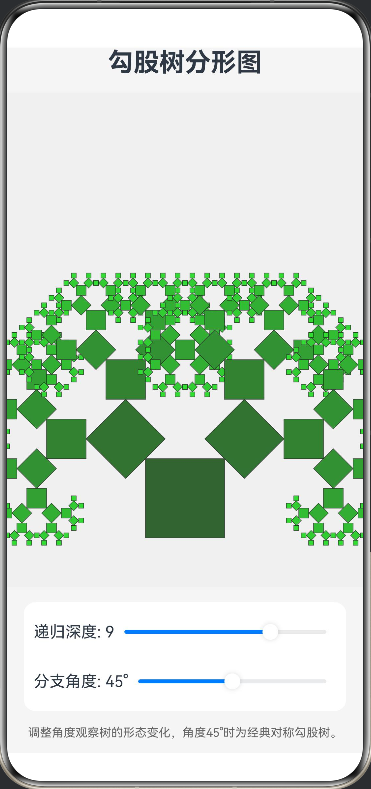
- 功能:利用勾股定理递归绘制勾股树分形图,参数可调,展示数学之美。
本应用利用递归算法在 Canvas 画布上动态绘制勾股树分形图。用户可以通过滑块调整递归深度(细节丰富度)、分支旋转角度和初始大小。随着参数的变化,图形会实时重绘,展示出正方形与直角三角形层层嵌套的几何之美,直观演示了勾股定理与分形几何的结合。
完整代码:
@Entry
@Component
struct PythagorasTree {
  @State depth: number = 9 // 递归深度
  @State angle: number = 45 // 旋转角度
  private settings: RenderingContextSettings = new RenderingContextSettings(true)
  private context: CanvasRenderingContext2D = new CanvasRenderingContext2D(this.settings)

  build() {
    Column({ space: 15 }) {
      Text('勾股树分形图')
        .fontSize(26)
        .fontWeight(FontWeight.Bold)

      // 绘图区域
      Canvas(this.context)
        .width('100%')
        .height(500)
        .backgroundColor('#F0F0F0')
        .onReady(() => {
          this.drawTree()
        })

      // 参数控制面板
      Column({ space: 10 }) {
        Row() {
          Text(`递归深度: ${this.depth}`)
          Slider({ value: this.depth, min: 1, max: 12, step: 1 })
            .layoutWeight(1)
            .onChange((val) => {
              this.depth = Math.round(val)
              this.drawTree()
            })
        }.width('90%')

        Row() {
          Text(`分支角度: ${this.angle}°`)
          Slider({ value: this.angle, min: 20, max: 70, step: 1 })
            .layoutWeight(1)
            .onChange((val) => {
              this.angle = val
              this.drawTree()
            })
        }.width('90%')
      }
      .padding(10)
      .backgroundColor('#FFFFFF')
      .borderRadius(12)

      Text('调整角度观察树的形态变化,角度45°时为经典对称勾股树。')
        .fontSize(12)
        .fontColor('#666')
        .padding({ left: 20, right: 20 })
    }
    .width('100%')
    .height('100%')
    .backgroundColor('#F5F5F5')
  }

  // 绘制主逻辑
  private drawTree() {
    const ctx = this.context
    const w = 360
    const h = 500
    ctx.clearRect(0, 0, w, h)

    // 设置原点到画布底部中心
    ctx.save()
    ctx.translate(w / 2, h - 50)

    // 开始递归绘制,初始正方形边长
    this.drawBranch(80, this.depth)

    ctx.restore()
  }

  // 递归绘制函数
  private drawBranch(size: number, currentDepth: number) {
    if (currentDepth <= 0 || size < 1) return

    const ctx = this.context

    // 1. 绘制当前正方形
    // 颜色随深度变化,模拟树干到树叶的颜色
    const greenValue = Math.min(255, 100 + (this.depth - currentDepth) * 15)
    ctx.fillStyle = `rgb(50, ${greenValue}, 50)`
    ctx.strokeStyle = '#333'
    ctx.lineWidth = 0.5

    ctx.beginPath()
    ctx.rect(-size / 2, -size, size, size)
    ctx.fill()
    ctx.stroke()

    if (currentDepth <= 1) return

    // 2. 计算上方三角形的参数
    const radAngle = this.angle * Math.PI / 180
    const sinA = Math.sin(radAngle)
    const cosA = Math.cos(radAngle)

    // 根据勾股定理和正弦定理计算子正方形边长
    const leftSize = size * sinA
    const rightSize = size * cosA

    // 3. 绘制左分支
    ctx.save()
    ctx.translate(-size / 2, -size) // 移动到左上角
    ctx.rotate(-radAngle) // 旋转
    this.drawBranch(leftSize, currentDepth - 1)
    ctx.restore()

    // 4. 绘制右分支
    ctx.save()
    ctx.translate(size / 2, -size) // 移动到右上角
    ctx.rotate(Math.PI / 2 - radAngle) // 旋转 (90度减去角度)
    this.drawBranch(rightSize, currentDepth - 1)
    ctx.restore()
  }
}

讨论HarmonyOS开发技术,专注于API与组件、DevEco Studio、测试、元服务和应用上架分发等。
更多推荐

 20
20 0
0- 0


 已为社区贡献402条内容

所有评论(0)