Harmonyos应用实例226:复数的三角形式与运算
·
8. 复数的三角形式与运算
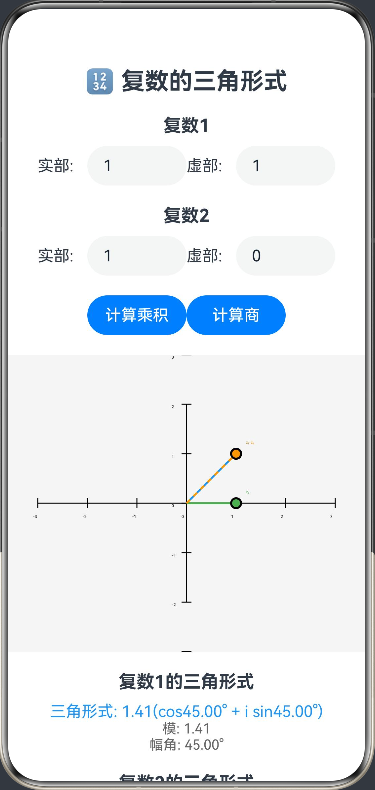
功能简介:将复数表示为三角形式,计算模和幅角,支持复数的乘法、除法运算的几何意义。通过复平面可视化展示复数的三角形式和运算过程,帮助学生理解复数的三角表示和运算规则。
ArkTS代码:
@Entry
@Component
struct ComplexTrigonometric {
  @State private real: number = 1
  @State private imag: number = 1
  @State private real2: number = 1
  @State private imag2: number = 0
  @State private trigForm: string = ''
  @State private trigForm2: string = ''
  @State private modulus: number = Math.sqrt(2)
  @State private argument: number = 45
  @State private modulus2: number = 1
  @State private argument2: number = 0
  @State private productResult: string = ''
  @State private quotientResult: string = ''
  private settings: RenderingContextSettings = new RenderingContextSettings(true)
  private context: CanvasRenderingContext2D = new CanvasRenderingContext2D(this.settings)

  build() {
    Column() {
      Text('🔢 复数的三角形式')
        .fontSize(24).fontWeight(FontWeight.Bold)
        .margin({ bottom: 20 })

      Text('复数1')
        .fontSize(18).fontWeight(FontWeight.Bold)
        .margin({ bottom: 10 })

      Row() {
        Text('实部: ')
          .width(50)
        TextInput({
          placeholder: '实部',
          text: this.real.toString()
        })
          .width(100)
          .onChange((v: string) => {
            this.real = parseFloat(v) || 0
            this.updateTrigForm()
          })
        Text('虚部: ')
          .width(50)
        TextInput({
          placeholder: '虚部',
          text: this.imag.toString()
        })
          .width(100)
          .onChange((v: string) => {
            this.imag = parseFloat(v) || 0
            this.updateTrigForm()
          })
      }
      .margin({ bottom: 20 })

      Text('复数2')
        .fontSize(18).fontWeight(FontWeight.Bold)
        .margin({ bottom: 10 })

      Row() {
        Text('实部: ')
          .width(50)
        TextInput({
          placeholder: '实部',
          text: this.real2.toString()
        })
          .width(100)
          .onChange((v: string) => {
            this.real2 = parseFloat(v) || 0
            this.updateTrigForm2()
          })
        Text('虚部: ')
          .width(50)
        TextInput({
          placeholder: '虚部',
          text: this.imag2.toString()
        })
          .width(100)
          .onChange((v: string) => {
            this.imag2 = parseFloat(v) || 0
            this.updateTrigForm2()
          })
      }
      .margin({ bottom: 20 })

      Row() {
        Button('计算乘积')
          .width(100)
          .onClick(() => this.calculateProduct())
        Button('计算商')
          .width(100)
          .onClick(() => this.calculateQuotient())
      }
      .margin({ bottom: 20 })

      Canvas(this.context)
        .width(400).height(300)
        .backgroundColor('#f5f5f5')
        .onReady(() => this.drawComplex())

      Text('复数1的三角形式')
        .fontSize(18).fontWeight(FontWeight.Bold)
        .margin({ top: 20, bottom: 10 })

      Text(`三角形式: ${this.trigForm}`)
        .fontSize(16).fontColor('#2196F3')
      Text(`模: ${this.modulus.toFixed(2)}`)
        .fontSize(14).fontColor('#666')
      Text(`幅角: ${this.argument.toFixed(2)}°`)
        .fontSize(14).fontColor('#666')

      Text('复数2的三角形式')
        .fontSize(18).fontWeight(FontWeight.Bold)
        .margin({ top: 20, bottom: 10 })

      Text(`三角形式: ${this.trigForm2}`)
        .fontSize(16).fontColor('#4CAF50')
      Text(`模: ${this.modulus2.toFixed(2)}`)
        .fontSize(14).fontColor('#666')
      Text(`幅角: ${this.argument2.toFixed(2)}°`)
        .fontSize(14).fontColor('#666')

      Text('运算结果')
        .fontSize(18).fontWeight(FontWeight.Bold)
        .margin({ top: 20, bottom: 10 })

      Text(`乘积: ${this.productResult}`)
        .fontSize(14).fontColor('#FF9800')
      Text(`商: ${this.quotientResult}`)
        .fontSize(14).fontColor('#9C27B0')

      Text('复数运算的几何意义')
        .fontSize(18).fontWeight(FontWeight.Bold)
        .margin({ top: 20, bottom: 10 })

      Text('乘法: 模相乘,幅角相加')
        .fontSize(14).fontColor('#666')
      Text('除法: 模相除,幅角相减')
        .fontSize(14).fontColor('#666')
    }
    .padding(20)
  }

  private updateTrigForm() {
    this.modulus = Math.sqrt(this.real ** 2 + this.imag ** 2)
    this.argument = Math.atan2(this.imag, this.real) * 180 / Math.PI
    if (this.argument < 0) {
      this.argument += 360
    }
    this.trigForm = `${this.modulus.toFixed(2)}(cos${this.argument.toFixed(2)}° + i sin${this.argument.toFixed(2)}°)`
    this.drawComplex()
  }

  private updateTrigForm2() {
    this.modulus2 = Math.sqrt(this.real2 ** 2 + this.imag2 ** 2)
    this.argument2 = Math.atan2(this.imag2, this.real2) * 180 / Math.PI
    if (this.argument2 < 0) {
      this.argument2 += 360
    }
    this.trigForm2 = `${this.modulus2.toFixed(2)}(cos${this.argument2.toFixed(2)}° + i sin${this.argument2.toFixed(2)}°)`
    this.drawComplex()
  }

  private calculateProduct() {
    // 计算乘积的模和幅角
    const productModulus = this.modulus * this.modulus2
    const productArgument = this.argument + this.argument2

    // 转换为代数形式
    const productReal = productModulus * Math.cos(productArgument * Math.PI / 180)
    const productImag = productModulus * Math.sin(productArgument * Math.PI / 180)

    // 生成结果字符串
    this.productResult = `${productReal.toFixed(2)} + ${productImag.toFixed(2)}i = ${productModulus.toFixed(2)}(cos${productArgument.toFixed(2)}° + i sin${productArgument.toFixed(2)}°)`
    this.drawComplex()
  }

  private calculateQuotient() {
    // 计算商的模和幅角
    const quotientModulus = this.modulus / this.modulus2
    const quotientArgument = this.argument - this.argument2

    // 转换为代数形式
    const quotientReal = quotientModulus * Math.cos(quotientArgument * Math.PI / 180)
    const quotientImag = quotientModulus * Math.sin(quotientArgument * Math.PI / 180)

    // 生成结果字符串
    this.quotientResult = `${quotientReal.toFixed(2)} + ${quotientImag.toFixed(2)}i = ${quotientModulus.toFixed(2)}(cos${quotientArgument.toFixed(2)}° + i sin${quotientArgument.toFixed(2)}°)`
    this.drawComplex()
  }

  private drawComplex() {
    const ctx = this.context
    const width = 400
    const height = 300
    const centerX = width / 2
    const centerY = height / 2
    const scale = 50

    // 清空画布
    ctx.clearRect(0, 0, width, height)

    // 绘制复平面
    ctx.beginPath()
    ctx.moveTo(50, centerY)
    ctx.lineTo(width - 50, centerY)
    ctx.moveTo(centerX, 50)
    ctx.lineTo(centerX, height - 50)
    ctx.strokeStyle = '#000'
    ctx.lineWidth = 1
    ctx.stroke()

    // 绘制刻度
    for (let i = -3; i <= 3; i++) {
      const x = centerX + i * scale
      ctx.beginPath()
      ctx.moveTo(x, centerY - 5)
      ctx.lineTo(x, centerY + 5)
      ctx.stroke()
      ctx.font = '12px Arial'
      ctx.fillStyle = '#000'
      ctx.fillText(i.toString(), x - 5, centerY + 15)
    }

    for (let i = -3; i <= 3; i++) {
      const y = centerY - i * scale
      ctx.beginPath()
      ctx.moveTo(centerX - 5, y)
      ctx.lineTo(centerX + 5, y)
      ctx.stroke()
      ctx.font = '12px Arial'
      ctx.fillStyle = '#000'
      ctx.fillText(i.toString(), centerX - 15, y + 4)
    }

    // 绘制复数1
    const x1 = centerX + this.real * scale
    const y1 = centerY - this.imag * scale

    ctx.beginPath()
    ctx.moveTo(centerX, centerY)
    ctx.lineTo(x1, y1)
    ctx.strokeStyle = '#2196F3'
    ctx.lineWidth = 2
    ctx.stroke()

    ctx.beginPath()
    ctx.arc(x1, y1, 5, 0, 2 * Math.PI)
    ctx.fillStyle = '#2196F3'
    ctx.fill()
    ctx.strokeStyle = '#000'
    ctx.stroke()

    // 绘制复数2
    const x2 = centerX + this.real2 * scale
    const y2 = centerY - this.imag2 * scale

    ctx.beginPath()
    ctx.moveTo(centerX, centerY)
    ctx.lineTo(x2, y2)
    ctx.strokeStyle = '#4CAF50'
    ctx.lineWidth = 2
    ctx.stroke()

    ctx.beginPath()
    ctx.arc(x2, y2, 5, 0, 2 * Math.PI)
    ctx.fillStyle = '#4CAF50'
    ctx.fill()
    ctx.strokeStyle = '#000'
    ctx.stroke()

    // 绘制乘积
    if (this.productResult) {
      const productModulus = this.modulus * this.modulus2
      const productArgument = this.argument + this.argument2
      const productReal = productModulus * Math.cos(productArgument * Math.PI / 180)
      const productImag = productModulus * Math.sin(productArgument * Math.PI / 180)
      const x3 = centerX + productReal * scale
      const y3 = centerY - productImag * scale

      ctx.beginPath()
      ctx.moveTo(centerX, centerY)
      ctx.lineTo(x3, y3)
      ctx.strokeStyle = '#FF9800'
      ctx.lineWidth = 2
      ctx.setLineDash([5, 5])
      ctx.stroke()
      ctx.setLineDash([])

      ctx.beginPath()
      ctx.arc(x3, y3, 5, 0, 2 * Math.PI)
      ctx.fillStyle = '#FF9800'
      ctx.fill()
      ctx.strokeStyle = '#000'
      ctx.stroke()
    }

    // 绘制商
    if (this.quotientResult) {
      const quotientModulus = this.modulus / this.modulus2
      const quotientArgument = this.argument - this.argument2
      const quotientReal = quotientModulus * Math.cos(quotientArgument * Math.PI / 180)
      const quotientImag = quotientModulus * Math.sin(quotientArgument * Math.PI / 180)
      const x4 = centerX + quotientReal * scale
      const y4 = centerY - quotientImag * scale

      ctx.beginPath()
      ctx.moveTo(centerX, centerY)
      ctx.lineTo(x4, y4)
      ctx.strokeStyle = '#9C27B0'
      ctx.lineWidth = 2
      ctx.setLineDash([3, 3])
      ctx.stroke()
      ctx.setLineDash([])

      ctx.beginPath()
      ctx.arc(x4, y4, 5, 0, 2 * Math.PI)
      ctx.fillStyle = '#9C27B0'
      ctx.fill()
      ctx.strokeStyle = '#000'
      ctx.stroke()
    }

    // 绘制标签
    ctx.font = '12px Arial'
    ctx.fillStyle = '#2196F3'
    ctx.fillText('z₁', x1 + 10, y1 - 10)
    ctx.fillStyle = '#4CAF50'
    ctx.fillText('z₂', x2 + 10, y2 - 10)
    if (this.productResult) {
      const productModulus = this.modulus * this.modulus2
      const productArgument = this.argument + this.argument2
      const productReal = productModulus * Math.cos(productArgument * Math.PI / 180)
      const productImag = productModulus * Math.sin(productArgument * Math.PI / 180)
      const x3 = centerX + productReal * scale
      const y3 = centerY - productImag * scale
      ctx.fillStyle = '#FF9800'
      ctx.fillText('z₁·z₂', x3 + 10, y3 - 10)
    }
    if (this.quotientResult) {
      const quotientModulus = this.modulus / this.modulus2
      const quotientArgument = this.argument - this.argument2
      const quotientReal = quotientModulus * Math.cos(quotientArgument * Math.PI / 180)
      const quotientImag = quotientModulus * Math.sin(quotientArgument * Math.PI / 180)
      const x4 = centerX + quotientReal * scale
      const y4 = centerY - quotientImag * scale
      ctx.fillStyle = '#9C27B0'
      ctx.fillText('z₁/z₂', x4 + 10, y4 - 10)
    }
  }
}

讨论HarmonyOS开发技术,专注于API与组件、DevEco Studio、测试、元服务和应用上架分发等。
更多推荐



 0
0 0
0- 0


 已为社区贡献402条内容

所有评论(0)