Harmonyos应用实例223:立体几何体积与表面积计算器
·
5. 立体几何体积与表面积计算器
功能简介:支持常见几何体(棱柱、棱锥、圆柱、圆锥、球)的体积和表面积计算,通过3D可视化展示几何体,支持参数调整和展开图查看。帮助学生理解立体几何体的结构特征和计算公式
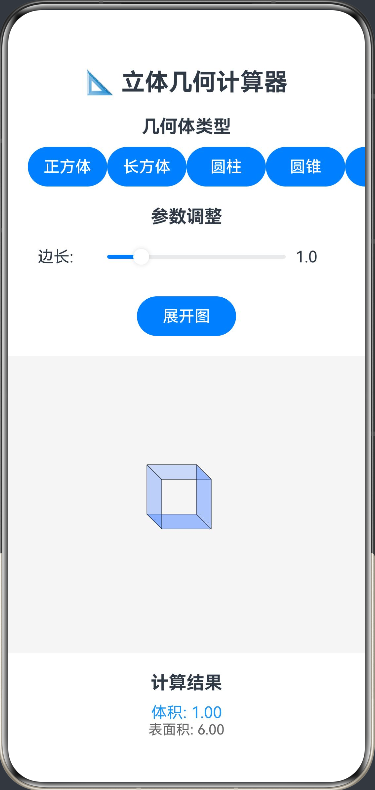
ArkTS代码:
@Entry
@Component
struct GeometryCalculator {
  @State private shape: string = 'cube'
  @State private parameters: number[] = [1, 1, 1]
  @State private volume: number = 1
  @State private surfaceArea: number = 6
  @State private showUnfolded: boolean = false
  private settings: RenderingContextSettings = new RenderingContextSettings(true)
  private context: CanvasRenderingContext2D = new CanvasRenderingContext2D(this.settings)

  build() {
    Column() {
      Text('📐 立体几何计算器')
        .fontSize(24).fontWeight(FontWeight.Bold)
        .margin({ bottom: 20 })

      Text('几何体类型')
        .fontSize(18).fontWeight(FontWeight.Bold)
        .margin({ bottom: 10 })

      Row() {
        Button('正方体')
          .width(80)
          .onClick(() => { this.shape = 'cube'; this.updateCalculation() })
        Button('长方体')
          .width(80)
          .onClick(() => { this.shape = 'cuboid'; this.updateCalculation() })
        Button('圆柱')
          .width(80)
          .onClick(() => { this.shape = 'cylinder'; this.updateCalculation() })
        Button('圆锥')
          .width(80)
          .onClick(() => { this.shape = 'cone'; this.updateCalculation() })
        Button('球')
          .width(80)
          .onClick(() => { this.shape = 'sphere'; this.updateCalculation() })
      }
      .margin({ bottom: 20 })

      Text('参数调整')
        .fontSize(18).fontWeight(FontWeight.Bold)
        .margin({ bottom: 10 })

      ForEach([0, 1, 2], (index: number) => {
        if (!((this.shape === 'cube' && index > 0) ||
             (this.shape === 'sphere' && index > 0) ||
             (this.shape === 'cone' && index > 1))) {
          Row() {
            Text(this.getParameterLabel(index))
              .width(60)
            Slider({ value: this.parameters[index], min: 0.1, max: 5, step: 0.1 })
              .width(200)
              .onChange((val: number) => {
                this.parameters[index] = val
                this.updateCalculation()
              })
            Text(this.parameters[index].toFixed(1))
              .width(40)
          }
          .margin({ bottom: 10 })
        }
      })

      Row() {
        Button(this.showUnfolded ? '3D视图' : '展开图')
          .width(100)
          .onClick(() => {
            this.showUnfolded = !this.showUnfolded
            this.drawGeometry()
          })
      }
      .margin({ top: 10, bottom: 20 })

      Canvas(this.context)
        .width(400).height(300)
        .backgroundColor('#f5f5f5')
        .onReady(() => this.drawGeometry())

      Text('计算结果')
        .fontSize(18).fontWeight(FontWeight.Bold)
        .margin({ top: 20, bottom: 10 })

      Text(`体积: ${this.volume.toFixed(2)}`)
        .fontSize(16).fontColor('#2196F3')
      Text(`表面积: ${this.surfaceArea.toFixed(2)}`)
        .fontSize(14).fontColor('#666')
    }
    .padding(20)
  }

  private getParameterLabel(index: number): string {
    switch (this.shape) {
      case 'cube': return '边长: '
      case 'cuboid': return ['长: ', '宽: ', '高: '][index]
      case 'cylinder': return ['半径: ', '高: ', ''][index]
      case 'cone': return ['半径: ', '高: ', ''][index]
      case 'sphere': return '半径: '
      default: return ''
    }
  }

  private updateCalculation() {
    switch (this.shape) {
      case 'cube':
        const a = this.parameters[0]
        this.volume = a ** 3
        this.surfaceArea = 6 * a ** 2
        break
      case 'cuboid':
        const l = this.parameters[0]
        const w = this.parameters[1]
        const h = this.parameters[2]
        this.volume = l * w * h
        this.surfaceArea = 2 * (l * w + l * h + w * h)
        break
      case 'cylinder':
        const r = this.parameters[0]
        const hc = this.parameters[1]
        this.volume = Math.PI * r ** 2 * hc
        this.surfaceArea = 2 * Math.PI * r * (r + hc)
        break
      case 'cone':
        const rc = this.parameters[0]
        const hcone = this.parameters[1]
        const slantHeight = Math.sqrt(rc ** 2 + hcone ** 2)
        this.volume = (1/3) * Math.PI * rc ** 2 * hcone
        this.surfaceArea = Math.PI * rc * (rc + slantHeight)
        break
      case 'sphere':
        const rs = this.parameters[0]
        this.volume = (4/3) * Math.PI * rs ** 3
        this.surfaceArea = 4 * Math.PI * rs ** 2
        break
    }
    this.drawGeometry()
  }

  private drawGeometry() {
    const ctx = this.context
    const width = 400
    const height = 300
    const centerX = width / 2
    const centerY = height / 2

    // 清空画布
    ctx.clearRect(0, 0, width, height)

    if (this.showUnfolded) {
      this.drawUnfolded()
    } else {
      this.draw3D()
    }
  }

  private draw3D() {
    const ctx = this.context
    const width = 400
    const height = 300
    const centerX = width / 2
    const centerY = height / 2

    switch (this.shape) {
      case 'cube':
        this.drawCube(centerX, centerY, this.parameters[0] * 50)
        break
      case 'cuboid':
        this.drawCuboid(centerX, centerY, this.parameters[0] * 50, this.parameters[1] * 50, this.parameters[2] * 50)
        break
      case 'cylinder':
        this.drawCylinder(centerX, centerY, this.parameters[0] * 50, this.parameters[1] * 50)
        break
      case 'cone':
        this.drawCone(centerX, centerY, this.parameters[0] * 50, this.parameters[1] * 50)
        break
      case 'sphere':
        this.drawSphere(centerX, centerY, this.parameters[0] * 50)
        break
    }
  }

  private drawUnfolded() {
    const ctx = this.context
    const width = 400
    const height = 300
    const centerX = width / 2
    const centerY = height / 2

    switch (this.shape) {
      case 'cube':
        this.drawUnfoldedCube(centerX, centerY, this.parameters[0] * 30)
        break
      case 'cylinder':
        this.drawUnfoldedCylinder(centerX, centerY, this.parameters[0] * 30, this.parameters[1] * 30)
        break
      case 'cone':
        this.drawUnfoldedCone(centerX, centerY, this.parameters[0] * 30, this.parameters[1] * 30)
        break
    }
  }

  private drawCube(x: number, y: number, size: number) {
    const ctx = this.context
    const offset = size * 0.3

    // 绘制后面
    ctx.beginPath()
    ctx.moveTo(x - size/2, y - size/2)
    ctx.lineTo(x + size/2, y - size/2)
    ctx.lineTo(x + size/2 - offset, y - size/2 - offset)
    ctx.lineTo(x - size/2 - offset, y - size/2 - offset)
    ctx.closePath()
    ctx.fillStyle = 'rgba(100, 150, 255, 0.3)'
    ctx.fill()
    ctx.strokeStyle = '#000'
    ctx.stroke()

    // 绘制前面
    ctx.beginPath()
    ctx.moveTo(x - size/2, y + size/2)
    ctx.lineTo(x + size/2, y + size/2)
    ctx.lineTo(x + size/2 - offset, y + size/2 - offset)
    ctx.lineTo(x - size/2 - offset, y + size/2 - offset)
    ctx.closePath()
    ctx.fillStyle = 'rgba(100, 150, 255, 0.6)'
    ctx.fill()
    ctx.stroke()

    // 绘制侧面
    ctx.beginPath()
    ctx.moveTo(x - size/2, y - size/2)
    ctx.lineTo(x - size/2, y + size/2)
    ctx.lineTo(x - size/2 - offset, y + size/2 - offset)
    ctx.lineTo(x - size/2 - offset, y - size/2 - offset)
    ctx.closePath()
    ctx.fillStyle = 'rgba(100, 150, 255, 0.4)'
    ctx.fill()
    ctx.stroke()

    // 绘制顶面
    ctx.beginPath()
    ctx.moveTo(x + size/2, y - size/2)
    ctx.lineTo(x + size/2, y + size/2)
    ctx.lineTo(x + size/2 - offset, y + size/2 - offset)
    ctx.lineTo(x + size/2 - offset, y - size/2 - offset)
    ctx.closePath()
    ctx.fillStyle = 'rgba(100, 150, 255, 0.5)'
    ctx.fill()
    ctx.stroke()
  }

  private drawCuboid(x: number, y: number, length: number, width: number, height: number) {
    const ctx = this.context
    const offsetX = width * 0.3
    const offsetY = height * 0.3

    // 绘制后面
    ctx.beginPath()
    ctx.moveTo(x - length/2, y - height/2)
    ctx.lineTo(x + length/2, y - height/2)
    ctx.lineTo(x + length/2 - offsetX, y - height/2 - offsetY)
    ctx.lineTo(x - length/2 - offsetX, y - height/2 - offsetY)
    ctx.closePath()
    ctx.fillStyle = 'rgba(150, 200, 100, 0.3)'
    ctx.fill()
    ctx.strokeStyle = '#000'
    ctx.stroke()

    // 绘制前面
    ctx.beginPath()
    ctx.moveTo(x - length/2, y + height/2)
    ctx.lineTo(x + length/2, y + height/2)
    ctx.lineTo(x + length/2 - offsetX, y + height/2 - offsetY)
    ctx.lineTo(x - length/2 - offsetX, y + height/2 - offsetY)
    ctx.closePath()
    ctx.fillStyle = 'rgba(150, 200, 100, 0.6)'
    ctx.fill()
    ctx.stroke()

    // 绘制侧面
    ctx.beginPath()
    ctx.moveTo(x - length/2, y - height/2)
    ctx.lineTo(x - length/2, y + height/2)
    ctx.lineTo(x - length/2 - offsetX, y + height/2 - offsetY)
    ctx.lineTo(x - length/2 - offsetX, y - height/2 - offsetY)
    ctx.closePath()
    ctx.fillStyle = 'rgba(150, 200, 100, 0.4)'
    ctx.fill()
    ctx.stroke()

    // 绘制顶面
    ctx.beginPath()
    ctx.moveTo(x + length/2, y - height/2)
    ctx.lineTo(x + length/2, y + height/2)
    ctx.lineTo(x + length/2 - offsetX, y + height/2 - offsetY)
    ctx.lineTo(x + length/2 - offsetX, y - height/2 - offsetY)
    ctx.closePath()
    ctx.fillStyle = 'rgba(150, 200, 100, 0.5)'
    ctx.fill()
    ctx.stroke()
  }

  private drawCylinder(x: number, y: number, radius: number, height: number) {
    const ctx = this.context

    // 绘制底面
    ctx.beginPath()
    ctx.ellipse(x, y + height/2, radius, radius * 0.3, -Math.PI/6, 0, 2 * Math.PI)
    ctx.fillStyle = 'rgba(200, 150, 100, 0.6)'
    ctx.fill()
    ctx.strokeStyle = '#000'
    ctx.stroke()

    // 绘制顶面
    ctx.beginPath()
    ctx.ellipse(x, y - height/2, radius, radius * 0.3, -Math.PI/6, 0, 2 * Math.PI)
    ctx.fillStyle = 'rgba(200, 150, 100, 0.3)'
    ctx.fill()
    ctx.stroke()

    // 绘制侧面
    ctx.beginPath()
    ctx.moveTo(x - radius, y + height/2)
    ctx.lineTo(x - radius * 0.8, y - height/2)
    ctx.lineTo(x + radius * 0.8, y - height/2)
    ctx.lineTo(x + radius, y + height/2)
    ctx.closePath()
    ctx.fillStyle = 'rgba(200, 150, 100, 0.4)'
    ctx.fill()
    ctx.stroke()
  }

  private drawCone(x: number, y: number, radius: number, height: number) {
    const ctx = this.context

    // 绘制底面
    ctx.beginPath()
    ctx.ellipse(x, y + height/2, radius, radius * 0.3, -Math.PI/6, 0, 2 * Math.PI)
    ctx.fillStyle = 'rgba(200, 100, 150, 0.6)'
    ctx.fill()
    ctx.strokeStyle = '#000'
    ctx.stroke()

    // 绘制侧面
    ctx.beginPath()
    ctx.moveTo(x - radius, y + height/2)
    ctx.lineTo(x, y - height/2)
    ctx.lineTo(x + radius, y + height/2)
    ctx.closePath()
    ctx.fillStyle = 'rgba(200, 100, 150, 0.4)'
    ctx.fill()
    ctx.stroke()
  }

  private drawSphere(x: number, y: number, radius: number) {
    const ctx = this.context

    // 绘制球体(简化为椭圆)
    ctx.beginPath()
    ctx.ellipse(x, y, radius, radius * 0.7, 0, 0, 2 * Math.PI)
    ctx.fillStyle = 'rgba(100, 200, 200, 0.5)'
    ctx.fill()
    ctx.strokeStyle = '#000'
    ctx.stroke()

    // 绘制赤道线
    ctx.beginPath()
    ctx.ellipse(x, y, radius, radius * 0.7, 0, 0, 2 * Math.PI)
    ctx.strokeStyle = 'rgba(0, 0, 0, 0.3)'
    ctx.stroke()

    // 绘制经线
    ctx.beginPath()
    ctx.ellipse(x, y, radius * 0.7, radius, 0, 0, 2 * Math.PI)
    ctx.strokeStyle = 'rgba(0, 0, 0, 0.3)'
    ctx.stroke()
  }

  private drawUnfoldedCube(x: number, y: number, size: number) {
    const ctx = this.context

    // 绘制展开的正方体
    // 中心正方形
    ctx.fillStyle = 'rgba(100, 150, 255, 0.6)'
    ctx.fillRect(x - size, y - size, size * 2, size * 2)
    ctx.strokeRect(x - size, y - size, size * 2, size * 2)

    // 顶部正方形
    ctx.fillStyle = 'rgba(100, 150, 255, 0.4)'
    ctx.fillRect(x - size, y - size * 3, size * 2, size * 2)
    ctx.strokeRect(x - size, y - size * 3, size * 2, size * 2)

    // 底部正方形
    ctx.fillStyle = 'rgba(100, 150, 255, 0.5)'
    ctx.fillRect(x - size, y + size, size * 2, size * 2)
    ctx.strokeRect(x - size, y + size, size * 2, size * 2)
  }

  private drawUnfoldedCylinder(x: number, y: number, radius: number, height: number) {
    const ctx = this.context
    const circumference = 2 * Math.PI * radius

    // 绘制侧面(矩形)
    ctx.fillStyle = 'rgba(200, 150, 100, 0.4)'
    ctx.fillRect(x - circumference/2, y - height/2, circumference, height)
    ctx.strokeRect(x - circumference/2, y - height/2, circumference, height)

    // 绘制底面(圆形)
    ctx.beginPath()
    ctx.arc(x - circumference/4, y + height/2 + radius, radius, 0, 2 * Math.PI)
    ctx.fillStyle = 'rgba(200, 150, 100, 0.6)'
    ctx.fill()
    ctx.stroke()

    // 绘制顶面(圆形)
    ctx.beginPath()
    ctx.arc(x + circumference/4, y + height/2 + radius, radius, 0, 2 * Math.PI)
    ctx.fillStyle = 'rgba(200, 150, 100, 0.6)'
    ctx.fill()
    ctx.stroke()
  }

  private drawUnfoldedCone(x: number, y: number, radius: number, height: number) {
    const ctx = this.context
    const slantHeight = Math.sqrt(radius ** 2 + height ** 2)
    const angle = (2 * Math.PI * radius) / (2 * Math.PI * slantHeight) * 2 * Math.PI

    // 绘制侧面(扇形)
    ctx.beginPath()
    ctx.moveTo(x, y)
    ctx.arc(x, y, slantHeight, 0, angle)
    ctx.closePath()
    ctx.fillStyle = 'rgba(200, 100, 150, 0.4)'
    ctx.fill()
    ctx.stroke()

    // 绘制底面(圆形)
    ctx.beginPath()
    ctx.arc(x + slantHeight/2, y + slantHeight, radius, 0, 2 * Math.PI)
    ctx.fillStyle = 'rgba(200, 100, 150, 0.6)'
    ctx.fill()
    ctx.stroke()
  }
}

讨论HarmonyOS开发技术,专注于API与组件、DevEco Studio、测试、元服务和应用上架分发等。
更多推荐

 0
0 0
0- 0


 已为社区贡献402条内容

所有评论(0)