Harmonyos应用实例238:平方根估算游戏
·
- 平方根估算游戏
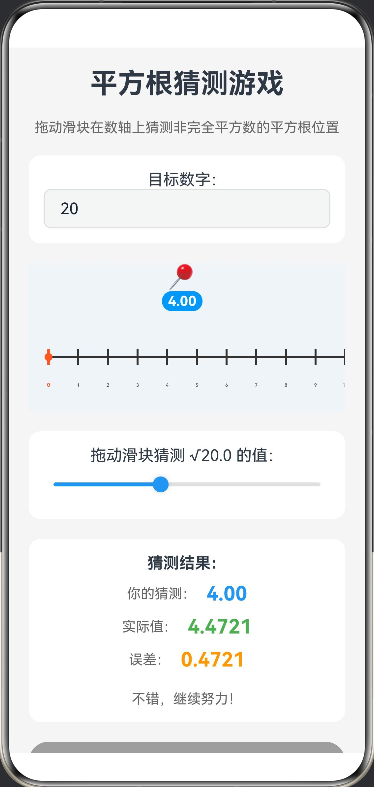
- 功能: 这是一个基于 HarmonyOS ArkTS 开发的交互式平方根猜测游戏,用户可以通过拖动滑块在数轴上猜测非完全平方数(如20)的平方根位置。系统会实时计算并显示猜测值与实际值的误差,提供即时反馈,帮助用户提升对平方根的估算能力。
@Entry
@Component
struct SquareRootGame {
  // 状态变量:目标数字(非完全平方数)
  @State targetNumber: number = 20
  // 状态变量:用户猜测值
  @State guessedValue: number = 4
  // 状态变量:实际平方根值
  @State actualValue: number = Math.sqrt(20)
  // 状态变量:误差值
  @State error: number = Math.abs(4 - Math.sqrt(20))
  // 数轴范围
  private rangeMin: number = 0
  private rangeMax: number = 10
  // 数轴单位像素宽度
  private unitWidth: number = 30
  // Canvas 上下文
  private settings: RenderingContextSettings = new RenderingContextSettings(true)
  private context: CanvasRenderingContext2D = new CanvasRenderingContext2D(this.settings)

  build() {
    Scroll() {
      Column({ space: 20 }) {
        // 标题区
        Text('平方根猜测游戏')
          .fontSize(28)
          .fontWeight(FontWeight.Bold)

        Text('拖动滑块在数轴上猜测非完全平方数的平方根位置')
          .fontSize(14)
          .fontColor('#666')

        // 目标数字输入
        Column() {
          Text('目标数字:')
            .fontSize(16)
          TextInput({
            placeholder: '请输入非完全平方数,如20',
            text: this.targetNumber.toString()
          })
            .width('100%')
            .height(40)
            .borderRadius(8)
            .border({ width: 1, color: '#DDDDDD' })
            .onChange((value: string) => {
              const num = parseFloat(value)
              if (!isNaN(num) && num > 0) {
                this.targetNumber = num
                this.actualValue = Math.sqrt(num)
                this.calculateError()
              }
            })
        }
        .width('100%')
        .padding(15)
        .backgroundColor('#FFFFFF')
        .borderRadius(12)

        // 核心可视化区域:数轴
        Stack() {
          // 1. 背景:数轴刻度 (使用Canvas绘制)
          Canvas(this.context)
            .width('100%')
            .height(150)
            .backgroundColor('#F0F4F8')
            .onReady(() => {
              this.drawNumberLine()
            })

          // 2. 前景:猜测位置标记
          Row() {
            Column() {
              Text('📍')
                .fontSize(24)
              Text(`${this.guessedValue.toFixed(2)}`)
                .fontSize(14)
                .fontWeight(FontWeight.Bold)
                .fontColor('#FFFFFF')
                .backgroundColor('#2196F3')
                .borderRadius(10)
                .padding({ left: 6, right: 6, top: 2, bottom: 2 })
            }
            .offset({ x: this.guessedValue * this.unitWidth-125, y: 0 })
            .animation({ duration: 300, curve: Curve.EaseOut })
          }
          .width('100%')
          .height(150)
          .justifyContent(FlexAlign.Center)
          .alignItems(VerticalAlign.Top)
        }
        .width('100%')
        .height(150)
        .backgroundColor('#F0F4F8')
        .borderRadius(15)

        // 滑块控制
        Column() {
          Text(`拖动滑块猜测 √${this.targetNumber.toFixed(1)} 的值:`)
            .fontSize(16)
          Slider({
            value: this.guessedValue,
            min: this.rangeMin,
            max: this.rangeMax,
            step: 0.1
          })
            .width('100%')
            .height(40)
            .blockColor('#2196F3')
            .trackColor('#E0E0E0')
            .selectedColor('#2196F3')
            .onChange((value: number) => {
              this.guessedValue = value
              this.calculateError()
            })
        }
        .width('100%')
        .padding(15)
        .backgroundColor('#FFFFFF')
        .borderRadius(12)

        // 结果显示
        Column({ space: 10 }) {
          Text('猜测结果:')
            .fontSize(16)
            .fontWeight(FontWeight.Bold)

          Row({ space: 10 }) {
            Text('你的猜测:')
              .fontSize(14)
              .fontColor('#666')
            Text(`${this.guessedValue.toFixed(2)}`)
              .fontSize(20)
              .fontWeight(FontWeight.Bold)
              .fontColor('#2196F3')
          }

          Row({ space: 10 }) {
            Text('实际值:')
              .fontSize(14)
              .fontColor('#666')
            Text(`${this.actualValue.toFixed(4)}`)
              .fontSize(20)
              .fontWeight(FontWeight.Bold)
              .fontColor('#4CAF50')
          }

          Row({ space: 10 }) {
            Text('误差:')
              .fontSize(14)
              .fontColor('#666')
            Text(`${this.error.toFixed(4)}`)
              .fontSize(20)
              .fontWeight(FontWeight.Bold)
              .fontColor(this.error < 0.1 ? '#4CAF50' : '#FF9800')
          }

          Text(this.getFeedback())
            .fontSize(14)
            .fontColor('#666')
            .margin({ top: 10 })
        }
        .width('100%')
        .padding(15)
        .backgroundColor('#FFFFFF')
        .borderRadius(12)

        // 重置按钮
        Button('重置游戏')
          .width('100%')
          .height(40)
          .backgroundColor('#9E9E9E')
          .onClick(() => {
            this.targetNumber = 20
            this.guessedValue = 4
            this.actualValue = Math.sqrt(20)
            this.calculateError()
          })

        // 提示信息
        Text('提示:尝试将误差控制在0.1以内,挑战你的估算能力!')
          .fontSize(12)
          .fontColor('#999')
          .margin({ top: 10 })

      }
      .width('100%')
      .padding(20)
      .backgroundColor('#F5F5F5')
    }
    .width('100%')
    .height('100%')
  }

  // 绘制数轴
  private drawNumberLine() {
    const ctx = this.context
    const width = 360 // 画布宽度
    const height = 150 // 画布高度
    const centerX = 0 // 原点在左侧
    const centerY = height / 2 + 20

    // 清空画布
    ctx.clearRect(0, 0, width, height)

    // 绘制数轴线
    ctx.strokeStyle = '#333333'
    ctx.lineWidth = 2
    ctx.beginPath()
    ctx.moveTo(20, centerY)
    ctx.lineTo(width - 20, centerY)
    ctx.stroke()

    // 绘制箭头
    ctx.beginPath()
    ctx.moveTo(width - 20, centerY)
    ctx.lineTo(width - 30, centerY - 5)
    ctx.lineTo(width - 30, centerY + 5)
    ctx.closePath()
    ctx.fillStyle = '#333333'
    ctx.fill()

    // 绘制刻度和数字
    ctx.font = '14px sans-serif'
    ctx.textAlign = 'center'
    ctx.fillStyle = '#333333'

    for (let i = this.rangeMin; i <= this.rangeMax; i++) {
      const x = 20 + i * this.unitWidth

      // 绘制刻度线
      ctx.beginPath()
      ctx.moveTo(x, centerY - 8)
      ctx.lineTo(x, centerY + 8)
      ctx.strokeStyle = i === 0 ? '#FF5722' : '#333333'
      ctx.lineWidth = i === 0 ? 3 : 2
      ctx.stroke()

      // 绘制数字
      ctx.fillStyle = i === 0 ? '#FF5722' : '#333333'
      ctx.font = i === 0 ? 'bold 16px sans-serif' : '14px sans-serif'
      ctx.fillText(i.toString(), x, centerY + 30)
    }

    // 绘制原点标记
    ctx.beginPath()
    ctx.arc(20, centerY, 4, 0, Math.PI * 2)
    ctx.fillStyle = '#FF5722'
    ctx.fill()
  }

  // 计算误差
  private calculateError() {
    this.error = Math.abs(this.guessedValue - this.actualValue)
  }

  // 获取反馈信息
  private getFeedback(): string {
    if (this.error < 0.01) {
      return '太棒了!你是数学天才!'
    } else if (this.error < 0.1) {
      return '做得很好!误差很小!'
    } else if (this.error < 0.5) {
      return '不错,继续努力!'
    } else {
      return '再试一次,调整你的猜测!'
    }
  }
}

讨论HarmonyOS开发技术,专注于API与组件、DevEco Studio、测试、元服务和应用上架分发等。
更多推荐

 0
0 0
0- 0


 已为社区贡献402条内容

所有评论(0)