Harmonyos应用实例211:椭圆性质探索
·
3. 椭圆性质探索
功能简介:通过调整椭圆的长轴、短轴、中心坐标,实时展示椭圆的标准方程、离心率、焦点位置,支持拖动焦点观察椭圆形状变化。帮助学生理解椭圆的几何性质和参数关系。
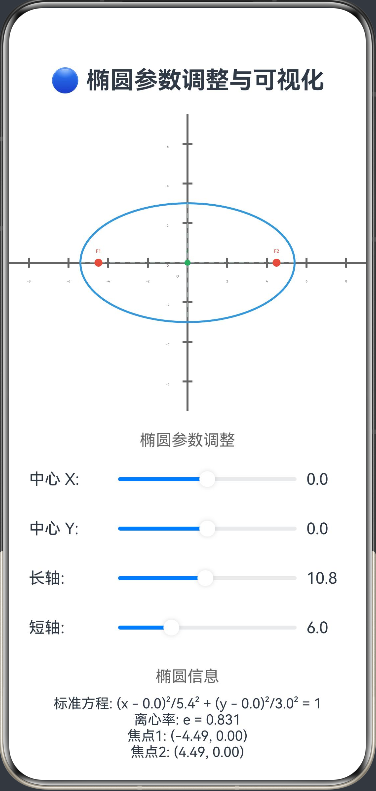
ArkTS代码:
@Entry
@Component
struct EllipseExplorer {
  @State centerX: number = 0 // 椭圆中心 x 坐标
  @State centerY: number = 0 // 椭圆中心 y 坐标
  @State majorAxis: number = 10 // 长轴长度
  @State minorAxis: number = 6 // 短轴长度
  @State eccentricity: number = 0 // 离心率
  @State focus1: [number, number] = [0, 0] // 焦点1坐标
  @State focus2: [number, number] = [0, 0] // 焦点2坐标
  @State isDragging: boolean = false // 是否正在拖动焦点
  @State draggingFocus: number = 0 // 正在拖动的焦点索引 (1或2)
  private settings: RenderingContextSettings = new RenderingContextSettings(true)
  private context: CanvasRenderingContext2D = new CanvasRenderingContext2D(this.settings)

  build() {
    Column() {
      Text('🔵 椭圆参数调整与可视化')
        .fontSize(24).fontWeight(FontWeight.Bold).margin({ bottom: 20 })

      Canvas(this.context)
        .width(400).height(300)
        .onReady(() => this.drawEllipse())
        .gesture(
          PanGesture({
            fingers: 1,
            direction: PanDirection.All
          })
            .onActionStart((event: GestureEvent) => {
              this.checkFocusDrag(event)
            })
            .onActionUpdate((event: GestureEvent) => {
              this.handleFocusDrag(event)
            })
            .onActionEnd(() => {
              this.isDragging = false
              this.draggingFocus = 0
            })
        )

      Text('椭圆参数调整')
        .fontSize(16).fontColor('#666').margin({ top: 20, bottom: 10 })

      Row() {
        Text('中心 X: ')
          .width(80)
        Slider({
          value: this.centerX,
          min: -10,
          max: 10,
          step: 0.1
        })
          .width(200)
          .onChange((val: number) => {
            this.centerX = val
            this.calculateParameters()
          })
        Text(this.centerX.toFixed(1))
          .width(60)
      }
      .margin({ bottom: 10 })

      Row() {
        Text('中心 Y: ')
          .width(80)
        Slider({
          value: this.centerY,
          min: -10,
          max: 10,
          step: 0.1
        })
          .width(200)
          .onChange((val: number) => {
            this.centerY = val
            this.calculateParameters()
          })
        Text(this.centerY.toFixed(1))
          .width(60)
      }
      .margin({ bottom: 10 })

      Row() {
        Text('长轴: ')
          .width(80)
        Slider({
          value: this.majorAxis,
          min: 2,
          max: 20,
          step: 0.1
        })
          .width(200)
          .onChange((val: number) => {
            this.majorAxis = val
            this.calculateParameters()
          })
        Text(this.majorAxis.toFixed(1))
          .width(60)
      }
      .margin({ bottom: 10 })

      Row() {
        Text('短轴: ')
          .width(80)
        Slider({
          value: this.minorAxis,
          min: 1,
          max: 18,
          step: 0.1
        })
          .width(200)
          .onChange((val: number) => {
            this.minorAxis = val
            this.calculateParameters()
          })
        Text(this.minorAxis.toFixed(1))
          .width(60)
      }
      .margin({ bottom: 20 })

      Text('椭圆信息')
        .fontSize(16).fontColor('#666').margin({ bottom: 10 })
      Text(`标准方程: (x - ${this.centerX.toFixed(1)})²/${(this.majorAxis/2).toFixed(1)}² + (y - ${this.centerY.toFixed(1)})²/${(this.minorAxis/2).toFixed(1)}² = 1`)
        .fontSize(14)
      Text(`离心率: e = ${this.eccentricity.toFixed(3)}`)
        .fontSize(14)
      Text(`焦点1: (${this.focus1[0].toFixed(2)}, ${this.focus1[1].toFixed(2)})`)
        .fontSize(14)
      Text(`焦点2: (${this.focus2[0].toFixed(2)}, ${this.focus2[1].toFixed(2)})`)
        .fontSize(14)
    }
    .padding(20)
  }

  private calculateParameters() {
    const a = this.majorAxis / 2 // 长半轴
    const b = this.minorAxis / 2 // 短半轴

    // 计算焦距 c
    const c = Math.sqrt(a * a - b * b)

    // 计算离心率
    this.eccentricity = c / a

    // 计算焦点位置
    this.focus1[0] = this.centerX - c
    this.focus1[1] = this.centerY
    this.focus2[0] = this.centerX + c
    this.focus2[1] = this.centerY

    this.drawEllipse()
  }

  private checkFocusDrag(event: PanGestureEvent) {
    const width = 400
    const height = 300
    const centerX = width / 2
    const centerY = height / 2
    const scale = 20 // 缩放因子

    // 转换鼠标坐标到椭圆坐标系
    const mouseX = (event.offsetX - centerX) / scale
    const mouseY = (centerY - event.offsetY) / scale

    // 检查是否点击了焦点
    const dist1 = Math.sqrt(Math.pow(mouseX - this.focus1[0], 2) + Math.pow(mouseY - this.focus1[1], 2))
    const dist2 = Math.sqrt(Math.pow(mouseX - this.focus2[0], 2) + Math.pow(mouseY - this.focus2[1], 2))

    if (dist1 < 0.5) {
      this.isDragging = true
      this.draggingFocus = 1
    } else if (dist2 < 0.5) {
      this.isDragging = true
      this.draggingFocus = 2
    }
  }

  private handleFocusDrag(event: PanGestureEvent) {
    if (!this.isDragging) return

    const width = 400
    const height = 300
    const centerX = width / 2
    const centerY = height / 2
    const scale = 20 // 缩放因子

    // 转换鼠标坐标到椭圆坐标系
    const mouseX = (event.offsetX - centerX) / scale
    const mouseY = (centerY - event.offsetY) / scale

    if (this.draggingFocus === 1) {
      this.focus1[0] = mouseX
      this.focus1[1] = mouseY
      // 重新计算中心和长轴
      this.updateEllipseFromFoci()
    } else if (this.draggingFocus === 2) {
      this.focus2[0] = mouseX
      this.focus2[1] = mouseY
      // 重新计算中心和长轴
      this.updateEllipseFromFoci()
    }
  }

  private updateEllipseFromFoci() {
    // 根据焦点位置重新计算椭圆参数
    const focus1X = this.focus1[0]
    const focus1Y = this.focus1[1]
    const focus2X = this.focus2[0]
    const focus2Y = this.focus2[1]

    // 计算新的中心
    this.centerX = (focus1X + focus2X) / 2
    this.centerY = (focus1Y + focus2Y) / 2

    // 计算焦距 c
    const c = Math.sqrt(Math.pow(focus2X - focus1X, 2) + Math.pow(focus2Y - focus1Y, 2)) / 2

    // 保持短轴不变,重新计算长轴
    const b = this.minorAxis / 2
    const a = Math.sqrt(b * b + c * c)
    this.majorAxis = 2 * a

    // 重新计算离心率
    this.eccentricity = c / a

    this.drawEllipse()
  }

  private drawEllipse() {
    const width = 400
    const height = 300
    const centerX = width / 2
    const centerY = height / 2
    const scale = 20 // 缩放因子

    const ctx = this.context
    ctx.clearRect(0, 0, width, height)

    // 绘制坐标系
    this.drawCoordinateSystem(ctx, centerX, centerY, scale)

    // 绘制椭圆
    this.drawEllipseShape(ctx, centerX, centerY, scale)

    // 绘制焦点
    this.drawFoci(ctx, centerX, centerY, scale)

    // 绘制中心
    this.drawCenter(ctx, centerX, centerY, scale)
  }

  private drawCoordinateSystem(ctx: CanvasRenderingContext2D, centerX: number, centerY: number, scale: number) {
    // 绘制坐标轴
    ctx.strokeStyle = '#666666'
    ctx.lineWidth = 2

    // X轴
    ctx.beginPath()
    ctx.moveTo(0, centerY)
    ctx.lineTo(400, centerY)
    ctx.stroke()

    // Y轴
    ctx.beginPath()
    ctx.moveTo(centerX, 0)
    ctx.lineTo(centerX, 300)
    ctx.stroke()

    // 绘制刻度
    ctx.font = '10px sans-serif'
    ctx.fillStyle = '#666666'
    ctx.textAlign = 'center'

    // X轴刻度
    for (let x = centerX; x < 400; x += scale * 2) {
      ctx.beginPath()
      ctx.moveTo(x, centerY - 5)
      ctx.lineTo(x, centerY + 5)
      ctx.stroke()
      const value = (x - centerX) / scale
      ctx.fillText(value.toString(), x, centerY + 20)
    }

    for (let x = centerX; x > 0; x -= scale * 2) {
      ctx.beginPath()
      ctx.moveTo(x, centerY - 5)
      ctx.lineTo(x, centerY + 5)
      ctx.stroke()
      const value = (x - centerX) / scale
      ctx.fillText(value.toString(), x, centerY + 20)
    }

    // Y轴刻度
    for (let y = centerY; y < 300; y += scale * 2) {
      ctx.beginPath()
      ctx.moveTo(centerX - 5, y)
      ctx.lineTo(centerX + 5, y)
      ctx.stroke()
      const value = (centerY - y) / scale
      ctx.fillText(value.toString(), centerX - 20, y + 4)
    }

    for (let y = centerY; y > 0; y -= scale * 2) {
      ctx.beginPath()
      ctx.moveTo(centerX - 5, y)
      ctx.lineTo(centerX + 5, y)
      ctx.stroke()
      const value = (centerY - y) / scale
      ctx.fillText(value.toString(), centerX - 20, y + 4)
    }

    // 绘制原点
    ctx.fillText('O', centerX - 10, centerY + 15)
  }

  private drawEllipseShape(ctx: CanvasRenderingContext2D, centerX: number, centerY: number, scale: number) {
    const a = this.majorAxis / 2 // 长半轴
    const b = this.minorAxis / 2 // 短半轴
    const screenCenterX = centerX + this.centerX * scale
    const screenCenterY = centerY - this.centerY * scale
    const screenA = a * scale
    const screenB = b * scale

    // 绘制椭圆
    ctx.strokeStyle = '#3498DB'
    ctx.lineWidth = 2
    ctx.beginPath()

    // 使用椭圆绘制算法
    for (let angle = 0; angle < 2 * Math.PI; angle += 0.01) {
      const x = screenCenterX + screenA * Math.cos(angle)
      const y = screenCenterY + screenB * Math.sin(angle)
      if (angle === 0) {
        ctx.moveTo(x, y)
      } else {
        ctx.lineTo(x, y)
      }
    }
    ctx.closePath()
    ctx.stroke()

    // 绘制长轴和短轴
    ctx.strokeStyle = '#95A5A6'
    ctx.lineWidth = 1
    ctx.setLineDash([5, 5])

    // 长轴
    ctx.beginPath()
    ctx.moveTo(screenCenterX - screenA, screenCenterY)
    ctx.lineTo(screenCenterX + screenA, screenCenterY)
    ctx.stroke()

    // 短轴
    ctx.beginPath()
    ctx.moveTo(screenCenterX, screenCenterY - screenB)
    ctx.lineTo(screenCenterX, screenCenterY + screenB)
    ctx.stroke()

    ctx.setLineDash([])
  }

  private drawFoci(ctx: CanvasRenderingContext2D, centerX: number, centerY: number, scale: number) {
    // 绘制焦点
    ctx.fillStyle = '#E74C3C'
    ctx.font = '14px sans-serif'
    ctx.textAlign = 'center'

    // 焦点1
    const screenFocus1X = centerX + this.focus1[0] * scale
    const screenFocus1Y = centerY - this.focus1[1] * scale
    ctx.beginPath()
    ctx.arc(screenFocus1X, screenFocus1Y, 4, 0, 2 * Math.PI)
    ctx.fill()
    ctx.fillText('F1', screenFocus1X, screenFocus1Y - 10)

    // 焦点2
    const screenFocus2X = centerX + this.focus2[0] * scale
    const screenFocus2Y = centerY - this.focus2[1] * scale
    ctx.beginPath()
    ctx.arc(screenFocus2X, screenFocus2Y, 4, 0, 2 * Math.PI)
    ctx.fill()
    ctx.fillText('F2', screenFocus2X, screenFocus2Y - 10)
  }

  private drawCenter(ctx: CanvasRenderingContext2D, centerX: number, centerY: number, scale: number) {
    // 绘制中心
    const screenCenterX = centerX + this.centerX * scale
    const screenCenterY = centerY - this.centerY * scale

    ctx.fillStyle = '#27AE60'
    ctx.beginPath()
    ctx.arc(screenCenterX, screenCenterY, 3, 0, 2 * Math.PI)
    ctx.fill()

    ctx.font = '12px sans-serif'
    ctx.textAlign = 'center'
    ctx.fillText('C', screenCenterX, screenCenterY - 10)
  }
}

讨论HarmonyOS开发技术,专注于API与组件、DevEco Studio、测试、元服务和应用上架分发等。
更多推荐

 2
2 0
0- 0


 已为社区贡献402条内容

所有评论(0)