Harmonyos应用实例204:圆锥曲线的方程
·
第三章:圆锥曲线的方程
6. 椭圆定义“绳长”模拟
对应章节:3.1 椭圆
功能简介:
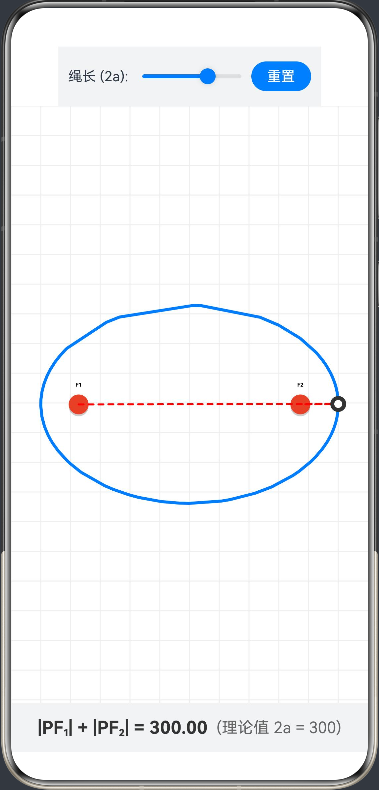
模拟“绳子固定两端画椭圆”的物理过程。屏幕上有两个焦点 F1,F2F_1, F_2F1,F2 和一条“绳子”。学生拖动笔尖(屏幕上的点)移动,系统约束该点始终满足 ∣PF1∣+∣PF2∣=2a|PF_1| + |PF_2| = 2a∣PF1∣+∣PF2∣=2a。移动过程中实时绘制轨迹,生成椭圆。
@Entry
@Component
struct EllipseDrawingSimulation {
  private settings: RenderingContextSettings = new RenderingContextSettings(true);
  private context: CanvasRenderingContext2D = new CanvasRenderingContext2D(this.settings);

  // 画布尺寸
  private canvasWidth: number = 0;
  private canvasHeight: number = 0;

  // 椭圆参数
  @State a: number = 150; // 半长轴 a (绳长 = 2a)
  @State b: number = 100; // 半短轴 b
  private c: number = 0; // 焦距 c = sqrt(a^2 - b^2)

  // 焦点坐标 (屏幕坐标系)
  private f1: Point = { x: 0, y: 0 };
  private f2: Point = { x: 0, y: 0 };
  private center: Point = { x: 0, y: 0 };

  // 笔尖状态
  @State penX: number = 0;
  @State penY: number = 0;

  // 轨迹记录
  private pathPoints: Point[] = [];
  @State currentSumDist: string = "0.00";

  aboutToAppear() {
    // 初始计算参数
    this.calculateParams();
  }

  // 根据参数计算焦点位置等
  private calculateParams() {
    // 确保 a >= b
    if (this.a < this.b) {
      let temp = this.a;
      this.a = this.b;
      this.b = temp;
    }
    // 计算焦距
    this.c = Math.sqrt(this.a * this.a - this.b * this.b);

    // 假设画布中心
    // 实际坐标会在 onAreaChange 中更新,这里先预估值防止初始报错
    this.center = { x: this.canvasWidth / 2, y: this.canvasHeight / 2 };

    this.f1 = { x: this.center.x - this.c, y: this.center.y };
    this.f2 = { x: this.center.x + this.c, y: this.center.y };

    // 初始笔尖位置 (椭圆右顶点)
    this.penX = this.center.x + this.a;
    this.penY = this.center.y;

    this.pathPoints = [];
    this.currentSumDist = (2 * this.a).toFixed(2);
  }

  // 核心绘制逻辑
  private drawScene() {
    if (!this.context || this.canvasWidth === 0) return;

    // 1. 清空画布
    this.context.clearRect(0, 0, this.canvasWidth, this.canvasHeight);

    // 绘制背景网格 (可选,增加视觉效果)
    this.drawGrid();

    // 2. 绘制已生成的轨迹
    if (this.pathPoints.length > 1) {
      this.context.beginPath();
      this.context.moveTo(this.pathPoints[0].x, this.pathPoints[0].y);
      for (let p of this.pathPoints) {
        this.context.lineTo(p.x, p.y);
      }
      this.context.strokeStyle = '#007DFF'; // 蓝色轨迹
      this.context.lineWidth = 3;
      this.context.lineCap = 'round';
      this.context.lineJoin = 'round';
      this.context.stroke();
    }

    // 3. 绘制两个焦点 (图钉)
    this.drawPin(this.f1.x, this.f1.y, 'F1');
    this.drawPin(this.f2.x, this.f2.y, 'F2');

    // 4. 绘制绳子 (F1 -> Pen -> F2)
    this.context.beginPath();
    this.context.moveTo(this.f1.x, this.f1.y);
    this.context.lineTo(this.penX, this.penY);
    this.context.lineTo(this.f2.x, this.f2.y);
    this.context.strokeStyle = '#FF0000'; // 红色绳子
    this.context.lineWidth = 2;
    this.context.setLineDash([5, 5]); // 虚线模拟绳子
    this.context.stroke();
    this.context.setLineDash([]); // 恢复实线

    // 5. 绘制笔尖
    this.context.beginPath();
    this.context.arc(this.penX, this.penY, 8, 0, 6.28);
    this.context.fillStyle = '#333333';
    this.context.fill();
    this.context.beginPath();
    this.context.arc(this.penX, this.penY, 4, 0, 6.28);
    this.context.fillStyle = '#FFFFFF';
    this.context.fill();
  }

  // 绘制图钉
  private drawPin(x: number, y: number, label: string) {
    // 钉子阴影
    this.context.beginPath();
    this.context.arc(x, y + 2, 10, 0, 6.28);
    this.context.fillStyle = 'rgba(0,0,0,0.2)';
    this.context.fill();

    // 钉子本体
    this.context.beginPath();
    this.context.arc(x, y, 10, 0, 6.28);
    this.context.fillStyle = '#E84026'; // 红色图钉
    this.context.fill();

    // 文字标签
    this.context.font = 'bold 16px sans-serif';
    this.context.fillStyle = '#000000';
    this.context.textAlign = 'center';
    this.context.fillText(label, x, y - 18);
  }

  // 绘制背景网格
  private drawGrid() {
    this.context.strokeStyle = '#EEEEEE';
    this.context.lineWidth = 1;
    const step = 30;
    for (let x = 0; x < this.canvasWidth; x += step) {
      this.context.beginPath();
      this.context.moveTo(x, 0);
      this.context.lineTo(x, this.canvasHeight);
      this.context.stroke();
    }
    for (let y = 0; y < this.canvasHeight; y += step) {
      this.context.beginPath();
      this.context.moveTo(0, y);
      this.context.lineTo(this.canvasWidth, y);
      this.context.stroke();
    }
  }

  build() {
    Column() {
      // 控制面板
      Row() {
        Text('绳长 (2a): ').fontSize(14)
        Slider({ value: this.a, min: 50, max: 200, step: 1, style: SliderStyle.OutSet })
          .width(120)
          .blockColor('#007DFF')
          .onChange((value: number) => {
            this.a = value;
            this.calculateParams();
            this.drawScene();
          })

        Button('重置')
          .fontSize(14)
          .height(30)
          .onClick(() => {
            this.pathPoints = [];
            this.penX = this.center.x + this.a;
            this.penY = this.center.y;
            this.drawScene();
          })
      }
      .padding(10)
      .backgroundColor('#F1F3F5')

      // 画布区域
      Canvas(this.context)
        .width('100%')
        .layoutWeight(1)
        .backgroundColor('#FFFFFF')
        .onReady(() => {
          // 获取画布尺寸并初始化
          // 这里的 width/height 获取可能需要根据具体容器微调,这里使用Area接口估算
        })
        .onAreaChange((oldValue: Area, newValue: Area) => {
          // 屏幕尺寸变化或初次加载时更新坐标
          this.canvasWidth = Number(newValue.width);
          this.canvasHeight = Number(newValue.height);
          this.calculateParams();
          this.drawScene();
        })
        .onTouch((event: TouchEvent) => {
          if (event.type === TouchType.Move || event.type === TouchType.Down) {
            // 获取手指坐标
            let touchX = event.touches[0].x;
            let touchY = event.touches[0].y;

            // 计算手指相对于中心的角度
            let dx = touchX - this.center.x;
            let dy = touchY - this.center.y;
            let angle = Math.atan2(dy, dx);

            // 约束点 P:根据角度强制将笔尖映射到椭圆方程上
            // 椭圆参数方程: x = a*cos(t), y = b*sin(t)
            this.penX = this.center.x + this.a * Math.cos(angle);
            this.penY = this.center.y + this.b * Math.sin(angle);

            // 记录轨迹点 (可以增加采样判断,避免点太密集)
            this.pathPoints.push({ x: this.penX, y: this.penY });

            // 实时计算物理量验证
            let dist1 = Math.sqrt(Math.pow(this.penX - this.f1.x, 2) + Math.pow(this.penY - this.f1.y, 2));
            let dist2 = Math.sqrt(Math.pow(this.penX - this.f2.x, 2) + Math.pow(this.penY - this.f2.y, 2));
            this.currentSumDist = (dist1 + dist2).toFixed(2);

            // 触发重绘
            this.drawScene();
          }
        })

      // 数据显示面板
      Row() {
        Text(`|PF₁| + |PF₂| = ${this.currentSumDist}`)
          .fontSize(18)
          .fontColor('#333')
          .fontWeight(FontWeight.Bold)
        Text(`  (理论值 2a = ${(this.a * 2).toFixed(0)})`)
          .fontSize(16)
          .fontColor('#666')
      }
      .width('100%')
      .height(50)
      .justifyContent(FlexAlign.Center)
      .backgroundColor('#F1F3F5')
    }
    .width('100%')
    .height('100%')
  }
}

interface Point {
  x: number;
  y: number;
}

讨论HarmonyOS开发技术,专注于API与组件、DevEco Studio、测试、元服务和应用上架分发等。
更多推荐

 0
0 0
0- 0


 已为社区贡献402条内容

所有评论(0)