实例 4:平面镜成像特点探究
·
实例 4:平面镜成像特点探究
功能介绍:
交互式模拟平面镜成像实验。学生拖动屏幕上的物体(如蜡烛),系统实时绘制其关于镜面对称的像。应用通过网格背景和距离标尺,直观验证“像与物到镜面距离相等”、“像与物大小相等”、“虚像”等特点。点击“遮挡玻璃板”功能,演示像无法呈现在光屏上,强化虚像概念。
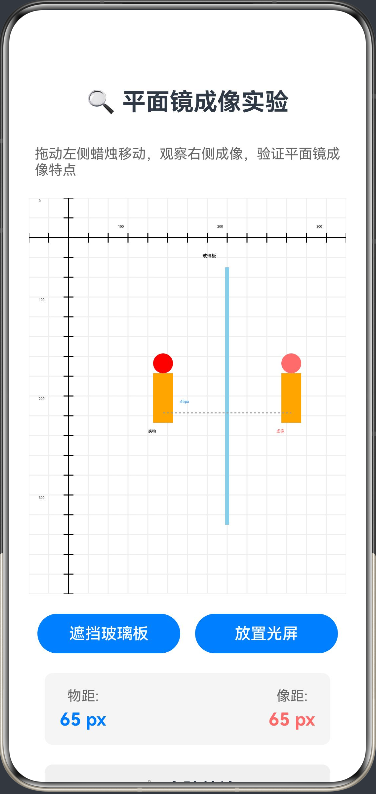
@Entry
@Component
struct PlaneMirrorImaging {
  private settings: RenderingContextSettings = new RenderingContextSettings(true);
  private context: CanvasRenderingContext2D = new CanvasRenderingContext2D(this.settings);

  @State objX: number = 100; // 物体X坐标
  @State objY: number = 200; // 物体Y坐标
  @State isBlocked: boolean = false; // 是否遮挡玻璃板
  @State screenVisible: boolean = false; // 是否显示光屏
  private mirrorX: number = 200; // 镜面位置
  private canvasWidth: number = 400;
  private canvasHeight: number = 400;

  build() {
    Column({ space: 20 }) {
      Text('🔍 平面镜成像实验')
        .fontSize(24).fontWeight(FontWeight.Bold)
        .margin({ top: 20, bottom: 10 })

      Text('拖动左侧蜡烛移动,观察右侧成像,验证平面镜成像特点')
        .fontSize(14).fontColor('#666666')

      Canvas(this.context)
        .width('100%')
        .height(400)
        .backgroundColor('#FFFFFF')
        .onReady(() => this.drawScene())
        .onTouch((event: TouchEvent) => {
          if (event.type === TouchType.Move) {
            // 限制物体只能在镜面左侧移动
            if (event.touches[0].x < this.mirrorX - 10 &&
                event.touches[0].x > 20 &&
                event.touches[0].y > 70 &&
                event.touches[0].y < 330) {
              this.objX = event.touches[0].x;
              this.objY = event.touches[0].y;
              this.drawScene();
            }
          }
        })

      Row({ space: 15 }) {
        Button(this.isBlocked ? '移除遮挡' : '遮挡玻璃板')
          .width('45%')
          .height(40)
          .onClick(() => {
            this.isBlocked = !this.isBlocked;
            this.drawScene();
          })

        Button(this.screenVisible ? '移除光屏' : '放置光屏')
          .width('45%')
          .height(40)
          .onClick(() => {
            this.screenVisible = !this.screenVisible;
            this.drawScene();
          })
      }

      Row() {
        Column({
          space: 5
        }) {
          Text('物距:')
            .fontSize(14).fontColor('#666666')
          Text(`${(this.mirrorX - this.objX).toFixed(0)} px`)
            .fontSize(18).fontWeight(FontWeight.Bold).fontColor('#007DFF')
        }
        Blank()
        Column({
          space: 5
        }) {
          Text('像距:')
            .fontSize(14).fontColor('#666666')
          Text(`${(this.mirrorX - this.objX).toFixed(0)} px`)
            .fontSize(18).fontWeight(FontWeight.Bold).fontColor('#FF6B6B')
        }
      }
      .width('90%')
      .padding(15)
      .backgroundColor('#F5F5F5')
      .borderRadius(8)

      Column() {
        Text('📋 实验结论')
          .fontSize(18).fontWeight(FontWeight.Bold)
          .margin({ bottom: 10 })

        Text('1. 像与物到镜面的距离相等')
          .fontSize(14)
          .margin({ bottom: 5 })
        Text('2. 像与物的大小相等')
          .fontSize(14)
          .margin({ bottom: 5 })
        Text('3. 像与物关于镜面对称')
          .fontSize(14)
          .margin({ bottom: 5 })
        Text('4. 平面镜成的是虚像,无法呈现在光屏上')
          .fontSize(14)
          .margin({ bottom: 5 })
      }
      .width('90%')
      .padding(15)
      .backgroundColor('#F0F0F0')
      .borderRadius(8)

      Text('💡 实验提示:点击"遮挡玻璃板"按钮,观察像的变化;点击"放置光屏"按钮,验证虚像无法呈现在光屏上。')
        .fontSize(12).fontColor('#999999')
        .margin({ bottom: 20 })
    }
    .width('100%')
    .height('100%')
    .padding(20)
  }

  private drawScene() {
    const ctx = this.context;
    ctx.clearRect(0, 0, this.canvasWidth, this.canvasHeight);

    // 绘制网格
    this.drawGrid(ctx);

    // 绘制距离标尺
    this.drawRuler(ctx);

    // 绘制镜面
    this.drawMirror(ctx);

    // 绘制物体 (蜡烛)
    this.drawCandle(ctx, this.objX, this.objY, '实物', false);

    // 计算像的位置:关于 mirrorX 对称
    let imgX = 2 * this.mirrorX - this.objX;

    // 绘制像 (虚线)
    if (!this.isBlocked) {
      ctx.setLineDash([5, 5]);
      this.drawCandle(ctx, imgX, this.objY, '虚像', true);
      ctx.setLineDash([]);

      // 绘制对称轴
      this.drawAxis(ctx);
    }

    // 绘制光屏
    if (this.screenVisible) {
      this.drawScreen(ctx, imgX, this.objY);
    }
  }

  private drawGrid(ctx: CanvasRenderingContext2D) {
    ctx.strokeStyle = '#EEEEEE';
    ctx.lineWidth = 1;

    // 绘制垂直线
    for (let x = 0; x <= this.canvasWidth; x += 20) {
      ctx.beginPath();
      ctx.moveTo(x, 0);
      ctx.lineTo(x, this.canvasHeight);
      ctx.stroke();
    }

    // 绘制水平线
    for (let y = 0; y <= this.canvasHeight; y += 20) {
      ctx.beginPath();
      ctx.moveTo(0, y);
      ctx.lineTo(this.canvasWidth, y);
      ctx.stroke();
    }
  }

  private drawRuler(ctx: CanvasRenderingContext2D) {
    // 顶部水平标尺
    ctx.strokeStyle = '#000000';
    ctx.lineWidth = 1;
    ctx.beginPath();
    ctx.moveTo(0, 40);
    ctx.lineTo(this.canvasWidth, 40);
    ctx.stroke();

    // 标尺刻度
    for (let x = 0; x <= this.canvasWidth; x += 20) {
      ctx.beginPath();
      ctx.moveTo(x, 35);
      ctx.lineTo(x, 45);
      ctx.stroke();

      if (x % 100 === 0) {
        ctx.fillStyle = '#000000';
        ctx.font = '10px Arial';
        ctx.fillText(x.toString(), x - 10, 30);
      }
    }

    // 左侧垂直标尺
    ctx.beginPath();
    ctx.moveTo(40, 0);
    ctx.lineTo(40, this.canvasHeight);
    ctx.stroke();

    // 标尺刻度
    for (let y = 0; y <= this.canvasHeight; y += 20) {
      ctx.beginPath();
      ctx.moveTo(35, y);
      ctx.lineTo(45, y);
      ctx.stroke();

      if (y % 100 === 0) {
        ctx.fillStyle = '#000000';
        ctx.font = '10px Arial';
        ctx.fillText(y.toString(), 10, y + 4);
      }
    }
  }

  private drawMirror(ctx: CanvasRenderingContext2D) {
    // 绘制镜面
    ctx.strokeStyle = '#87CEEB';
    ctx.lineWidth = 4;
    ctx.beginPath();
    ctx.moveTo(this.mirrorX, 70);
    ctx.lineTo(this.mirrorX, 330);
    ctx.stroke();

    // 绘制镜面标签
    ctx.fillStyle = '#000000';
    ctx.font = '14px Arial';
    ctx.fillText('玻璃板', this.mirrorX - 25, 60);

    // 绘制遮挡效果
    if (this.isBlocked) {
      ctx.fillStyle = 'rgba(0, 0, 0, 0.3)';
      ctx.fillRect(this.mirrorX - 2, 70, 4, 260);
      ctx.fillStyle = '#000000';
      ctx.font = '12px Arial';
      ctx.fillText('已遮挡', this.mirrorX - 20, 350);
    }
  }

  private drawCandle(ctx: CanvasRenderingContext2D, x: number, y: number, label: string, isImage: boolean) {
    // 烛身
    ctx.fillStyle = isImage ? '#FFA500' : '#FFA500';
    ctx.fillRect(x - 10, y - 40, 20, 50);

    // 火焰
    ctx.fillStyle = isImage ? '#FF6B6B' : '#FF0000';
    ctx.beginPath();
    ctx.arc(x, y - 50, 10, 0, Math.PI * 2);
    ctx.fill();

    // 标签
    ctx.fillStyle = isImage ? '#FF6B6B' : '#000000';
    ctx.font = '12px Arial';
    ctx.fillText(label, x - 15, y + 20);
  }

  private drawAxis(ctx: CanvasRenderingContext2D) {
    // 绘制对称轴
    ctx.strokeStyle = '#999999';
    ctx.lineWidth = 1;
    ctx.setLineDash([2, 2]);
    ctx.beginPath();
    ctx.moveTo(this.objX, this.objY);
    ctx.lineTo(2 * this.mirrorX - this.objX, this.objY);
    ctx.stroke();
    ctx.setLineDash([]);

    // 绘制距离标记
    const distance = this.mirrorX - this.objX;
    ctx.fillStyle = '#007DFF';
    ctx.font = '12px Arial';
    ctx.fillText(`${distance.toFixed(0)}px`, this.objX + distance / 2 - 15, this.objY - 10);
  }

  private drawScreen(ctx: CanvasRenderingContext2D, x: number, y: number) {
    // 绘制光屏
    ctx.fillStyle = '#FFFFFF';
    ctx.strokeStyle = '#000000';
    ctx.lineWidth = 1;
    ctx.fillRect(x - 30, y - 60, 60, 120);
    ctx.strokeRect(x - 30, y - 60, 60, 120);

    // 绘制光屏标签
    ctx.fillStyle = '#000000';
    ctx.font = '12px Arial';
    ctx.fillText('光屏', x - 15, y - 70);

    // 绘制虚像提示
    ctx.fillStyle = '#999999';
    ctx.font = '10px Arial';
    ctx.fillText('虚像无法', x - 20, y + 70);
    ctx.fillText('呈现在光屏上', x - 25, y + 85);
  }
}

讨论HarmonyOS开发技术,专注于API与组件、DevEco Studio、测试、元服务和应用上架分发等。
更多推荐


 5
5 0
0- 0


 已为社区贡献402条内容

所有评论(0)