HARMONYOS应用实例242:不等式组解集图示
·
- 不等式组解集图示
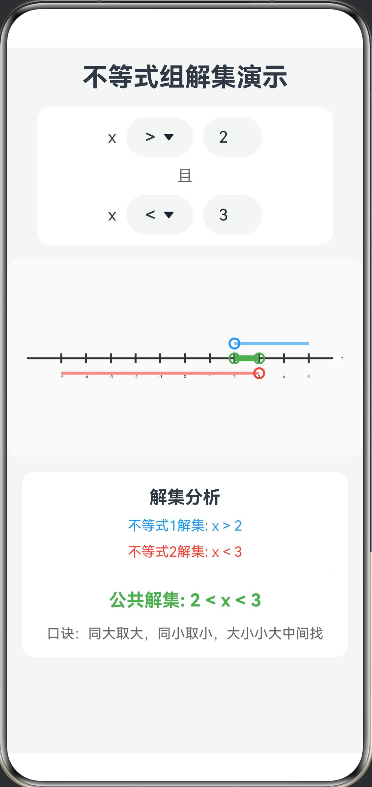
- 功能:输入两个不等式,自动在数轴上绘制两个解集,并高亮显示其公共部分。这是一个基于 HarmonyOS ArkTS 开发的交互式不等式求解工具,用户可以输入两个不等式(如 x > 2 和 x < 5),系统会自动解析并在数轴上绘制两个解集,同时高亮显示它们的公共部分。工具通过直观的可视化效果,帮助学生理解不等式的解集和交集概念。
@Entry
@Component
struct InequalityVisualizer {
  // 不等式1参数
  @State symbol1: string = '>' // 符号: >, <, >=, <=
  @State value1: number = -2   // 数值
  @State range1: Interval = { min: -Infinity, max: Infinity, minOpen: true, maxOpen: true }

  // 不等式2参数
  @State symbol2: string = '<'
  @State value2: number = 3
  @State range2: Interval = { min: -Infinity, max: Infinity, minOpen: true, maxOpen: true }

  // 画布配置
  private settings: RenderingContextSettings = new RenderingContextSettings(true)
  private context: CanvasRenderingContext2D = new CanvasRenderingContext2D(this.settings)
  private canvasWidth: number = 360
  private canvasHeight: number = 200

  // 符号选项
  private symbols: string[] = ['>', '<', '≥', '≤']

  aboutToAppear() {
    this.calculateRanges()
  }

  build() {
    Column({ space: 15 }) {
      Text('不等式组解集演示')
        .fontSize(26)
        .fontWeight(FontWeight.Bold)

      // ================= 输入控制区 =================
      Column({ space: 10 }) {
        // 不等式1 输入
        Row({ space: 10 }) {
          Text('x')
          Select(this.symbols.map(s => { return { value: s } as SelectOptionItem }))
            .selected(this.symbols.indexOf(this.symbol1))
            .value(this.symbol1)
            .font({ size: 18 })
            .onSelect((index) => {
              this.symbol1 = this.symbols[index]
              this.calculateRanges()
            })

          TextInput({ text: this.value1.toString() })
            .type(InputType.Number)
            .width(60)
            .height(40)
            .onChange((val) => {
              this.value1 = parseInt(val) || 0
              this.calculateRanges()
            })
        }
        .width('90%')
        .justifyContent(FlexAlign.Center)

        Text('且').fontSize(16).fontColor('#666')

        // 不等式2 输入
        Row({ space: 10 }) {
          Text('x')
          Select(this.symbols.map(s => { return { value: s } as SelectOptionItem }))
            .selected(this.symbols.indexOf(this.symbol2))
            .value(this.symbol2)
            .font({ size: 18 })
            .onSelect((index) => {
              this.symbol2 = this.symbols[index]
              this.calculateRanges()
            })

          TextInput({ text: this.value2.toString() })
            .type(InputType.Number)
            .width(60)
            .height(40)
            .onChange((val) => {
              this.value2 = parseInt(val) || 0
              this.calculateRanges()
            })
        }
        .width('90%')
        .justifyContent(FlexAlign.Center)
      }
      .padding(10)
      .backgroundColor('#FFFFFF')
      .borderRadius(12)

      // ================= Canvas 可视化区域 =================
      Canvas(this.context)
        .width(this.canvasWidth)
        .height(this.canvasHeight)
        .backgroundColor('#FAFAFA')
        .borderRadius(12)
        .onReady(() => {
          this.drawScene()
        })

      // ================= 结果说明区域 =================
      Column({ space: 10 }) {
        Text('解集分析')
          .fontSize(18)
          .fontWeight(FontWeight.Bold)

        // 显示计算出的解集区间
        Text(`不等式1解集: ${this.formatRange(this.range1)}`)
          .fontSize(14)
          .fontColor('#2196F3')
        Text(`不等式2解集: ${this.formatRange(this.range2)}`)
          .fontSize(14)
          .fontColor('#F44336')

        Divider().margin({ top: 5, bottom: 5 })

        // 显示公共部分
        Text(`公共解集: ${this.formatIntersection()}`)
          .fontSize(18)
          .fontWeight(FontWeight.Bold)
          .fontColor('#4CAF50')

        Text(this.getRuleTip())
          .fontSize(14)
          .fontColor('#666')
          .margin({ top: 5 })
      }
      .width('100%')
      .padding(15)
      .backgroundColor('#FFFFFF')
      .borderRadius(12)
    }
    .width('100%')
    .height('100%')
    .padding(15)
    .backgroundColor('#F5F5F5')
  }

  // 核心绘制逻辑
  private drawScene() {
    const ctx = this.context
    ctx.clearRect(0, 0, this.canvasWidth, this.canvasHeight)

    const centerY = this.canvasHeight / 2
    const centerX = this.canvasWidth / 2
    const unit = 25 // 像素/单位长度

    // 1. 绘制数轴主体
    ctx.strokeStyle = '#333'
    ctx.lineWidth = 2
    ctx.beginPath()
    ctx.moveTo(20, centerY)
    ctx.lineTo(this.canvasWidth - 20, centerY)
    ctx.stroke()
    // 箭头
    ctx.beginPath()
    ctx.moveTo(this.canvasWidth - 20, centerY)
    ctx.lineTo(this.canvasWidth - 30, centerY - 5)
    ctx.lineTo(this.canvasWidth - 30, centerY + 5)
    ctx.fill()

    // 绘制刻度 (-5 到 5)
    ctx.fillStyle = '#333'
    ctx.font = '12px sans-serif'
    ctx.textAlign = 'center'
    for (let i = -5; i <= 5; i++) {
      let x = centerX + i * unit
      ctx.beginPath()
      ctx.moveTo(x, centerY - 5)
      ctx.lineTo(x, centerY + 5)
      ctx.stroke()
      ctx.fillText(i.toString(), x, centerY + 20)
    }

    // 2. 绘制不等式1的解集 (蓝色,稍微偏上)
    this.drawRange(ctx, this.range1, centerY - 15, '#2196F3', unit, centerX)

    // 3. 绘制不等式2的解集 (红色,稍微偏下)
    this.drawRange(ctx, this.range2, centerY + 15, '#F44336', unit, centerX)

    // 4. 绘制公共部分 (绿色粗线,覆盖在轴上)
    this.drawIntersection(ctx, unit, centerX, centerY)
  }

  // 绘制单个解集范围
  private drawRange(ctx: CanvasRenderingContext2D, range: Interval, yOffset: number, color: string, unit: number, centerX: number) {
    ctx.strokeStyle = color
    ctx.lineWidth = 3
    ctx.globalAlpha = 0.6

    // 确定绘制起点和终点 (限制在可视区域 -5 到 5)
    let startX = centerX + (range.min === -Infinity ? -5 * unit : range.min * unit)
    let endX = centerX + (range.max === Infinity ? 5 * unit : range.max * unit)

    ctx.beginPath()
    ctx.moveTo(startX, yOffset)
    ctx.lineTo(endX, yOffset)
    ctx.stroke()
    ctx.globalAlpha = 1.0

    // 绘制端点圆圈
    if (range.min !== -Infinity) {
      this.drawEndpoint(ctx, centerX + range.min * unit, yOffset, range.minOpen, color)
    }
    if (range.max !== Infinity) {
      this.drawEndpoint(ctx, centerX + range.max * unit, yOffset, range.maxOpen, color)
    }
  }

  // 绘制交点解集
  private drawIntersection(ctx: CanvasRenderingContext2D, unit: number, centerX: number, centerY: number) {
    let inter = this.calculateIntersection()

    // 如果没有交集或是空集,不绘制
    if (!inter || (inter.min === Infinity && inter.max === -Infinity)) return

    ctx.strokeStyle = '#4CAF50' // 绿色
    ctx.lineWidth = 6 // 加粗显示

    let startX = centerX + (inter.min === -Infinity ? -5 * unit : inter.min * unit)
    let endX = centerX + (inter.max === Infinity ? 5 * unit : inter.max * unit)

    // 限制绘制范围
    startX = Math.max(startX, 20)
    endX = Math.min(endX, this.canvasWidth - 20)

    if (startX < endX) {
      ctx.beginPath()
      ctx.moveTo(startX, centerY)
      ctx.lineTo(endX, centerY)
      ctx.stroke()
    } else if (startX === endX && !inter.minOpen && !inter.maxOpen) {
      // 如果解集是一个点(例如 x>=3 且 x<=3)
      ctx.fillStyle = '#4CAF50'
      ctx.beginPath()
      ctx.arc(startX, centerY, 4, 0, Math.PI * 2)
      ctx.fill()
    }

    // 绘制交集端点标记
    if (inter.min !== -Infinity) {
      this.drawEndpoint(ctx, centerX + inter.min * unit, centerY, inter.minOpen, '#4CAF50')
    }
    if (inter.max !== Infinity) {
      this.drawEndpoint(ctx, centerX + inter.max * unit, centerY, inter.maxOpen, '#4CAF50')
    }
  }

  // 绘制空心或实心圆点
  private drawEndpoint(ctx: CanvasRenderingContext2D, x: number, y: number, isOpen: boolean, color: string) {
    ctx.fillStyle = '#FFFFFF' // 白色背景
    ctx.strokeStyle = color
    ctx.lineWidth = 2
    ctx.beginPath()
    ctx.arc(x, y, 5, 0, Math.PI * 2)
    if (isOpen) {
      ctx.stroke() // 空心圆
    } else {
      ctx.fill() // 实心圆(白色填充)
      ctx.stroke() // 描边
      ctx.fillStyle = color
      ctx.beginPath() // 再画一个小一点的实心圆表示包含
      ctx.arc(x, y, 3, 0, Math.PI * 2)
      ctx.fill()
    }
  }

  // 逻辑计算:根据符号生成区间对象
  private calculateRanges() {
    this.range1 = this.getRange(this.symbol1, this.value1)
    this.range2 = this.getRange(this.symbol2, this.value2)
    this.drawScene()
  }

  private getRange(symbol: string, value: number): Interval {
    switch (symbol) {
      case '>': return { min: value, max: Infinity, minOpen: true, maxOpen: true }
      case '<': return { min: -Infinity, max: value, minOpen: true, maxOpen: true }
      case '≥': return { min: value, max: Infinity, minOpen: false, maxOpen: true }
      case '≤': return { min: -Infinity, max: value, minOpen: true, maxOpen: false }
      default: return { min: -Infinity, max: Infinity, minOpen: true, maxOpen: true }
    }
  }

  // 计算交集
  private calculateIntersection(): Interval | null {
    let r1 = this.range1
    let r2 = this.range2

    // 交集的起点取两个起点的最大值
    let maxMin = Math.max(r1.min, r2.min)
    let minOpen = (r1.min > r2.min) ? r1.minOpen : ((r2.min > r1.min) ? r2.minOpen : (r1.minOpen || r2.minOpen))

    // 交集的终点取两个终点的最小值
    let minMax = Math.min(r1.max, r2.max)
    let maxOpen = (r1.max < r2.max) ? r1.maxOpen : ((r2.max < r1.max) ? r2.maxOpen : (r1.maxOpen || r2.maxOpen))

    // 判断是否为空集
    // 情况1: 起点大于终点
    if (maxMin > minMax) return null;
    // 情况2: 起点等于终点,但有一个是开区间(不包含该点)
    if (maxMin === minMax && (minOpen || maxOpen)) return null;

    return {
      min: maxMin,
      max: minMax,
      minOpen: minOpen,
      maxOpen: maxOpen
    }
  }

  // 文本格式化
  private formatRange(range: Interval): string {
    let left = range.min === -Infinity ? '' : range.min.toString()
    let right = range.max === Infinity ? '' : range.max.toString()

    if (range.min === -Infinity) return `x < ${right}`
    if (range.max === Infinity) return `x > ${left}`
    return 'Invalid'
  }

  private formatIntersection(): string {
    let inter = this.calculateIntersection()
    if (!inter) return '无解'

    if (inter.min === -Infinity && inter.max === Infinity) return '全体实数'
    if (inter.min === -Infinity) return `x <${inter.maxOpen ? '' : '='} ${inter.max}`
    if (inter.max === Infinity) return `x >${inter.minOpen ? '' : '='} ${inter.min}`
    if (inter.min === inter.max) return `x = ${inter.min}`

    return `${inter.min} <${inter.minOpen ? '' : '='} x <${inter.maxOpen ? '' : '='} ${inter.max}`
  }

  private getRuleTip(): string {
    if (!this.calculateIntersection()) return '口诀:大大小小无解'
    // 简单判断逻辑,这里可以扩展更详细的口诀匹配
    return '口诀:同大取大,同小取小,大小小大中间找'
  }
}

// 区间接口定义
interface Interval {
  min: number,
  max: number,
  minOpen: boolean, // 是否是开区间(不包含端点)
  maxOpen: boolean
}

// Select 选项接口定义
interface SelectOptionItem {
  value: string
}

讨论HarmonyOS开发技术,专注于API与组件、DevEco Studio、测试、元服务和应用上架分发等。
更多推荐


 6
6 0
0- 0


 已为社区贡献402条内容

所有评论(0)