鸿蒙flutter第三方库适配 - 儿童故事
儿童故事应用
欢迎加入开源鸿蒙跨平台社区:
https://openharmonycrossplatform.csdn.net
适配的第三方库地址:
- audioplayers: https://pub.dev/packages/audioplayers
- flutter_local_notifications: https://pub.dev/packages/flutter_local_notifications
- sqflite: https://pub.dev/packages/sqflite
- local_auth: https://pub.dev/packages/local_auth
一、项目概述
运行效果图
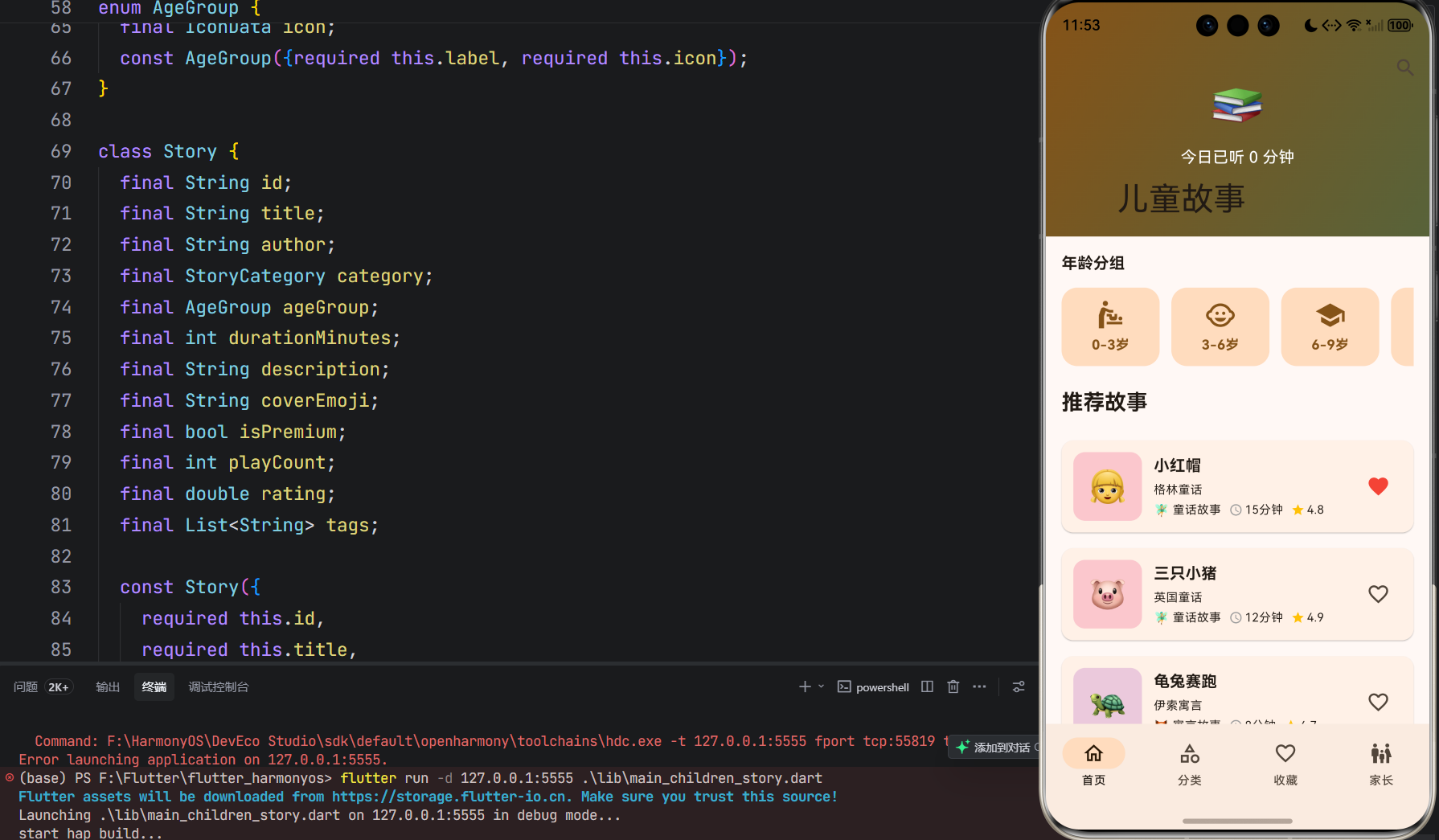
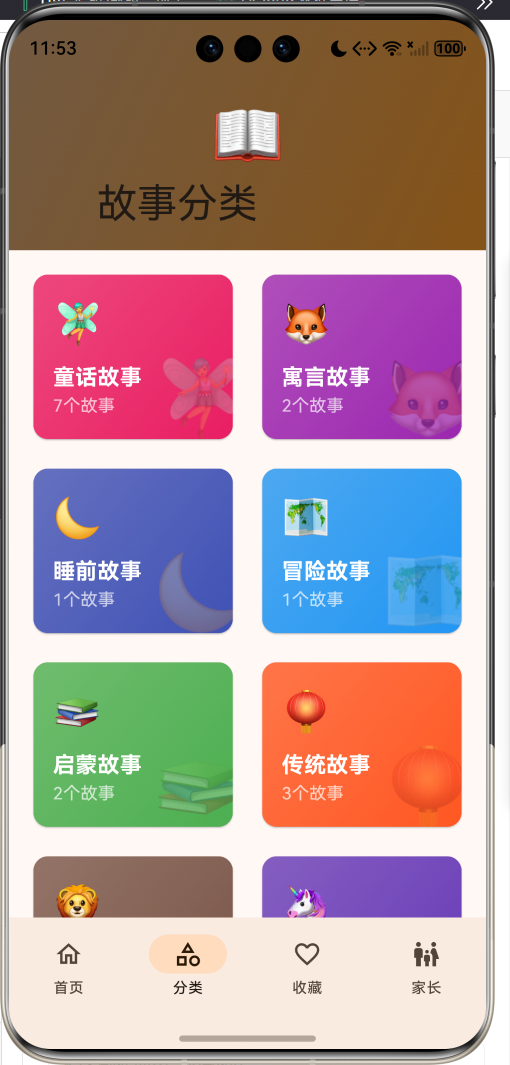
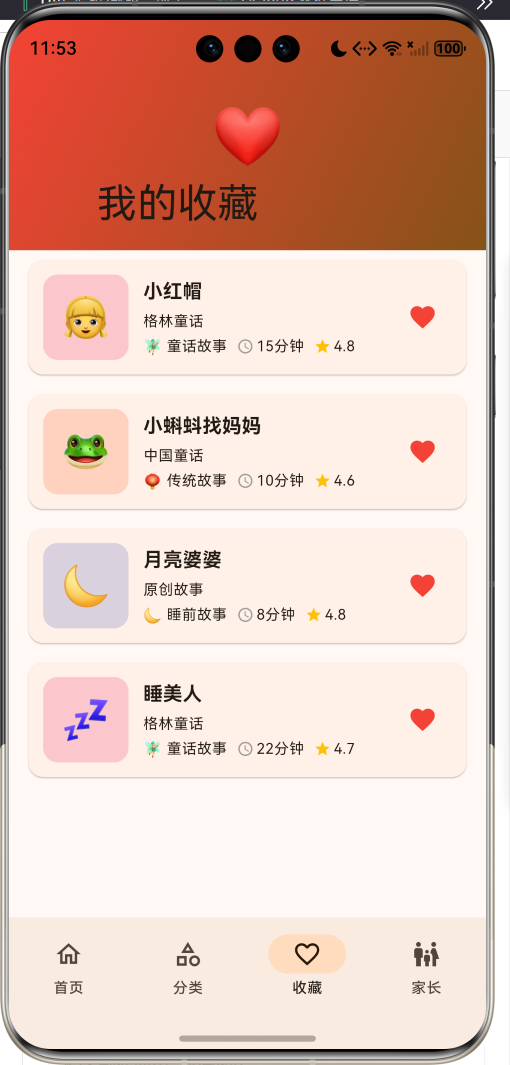
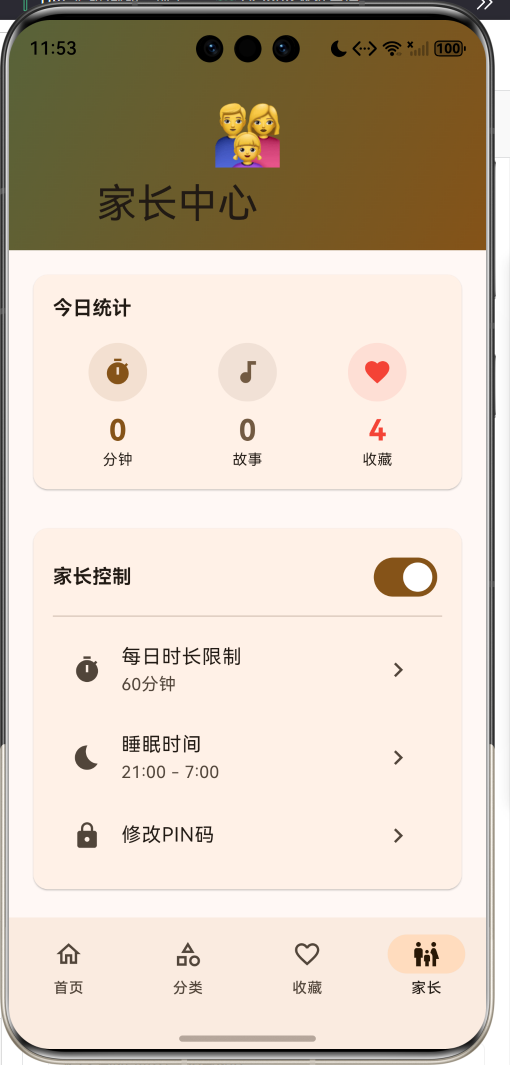
1.1 应用简介
儿童故事应用是一款专为儿童设计的故事播放应用,致力于为孩子们提供丰富多彩的故事内容。应用支持儿童故事播放、定时关闭、收藏管理、家长控制模式等功能,让孩子在安全的环境中聆听精彩故事。
应用以温暖的橙色为主色调,象征童年的快乐与温馨。涵盖首页推荐、分类浏览、收藏管理、家长中心四大模块。家长可以设置使用时长限制、睡眠时间、PIN码保护等,为孩子创造健康的听故事环境。
1.2 核心功能
| 功能模块 | 功能描述 | 实现方式 |
|---|---|---|
| 故事播放 | 播放儿童故事音频 | 音频播放器 |
| 定时关闭 | 设置定时自动关闭 | 定时器 |
| 收藏管理 | 收藏喜欢的故事 | 数据存储 |
| 家长控制 | 时长限制、睡眠时间 | 家长模式 |
| 分类浏览 | 按类型、年龄分类 | 分类筛选 |
| 搜索功能 | 搜索故事名称、作者 | 关键词匹配 |
| 年龄分组 | 按年龄段推荐内容 | 分组展示 |
| VIP内容 | 会员专属故事内容 | 会员系统 |
1.3 故事分类定义
| 序号 | 分类名称 | Emoji | 描述 | 颜色 |
|---|---|---|---|---|
| 1 | 童话故事 | 🧚 | 经典童话故事 | 粉红色 |
| 2 | 寓言故事 | 🦊 | 寓教于乐的寓言 | 紫色 |
| 3 | 睡前故事 | 🌙 | 温馨睡前故事 | 靛蓝色 |
| 4 | 冒险故事 | 🗺️ | 刺激冒险故事 | 蓝色 |
| 5 | 启蒙故事 | 📚 | 启蒙教育故事 | 绿色 |
| 6 | 传统故事 | 🏮 | 中国传统故事 | 橙红色 |
| 7 | 动物故事 | 🦁 | 可爱动物故事 | 棕色 |
| 8 | 奇幻故事 | 🦄 | 奇幻魔法故事 | 深紫色 |
1.4 年龄分组定义
| 序号 | 年龄段 | 图标 | 描述 | 特点 |
|---|---|---|---|---|
| 1 | 0-3岁 | 👶 | 婴幼儿期 | 简单儿歌、短故事 |
| 2 | 3-6岁 | 🧒 | 学龄前期 | 童话故事、启蒙 |
| 3 | 6-9岁 | 🎒 | 小学低年级 | 冒险故事、寓言 |
| 4 | 9-12岁 | 😊 | 小学高年级 | 长篇故事、名著 |
1.5 技术栈
| 技术领域 | 技术选型 | 版本要求 |
|---|---|---|
| 开发框架 | Flutter | >= 3.0.0 |
| 编程语言 | Dart | >= 2.17.0 |
| 设计规范 | Material Design 3 | - |
| 音频播放 | audioplayers | >= 5.0.0 |
| 定时提醒 | flutter_local_notifications | >= 16.0.0 |
| 数据存储 | sqflite | >= 2.0.0 |
| 生物认证 | local_auth | >= 2.0.0 |
| 目标平台 | 鸿蒙OS / Android / iOS | API 21+ |
1.6 项目结构
lib/
└── main_children_story.dart
    ├── ChildrenStoryApp              # 应用入口
    ├── StoryCategory                 # 故事分类枚举
    ├── AgeGroup                      # 年龄分组枚举
    ├── Story                         # 故事模型
    ├── StoryProgress                 # 播放进度模型
    ├── ParentalSettings              # 家长设置模型
    ├── SleepTimer                    # 睡眠定时器模型
    ├── StoryController               # 故事控制器
    ├── StoryHomePage                 # 主页面(底部导航)
    ├── _buildHomePage                # 首页
    ├── _buildCategoryPage            # 分类页
    ├── _buildFavoritesPage           # 收藏页
    ├── _buildParentalPage            # 家长中心页
    ├── _StoryDetailSheet             # 故事详情弹窗
    └── _SearchSheet                  # 搜索弹窗
二、系统架构
2.1 整体架构图
2.2 类图设计
2.3 页面导航流程
2.4 播放流程
三、核心模块设计
3.1 数据模型设计
3.1.1 故事分类枚举 (StoryCategory)
enum StoryCategory {
  fairyTale(label: '童话故事', emoji: '🧚', color: Color(0xFFE91E63)),
  fable(label: '寓言故事', emoji: '🦊', color: Color(0xFF9C27B0)),
  bedtime(label: '睡前故事', emoji: '🌙', color: Color(0xFF3F51B5)),
  adventure(label: '冒险故事', emoji: '🗺️', color: Color(0xFF2196F3)),
  educational(label: '启蒙故事', emoji: '📚', color: Color(0xFF4CAF50)),
  chinese(label: '传统故事', emoji: '🏮', color: Color(0xFFFF5722)),
  animal(label: '动物故事', emoji: '🦁', color: Color(0xFF795548)),
  fantasy(label: '奇幻故事', emoji: '🦄', color: Color(0xFF673AB7));

  final String label;
  final String emoji;
  final Color color;
  const StoryCategory({required this.label, required this.emoji, required this.color});
}
3.1.2 年龄分组枚举 (AgeGroup)
enum AgeGroup {
  toddler(label: '0-3岁', icon: Icons.baby_changing_station),
  preschool(label: '3-6岁', icon: Icons.child_care),
  earlySchool(label: '6-9岁', icon: Icons.school),
  preTeen(label: '9-12岁', icon: Icons.face);

  final String label;
  final IconData icon;
  const AgeGroup({required this.label, required this.icon});
}
3.1.3 故事模型 (Story)
class Story {
  final String id;
  final String title;
  final String author;
  final StoryCategory category;
  final AgeGroup ageGroup;
  final int durationMinutes;
  final String description;
  final String coverEmoji;
  final bool isPremium;
  final int playCount;
  final double rating;
  final List<String> tags;

  const Story({
    required this.id,
    required this.title,
    required this.author,
    required this.category,
    required this.ageGroup,
    required this.durationMinutes,
    required this.description,
    required this.coverEmoji,
    this.isPremium = false,
    this.playCount = 0,
    this.rating = 4.5,
    this.tags = const [],
  });

  String get durationText {
    if (durationMinutes >= 60) {
      final hours = durationMinutes ~/ 60;
      final mins = durationMinutes % 60;
      return '${hours}小时${mins > 0 ? '$mins分钟' : ''}';
    }
    return '$durationMinutes分钟';
  }
}
3.1.4 家长设置模型 (ParentalSettings)
class ParentalSettings {
  final bool isParentalModeEnabled;
  final int dailyLimitMinutes;
  final TimeOfDay bedtimeStart;
  final TimeOfDay bedtimeEnd;
  final bool requirePinForSettings;
  final String pin;

  const ParentalSettings({
    this.isParentalModeEnabled = true,
    this.dailyLimitMinutes = 60,
    required this.bedtimeStart,
    required this.bedtimeEnd,
    this.requirePinForSettings = true,
    this.pin = '1234',
  });
}
3.1.5 故事分类分布
3.2 页面结构设计
3.2.1 主页面布局
3.2.2 首页结构
3.2.3 家长中心结构
3.3 故事控制器逻辑
3.4 家长控制逻辑
四、UI设计规范
4.1 配色方案
应用以温暖的橙色为主色调,象征童年的快乐与温馨:
| 颜色类型 | 色值 | 用途 |
|---|---|---|
| 主色 | #FF9800 (Orange) | 导航、主题元素 |
| 辅助色 | #FFB74D | 渐变效果 |
| 第三色 | #FFCC80 | 卡片背景 |
| 强调色 | #F57C00 | 按钮高亮 |
| 背景色 | #FAFAFA | 页面背景 |
| 卡片背景 | #FFFFFF | 信息卡片 |
| 童话色 | #E91E63 | 童话故事 |
| 寓言色 | #9C27B0 | 寓言故事 |
4.2 故事分类配色
| 分类 | 色值 | 视觉效果 |
|---|---|---|
| 童话故事 | #E91E63 | 粉红色 |
| 寓言故事 | #9C27B0 | 紫色 |
| 睡前故事 | #3F51B5 | 靛蓝色 |
| 冒险故事 | #2196F3 | 蓝色 |
| 启蒙故事 | #4CAF50 | 绿色 |
| 传统故事 | #FF5722 | 橙红色 |
| 动物故事 | #795548 | 棕色 |
| 奇幻故事 | #673AB7 | 深紫色 |
4.3 字体规范
| 元素 | 字号 | 字重 | 颜色 |
|---|---|---|---|
| 页面标题 | 24px | Bold | 主色 |
| 故事标题 | 18px | Bold | #000000 |
| 作者名称 | 14px | Medium | 主色 |
| 故事描述 | 14px | Regular | #666666 |
| 分类标签 | 12px | Regular | 分类色 |
| 统计数字 | 24px | Bold | 主色 |
4.4 组件规范
4.4.1 故事卡片
┌─────────────────────────────────────┐
│  ┌────┐  小红帽               VIP   │
│  │ 👧 │  格林童话                    │
│  └────┘  🧚 童话故事 ⏱ 15分钟 ⭐4.8  ❤️│
└─────────────────────────────────────┘
4.4.2 分类卡片
┌─────────────────────┐
│  🧚                  │
│  童话故事            │
│  5个故事             │
│              🧚      │
└─────────────────────┘
4.4.3 迷你播放器
┌─────────────────────────────────────┐
│  ┌────┐  小红帽                      │
│  │ 👧 │  ═════════════●═══════      │
│  └────┘                    ▶️   ✕   │
└─────────────────────────────────────┘
4.4.4 今日统计
┌─────────────────────────────────────┐
│  今日统计                            │
│   ⏱️          🎵          ❤️       │
│   30分钟      5个故事     8个收藏    │
└─────────────────────────────────────┘
4.4.5 故事详情
┌─────────────────────────────────────┐
│                 ───                 │
│                                     │
│              ┌──────┐              │
│              │  👧  │              │
│              └──────┘              │
│                                     │
│             小红帽                  │
│           格林童话                  │
│                                     │
│  [🧚童话] [3-6岁] [⏱15分钟] [⭐4.8]│
│                                     │
│  ┌─────────────────────────────┐   │
│  │ 故事简介                    │   │
│  │ 小红帽去看望外婆的路上...   │   │
│  └─────────────────────────────┘   │
│                                     │
│  [💔 取消收藏]      [▶️ 播放]      │
└─────────────────────────────────────┘
五、核心功能实现
5.1 故事控制器实现
class StoryController extends ChangeNotifier {
  List<Story> _stories = [];
  Set<String> _favorites = {};
  Story? _currentStory;
  bool _isPlaying = false;
  SleepTimer? _sleepTimer;
  ParentalSettings _parentalSettings = ParentalSettings(...);

  void playStory(Story story) {
    _currentStory = story;
    _isPlaying = true;
    _startPlayTimer();
    notifyListeners();
  }

  void pauseStory() {
    _isPlaying = false;
    _stopPlayTimer();
    notifyListeners();
  }

  void stopStory() {
    _isPlaying = false;
    _stopPlayTimer();
    notifyListeners();
  }
}
5.2 收藏管理实现
void toggleFavorite(String storyId) {
  if (_favorites.contains(storyId)) {
    _favorites.remove(storyId);
  } else {
    _favorites.add(storyId);
  }
  notifyListeners();
}

bool isFavorite(String storyId) {
  return _favorites.contains(storyId);
}

List<Story> getFavoriteStories() {
  return _stories.where((s) => _favorites.contains(s.id)).toList();
}
5.3 睡眠定时器实现
void setSleepTimer(int minutes) {
  _sleepTimer = SleepTimer(
    minutes: minutes,
    startTime: DateTime.now(),
  );
  notifyListeners();
}

void cancelSleepTimer() {
  _sleepTimer = null;
  notifyListeners();
}

class SleepTimer {
  final int minutes;
  final DateTime startTime;

  int get remainingMinutes {
    final elapsed = DateTime.now().difference(startTime).inMinutes;
    return max(0, minutes - elapsed);
  }

  bool get isActive => remainingMinutes > 0;
}
5.4 家长控制实现
bool canPlay() {
  if (!_parentalSettings.isParentalModeEnabled) return true;
  if (isWithinBedtime()) return false;
  if (_todayPlayMinutes >= _parentalSettings.dailyLimitMinutes) return false;
  return true;
}

bool isWithinBedtime() {
  final now = TimeOfDay.now();
  final start = _parentalSettings.bedtimeStart;
  final end = _parentalSettings.bedtimeEnd;

  final nowMinutes = now.hour * 60 + now.minute;
  final startMinutes = start.hour * 60 + start.minute;
  final endMinutes = end.hour * 60 + end.minute;

  if (startMinutes > endMinutes) {
    return nowMinutes >= startMinutes || nowMinutes <= endMinutes;
  }
  return nowMinutes >= startMinutes && nowMinutes <= endMinutes;
}

bool verifyPin(String pin) {
  if (pin == _parentalSettings.pin) {
    _isParentalUnlocked = true;
    notifyListeners();
    return true;
  }
  return false;
}
5.5 搜索功能实现
List<Story> searchStories(String query) {
  final lowerQuery = query.toLowerCase();
  return _stories.where((s) {
    return s.title.toLowerCase().contains(lowerQuery) ||
        s.author.toLowerCase().contains(lowerQuery) ||
        s.tags.any((tag) => tag.toLowerCase().contains(lowerQuery));
  }).toList();
}
六、交互设计
6.1 播放流程
6.2 家长设置流程
6.3 收藏管理流程
七、扩展功能规划
7.1 后续版本规划
7.2 功能扩展建议
7.2.1 会员系统
会员功能:
- VIP专属故事内容
- 无广告体验
- 离线下载
- 高清音质
7.2.2 互动功能
互动功能:
- 故事问答
- 角色配音
- 绘本展示
- 互动游戏
7.2.3 成长记录
成长功能:
- 听故事时长统计
- 阅读习惯分析
- 成长报告
- 成就徽章
八、注意事项
8.1 开发注意事项
-
儿童友好:界面设计要简洁易懂,适合儿童操作
-
家长控制:确保家长控制功能安全可靠
-
内容审核:故事内容要经过严格审核
-
隐私保护:保护儿童隐私信息
-
音量控制:注意音频音量,保护儿童听力
8.2 常见问题
| 问题 | 原因 | 解决方案 |
|---|---|---|
| 无法播放 | 家长限制 | 检查家长设置 |
| 定时不工作 | 后台被杀 | 使用前台服务 |
| PIN忘记 | 用户遗忘 | 提供找回方式 |
| 音频中断 | 音频焦点丢失 | 正确处理焦点 |
| 数据丢失 | 未正确保存 | 使用事务存储 |
8.3 使用技巧
📚 儿童故事应用使用技巧 📚
家长设置
- 合理设置每日时长
- 设置合适的睡眠时间
- 定期更换PIN码
- 关注孩子使用情况
故事选择
- 根据年龄选择故事
- 关注故事评分
- 收藏孩子喜欢的故事
- 尝试不同类型故事
播放管理
- 使用定时关闭功能
- 注意音量控制
- 避免睡前过于兴奋
- 陪伴孩子一起听
九、鸿蒙适配说明
9.1 权限配置
在 ohos/entry/src/main/module.json5 中添加权限:
{
  "module": {
    "requestPermissions": [
      {"name": "ohos.permission.INTERNET"},
      {"name": "ohos.permission.READ_MEDIA"},
      {"name": "ohos.permission.WRITE_MEDIA"},
      {"name": "ohos.permission.VIBRATE"}
    ]
  }
}
9.2 第三方库适配状态
| 第三方库 | 适配状态 | 说明 |
|---|---|---|
| audioplayers | ✅ 已适配 | 音频播放 |
| flutter_local_notifications | ✅ 已适配 | 定时提醒 |
| sqflite | ✅ 已适配 | 数据存储 |
| local_auth | ✅ 已适配 | 生物认证 |
9.3 运行命令
# 查看可用设备
flutter devices

# 运行到Web服务器
flutter run -d web-server -t lib/main_children_story.dart --web-port 8149

# 运行到鸿蒙设备
flutter run -d 127.0.0.1:5555 -t lib/main_children_story.dart

# 代码分析
flutter analyze lib/main_children_story.dart
十、总结
儿童故事应用为用户提供了一套完整的儿童故事播放解决方案。应用支持儿童故事播放、定时关闭、收藏管理、家长控制模式等功能,让孩子在安全的环境中聆听精彩故事。
核心功能涵盖故事播放、定时关闭、收藏管理、家长控制、分类浏览、搜索功能、年龄分组、VIP内容八大模块。家长可以设置使用时长限制、睡眠时间、PIN码保护等,为孩子创造健康的听故事环境。
应用采用 Material Design 3 设计规范,以温暖的橙色为主色调,象征童年的快乐与温馨。通过本应用,希望能够为孩子们带来精彩的故事体验,陪伴他们度过美好的童年时光。
儿童故事——陪伴孩子快乐成长

讨论HarmonyOS开发技术,专注于API与组件、DevEco Studio、测试、元服务和应用上架分发等。
更多推荐


 10
10 0
0- 0


 已为社区贡献22条内容

所有评论(0)