Harmonyos在语文教学中应用-14. 交友名片生成器(对应:我们做朋友)
·
14. 交友名片生成器(对应:我们做朋友)
功能介绍:
辅助《我们做朋友》口语交际活动。提供一个简单的表单界面,学生输入自己的名字、爱好(如画画、踢球),点击生成,系统会自动设计一张带有可爱边框的电子名片。学生可以将这张名片“展示”给同学看,练习自我介绍的句式。
应用功能:
- 个人信息输入:
名字输入
年龄输入(数字键盘)
学校输入
班级输入 - 爱好选择:
8种预设爱好:画画🎨、踢球⚽、唱歌🎤、跳舞💃、读书📚、游泳🏊、弹琴🎹、下棋♟️
最多可选择3个爱好
点击按钮即可选择/取消 - 名片颜色选择:
5种颜色可选:橙色、绿色、蓝色、紫色、粉色
点击色块即可选择
选中的颜色会有边框标识 - 精美名片设计:
渐变色头部区域
挥手emoji欢迎图标
大号姓名和年龄显示
学校和班级信息
爱好标签展示
圆角卡片设计,带阴影效果 - 自我介绍示范:
自动生成完整的自我介绍
包含姓名、年龄、学校、班级、爱好
帮助学生练习自我介绍的句式
示例:“大家好,我叫XX,今年X岁。我来自XX学校XX班。我喜欢画画、踢球。希望能和大家成为好朋友!” - 交互功能:
点击"生成名片"按钮生成名片
点击名片任意位置返回编辑
所有信息都可以修改
使用方法:
1.填写个人信息(名字、年龄、学校、班级)
2.选择爱好(最多3个)
3.选择喜欢的名片颜色
4.点击"生成名片"按钮
5.查看生成的精美名片
6.阅读自我介绍示范,练习口语表达
7.点击名片返回编辑,可以修改信息
您可以在IDE中预览这个应用,体验完整的交友名片生成功能!这个应用通过精美的设计和互动功能,帮助学生练习自我介绍,增强社交能力。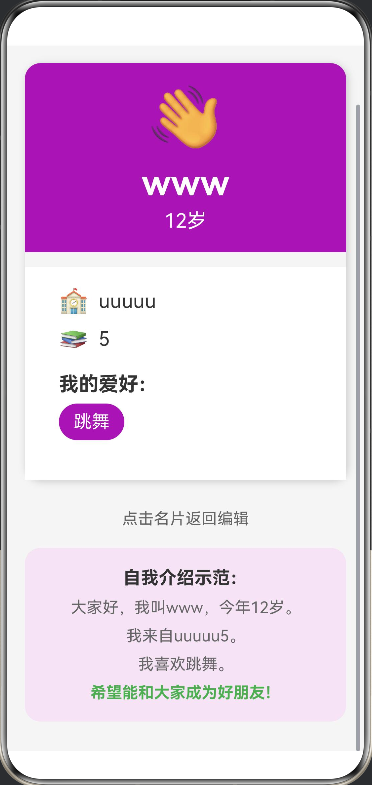
interface HobbyItem {
  name: string;
  emoji: string;
}

@Entry
@Component
struct FriendCardMaker {
  @State name: string = "";
  @State age: string = "";
  @State school: string = "";
  @State classNum: string = "";
  @State selectedHobbies: string[] = [];
  @State showCard: boolean = false;
  @State cardColor: string = "#FF9800";

  private hobbies: HobbyItem[] = [
    { name: "画画", emoji: "🎨" },
    { name: "踢球", emoji: "⚽" },
    { name: "唱歌", emoji: "🎤" },
    { name: "跳舞", emoji: "💃" },
    { name: "读书", emoji: "📚" },
    { name: "游泳", emoji: "🏊" },
    { name: "弹琴", emoji: "🎹" },
    { name: "下棋", emoji: "♟️" }
  ];

  private colors: string[] = ["#FF9800", "#4CAF50", "#2196F3", "#9C27B0", "#E91E63"];

  toggleHobby(hobby: string) {
    const index = this.selectedHobbies.indexOf(hobby);
    if (index > -1) {
      this.selectedHobbies.splice(index, 1);
    } else {
      if (this.selectedHobbies.length < 3) {
        this.selectedHobbies.push(hobby);
      }
    }
  }

  changeCardColor() {
    const currentIndex = this.colors.indexOf(this.cardColor);
    const nextIndex = (currentIndex + 1) % this.colors.length;
    this.cardColor = this.colors[nextIndex];
  }

  build() {
    Scroll() {
      Column() {
        if (!this.showCard) {
          Column({ space: 20 }) {
            Text("交友名片生成器")
              .fontSize(32)
              .fontWeight(FontWeight.Bold)
              .fontColor('#333333')
              .margin({ top: 30 })

            Text("填写信息,制作你的专属名片")
              .fontSize(16)
              .fontColor('#666666')

            Column({ space: 15 }) {
              TextInput({ placeholder: "请输入你的名字" })
                .width('90%')
                .height(50)
                .backgroundColor('#FFFFFF')
                .borderRadius(10)
                .padding({ left: 15, right: 15 })
                .onChange((value: string) => {
                  this.name = value;
                })

              TextInput({ placeholder: "请输入你的年龄" })
                .width('90%')
                .height(50)
                .backgroundColor('#FFFFFF')
                .borderRadius(10)
                .padding({ left: 15, right: 15 })
                .type(InputType.Number)
                .onChange((value: string) => {
                  this.age = value;
                })

              TextInput({ placeholder: "请输入你的学校" })
                .width('90%')
                .height(50)
                .backgroundColor('#FFFFFF')
                .borderRadius(10)
                .padding({ left: 15, right: 15 })
                .onChange((value: string) => {
                  this.school = value;
                })

              TextInput({ placeholder: "请输入你的班级" })
                .width('90%')
                .height(50)
                .backgroundColor('#FFFFFF')
                .borderRadius(10)
                .padding({ left: 15, right: 15 })
                .onChange((value: string) => {
                  this.classNum = value;
                })
            }
            .width('95%')
            .padding(20)
            .backgroundColor('#F5F5F5')
            .borderRadius(16)

            Column({ space: 10 }) {
              Text("选择你的爱好(最多3个)")
                .fontSize(18)
                .fontWeight(FontWeight.Bold)
                .fontColor('#333333')
                .width('90%')

              Flex({ wrap: FlexWrap.Wrap, justifyContent: FlexAlign.Start }) {
                ForEach(this.hobbies, (hobby: HobbyItem) => {
                  Button(hobby.emoji + " " + hobby.name)
                    .fontSize(16)
                    .height(40)
                    .margin({ right: 10, bottom: 10 })
                    .backgroundColor(this.selectedHobbies.indexOf(hobby.name) > -1 ? '#4CAF50' : '#E0E0E0')
                    .fontColor(this.selectedHobbies.indexOf(hobby.name) > -1 ? '#FFFFFF' : '#333333')
                    .onClick(() => {
                      this.toggleHobby(hobby.name);
                    })
                }, (hobby: HobbyItem) => hobby.name)
              }
              .width('90%')
            }
            .width('95%')
            .padding(20)
            .backgroundColor('#FFFFFF')
            .borderRadius(16)
            .shadow({ radius: 5, color: '#1F000000', offsetX: 2, offsetY: 2 })

            Column({ space: 10 }) {
              Text("选择名片颜色")
                .fontSize(18)
                .fontWeight(FontWeight.Bold)
                .fontColor('#333333')
                .width('90%')

              Row({ space: 15 }) {
                ForEach(this.colors, (color: string) => {
                  Column()
                    .width(50)
                    .height(50)
                    .backgroundColor(color)
                    .borderRadius(25)
                    .border({ width: this.cardColor === color ? 3 : 0, color: '#333333' })
                    .onClick(() => {
                      this.cardColor = color;
                    })
                }, (color: string) => color)
              }
              .width('90%')
              .justifyContent(FlexAlign.Center)
            }
            .width('95%')
            .padding(20)
            .backgroundColor('#FFFFFF')
            .borderRadius(16)
            .shadow({ radius: 5, color: '#1F000000', offsetX: 2, offsetY: 2 })

            Button("生成名片")
              .width('90%')
              .height(50)
              .fontSize(20)
              .fontWeight(FontWeight.Bold)
              .backgroundColor('#4CAF50')
              .borderRadius(25)
              .onClick(() => {
                if (this.name && this.age && this.school && this.classNum) {
                  this.showCard = true;
                }
              })
              .margin({ bottom: 30 })
          }
          .width('100%')
          .backgroundColor('#F5F5F5')
          .justifyContent(FlexAlign.Start)
          .alignItems(HorizontalAlign.Center)
        } else {
          Column({ space: 20 }) {
            Text("我的名片")
              .fontSize(28)
              .fontWeight(FontWeight.Bold)
              .fontColor('#333333')
              .margin({ top: 30 })

            Column({ space: 15 }) {
              Column() {
                Text("👋")
                  .fontSize(60)
                  .margin({ bottom: 10 })

                Text(this.name)
                  .fontSize(36)
                  .fontWeight(FontWeight.Bold)
                  .fontColor('#FFFFFF')

                Text(this.age + "岁")
                  .fontSize(20)
                  .fontColor('#FFFFFF')
                  .margin({ top: 5 })
              }
              .width('100%')
              .padding({ top: 20, bottom: 20 })
              .backgroundColor(this.cardColor)
              .borderRadius({ topLeft: 16, topRight: 16 })

              Column({ space: 10 }) {
                Row({ space: 10 }) {
                  Text("🏫")
                    .fontSize(24)
                  Text(this.school)
                    .fontSize(20)
                    .fontColor('#333333')
                }
                .width('90%')
                .justifyContent(FlexAlign.Start)

                Row({ space: 10 }) {
                  Text("📚")
                    .fontSize(24)
                  Text(this.classNum)
                    .fontSize(20)
                    .fontColor('#333333')
                }
                .width('90%')
                .justifyContent(FlexAlign.Start)

                Column({ space: 8 }) {
                  Text("我的爱好:")
                    .fontSize(20)
                    .fontWeight(FontWeight.Bold)
                    .fontColor('#333333')
                    .width('90%')

                  Flex({ wrap: FlexWrap.Wrap, justifyContent: FlexAlign.Start }) {
                    ForEach(this.selectedHobbies, (hobby: string) => {
                      Text(hobby)
                        .fontSize(18)
                        .fontColor('#FFFFFF')
                        .backgroundColor(this.cardColor)
                        .padding({ left: 15, right: 15, top: 8, bottom: 8 })
                        .borderRadius(20)
                        .margin({ right: 10, bottom: 10 })
                    }, (hobby: string) => hobby)
                  }
                  .width('90%')
                }
                .width('100%')
                .padding({ top: 10, bottom: 10 })
              }
              .width('100%')
              .padding(20)
              .backgroundColor('#FFFFFF')
            }
            .width('90%')
            .borderRadius(16)
            .shadow({ radius: 20, color: '#2F000000', offsetX: 5, offsetY: 5 })

            Text("点击名片返回编辑")
              .fontSize(16)
              .fontColor('#666666')
              .margin({ top: 10 })

            Column({ space: 10 }) {
              Text("自我介绍示范:")
                .fontSize(18)
                .fontWeight(FontWeight.Bold)
                .fontColor('#333333')

              Text("大家好,我叫" + this.name + ",今年" + this.age + "岁。")
                .fontSize(16)
                .fontColor('#666666')
                .textAlign(TextAlign.Center)

              Text("我来自" + this.school + this.classNum + "。")
                .fontSize(16)
                .fontColor('#666666')
                .textAlign(TextAlign.Center)

              if (this.selectedHobbies.length > 0) {
                Text("我喜欢" + this.selectedHobbies.join("、") + "。")
                  .fontSize(16)
                  .fontColor('#666666')
                  .textAlign(TextAlign.Center)
              }

              Text("希望能和大家成为好朋友!")
                .fontSize(16)
                .fontColor('#4CAF50')
                .fontWeight(FontWeight.Bold)
                .textAlign(TextAlign.Center)
            }
            .width('90%')
            .padding(20)
            .backgroundColor('#F3E5F5')
            .borderRadius(16)
            .margin({ bottom: 30 })
          }
          .width('100%')
          .backgroundColor('#F5F5F5')
          .justifyContent(FlexAlign.Start)
          .alignItems(HorizontalAlign.Center)
          .onClick(() => {
            this.showCard = false;
          })
        }
      }
      .width('100%')
    }
    .scrollable(ScrollDirection.Vertical)
    .scrollBar(BarState.On)
    .edgeEffect(EdgeEffect.Spring)
    .width('100%')
    .height('100%')
    .backgroundColor('#F5F5F5')
  }
}

讨论HarmonyOS开发技术,专注于API与组件、DevEco Studio、测试、元服务和应用上架分发等。
更多推荐

 0
0 0
0- 0


 已为社区贡献400条内容

所有评论(0)