解决鸿蒙项目运行报错:ErrorCode: 00401004
ErrorCode: 00401004
ErrorDescription: Please try to match the API version of the device and the app. The current device does not contain the following SysCap attributes in the rpcid.json file: SystemCapability.Telephony.CellularCall. Make sure the device supports all the SysCap attributes required for running the app.
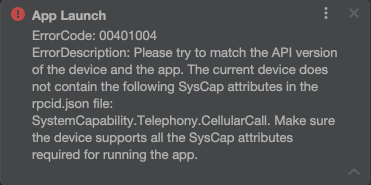
运行一些官方应用时,有的会提示上述错误,看提示应该是鸿蒙系统的 SysCap(SystemCapability,系统能力)校验失败的错误。
但我看项目内并没有用到 SystemCapability.Telephony.CellularCall(设备的蜂窝移动网络通话(2G/3G/4G/5G 语音通话) 的基础能力,在搜索中发现开发者问答有人遇到同样问题:运行报错 ErrorCode: 00401004-华为开发者问答。
最后也是通过配置文件屏蔽 SysCap 校验的方式解决。
具体做法是:
- 在hap模块的src/main目录下新建
syscap.json文件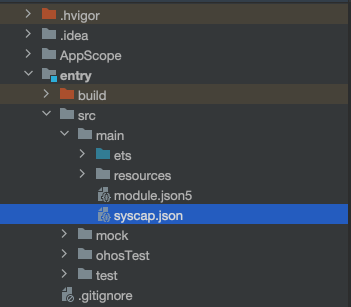
- 该文件中配置移除错误提示中不支持的SysCap特性
{
  "devices": {
    "general": ["default"]
  },
  "production": {
    "removedSysCaps": [
      "SystemCapability.ArkUi.Graphics3Dh",
      "SystemCapability.Telephony.CellularCall"
    ]
  }
}
removedSysCaps数组中可指定多个SysCap特性,可根据自己的报错提示来填写。比如我这里报错特性是:SystemCapability.Telephony.CellularCall
添加后 sync 项目。
Clean Project。
Rebuild Project。

讨论HarmonyOS开发技术,专注于API与组件、DevEco Studio、测试、元服务和应用上架分发等。
更多推荐

 7
7 0
0- 0


 已为社区贡献1条内容

所有评论(0)