Harmonyos在语文教学中应用-11. 弯弯的月亮(对应:小小的船)
·
11. 弯弯的月亮(对应:小小的船)
功能介绍:
为了让学生理解《小小的船》中“弯弯的月亮小小的船”的比喻,应用提供一个月亮滑块。拖动滑块,月亮会从弯弯的新月逐渐变成满月,同时与之匹配的小船形状也会随之变化。这帮助学生理解形状的相似性,激发想象力。
应用功能:
1.月亮滑块:拖动滑块,月亮会从弯弯的新月(🌒)逐渐变成满月(🌕),分4个阶段展示
2.同步变化的小船:随着月亮变圆,小船也会从小小的船(🚣♂️)变成大船(🛳️)
3.智能描述:根据当前进度显示相应的提示文字:
“弯弯的月亮小小的船”
“月亮慢慢变圆了”
“月亮越来越圆了”
“圆圆的月亮像大船”
4.完整诗歌展示:底部展示《小小的船》全文,方便学生学习
5.精美UI设计:使用渐变色、卡片、阴影等效果,营造美观的学习环境
使用方法:
拖动中间的橙色滑块,观察月亮和小船的变化
滑块范围从0%到100%
实时显示变化进度百分比
您可以在IDE中预览这个应用,体验完整的互动学习功能。这个应用通过直观的视觉对比,帮助学生理解形状的相似性,激发他们的想象力!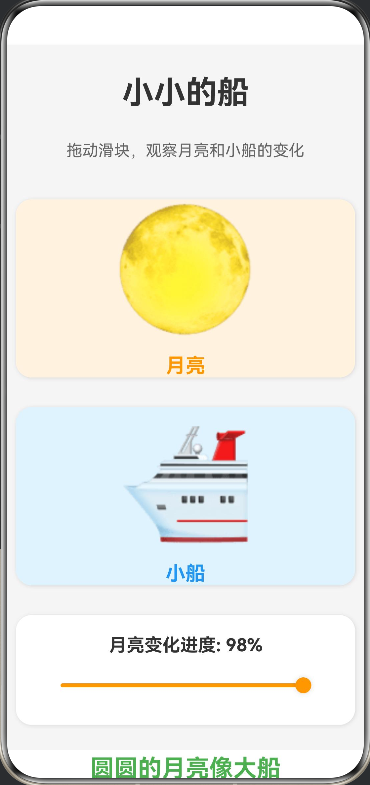
@Entry
@Component
struct LittleBoat {
@State sliderValue: number = 0;
@State moonPhase: number = 0;
@State boatPhase: number = 0;
aboutToAppear() {
this.moonPhase = this.sliderValue;
this.boatPhase = this.sliderValue;
}
updateMoonPhase(value: number) {
this.sliderValue = value;
this.moonPhase = value;
this.boatPhase = value;
}
getMoonEmoji(): string {
if (this.moonPhase < 25) {
return "🌒";
} else if (this.moonPhase < 50) {
return "🌓";
} else if (this.moonPhase < 75) {
return "🌔";
} else {
return "🌕";
}
}
getBoatText(): string {
if (this.boatPhase < 25) {
return "🚣♂️";
} else if (this.boatPhase < 50) {
return "⛵";
} else if (this.boatPhase < 75) {
return "🚢";
} else {
return "🛳️";
}
}
getDescription(): string {
if (this.boatPhase < 25) {
return "弯弯的月亮小小的船";
} else if (this.boatPhase < 50) {
return "月亮慢慢变圆了";
} else if (this.boatPhase < 75) {
return "月亮越来越圆了";
} else {
return "圆圆的月亮像大船";
}
}
build() {
Column({ space: 30 }) {
Text("小小的船")
.fontSize(32)
.fontWeight(FontWeight.Bold)
.fontColor('#333333')
.margin({ top: 30 })
Text("拖动滑块,观察月亮和小船的变化")
.fontSize(16)
.fontColor('#666666')
.margin({ bottom: 10 })
// 月亮显示区
Column({ space: 15 }) {
Text(this.getMoonEmoji())
.fontSize(120)
.textAlign(TextAlign.Center)
Text("月亮")
.fontSize(20)
.fontColor('#FF9800')
.fontWeight(FontWeight.Bold)
}
.width('95%')
.height(180)
.justifyContent(FlexAlign.Center)
.backgroundColor('#FFF3E0')
.borderRadius(16)
.shadow({ radius: 10, color: '#1F000000', offsetX: 2, offsetY: 2 })
// 小船显示区
Column({ space: 15 }) {
Text(this.getBoatText())
.fontSize(120)
.textAlign(TextAlign.Center)
Text("小船")
.fontSize(20)
.fontColor('#2196F3')
.fontWeight(FontWeight.Bold)
}
.width('95%')
.height(180)
.justifyContent(FlexAlign.Center)
.backgroundColor('#E3F2FD')
.borderRadius(16)
.shadow({ radius: 10, color: '#1F000000', offsetX: 2, offsetY: 2 })
// 滑块
Column({ space: 10 }) {
Text("月亮变化进度: " + Math.round(this.sliderValue) + "%")
.fontSize(18)
.fontColor('#333333')
.fontWeight(FontWeight.Bold)
Slider({
value: this.sliderValue,
min: 0,
max: 100,
step: 1,
style: SliderStyle.OutSet
})
.blockColor('#FF9800')
.trackColor('#FFE0B2')
.selectedColor('#FF9800')
.onChange((value: number) => {
this.updateMoonPhase(value);
})
.width('90%')
.height(40)
}
.width('95%')
.padding(20)
.backgroundColor('#FFFFFF')
.borderRadius(16)
.shadow({ radius: 10, color: '#1F000000', offsetX: 2, offsetY: 2 })
// 描述文本
Text(this.getDescription())
.fontSize(24)
.fontWeight(FontWeight.Bold)
.fontColor('#4CAF50')
.textAlign(TextAlign.Center)
.width('90%')
// 诗歌展示
Column({ space: 10 }) {
Text("小小的船")
.fontSize(20)
.fontWeight(FontWeight.Bold)
.fontColor('#333333')
Text("弯弯的月儿小小的船,")
.fontSize(16)
.fontColor('#666666')
.textAlign(TextAlign.Center)
Text("小小的船儿两头尖。")
.fontSize(16)
.fontColor('#666666')
.textAlign(TextAlign.Center)
Text("我在小小的船里坐,")
.fontSize(16)
.fontColor('#666666')
.textAlign(TextAlign.Center)
Text("只看见闪闪的星星蓝蓝的天。")
.fontSize(16)
.fontColor('#666666')
.textAlign(TextAlign.Center)
}
.width('95%')
.padding(20)
.backgroundColor('#F3E5F5')
.borderRadius(16)
.shadow({ radius: 10, color: '#1F000000', offsetX: 2, offsetY: 2 })
}
.width('100%')
.height('100%')
.backgroundColor('#F5F5F5')
.justifyContent(FlexAlign.Start)
.alignItems(HorizontalAlign.Center)
}
}

讨论HarmonyOS开发技术,专注于API与组件、DevEco Studio、测试、元服务和应用上架分发等。
更多推荐


 0
0 0
0- 0


 已为社区贡献402条内容

所有评论(0)