Harmonyos在语文教学中应用-5. 对韵歌填空(对应:对韵歌)
·
5. 对韵歌填空(对应:对韵歌)
功能介绍:
针对《对韵歌》设计的互动填空应用。界面展示诗歌内容,但隐藏了部分关键词(如“云”对“?”)。学生需要点击下方打乱的词汇,将其填入正确的位置。通过色彩变化和即时反馈(正确变绿,错误抖动),让学生在游戏中感受汉语的韵律美和对仗工整。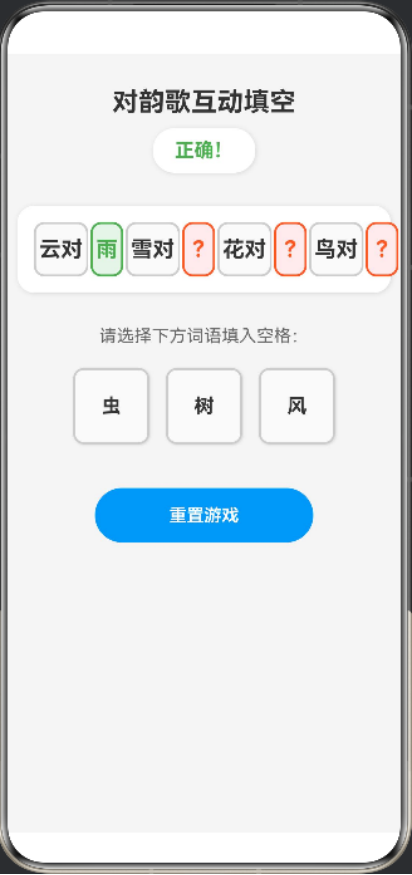
@Entry
@Component
struct RhymeGame {
  // 定义游戏数据
  @State rhymeContent: string[] = [
    '云对', '雨', '雪对', '风', '花对', '树', '鸟对', '虫'
  ];

  @State hiddenIndices: number[] = [1, 3, 5, 7]; // 需要填空的位置
  @State userAnswers: string[] = new Array(this.rhymeContent.length).fill('');
  @State options: string[] = ['雨', '风', '树', '虫'];
  @State shuffledOptions: string[] = this.shuffleArray([...this.options]);
  @State successMessage: string = '点击下方词语,将其拖到正确的位置';
  @State isCorrect: boolean[] = new Array(this.hiddenIndices.length).fill(false);

  // 打乱数组
  shuffleArray(array: string[]): string[] {
    for (let i = array.length - 1; i > 0; i--) {
      const j = Math.floor(Math.random() * (i + 1));
      const temp = array[i];
      array[i] = array[j];
      array[j] = temp;
    }
    return array;
  }

  // 检查答案是否正确
  checkAnswer(index: number, answer: string): boolean {
    return answer === this.rhymeContent[index];
  }

  // 处理选项点击
  handleOptionClick(option: string) {
    // 找到第一个空的位置
    const emptyIndex = this.userAnswers.findIndex((answer, i) =>
      this.hiddenIndices.includes(i) && answer === ''
    );

    if (emptyIndex !== -1) {
      this.userAnswers[emptyIndex] = option;

      // 检查是否正确
      const isCorrect = this.checkAnswer(emptyIndex, option);
      this.isCorrect[this.hiddenIndices.indexOf(emptyIndex)] = isCorrect;

      if (isCorrect) {
        this.successMessage = '正确!';
      } else {
        this.successMessage = '错误,请再试一次!';
      }

      // 从选项中移除已选择的词语
      const optionIndex = this.shuffledOptions.indexOf(option);
      if (optionIndex !== -1) {
        this.shuffledOptions.splice(optionIndex, 1);
      }

      // 检查是否完成所有填空
      const allFilled = this.hiddenIndices.every(index => this.userAnswers[index] !== '');
      if (allFilled) {
        const allCorrect = this.hiddenIndices.every(index =>
          this.checkAnswer(index, this.userAnswers[index])
        );
        if (allCorrect) {
          this.successMessage = '太棒了!所有答案都正确!';
        } else {
          this.successMessage = '还有错误,请检查!';
        }
      }
    }
  }

  // 重置游戏
  resetGame() {
    this.userAnswers = new Array(this.rhymeContent.length).fill('');
    this.shuffledOptions = this.shuffleArray([...this.options]);
    this.successMessage = '点击下方词语,将其拖到正确的位置';
    this.isCorrect = new Array(this.hiddenIndices.length).fill(false);
  }

  build() {
    Column({
      space: 10
    }) {
      // 标题
      Text('对韵歌互动填空')
        .fontSize(24)
        .fontWeight(FontWeight.Bold)
        .fontColor('#333333')
        .margin({ top: 30 })

      // 成功提示
      Text(this.successMessage)
        .fontSize(18)
        .fontColor('#4CAF50')
        .fontWeight(FontWeight.Bold)
        .backgroundColor('#FFFFFF')
        .padding({ top: 10, bottom: 10, left: 20, right: 20 })
        .borderRadius(20)
        .shadow({ radius: 10, color: '#1F000000', offsetX: 2, offsetY: 2 })
        .margin({ bottom: 20 })
        .zIndex(100)

      // 诗歌内容
      Row({
        space: 2
      }) {
        ForEach(this.rhymeContent, (word: string, index: number) => {
          if (this.hiddenIndices.includes(index)) {
            // 填空位置
            Text(this.userAnswers[index] || '?')
              .fontSize(20)
              .fontWeight(FontWeight.Bold)
              .fontColor(this.userAnswers[index] && this.isCorrect[this.hiddenIndices.indexOf(index)] ? '#4CAF50' : '#FF5722')
              .width(30)
              .height(50)
              .textAlign(TextAlign.Center)
              .backgroundColor(this.userAnswers[index] && this.isCorrect[this.hiddenIndices.indexOf(index)] ? '#E8F5E9' : '#FFEBEE')
              .borderRadius(10)
              .border(this.userAnswers[index] && this.isCorrect[this.hiddenIndices.indexOf(index)] ? { width: 2, color: '#4CAF50' } : { width: 2, color: '#FF5722' })
          } else {
            // 固定内容
            Text(word)
              .fontSize(20)
              .fontWeight(FontWeight.Bold)
              .fontColor('#333333')
              .width(50)
              .height(50)
              .textAlign(TextAlign.Center)
              .backgroundColor('#FAFAFA')
              .borderRadius(10)
              .border({ width: 2, color: '#CCCCCC' })
          }
        })
      }
      .width('95%')
      .padding(15)
      .backgroundColor('#FFFFFF')
      .borderRadius(16)
      .shadow({ radius: 10, color: '#1F000000', offsetX: 2, offsetY: 2 })

      // 选项区域
      Text('请选择下方词语填入空格:')
        .fontSize(16)
        .fontColor('#666666')
        .margin({ top: 20, bottom: 10 })

      Row({
        space: 15
      }) {
        ForEach(this.shuffledOptions, (option: string) => {
          Text(option)
            .fontSize(18)
            .fontWeight(FontWeight.Bold)
            .fontColor('#333333')
            .width(70)
            .height(70)
            .textAlign(TextAlign.Center)
            .backgroundColor('#FAFAFA')
            .borderRadius(10)
            .border({ width: 2, color: '#CCCCCC' })
            .shadow({ radius: 5, color: '#1F000000', offsetX: 2, offsetY: 2 })
            .onClick(() => {
              this.handleOptionClick(option);
            })
        })
      }
      .width('95%')
      .justifyContent(FlexAlign.Center)

      // 重置按钮
      Button('重置游戏')
        .fontSize(16)
        .fontWeight(FontWeight.Bold)
        .fontColor('#FFFFFF')
        .backgroundColor('#2196F3')
        .width(200)
        .height(50)
        .borderRadius(25)
        .margin({ top: 30 })
        .onClick(() => {
          this.resetGame();
        })
    }
    .width('100%')
    .height('100%')
    .backgroundColor('#F5F5F5')
    .justifyContent(FlexAlign.Start)
    .alignItems(HorizontalAlign.Center)
  }
}

讨论HarmonyOS开发技术,专注于API与组件、DevEco Studio、测试、元服务和应用上架分发等。
更多推荐


 0
0 0
0- 0


 已为社区贡献402条内容

所有评论(0)