Harmonyos在语文教学中应用-15. 比一比大小(对应:大小多少)
·
15. 比一比大小(对应:大小多少)
功能介绍:
针对《大小多少》中反义词和量词的教学。左侧显示“一个大苹果”,右侧显示“一颗小枣”。下方提供“大”、“小”、“多”、“少”四个按钮。学生点击对应按钮,正确的词汇会飞入对应的句子中。通过直观的图片对比,帮助学生掌握量词“头、只、群、颗”的用法。
应用功能:
- 多组对比项目:
第1组:🍎 大苹果 VS 🍒 小枣(大/小)
第2组:🐄 大牛 VS 🐱 小猫(大/小)
第3组:🐦 少鸟 VS 🦆 多鸭子(少/多)
第4组:🍑 少桃子 VS 🍇 多葡萄(少/多) - 填空互动:
左右两侧显示带空格的句子(如"___个苹果")
学生需要点击正确的词语填空
填写正确后,词语会显示在句子中 - 词语选择:
四个按钮:大、小、多、少
每个按钮有不同颜色,便于区分
点击正确的词语会得到分数 - 视觉反馈:
正确填写后,文字变绿色并加粗
背景变为浅绿色,边框变绿
显示动画效果,词语飞入对应位置 - 量词教学:
底部展示量词小知识
包含:个、颗、头、只、群、串
每个量词都有使用示例 - 进度和得分:
显示当前题目进度(第X/4题)
显示累计得分
完成一题后自动进入下一题 - 精美UI设计:
卡片式布局,带阴影效果
VS标志突出对比关系
大号emoji图标,直观易懂
使用方法:
1.观察左右两侧的图片和句子
2.点击下方正确的词语按钮
3.词语会填入对应的句子中
4.完成左右两侧的填空后,自动进入下一题
5.学习底部的量词知识
您可以在IDE中预览这个应用,体验完整的互动学习功能!这个应用通过直观的图片对比和互动填空,帮助学生掌握反义词和量词的用法。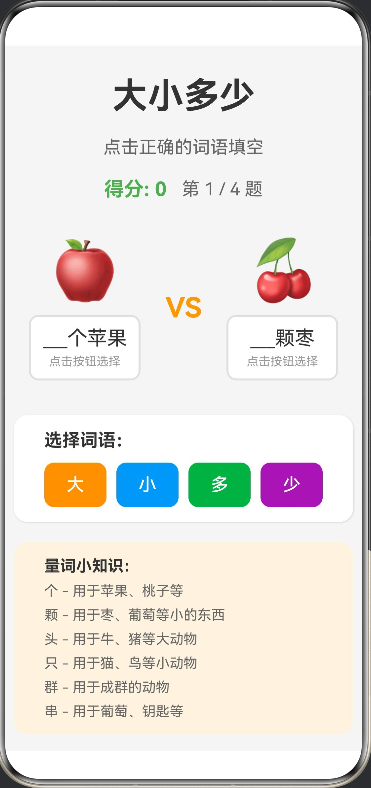
interface CompareItem {
  leftEmoji: string;
  rightEmoji: string;
  leftWord: string;
  rightWord: string;
  leftMeasure: string;
  rightMeasure: string;
  leftObject: string;
  rightObject: string;
}

@Entry
@Component
struct CompareLesson {
  @State currentIndex: number = 0;
  @State leftText: string = "";
  @State rightText: string = "";
  @State leftComplete: boolean = false;
  @State rightComplete: boolean = false;
  @State showAnimation: boolean = false;
  @State animationText: string = "";
  @State animationTarget: string = "";
  @State score: number = 0;

  private items: CompareItem[] = [
    {
      leftEmoji: "🍎",
      rightEmoji: "🍒",
      leftWord: "大",
      rightWord: "小",
      leftMeasure: "个",
      rightMeasure: "颗",
      leftObject: "苹果",
      rightObject: "枣"
    },
    {
      leftEmoji: "🐄",
      rightEmoji: "🐱",
      leftWord: "大",
      rightWord: "小",
      leftMeasure: "头",
      rightMeasure: "只",
      leftObject: "牛",
      rightObject: "猫"
    },
    {
      leftEmoji: "🐦",
      rightEmoji: "🦆",
      leftWord: "少",
      rightWord: "多",
      leftMeasure: "只",
      rightMeasure: "群",
      leftObject: "鸟",
      rightObject: "鸭子"
    },
    {
      leftEmoji: "🍑",
      rightEmoji: "🍇",
      leftWord: "少",
      rightWord: "多",
      leftMeasure: "个",
      rightMeasure: "串",
      leftObject: "桃子",
      rightObject: "葡萄"
    }
  ];

  aboutToAppear() {
    this.loadCurrentItem();
  }

  loadCurrentItem() {
    const item = this.items[this.currentIndex];
    this.leftText = "___" + item.leftMeasure + item.leftObject;
    this.rightText = "___" + item.rightMeasure + item.rightObject;
    this.leftComplete = false;
    this.rightComplete = false;
  }

  handleButtonClick(word: string, target: string) {
    const item = this.items[this.currentIndex];

    if (target === "left") {
      if (word === item.leftWord) {
        this.leftText = item.leftWord + item.leftMeasure + item.leftObject;
        this.leftComplete = true;
        this.score += 10;
        this.showAnimationMessage(word, "left");
      }
    } else {
      if (word === item.rightWord) {
        this.rightText = item.rightWord + item.rightMeasure + item.rightObject;
        this.rightComplete = true;
        this.score += 10;
        this.showAnimationMessage(word, "right");
      }
    }

    if (this.leftComplete && this.rightComplete) {
      setTimeout(() => {
        this.nextItem();
      }, 1500);
    }
  }

  showAnimationMessage(word: string, target: string) {
    this.animationText = word;
    this.animationTarget = target;
    this.showAnimation = true;

    setTimeout(() => {
      this.showAnimation = false;
    }, 800);
  }

  nextItem() {
    if (this.currentIndex < this.items.length - 1) {
      this.currentIndex++;
      this.loadCurrentItem();
    } else {
      this.currentIndex = 0;
      this.loadCurrentItem();
    }
  }

  build() {
    Column({ space: 20 }) {
      Text("大小多少")
        .fontSize(36)
        .fontWeight(FontWeight.Bold)
        .fontColor('#333333')
        .margin({ top: 30 })

      Text("点击正确的词语填空")
        .fontSize(18)
        .fontColor('#666666')

      Row({ space: 15 }) {
        Text("得分: " + this.score)
          .fontSize(20)
          .fontColor('#4CAF50')
          .fontWeight(FontWeight.Bold)

        Text("第 " + (this.currentIndex + 1) + " / " + this.items.length + " 题")
          .fontSize(18)
          .fontColor('#666666')
      }

      Row({ space: 10 }) {
        Column({ space: 10 }) {
          Text(this.items[this.currentIndex].leftEmoji)
            .fontSize(60)
            .textAlign(TextAlign.Center)

          Column({ space: 5 }) {
            Text(this.leftText)
              .fontSize(20)
              .fontColor(this.leftComplete ? '#4CAF50' : '#333333')
              .fontWeight(this.leftComplete ? FontWeight.Bold : FontWeight.Normal)
              .textAlign(TextAlign.Center)

            if (!this.leftComplete) {
              Text("点击按钮选择")
                .fontSize(12)
                .fontColor('#999999')
            }
          }
          .width('100%')
          .padding(10)
          .backgroundColor(this.leftComplete ? '#E8F5E9' : '#FFFFFF')
          .borderRadius(10)
          .border({ width: 2, color: this.leftComplete ? '#4CAF50' : '#E0E0E0' })
        }
        .layoutWeight(1)
        .padding(15)
        .backgroundColor('#F5F5F5')
        .borderRadius(14)

        Text("VS")
          .fontSize(28)
          .fontWeight(FontWeight.Bold)
          .fontColor('#FF9800')

        Column({ space: 10 }) {
          Text(this.items[this.currentIndex].rightEmoji)
            .fontSize(60)
            .textAlign(TextAlign.Center)

          Column({ space: 5 }) {
            Text(this.rightText)
              .fontSize(20)
              .fontColor(this.rightComplete ? '#4CAF50' : '#333333')
              .fontWeight(this.rightComplete ? FontWeight.Bold : FontWeight.Normal)
              .textAlign(TextAlign.Center)

            if (!this.rightComplete) {
              Text("点击按钮选择")
                .fontSize(12)
                .fontColor('#999999')
            }
          }
          .width('100%')
          .padding(10)
          .backgroundColor(this.rightComplete ? '#E8F5E9' : '#FFFFFF')
          .borderRadius(10)
          .border({ width: 2, color: this.rightComplete ? '#4CAF50' : '#E0E0E0' })
        }
        .layoutWeight(1)
        .padding(15)
        .backgroundColor('#F5F5F5')
        .borderRadius(14)
      }
      .width('95%')
      .justifyContent(FlexAlign.Center)

      Column({ space: 12 }) {
        Text("选择词语:")
          .fontSize(18)
          .fontWeight(FontWeight.Bold)
          .fontColor('#333333')
          .width('90%')

        Row({ space: 10 }) {
          Button("大")
            .fontSize(18)
            .layoutWeight(1)
            .height(45)
            .backgroundColor('#FF9800')
            .fontColor('#FFFFFF')
            .borderRadius(10)
            .onClick(() => {
              this.handleButtonClick("大", "left");
            })

          Button("小")
            .fontSize(18)
            .layoutWeight(1)
            .height(45)
            .backgroundColor('#2196F3')
            .fontColor('#FFFFFF')
            .borderRadius(10)
            .onClick(() => {
              this.handleButtonClick("小", "right");
            })

          Button("多")
            .fontSize(18)
            .layoutWeight(1)
            .height(45)
            .backgroundColor('#4CAF50')
            .fontColor('#FFFFFF')
            .borderRadius(10)
            .onClick(() => {
              this.handleButtonClick("多", "right");
            })

          Button("少")
            .fontSize(18)
            .layoutWeight(1)
            .height(45)
            .backgroundColor('#9C27B0')
            .fontColor('#FFFFFF')
            .borderRadius(10)
            .onClick(() => {
              this.handleButtonClick("少", "left");
            })
        }
        .width('90%')
        .justifyContent(FlexAlign.Center)
      }
      .width('95%')
      .padding(15)
      .backgroundColor('#FFFFFF')
      .borderRadius(14)
      .shadow({ radius: 5, color: '#1F000000', offsetX: 2, offsetY: 2 })

      Column({ space: 8 }) {
        Text("量词小知识:")
          .fontSize(16)
          .fontWeight(FontWeight.Bold)
          .fontColor('#333333')
          .width('90%')

        Text("个 - 用于苹果、桃子等")
          .fontSize(14)
          .fontColor('#666666')
          .width('90%')

        Text("颗 - 用于枣、葡萄等小的东西")
          .fontSize(14)
          .fontColor('#666666')
          .width('90%')

        Text("头 - 用于牛、猪等大动物")
          .fontSize(14)
          .fontColor('#666666')
          .width('90%')

        Text("只 - 用于猫、鸟等小动物")
          .fontSize(14)
          .fontColor('#666666')
          .width('90%')

        Text("群 - 用于成群的动物")
          .fontSize(14)
          .fontColor('#666666')
          .width('90%')

        Text("串 - 用于葡萄、钥匙等")
          .fontSize(14)
          .fontColor('#666666')
          .width('90%')
      }
      .width('95%')
      .padding(15)
      .backgroundColor('#FFF3E0')
      .borderRadius(14)
      .margin({ bottom: 30 })

      if (this.showAnimation) {
        Text(this.animationText)
          .fontSize(40)
          .fontWeight(FontWeight.Bold)
          .fontColor('#FF9800')
          .position({
            x: this.animationTarget === "left" ? 100 : 250,
            y: 200
          })
          .opacity(this.showAnimation ? 1 : 0)
          .scale({ x: this.showAnimation ? 1.5 : 1, y: this.showAnimation ? 1.5 : 1 })
      }
    }
    .width('100%')
    .height('100%')
    .backgroundColor('#F5F5F5')
    .justifyContent(FlexAlign.Start)
    .alignItems(HorizontalAlign.Center)
  }
}

讨论HarmonyOS开发技术,专注于API与组件、DevEco Studio、测试、元服务和应用上架分发等。
更多推荐

 0
0 0
0- 0


 已为社区贡献402条内容

所有评论(0)