HarmonyOS在语文教学中的应用-3. “青”字族变换(对应:③ 小青蛙)
·
3. “青”字族变换(对应:③ 小青蛙)
功能介绍:
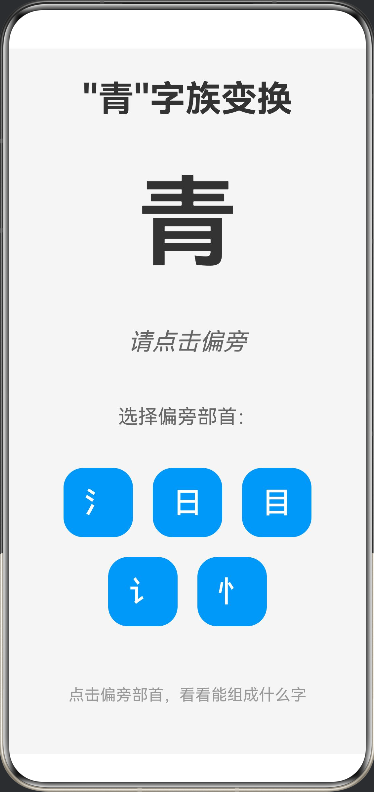
基于《小青蛙》中“青”字族(清、晴、睛、请、情)的教学设计。屏幕中央显示基础字“青”,下方提供不同偏旁部首按钮(氵、日、目、讠、忄)。学生点击部首,它会飞入“青”字旁组成新字,并显示组词(如“清水”)。这能举一反三,让学生掌握形声字的构字规律。
应用功能:
- “青"字族变换:
清:氵 + 青 = 清,口诀"有水才是清”,组词:清水、清洁、清澈
晴:日 + 青 = 晴,口诀"有日天气晴",组词:晴天、晴朗、晴空
睛:目 + 青 = 睛,口诀"有目是眼睛",组词:眼睛、目不转睛
请:讠 + 青 = 请,口诀"有言去邀请",组词:请客、请求、请坐
情:忄 + 青 = 情,口诀"有心就有情",组词:心情、感情、友情 - 交互功能:
点击选择:点击偏旁部首按钮选择要组合的偏旁
动画效果:点击后显示"组合中…"的动画提示
颜色区分:选中的偏旁按钮会变成绿色
实时反馈:组合后的字会以绿色显示,基础字会变淡 - 视觉设计:
清晰的层次结构
美观的按钮设计
和谐的色彩搭配
流畅的动画效果 - 教育价值:
帮助学生理解形声字的构字规律
通过偏旁组合掌握"青"字族
配合《小青蛙》课文使用
提供口诀和组词帮助记忆
增强识字趣味性 - 技术实现:
使用 @State 管理应用状态
使用 Stack 组件实现字的叠加显示
使用 Flex 组件实现响应式布局
使用 ForEach 循环渲染偏旁按钮
实现了简单的动画效果 - 动画效果:
1.点击偏旁按钮
2.显示"组合中…"的提示
3.基础字"青"变淡
4.组合后的字以绿色显示
5.显示对应的口诀和组词
您现在可以在IDE中预览这个应用,体验"青"字族变换的互动功能!
interface RadicalData {
  radical: string;
  result: string;
  desc: string;
  words: string;
}

@Entry
@Component
struct QingFamily {
  @State baseChar: string = "青";
  @State combinedChar: string = "";
  @State meaning: string = "请点击偏旁";
  @State words: string = "";
  @State isAnimating: boolean = false;
  @State radicalPosition: number = 0;

  private radicals: RadicalData[] = [
    { radical: '氵', result: '清', desc: '有水才是清', words: '清水、清洁、清澈' },
    { radical: '日', result: '晴', desc: '有日天气晴', words: '晴天、晴朗、晴空' },
    { radical: '目', result: '睛', desc: '有目是眼睛', words: '眼睛、目不转睛' },
    { radical: '讠', result: '请', desc: '有言去邀请', words: '请客、请求、请坐' },
    { radical: '忄', result: '情', desc: '有心就有情', words: '心情、感情、友情' }
  ];

  selectRadical(radical: string, result: string, desc: string, words: string) {
    this.isAnimating = true;
    this.radicalPosition = 0;

    // 动画效果
    setTimeout(() => {
      this.radicalPosition = 1;
    }, 100);

    setTimeout(() => {
      this.combinedChar = result;
      this.meaning = desc;
      this.words = words;
      this.isAnimating = false;
    }, 500);
  }

  build() {
    Column({ space: 30 }) {
      Text('"青"字族变换')
        .fontSize(36)
        .fontWeight(FontWeight.Bold)
        .fontColor('#333333')
        .margin({ top: 30 })

      // 显示区域
      Stack() {
        // 基础字"青"
        Text(this.baseChar)
          .fontSize(100)
          .fontWeight(FontWeight.Bold)
          .fontColor('#333333')
          .opacity(this.combinedChar ? 0.3 : 1)

        // 组合后的字
        if (this.combinedChar) {
          Text(this.combinedChar)
            .fontSize(100)
            .fontWeight(FontWeight.Bold)
            .fontColor('#4CAF50')
            .transition({ type: TransitionType.Insert, opacity: 0 })
            .animation({ duration: 500, curve: Curve.EaseOut })
        }

        // 动画效果
        if (this.isAnimating) {
          Text('组合中...')
            .fontSize(20)
            .fontColor('#666666')
            .margin({ top: 120 })
        }
      }
      .height(150)

      // 口诀
      Text(this.meaning)
        .fontSize(24)
        .fontColor('#666666')
        .fontStyle(FontStyle.Italic)

      // 组词
      if (this.words) {
        Text('组词:' + this.words)
          .fontSize(20)
          .fontColor('#999999')
          .margin({ top: 10 })
      }

      // 偏旁按钮
      Text('选择偏旁部首:')
        .fontSize(20)
        .fontColor('#666666')
        .margin({ top: 20 })

      Flex({ wrap: FlexWrap.Wrap, justifyContent: FlexAlign.Center }) {
        ForEach(this.radicals, (item: RadicalData) => {
          Button(item.radical)
            .fontSize(30)
            .width(70)
            .height(70)
            .margin(10)
            .backgroundColor(this.combinedChar === item.result ? '#4CAF50' : '#2196F3')
            .onClick(() => {
              this.selectRadical(item.radical, item.result, item.desc, item.words);
            })
        })
      }
      .width('90%')

      // 提示信息
      Text('点击偏旁部首,看看能组成什么字')
        .fontSize(16)
        .fontColor('#999999')
        .margin({ top: 20, bottom: 30 })
    }
    .width('100%')
    .height('100%')
    .backgroundColor('#F5F5F5')
  }
}

讨论HarmonyOS开发技术,专注于API与组件、DevEco Studio、测试、元服务和应用上架分发等。
更多推荐

 0
0 0
0- 0


 已为社区贡献402条内容

所有评论(0)