Flutter鸿蒙开发:安全键盘详解
·
Flutter鸿蒙开发:安全键盘详解
欢迎加入开源鸿蒙跨平台社区! https://openharmonycrossplatform.csdn.net
一、前言
安全键盘是金融、支付等敏感场景中不可或缺的安全组件,它可以有效防止键盘记录、截屏攻击等安全威胁。本文将详细介绍如何在Flutter鸿蒙应用中实现安全键盘功能,包括随机布局、防截屏和安全输入等内容。
二、效果展示
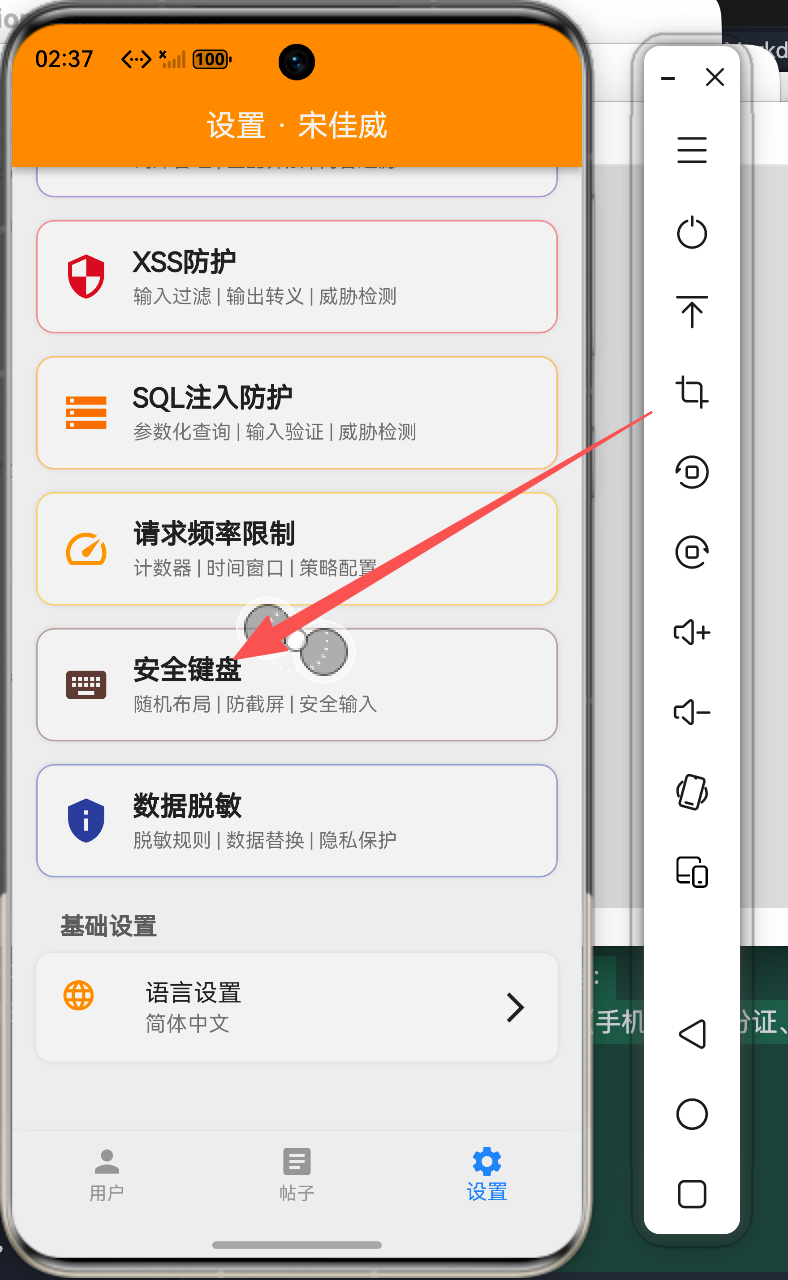
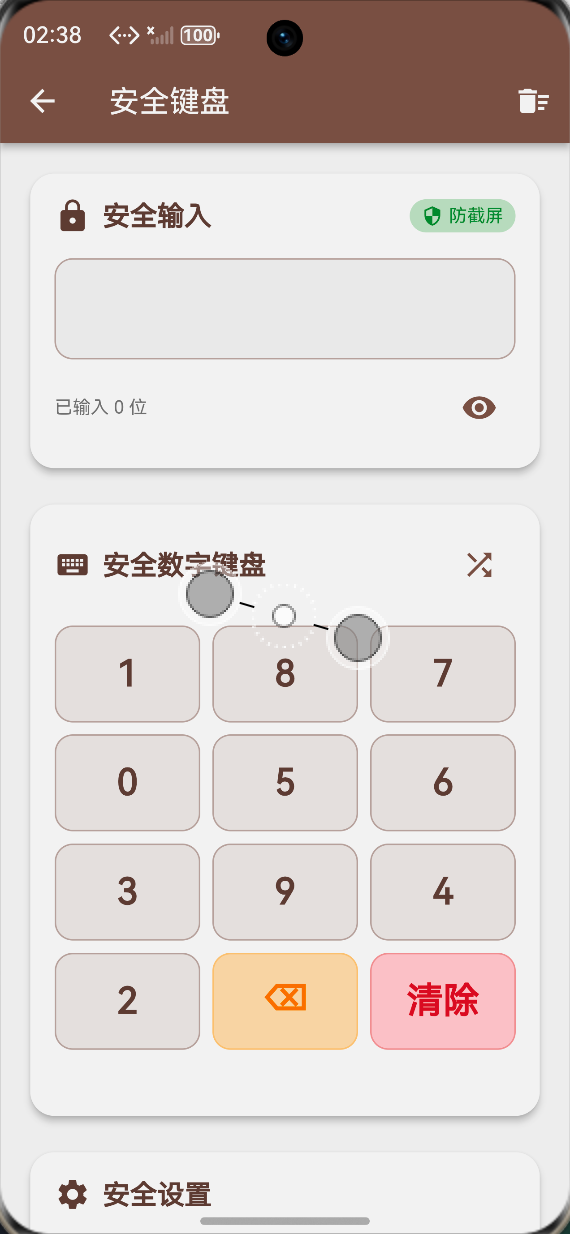
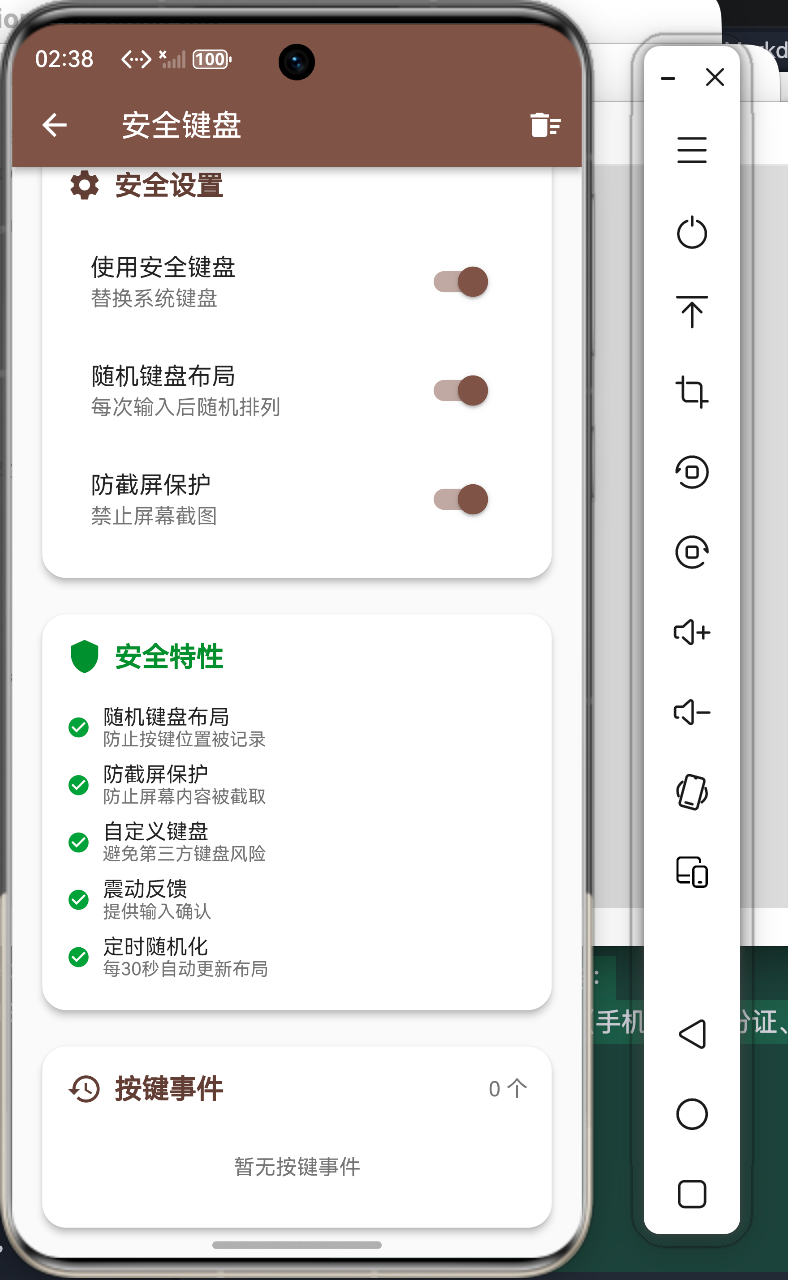
本组件实现了以下功能:
- 数字键盘随机布局
- 防截屏保护
- 密码遮盖显示
- 按键震动反馈
- 安全输入记录
三、技术要点
3.1 随机布局实现
List<String> _currentKeyLayout = [];
final Random _random = Random();

void _generateKeyLayout() {
  if (_randomizeLayout) {
    final numbers = ['0', '1', '2', '3', '4', '5', '6', '7', '8', '9'];
    numbers.shuffle(_random);
    _currentKeyLayout = numbers;
  } else {
    _currentKeyLayout = ['0', '1', '2', '3', '4', '5', '6', '7', '8', '9'];
  }
}
3.2 定时刷新布局
Timer? _shuffleTimer;
void _startShuffleTimer() {
_shuffleTimer?.cancel();
if (_randomizeLayout) {
_shuffleTimer = Timer.periodic(const Duration(seconds: 30), (timer) {
if (mounted) {
setState(() {
_generateKeyLayout();
});
}
});
}
}
void dispose() {
_shuffleTimer?.cancel();
super.dispose();
}
四、完整实现
4.1 按键事件模型
class KeyboardEvent {
  final String key;
  final DateTime time;
  final String type;  // press, delete, clear

  KeyboardEvent({
    required this.key,
    required this.time,
    required this.type,
  });
}
4.2 按键处理逻辑
String _inputText = '';
bool _obscureText = true;
bool _randomizeLayout = true;
bool _preventScreenshot = true;
final List<KeyboardEvent> _events = [];

void _onKeyPressed(String key) {
  setState(() {
    _inputText += key;

    _events.add(KeyboardEvent(
      key: key,
      time: DateTime.now(),
      type: 'press',
    ));
  });

  HapticFeedback.lightImpact();
}

void _onDeletePressed() {
  if (_inputText.isNotEmpty) {
    setState(() {
      _inputText = _inputText.substring(0, _inputText.length - 1);

      _events.add(KeyboardEvent(
        key: 'delete',
        time: DateTime.now(),
        type: 'delete',
      ));
    });

    HapticFeedback.lightImpact();
  }
}

void _onClearPressed() {
  setState(() {
    _inputText = '';

    _events.add(KeyboardEvent(
      key: 'clear',
      time: DateTime.now(),
      type: 'clear',
    ));
  });

  HapticFeedback.lightImpact();
}
4.3 密码强度检测
String _getPasswordStrength() {
  if (_inputText.isEmpty) return '无';
  if (_inputText.length < 6) return '弱';
  if (_inputText.length < 8) return '中';
  return '强';
}

Color _getStrengthColor() {
  switch (_getPasswordStrength()) {
    case '弱':
      return Colors.red;
    case '中':
      return Colors.orange;
    case '强':
      return Colors.green;
    default:
      return Colors.grey;
  }
}
五、界面实现
5.1 密码输入区域
Container(
  padding: const EdgeInsets.all(20),
  decoration: BoxDecoration(
    color: Theme.of(context).cardColor,
    borderRadius: BorderRadius.circular(16),
    border: Border.all(color: Colors.brown.shade200),
  ),
  child: Column(
    children: [
      Row(
        children: [
          Icon(Icons.lock, color: Colors.brown.shade700),
          const SizedBox(width: 8),
          const Text('安全密码输入', style: TextStyle(fontSize: 16, fontWeight: FontWeight.bold)),
          const Spacer(),
          // 密码强度指示
          Container(
            padding: const EdgeInsets.symmetric(horizontal: 8, vertical: 4),
            decoration: BoxDecoration(
              color: _getStrengthColor().withOpacity(0.2),
              borderRadius: BorderRadius.circular(12),
            ),
            child: Text(
              '强度: ${_getPasswordStrength()}',
              style: TextStyle(
                color: _getStrengthColor(),
                fontSize: 12,
                fontWeight: FontWeight.bold,
              ),
            ),
          ),
        ],
      ),
      const SizedBox(height: 16),

      // 密码显示区域
      Container(
        height: 56,
        decoration: BoxDecoration(
          color: Colors.grey.shade100,
          borderRadius: BorderRadius.circular(12),
          border: Border.all(color: Colors.grey.shade300),
        ),
        child: Center(
          child: Text(
            _obscureText ? '●' * _inputText.length : _inputText,
            style: const TextStyle(
              fontSize: 24,
              letterSpacing: 8,
              fontWeight: FontWeight.bold,
            ),
          ),
        ),
      ),

      const SizedBox(height: 8),

      // 字符计数
      Row(
        mainAxisAlignment: MainAxisAlignment.end,
        children: [
          Text(
            '${_inputText.length} / 20',
            style: TextStyle(
              color: Colors.grey.shade600,
              fontSize: 12,
            ),
          ),
        ],
      ),
    ],
  ),
)
5.2 安全键盘布局
Container(
  padding: const EdgeInsets.all(16),
  decoration: BoxDecoration(
    color: Theme.of(context).cardColor,
    borderRadius: BorderRadius.circular(16),
    border: Border.all(color: Colors.brown.shade200),
  ),
  child: Column(
    children: [
      // 数字键盘 3x4 布局
      for (int row = 0; row < 4; row++) ...[
        Row(
          children: [
            for (int col = 0; col < 3; col++) ...[
              Expanded(
                child: _buildKeyboardButton(
                  _getKeyLabel(row, col),
                  row == 3 && col == 0
                    ? Icons.backspace
                    : null,
                ),
              ),
              if (col < 2) const SizedBox(width: 8),
            ],
          ],
        ),
        if (row < 3) const SizedBox(height: 8),
      ],
    ],
  ),
)

Widget _buildKeyboardButton(String label, IconData? icon) {
  final isSpecial = label.isEmpty || label == 'clear';

  return InkWell(
    onTap: () {
      if (label == 'delete') {
        _onDeletePressed();
      } else if (label == 'clear') {
        _onClearPressed();
      } else if (label.isNotEmpty) {
        _onKeyPressed(label);
      }
    },
    child: Container(
      height: 56,
      decoration: BoxDecoration(
        color: isSpecial ? Colors.brown.shade100 : Colors.grey.shade100,
        borderRadius: BorderRadius.circular(12),
        border: Border.all(
          color: isSpecial ? Colors.brown.shade300 : Colors.grey.shade300,
        ),
      ),
      child: Center(
        child: icon != null
          ? Icon(icon, color: Colors.brown.shade700, size: 24)
          : Text(
              label,
              style: TextStyle(
                fontSize: 24,
                fontWeight: FontWeight.bold,
                color: isSpecial ? Colors.brown.shade700 : Colors.black87,
              ),
            ),
      ),
    ),
  );
}

String _getKeyLabel(int row, int col) {
  if (row == 3) {
    if (col == 0) return 'delete';
    if (col == 1) return '0';
    if (col == 2) return 'clear';
  }

  final index = row * 3 + col;
  if (index < _currentKeyLayout.length) {
    return _currentKeyLayout[index];
  }
  return '';
}
5.3 安全选项配置
Container(
  padding: const EdgeInsets.all(16),
  decoration: BoxDecoration(
    color: Theme.of(context).cardColor,
    borderRadius: BorderRadius.circular(12),
    border: Border.all(color: Colors.grey.shade200),
  ),
  child: Column(
    crossAxisAlignment: CrossAxisAlignment.start,
    children: [
      const Text('安全选项', style: TextStyle(fontSize: 16, fontWeight: FontWeight.bold)),
      const SizedBox(height: 12),

      // 随机布局开关
      SwitchListTile(
        title: const Text('随机键盘布局'),
        subtitle: const Text('每次使用时随机排列数字'),
        value: _randomizeLayout,
        onChanged: (value) {
          setState(() {
            _randomizeLayout = value;
            _generateKeyLayout();
            if (value) {
              _startShuffleTimer();
            } else {
              _shuffleTimer?.cancel();
            }
          });
        },
      ),

      // 防截屏开关
      SwitchListTile(
        title: const Text('防截屏保护'),
        subtitle: const Text('禁止在此页面截屏'),
        value: _preventScreenshot,
        onChanged: (value) {
          setState(() {
            _preventScreenshot = value;
          });
          // 实际应用中调用原生API设置防截屏
        },
      ),

      // 密码遮盖开关
      SwitchListTile(
        title: const Text('密码遮盖'),
        subtitle: const Text('使用圆点遮盖密码字符'),
        value: _obscureText,
        onChanged: (value) {
          setState(() {
            _obscureText = value;
          });
        },
      ),
    ],
  ),
)
六、高级安全特性
6.1 防截屏实现
import 'services/flutter/services.dart';

class SecureKeyboardService {
  static const MethodChannel _channel = MethodChannel('secure_keyboard');

  // 启用防截屏
  static Future<void> enableScreenshotProtection() async {
    try {
      await _channel.invokeMethod('enableScreenshotProtection');
    } catch (e) {
      debugPrint('Failed to enable screenshot protection: $e');
    }
  }

  // 禁用防截屏
  static Future<void> disableScreenshotProtection() async {
    try {
      await _channel.invokeMethod('disableScreenshotProtection');
    } catch (e) {
      debugPrint('Failed to disable screenshot protection: $e');
    }
  }

  // 检测截屏尝试
  static void listenForScreenshots(Function onScreenshot) {
    _channel.setMethodCallHandler((call) async {
      if (call.method == 'onScreenshot') {
        onScreenshot();
      }
    });
  }
}
6.2 安全输入加密
import 'dart:convert';
import 'package:crypto/crypto.dart';

class SecureInputEncryption {
  // 对输入进行哈希处理
  static String hashInput(String input, String salt) {
    final bytes = utf8.encode(input + salt);
    final hash = sha256.convert(bytes);
    return hash.toString();
  }

  // 生成随机盐值
  static String generateSalt() {
    final random = Random.secure();
    final saltBytes = List<int>.generate(32, (_) => random.nextInt(256));
    return base64.encode(saltBytes);
  }

  // 验证输入
  static bool verifyInput(String input, String salt, String hash) {
    return hashInput(input, salt) == hash;
  }
}
6.3 输入时间分析
class InputTimingAnalyzer {
  final List<Duration> _intervals = [];
  DateTime? _lastInputTime;

  void recordInput() {
    final now = DateTime.now();
    if (_lastInputTime != null) {
      _intervals.add(now.difference(_lastInputTime!));
    }
    _lastInputTime = now;
  }

  // 检测是否为机器人输入(过于规律)
  bool isSuspiciousInput() {
    if (_intervals.length < 5) return false;

    final avgInterval = _intervals.reduce((a, b) => a + b) ~/ _intervals.length;
    final variance = _intervals.fold<Duration>(
      Duration.zero,
      (sum, interval) => sum + (interval - avgInterval).abs(),
    ) ~/ _intervals.length;

    // 如果间隔差异太小,可能是机器人
    return variance.inMilliseconds < 50;
  }

  void reset() {
    _intervals.clear();
    _lastInputTime = null;
  }
}
七、最佳实践
7.1 安全键盘设计原则
- 随机性:键盘布局应定期随机化
- 防截屏:在敏感输入页面禁止截屏
- 输入遮盖:使用安全的方式显示输入
- 震动反馈:提供触觉反馈增强用户体验
- 时间限制:设置输入超时自动清除
7.2 原生平台集成
// Android 防截屏实现
// MainActivity.kt
class MainActivity : FlutterActivity() {
    override fun configureFlutterEngine(flutterEngine: FlutterEngine) {
        MethodChannel(flutterEngine.dartExecutor.binaryMessenger, "secure_keyboard")
            .setMethodCallHandler { call, result ->
                when (call.method) {
                    "enableScreenshotProtection" -> {
                        window.setFlags(
                            WindowManager.LayoutParams.FLAG_SECURE,
                            WindowManager.LayoutParams.FLAG_SECURE
                        )
                        result.success(null)
                    }
                    "disableScreenshotProtection" -> {
                        window.clearFlags(WindowManager.LayoutParams.FLAG_SECURE)
                        result.success(null)
                    }
                    else -> result.notImplemented()
                }
            }
    }
}
八、总结
安全键盘是金融应用的核心安全组件。通过本文介绍的方法,开发者可以:
- 实现随机键盘布局
- 集成防截屏保护
- 提供安全的输入体验
- 构建多层次的安全防护
在实际开发中,建议结合原生平台的安全特性,构建更加完善的安全输入系统。
九、参考资料
- Android FLAG_SECURE 安全标志
- iOS 安全输入最佳实践
- 鸿蒙安全开发指南
- 金融应用安全规范

讨论HarmonyOS开发技术,专注于API与组件、DevEco Studio、测试、元服务和应用上架分发等。
更多推荐


 0
0 0
0- 0


 已为社区贡献18条内容

所有评论(0)