Flutter鸿蒙开发:敏感词过滤详解
·
Flutter鸿蒙开发:敏感词过滤详解
欢迎加入开源鸿蒙跨平台社区! https://openharmonycrossplatform.csdn.net
一、前言
敏感词过滤是内容审核系统的重要组成部分,用于识别和过滤文本中的敏感内容。本文将详细介绍如何在Flutter鸿蒙应用中实现敏感词过滤功能,包括词库管理、匹配算法和内容过滤等内容。
二、效果展示
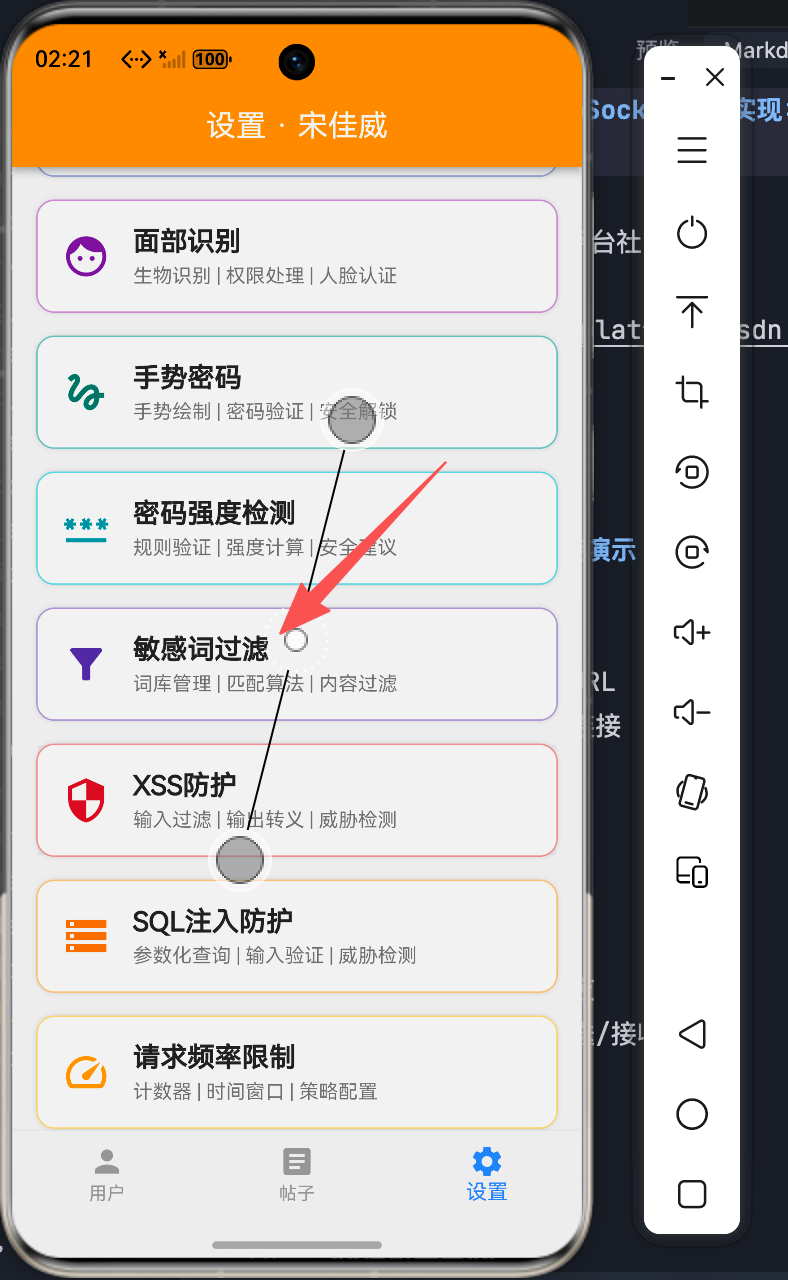
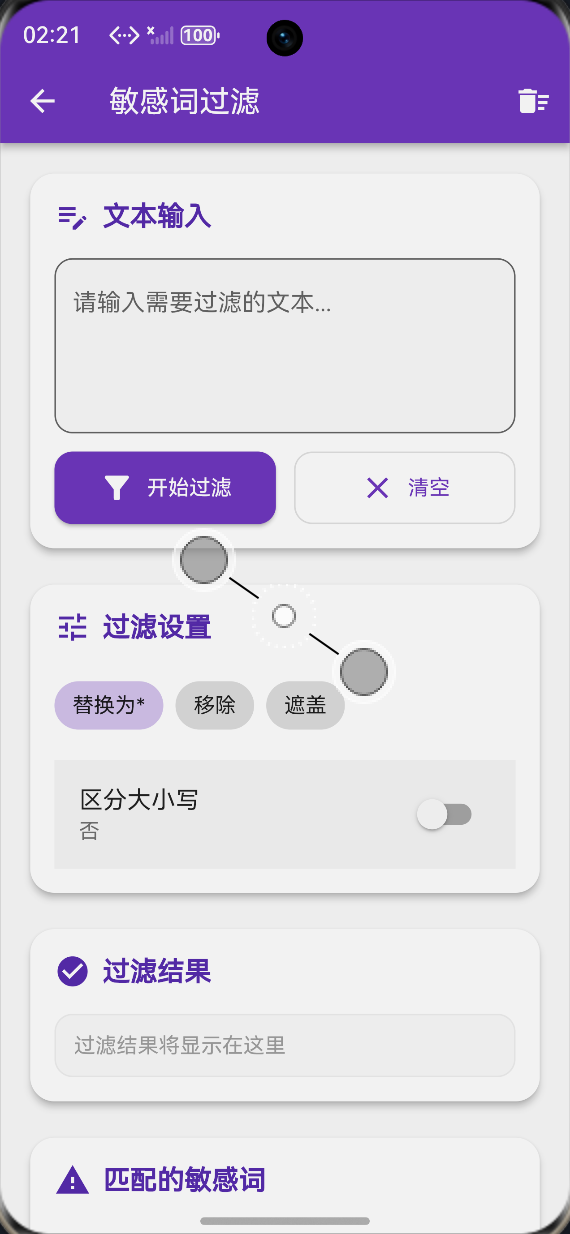
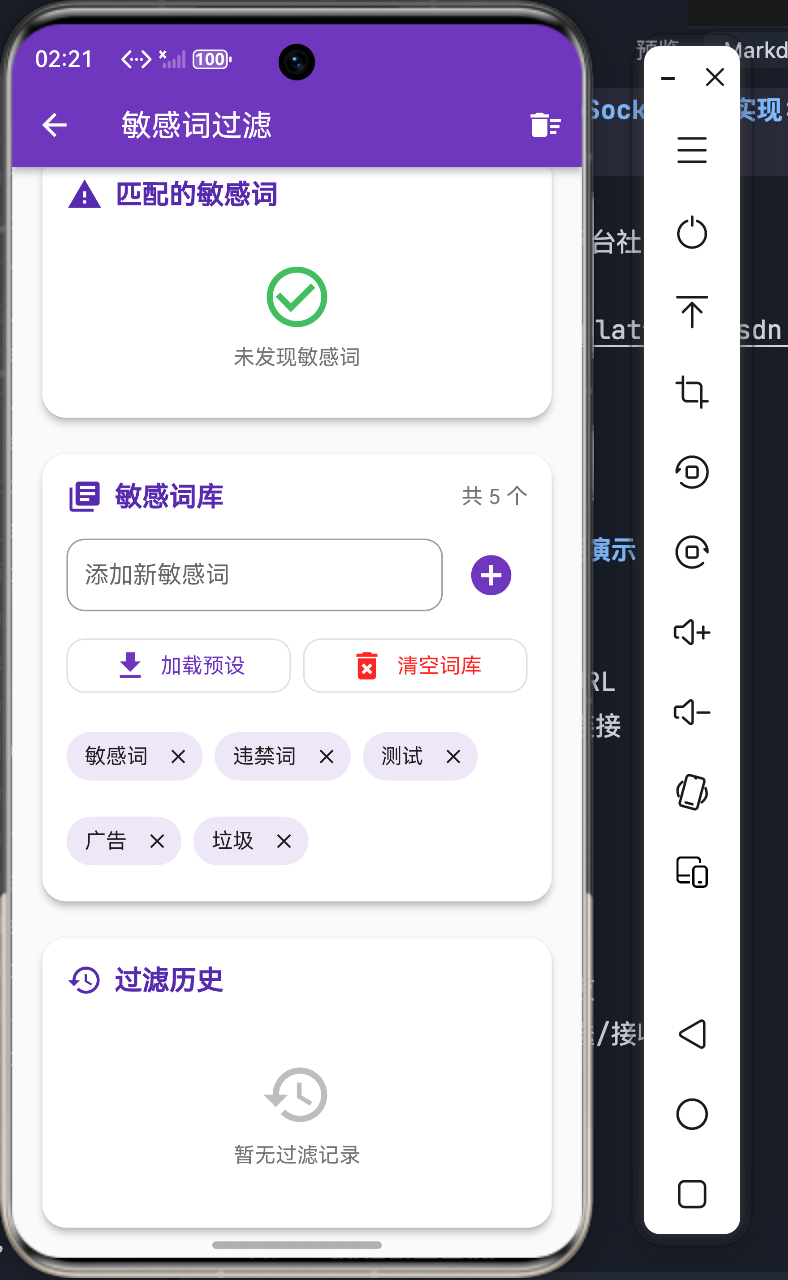
本组件实现了以下功能:
- 敏感词检测与过滤
- 词库管理(添加、删除、清空)
- 多种过滤模式(替换、移除、遮盖)
- 大小写敏感设置
- 过滤历史记录
三、技术要点
3.1 过滤模式
// 三种过滤模式
String _filterMode = 'replace';  // replace, remove, mask

// 替换模式:将敏感词替换为指定字符
// 移除模式:直接删除敏感词
// 遮盖模式:用***遮盖敏感词
3.2 敏感词匹配
String _detectContentType(String text) {
  if (RegExp(r'^https?://').hasMatch(text)) {
    return 'link';
  } else if (RegExp(r'^[\w-\.]+@[\w-]+\.[a-z]{2,}$').hasMatch(text)) {
    return 'email';
  } else if (RegExp(r'^\d{11}$').hasMatch(text)) {
    return 'phone';
  } else {
    return 'text';
  }
}
四、完整实现
4.1 匹配结果模型
class MatchedWord {
  final String word;
  final int startIndex;
  final int endIndex;

  MatchedWord({
    required this.word,
    required this.startIndex,
    required this.endIndex,
  });
}

class FilterHistory {
  final String originalText;
  final String filteredText;
  final int matchedCount;
  final DateTime time;

  FilterHistory({
    required this.originalText,
    required this.filteredText,
    required this.matchedCount,
    required this.time,
  });
}
4.2 过滤核心逻辑
void _filterText() {
  final text = _inputController.text;
  if (text.isEmpty) {
    setState(() {
      _originalText = '';
      _filteredText = '';
      _matchedWords.clear();
    });
    return;
  }

  setState(() {
    _originalText = text;
    _matchedWords.clear();

    String result = text;

    for (var word in _sensitiveWords) {
      final searchWord = _caseSensitive ? word : word.toLowerCase();
      final searchText = _caseSensitive ? text : text.toLowerCase();

      int index = searchText.indexOf(searchWord);
      while (index != -1) {
        _matchedWords.add(MatchedWord(
          word: word,
          startIndex: index,
          endIndex: index + word.length,
        ));

        index = searchText.indexOf(searchWord, index + 1);
      }

      if (text.toLowerCase().contains(word.toLowerCase())) {
        switch (_filterMode) {
          case 'replace':
            result = _replaceWord(result, word, _replaceChar * word.length);
            break;
          case 'remove':
            result = _replaceWord(result, word, '');
            break;
          case 'mask':
            result = _replaceWord(result, word, '***');
            break;
        }
      }
    }

    _filteredText = result;
  });
}

String _replaceWord(String text, String word, String replacement) {
  if (_caseSensitive) {
    return text.replaceAll(word, replacement);
  } else {
    final pattern = RegExp(RegExp.escape(word), caseSensitive: false);
    return text.replaceAll(pattern, replacement);
  }
}
4.3 词库管理
final Set<String> _sensitiveWords = {
  '敏感词',
  '违禁词',
  '测试',
  '广告',
  '垃圾',
};

void _addSensitiveWord() {
  final word = _wordController.text.trim();
  if (word.isEmpty || _sensitiveWords.contains(word)) return;

  setState(() {
    _sensitiveWords.add(word);
  });

  _wordController.clear();
}

void _removeSensitiveWord(String word) {
  setState(() {
    _sensitiveWords.remove(word);
  });
}

void _clearAllWords() {
  setState(() {
    _sensitiveWords.clear();
  });
}

void _loadPresetWords() {
  setState(() {
    _sensitiveWords.addAll([
      '违规',
      '禁止',
      '非法',
      '诈骗',
      '赌博',
      '毒品',
    ]);
  });
}
4.4 输入卡片UI
Widget _buildInputCard() {
  return Card(
    elevation: 4,
    shape: RoundedRectangleBorder(borderRadius: BorderRadius.circular(16)),
    child: Padding(
      padding: const EdgeInsets.all(16),
      child: Column(
        crossAxisAlignment: CrossAxisAlignment.start,
        children: [
          Row(
            children: [
              Icon(Icons.edit_note, color: Colors.deepPurple.shade700),
              const SizedBox(width: 8),
              Text('文本输入', style: TextStyle(fontSize: 18, fontWeight: FontWeight.bold)),
            ],
          ),
          const SizedBox(height: 16),
          TextField(
            controller: _inputController,
            maxLines: 4,
            decoration: InputDecoration(
              hintText: '请输入需要过滤的文本...',
              border: OutlineInputBorder(borderRadius: BorderRadius.circular(12)),
              filled: true,
              fillColor: Colors.grey.shade50,
            ),
          ),
          const SizedBox(height: 12),
          Row(
            children: [
              Expanded(
                child: ElevatedButton.icon(
                  onPressed: _filterText,
                  icon: const Icon(Icons.filter_alt),
                  label: const Text('开始过滤'),
                  style: ElevatedButton.styleFrom(
                    backgroundColor: Colors.deepPurple,
                    foregroundColor: Colors.white,
                  ),
                ),
              ),
              const SizedBox(width: 12),
              Expanded(
                child: OutlinedButton.icon(
                  onPressed: () {
                    _inputController.clear();
                    setState(() {
                      _originalText = '';
                      _filteredText = '';
                      _matchedWords.clear();
                    });
                  },
                  icon: const Icon(Icons.clear),
                  label: const Text('清空'),
                ),
              ),
            ],
          ),
        ],
      ),
    ),
  );
}
4.5 过滤设置卡片
Widget _buildFilterModeCard() {
  return Card(
    elevation: 4,
    shape: RoundedRectangleBorder(borderRadius: BorderRadius.circular(16)),
    child: Padding(
      padding: const EdgeInsets.all(16),
      child: Column(
        crossAxisAlignment: CrossAxisAlignment.start,
        children: [
          Row(
            children: [
              Icon(Icons.tune, color: Colors.deepPurple.shade700),
              const SizedBox(width: 8),
              Text('过滤设置', style: TextStyle(fontSize: 18, fontWeight: FontWeight.bold)),
            ],
          ),
          const SizedBox(height: 16),
          Wrap(
            spacing: 8,
            children: [
              ChoiceChip(
                label: const Text('替换为*'),
                selected: _filterMode == 'replace',
                selectedColor: Colors.deepPurple.shade100,
                onSelected: (selected) {
                  if (selected) setState(() => _filterMode = 'replace');
                },
              ),
              ChoiceChip(
                label: const Text('移除'),
                selected: _filterMode == 'remove',
                selectedColor: Colors.deepPurple.shade100,
                onSelected: (selected) {
                  if (selected) setState(() => _filterMode = 'remove');
                },
              ),
              ChoiceChip(
                label: const Text('遮盖'),
                selected: _filterMode == 'mask',
                selectedColor: Colors.deepPurple.shade100,
                onSelected: (selected) {
                  if (selected) setState(() => _filterMode = 'mask');
                },
              ),
            ],
          ),
          const SizedBox(height: 12),
          SwitchListTile(
            title: const Text('区分大小写'),
            value: _caseSensitive,
            onChanged: (value) {
              setState(() {
                _caseSensitive = value;
              });
            },
            activeColor: Colors.deepPurple,
          ),
        ],
      ),
    ),
  );
}
4.6 词库管理卡片
Widget _buildWordLibraryCard() {
  return Card(
    elevation: 4,
    shape: RoundedRectangleBorder(borderRadius: BorderRadius.circular(16)),
    child: Padding(
      padding: const EdgeInsets.all(16),
      child: Column(
        crossAxisAlignment: CrossAxisAlignment.start,
        children: [
          Row(
            children: [
              Icon(Icons.library_books, color: Colors.deepPurple.shade700),
              const SizedBox(width: 8),
              Text('敏感词库', style: TextStyle(fontSize: 18, fontWeight: FontWeight.bold)),
              const Spacer(),
              Text('共 ${_sensitiveWords.length} 个'),
            ],
          ),
          const SizedBox(height: 16),
          Row(
            children: [
              Expanded(
                child: TextField(
                  controller: _wordController,
                  decoration: InputDecoration(
                    hintText: '添加新敏感词',
                    border: OutlineInputBorder(borderRadius: BorderRadius.circular(12)),
                  ),
                  onSubmitted: (_) => _addSensitiveWord(),
                ),
              ),
              const SizedBox(width: 8),
              IconButton(
                onPressed: _addSensitiveWord,
                icon: const Icon(Icons.add_circle),
                color: Colors.deepPurple,
                iconSize: 32,
              ),
            ],
          ),
          const SizedBox(height: 12),
          Wrap(
            spacing: 8,
            runSpacing: 8,
            children: _sensitiveWords.map((word) {
              return Chip(
                label: Text(word),
                backgroundColor: Colors.deepPurple.shade50,
                deleteIcon: const Icon(Icons.close, size: 16),
                onDeleted: () => _removeSensitiveWord(word),
              );
            }).toList(),
          ),
        ],
      ),
    ),
  );
}
五、最佳实践
5.1 性能优化
- 使用高效的字符串匹配算法
- 大文本分批处理
- 词库预编译正则
5.2 词库管理
- 支持导入导出
- 分类管理
- 定期更新
5.3 安全考虑
- 本地词库加密
- 网络词库同步
- 敏感操作日志
六、总结
本文详细介绍了Flutter鸿蒙应用中敏感词过滤的实现方法,包括词库管理、匹配算法和多种过滤模式。通过合理的UI设计和算法选择,可以高效地实现内容审核功能。
欢迎加入开源鸿蒙跨平台社区! https://openharmonycrossplatform.csdn.net

讨论HarmonyOS开发技术,专注于API与组件、DevEco Studio、测试、元服务和应用上架分发等。
更多推荐



 0
0 0
0- 0


 已为社区贡献20条内容

所有评论(0)