鸿蒙实战:图像滤镜工坊——EffectKit 图像效果引擎
·
鸿蒙实战:图像滤镜工坊——EffectKit 图像效果引擎
完整源码:ImageEffectKitDemo 基于 HarmonyOS 5.0+,实现相册选图、多种滤镜实时预览、强度动态调节、保存到相册。本篇聚焦 EffectKit 图像效果模块。
一、ColorFilter 与 EffectKit 的根本区别
上一节我们通过 ColorFilter 配合 4×5 颜色矩阵,实现了灰度、复古、反色等滤镜效果。ColorFilter 作用于渲染管线,切换滤镜无延迟,非常适合实时预览。
但 ColorFilter 存在两个局限:
- 无法保存:
colorFilter只影响屏幕显示,不修改原始图片数据 - 缺少高级效果:不支持模糊、亮度调节等
本节使用 EffectKit 解决这些问题:
- EffectKit 直接生成新的 PixelMap,可以保存到相册
- 内置
blur()、brightness()等高级效果 - 处理后的图片可独立保存,原图不受影响
| 特性 | ColorFilter(上节) | EffectKit(本节) |
|---|---|---|
| 修改方式 | 渲染时修改,不改变原图 | 直接生成新的 PixelMap |
| 保存图片 | 需离屏截图 | 直接保存新图 |
| 模糊效果 | 不支持 | 支持 |
| 亮度调节 | 需颜色矩阵 | 内置 |
二、项目架构
2.1 目录结构
ImageEffectKitDemo/
├── pages/
│   └── Index.ets                       // 主界面
├── filter/
│   ├── core/
│   │   ├── IFilter.ets                 // 滤镜接口
│   │   └── FilterRegistry.ets          // 滤镜注册中心
│   ├── effectkit/
│   │   ├── EffectKitFilter.ets         // EffectKit 基类
│   │   ├── EffectKitDynamicMatrix.ets  // 动态矩阵滤镜
│   │   ├── EffectKitBrightness.ets     // 亮度滤镜
│   │   └── EffectKitBlur.ets           // 模糊滤镜
│   ├── processor/
│   │   └── EffectKitProcessor.ets      // 图片处理器
│   └── utils/
│       └── MediaHelper.ets             // 相册选图+保存
└── constants/
│   └── MatrixConstants.ets # 矩阵常量
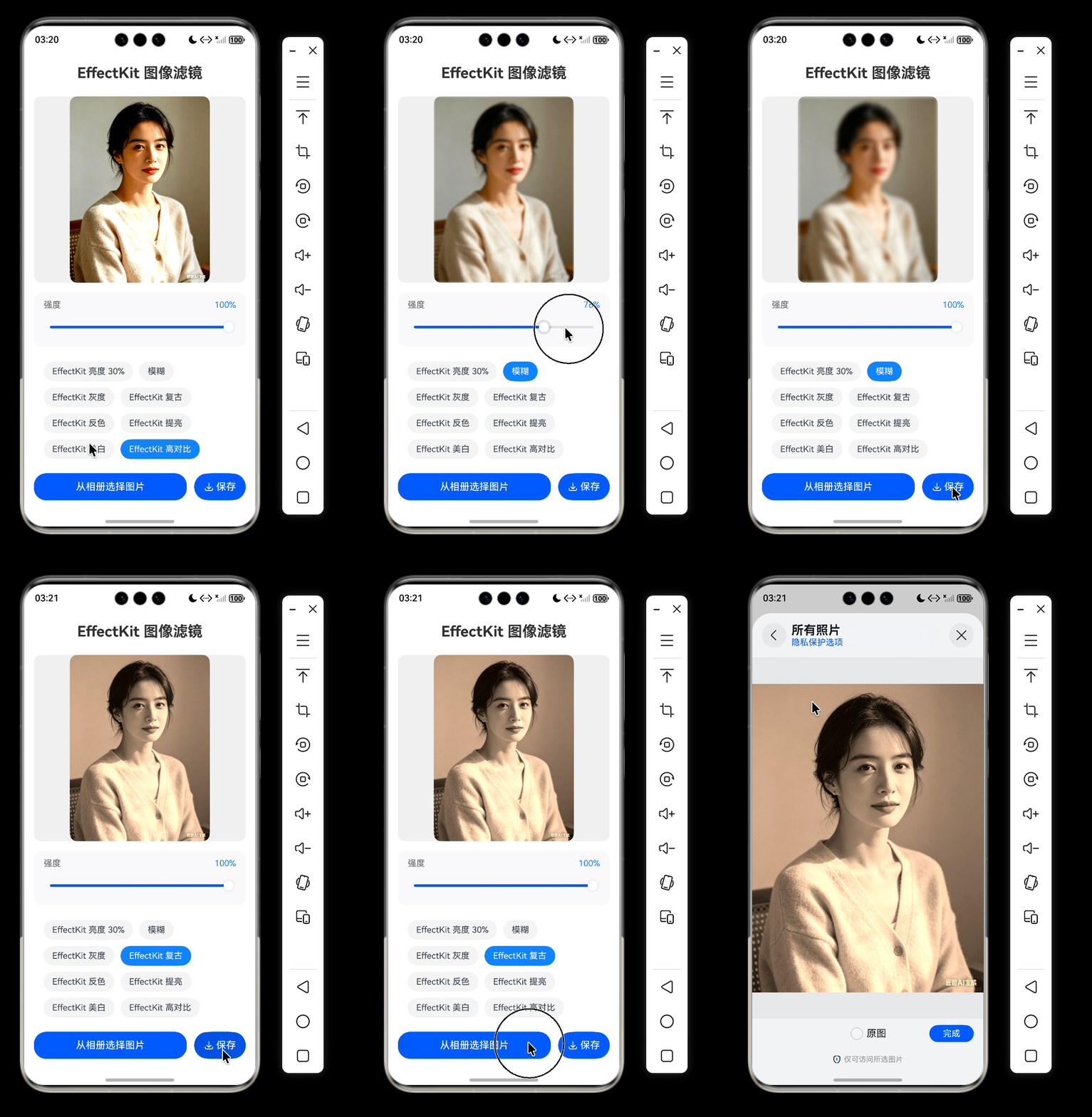
2.2 效果展示
三、EffectKit 核心 API
import { effectKit } from '@kit.ArkGraphics2D';

// 创建效果器,返回新的 PixelMap
const filter = effectKit.createEffect(pixelMap);
filter.grayscale();        // 灰度
filter.brightness(0.5);   // 亮度 50%
filter.blur(10);           // 模糊半径 10

// 获取处理后的新图片(原图不变)
const newPixelMap = await filter.getEffectPixelMap();

// 保存新图片
await saveToAlbum(newPixelMap);
四、颜色矩阵常量定义
关于颜色矩阵的详细原理(4×5 矩阵、对角线元素、通道混合等),已在上一节完整讲解,本节不再重复。动态矩阵滤镜中的矩阵插值原理与上节一致。
export class MatrixConstants {
  // 单位矩阵(原图)
  static readonly IDENTITY: number[] = [
    1, 0, 0, 0, 0,
    0, 1, 0, 0, 0,
    0, 0, 1, 0, 0,
    0, 0, 0, 1, 0
  ];

  // 灰度矩阵(平均值法)
  static readonly GRAY: number[] = [
    0.333, 0.333, 0.333, 0, 0,
    0.333, 0.333, 0.333, 0, 0,
    0.333, 0.333, 0.333, 0, 0,
    0, 0, 0, 1, 0
  ];

  // 复古矩阵(棕褐色调)
  static readonly SEPIA: number[] = [
    0.38, 0.62, 0.18, 0, 0.04,
    0.32, 0.58, 0.12, 0, 0.02,
    0.26, 0.54, 0.08, 0, 0.00,
    0, 0, 0, 1, 0
  ];

  // 反色矩阵
  static readonly INVERT: number[] = [
    -1, 0, 0, 0, 1,
    0, -1, 0, 0, 1,
    0, 0, -1, 0, 1,
    0, 0, 0, 1, 0
  ];

  // 提亮矩阵(偏移 +0.25)
  static readonly BRIGHTNESS: number[] = [
    1, 0, 0, 0, 0.25,
    0, 1, 0, 0, 0.25,
    0, 0, 1, 0, 0.25,
    0, 0, 0, 1, 0
  ];

  // 美白矩阵(增益 1.1,偏移 +0.05)
  static readonly WHITEN: number[] = [
    1.1, 0, 0, 0, 0.05,
    0, 1.1, 0, 0, 0.05,
    0, 0, 1.1, 0, 0.05,
    0, 0, 0, 1, 0
  ];

  // 高对比矩阵(增益 1.3,偏移 -0.12)
  static readonly CONTRAST: number[] = [
    1.3, 0, 0, 0, -0.12,
    0, 1.3, 0, 0, -0.12,
    0, 0, 1.3, 0, -0.12,
    0, 0, 0, 1, 0
  ];
}
五、核心代码实现
5.1 滤镜接口
// filter/core/IFilter.ets
export interface IFilter {
  getId(): string;
  getName(): string;
  isRealtime(): boolean;
}
5.2 EffectKit 滤镜基类
import { effectKit } from '@kit.ArkGraphics2D';
import { image } from '@kit.ImageKit';
import { IFilter } from '../core/IFilter';
import { drawing } from '@kit.ArkGraphics2D';

export abstract class EffectKitFilter implements IFilter {
  abstract getId(): string;
  abstract getName(): string;

  protected abstract applyEffect(filter: effectKit.Filter): effectKit.Filter;

  async apply(source: image.PixelMap): Promise<image.PixelMap | null> {
    try {
      let filter = effectKit.createEffect(source);
      if (!filter) {
        return null;
      }
      filter = this.applyEffect(filter);
      return await filter.getEffectPixelMap();
    } catch (error) {
      console.error(`EffectKit ${this.getName()} error:`, JSON.stringify(error));
      return null;
    }
  }

  getColorFilter(): ColorFilter | undefined {
    return undefined;
  }

  getImageFilter(): drawing.ImageFilter | undefined {
    return undefined;
  }

  isRealtime(): boolean {
    return false;
  }
}
5.3 动态矩阵滤镜
import { effectKit } from "@kit.ArkGraphics2D";
import { MatrixConstants } from "../constants/MatrixConstants";

export class EffectKitDynamicMatrix extends EffectKitFilter {
  private intensity: number = 1.0;
  private targetMatrix: number[];
  private filterId: string;
  private filterName: string;

  constructor(id: string, name: string, targetMatrix: number[]) {
    super();
    this.filterId = id;
    this.filterName = name;
    this.targetMatrix = targetMatrix;
  }

  getId(): string {
    return `effect_dynamic_${this.filterId}`;
  }

  getName(): string {
    return `EffectKit ${this.filterName}`;
  }

  setIntensity(value: number): void {
    this.intensity = Math.min(1, Math.max(0, value));
  }

  getIntensity(): number {
    return this.intensity;
  }

  protected applyEffect(filter: effectKit.Filter): effectKit.Filter {
    const matrix = this.interpolateMatrix(this.targetMatrix, this.intensity);
    return filter.setColorMatrix(matrix);
  }

  private interpolateMatrix(target: number[], t: number): number[] {
    const identity = MatrixConstants.IDENTITY;
    const result = new Array<number>(20);
    for (let i = 0; i < 20; i++) {
      result[i] = identity[i] * (1 - t) + target[i] * t;
    }
    return result;
  }
}
5.4 亮度滤镜
import { effectKit } from '@kit.ArkGraphics2D';
import { EffectKitFilter } from './EffectKitFilter';

export class EffectKitBrightness extends EffectKitFilter {
  private brightValue: number;

  constructor(brightValue: number = 0.5) {
    super();
    this.brightValue = Math.min(1, Math.max(0, brightValue));
  }

  getId(): string {
    return 'effect_brightness';
  }

  getName(): string {
    return `EffectKit 亮度 ${Math.round(this.brightValue * 100)}%`;
  }

  getBrightness(): number {
    return this.brightValue;
  }

  setBrightness(value: number): void {
    this.brightValue = Math.min(1, Math.max(0, value));
  }

  protected applyEffect(filter: effectKit.Filter): effectKit.Filter {
    return filter.brightness(this.brightValue);
  }
}
5.5 模糊滤镜
import { effectKit } from '@kit.ArkGraphics2D';
import { EffectKitFilter } from './EffectKitFilter';

export class EffectKitBlur extends EffectKitFilter {
  private radius: number;

  constructor(radius: number = 10) {
    super();
    this.radius = Math.max(0, radius);
  }

  getId(): string {
    return `effect_blur`;
  }

  getName(): string {
    return `模糊`;
  }

  getRadius(): number {
    return this.radius;
  }

  setRadius(value: number): void {
    this.radius = Math.max(0, value);
  }

  protected applyEffect(filter: effectKit.Filter): effectKit.Filter {
    return filter.blur(this.radius);
  }
}
5.6 滤镜注册中心
import { IFilter } from './IFilter';

import { EffectKitBrightness } from '../effectkit/EffectKitBrightness';
import { EffectKitBlur } from '../effectkit/EffectKitBlur';
import { MatrixConstants } from '../constants/MatrixConstants';
import { EffectKitDynamicMatrix } from '../effectkit/EffectKitDynamicMatrix';

export class FilterRegistry {
  private static filters: Map<string, IFilter> = new Map();

  static initialize() {
    // 动态亮度(默认 50%)
    FilterRegistry.register(new EffectKitBrightness(0.5));

    // 动态模糊(默认半径 10)
    FilterRegistry.register(new EffectKitBlur(10));

    // 动态矩阵滤镜(默认强度 1.0 = 完整效果)
    FilterRegistry.register(new EffectKitDynamicMatrix('gray', '灰度', MatrixConstants.GRAY));
    FilterRegistry.register(new EffectKitDynamicMatrix('sepia', '复古', MatrixConstants.SEPIA));
    FilterRegistry.register(new EffectKitDynamicMatrix('invert', '反色', MatrixConstants.INVERT));
    FilterRegistry.register(new EffectKitDynamicMatrix('brightness', '提亮', MatrixConstants.BRIGHTNESS));
    FilterRegistry.register(new EffectKitDynamicMatrix('whiten', '美白', MatrixConstants.WHITEN));
    FilterRegistry.register(new EffectKitDynamicMatrix('contrast', '高对比', MatrixConstants.CONTRAST));
  }

  private static register(filter: IFilter) {
    FilterRegistry.filters.set(filter.getId(), filter);
  }

  static getAll(): IFilter[] {
    if (FilterRegistry.filters.size === 0) {
      FilterRegistry.initialize();
    }
    return Array.from(FilterRegistry.filters.values());
  }

  static get(id: string): IFilter | undefined {
    if (FilterRegistry.filters.size === 0) {
      FilterRegistry.initialize();
    }
    return FilterRegistry.filters.get(id);
  }
}
5.7 图片处理器
import { image } from '@kit.ImageKit';
import { EffectKitFilter } from '../effectkit/EffectKitFilter';

export class EffectKitProcessor {
  static async applyFilter(
    src: image.PixelMap,
    filter: EffectKitFilter
  ): Promise<image.PixelMap | null> {
    return await filter.apply(src);
  }
}
5.8 相册工具
import { photoAccessHelper } from '@kit.MediaLibraryKit';
import { common } from '@kit.AbilityKit';
import fs from '@ohos.file.fs';
import { image } from '@kit.ImageKit';

export class MediaHelper {
  // 读取图片
  static async pickImage(): Promise<image.PixelMap | null> {
    const picker = new photoAccessHelper.PhotoViewPicker();
    try {
      const result = await picker.select({
        MIMEType: photoAccessHelper.PhotoViewMIMETypes.IMAGE_TYPE,
        maxSelectNumber: 1
      });
      if (result.photoUris.length === 0) {
        return null;
      }
      const uri = result.photoUris[0];
      const file = await fs.open(uri, fs.OpenMode.READ_ONLY);
      const imageSource = image.createImageSource(file.fd);
      const pixelMap = await imageSource.createPixelMap();
      await imageSource.release();
      await fs.close(file);
      return pixelMap;
    } catch (error) {

      return null
    }
  }

  static async saveToAlbum(pixelMap: image.PixelMap, context: common.Context): Promise<boolean> {

    try {
      const phHelper = photoAccessHelper.getPhotoAccessHelper(context);
      const uri = await phHelper.createAsset(photoAccessHelper.PhotoType.IMAGE, 'jpg');
      const file = await fs.open(uri, fs.OpenMode.READ_WRITE | fs.OpenMode.CREATE);

      // 将 PixelMap 编码为 JPEG
      const packer = image.createImagePacker();
      const data = await packer.packing(pixelMap, { format: 'image/jpeg', quality: 92 });
      await packer.release();

      await fs.write(file.fd, data);
      await fs.close(file);
      return true
    } catch (err) {
      console.error('Save error', JSON.stringify(err));
      return false
    }
  }
}
5.9 主界面
import { IFilter } from '../filter/core/IFilter';
import { EffectKitFilter } from '../filter/effectkit/EffectKitFilter';
import { EffectKitDynamicMatrix } from '../filter/effectkit/EffectKitDynamicMatrix';
import { EffectKitBrightness } from '../filter/effectkit/EffectKitBrightness';
import { EffectKitBlur } from '../filter/effectkit/EffectKitBlur';
import { FilterRegistry } from '../filter/core/FilterRegistry';
import promptAction from '@ohos.promptAction';
import { image } from '@kit.ImageKit';
import { common } from '@kit.AbilityKit';
import { LengthMetrics } from '@kit.ArkUI';
import { EffectKitProcessor } from '../filter/processor/EffectKitProcessor';
import { MediaHelper } from '../filter/utils/MediaHelper';

@Entry
@Component
struct Index {
  @State pixelMap: image.PixelMap | null = null;
  @State currentFilterId: string = '';
  @State filterList: IFilter[] = FilterRegistry.getAll();
  @State isProcessing: boolean = false;
  @State sliderValue: number = 0.5;
  private originalPixelMap: image.PixelMap | null = null;
  private context = getContext(this) as common.Context;

  aboutToAppear(): void {
    if (this.filterList.length > 0) {
      this.currentFilterId = this.filterList[0].getId();
      this.updateSliderValue();
    }
  }

  private getCurrentFilter(): IFilter | undefined {
    return FilterRegistry.get(this.currentFilterId);
  }

  // 更新滑块值
  private updateSliderValue(): void {
    const filter = this.getCurrentFilter();
    if (filter instanceof EffectKitDynamicMatrix) {
      this.sliderValue = filter.getIntensity();
    } else if (filter instanceof EffectKitBrightness) {
      this.sliderValue = filter.getBrightness();
    } else if (filter instanceof EffectKitBlur) {
      this.sliderValue = filter.getRadius() / 25; // 归一化 0-1
    } else {
      this.sliderValue = 0.5;
    }
  }

  // 滑块变化时更新滤镜
  private async onSliderChange(value: number): Promise<void> {
    const filter = this.getCurrentFilter();
    if (!filter || !(filter instanceof EffectKitFilter)) {
      return;
    }

    if (filter instanceof EffectKitDynamicMatrix) {
      filter.setIntensity(value);
    } else if (filter instanceof EffectKitBrightness) {
      filter.setBrightness(value);
    } else if (filter instanceof EffectKitBlur) {
      filter.setRadius(value * 25); // 还原 0-25
    }

    this.sliderValue = value;
    await this.applyFilterToCurrent(filter);
  }

  // 应用滤镜到当前图片
  private async applyFilterToCurrent(filter: EffectKitFilter): Promise<void> {
    if (!this.originalPixelMap) {
      return;
    }

    this.isProcessing = true;

    try {
      const result = await EffectKitProcessor.applyFilter(this.originalPixelMap, filter);
      if (result) {
        this.pixelMap = result;
      }
    } catch (e) {
      console.error('Apply error', JSON.stringify(e));
    } finally {
      this.isProcessing = false;
    }
  }

  // 切换滤镜
  private async switchFilter(filter: IFilter): Promise<void> {
    if (!this.originalPixelMap) {
      this.currentFilterId = filter.getId();
      this.updateSliderValue();
      return;
    }

    if (!(filter instanceof EffectKitFilter)) {
      promptAction.showToast({ message: '当前滤镜类型不支持' });
      return;
    }

    this.currentFilterId = filter.getId();
    this.updateSliderValue();
    await this.applyFilterToCurrent(filter);
  }

  // 保存图片
  private async saveToAlbum(): Promise<void> {
    if (!this.pixelMap) {
      promptAction.showToast({ message: '请先选择图片' });
      return;
    }

    this.isProcessing = true;
    promptAction.showToast({ message: '保存中...' });

    try {
      const success = await MediaHelper.saveToAlbum(this.pixelMap, this.context);
      promptAction.showToast({ message: success ? '已保存到相册' : '保存失败' });
    } catch (e) {
      console.error('Save error', JSON.stringify(e));
      promptAction.showToast({ message: '保存失败' });
    } finally {
      this.isProcessing = false;
    }
  }

  // 获取滑块的最大值
  private getSliderMax(): number {
    const filter = this.getCurrentFilter();
    if (filter instanceof EffectKitBlur) {
      return 1; // 归一化 0-1
    }
    return 1;
  }

  // 获取滑块步长
  private getSliderStep(): number {
    const filter = this.getCurrentFilter();
    if (filter instanceof EffectKitBlur) {
      return 0.04; // 对应半径步长 1
    }
    return 0.01;
  }

  build() {
    Column({ space: 16 }) {
      Text('EffectKit 图像滤镜')
        .fontSize(24)
        .fontWeight(FontWeight.Bold)
        .margin({ top: 8, bottom: 8 })

      // 图片预览区
      if (this.pixelMap) {
        Image(this.pixelMap)
          .width('100%')
          .layoutWeight(1)
          .objectFit(ImageFit.Contain)
          .borderRadius(12)
          .backgroundColor('#F0F0F0')
      } else {
        Column() {
          Text('暂无图片')
            .fontSize(16)
            .fontColor('#999')
          Text('请点击下方按钮选择图片')
            .fontSize(12)
            .fontColor('#BBB')
            .margin({ top: 8 })
        }
        .width('100%')
        .layoutWeight(1)
        .justifyContent(FlexAlign.Center)
        .alignItems(HorizontalAlign.Center)
        .backgroundColor('#F5F5F5')
        .borderRadius(12)
        .border({ width: 1, color: '#E0E0E0', style: BorderStyle.Dashed })
      }

      // 强度滑块
      if (this.pixelMap && this.getCurrentFilter() instanceof EffectKitFilter) {
        Column() {
          Row() {
            Text('强度')
              .fontSize(14)
              .fontColor('#666')
            Blank()
            Text(`${Math.round(this.sliderValue * 100)}%`)
              .fontSize(14)
              .fontColor('#3B82F6')
          }
          .width('100%')
          .margin({ bottom: 8 })

          Slider({
            value: this.sliderValue,
            min: 0,
            max: this.getSliderMax(),
            step: this.getSliderStep()
          })
            .width('100%')
            .onChange(async (value: number) => {
              await this.onSliderChange(value);
            })
        }
        .padding({ left: 16, right: 16, top: 12, bottom: 12 })
        .backgroundColor('#F8F9FA')
        .borderRadius(12)
        .margin({ bottom: 8 })
      }

      // 滤镜列表
      Flex({
        space: { main: LengthMetrics.vp(10), cross: LengthMetrics.vp(10) },
        direction: FlexDirection.Row,
        wrap: FlexWrap.Wrap,
        alignContent: FlexAlign.Start,
      }) {
        ForEach(this.filterList, (filter: IFilter) => {
          Text(filter.getName())
            .fontSize(14)
            .padding({ left: 14, right: 14, top: 8, bottom: 8 })
            .borderRadius(24)
            .backgroundColor(this.currentFilterId === filter.getId() ? '#3B82F6' : '#F3F4F6')
            .fontColor(this.currentFilterId === filter.getId() ? '#FFFFFF' : '#374151')
            .enabled(!this.isProcessing)
            .onClick(() => {
              this.switchFilter(filter);
            })
        }, (filter: IFilter) => filter.getId())
      }
      .padding({ left: 16, right: 16 })

      // 按钮行
      Row({ space: 12 }) {
        Button('从相册选择图片')
          .layoutWeight(1)
          .height(44)
          .onClick(async () => {
            const p = await MediaHelper.pickImage();
            if (p) {
              this.originalPixelMap = p;
              this.pixelMap = p;
              const filter = this.getCurrentFilter();
              if (filter && filter instanceof EffectKitFilter) {
                await this.applyFilterToCurrent(filter);
              }
            } else {
              promptAction.showToast({ message: '未选择图片' });
            }
          })

        SaveButton({
          icon: SaveIconStyle.FULL_FILLED,
          text: SaveDescription.SAVE
        })
          .height(44)
          .enabled(this.pixelMap !== null)
          .onClick(async (event: ClickEvent, result: SaveButtonOnClickResult) => {
            if (result === SaveButtonOnClickResult.SUCCESS) {
              await this.saveToAlbum();
            } else {
              promptAction.showToast({ message: '保存失败' });
            }
          })
      }
      .width('100%')
      .height(50)
      .padding({ top: 8 })
    }
    .width('100%')
    .height('100%')
    .padding(16)
    .backgroundColor(Color.White)
  }
}
六、总结
EffectKit 核心能力:
- 直接生成新的 PixelMap,原图不受影响,处理后的图片可保存到相册
- 内置
blur()模糊效果和brightness()亮度调节 - 支持
setColorMatrix()自定义颜色矩阵,实现灰度、复古、反色等效果 - 动态矩阵滤镜支持 0-100% 强度滑块调节
- 统一接口设计,新增滤镜只需继承
EffectKitFilter并注册
适用场景:
- 需要保存滤镜效果的应用
- 需要模糊、亮度等高级效果的应用
如果觉得本文对你有帮助,请点赞、收藏、转发支持!

讨论HarmonyOS开发技术,专注于API与组件、DevEco Studio、测试、元服务和应用上架分发等。
更多推荐
 8
8 0
0- 0


 已为社区贡献125条内容

所有评论(0)