阿里 AGenUI 开源库前后端实战教程 —— Day 7:鸿蒙端 SSE 流式通信与 AG-UI 聊天页面
·
Day 6 我们深入解析了 AGenUI Playground 官方示例的架构与自定义组件。今天将后端
/chat/streamSSE 接口与鸿蒙端对接,实现完整的流式 AI 聊天页面,支持 Markdown/Chart/Lottie 组件的实时渲染。
0. 今日目标
| 事项 | 内容 |
|---|---|
| SSE 客户端 | 基于 @ohos.net.http 实现 SSE 协议解析与流式数据接收 |
| 聊天页面 | 构建类微信聊天 UI,支持发送消息与流式接收回复 |
| AG-UI 集成 | 将 SSE 流式数据实时转换为 AGenUI Surface 渲染 |
| 生命周期管理 | Surface 创建/更新/销毁与消息列表的联动 |
一、SSE 客户端:SSEClient.ets
鸿蒙官方未提供 SSE 原生支持,需基于 http 模块自行实现。核心挑战:UTF-8 中文解码 与 SSE 协议解析。
1.1 UTF-8 解码工具函数
SSE 返回 ArrayBuffer,需手动解码为字符串(支持中文多字节):
function arrayBufferToString(buffer: ArrayBuffer): string {
  const uint8Array = new Uint8Array(buffer);
  let result = '';
  let i = 0;

  while (i < uint8Array.length) {
    const byte1 = uint8Array[i];

    if (byte1 < 0x80) {
      // 1字节 ASCII
      result += String.fromCharCode(byte1);
      i++;
    } else if (byte1 < 0xE0) {
      // 2字节 UTF-8
      const byte2 = uint8Array[i + 1];
      const codePoint = ((byte1 & 0x1F) << 6) | (byte2 & 0x3F);
      result += String.fromCharCode(codePoint);
      i += 2;
    } else if (byte1 < 0xF0) {
      // 3字节 UTF-8(中文常用)
      const byte2 = uint8Array[i + 1];
      const byte3 = uint8Array[i + 2];
      const codePoint = ((byte1 & 0x0F) << 12) | ((byte2 & 0x3F) << 6) | (byte3 & 0x3F);
      result += String.fromCharCode(codePoint);
      i += 3;
    } else {
      // 4字节 UTF-8(emoji/生僻字)
      const byte2 = uint8Array[i + 1];
      const byte3 = uint8Array[i + 2];
      const byte4 = uint8Array[i + 3];
      let codePoint = ((byte1 & 0x07) << 18) | ((byte2 & 0x3F) << 12) |
                      ((byte3 & 0x3F) << 6) | (byte4 & 0x3F);
      codePoint -= 0x10000;
      result += String.fromCharCode(0xD800 + (codePoint >> 10));
      result += String.fromCharCode(0xDC00 + (codePoint & 0x3FF));
      i += 4;
    }
  }
  return result;
}
1.2 SSE 客户端完整实现
import http from '@ohos.net.http';
import { BusinessError } from '@ohos.base';

/** 事件回调类型 */
type SSEEventHandler = (data: string) => void;
type SSEErrorHandler = (error: string) => void;

/** 连接状态 */
export enum ConnectionState {
  DISCONNECTED = 0,
  CONNECTING = 1,
  CONNECTED = 2,
  CLOSED = 3
}

export class SSEClient {
  private httpRequest: http.HttpRequest;
  private url: string;
  private state: ConnectionState = ConnectionState.DISCONNECTED;
  private messageHandler: SSEEventHandler | null = null;
  private doneHandler: SSEEventHandler | null = null;
  private errorHandler: SSEErrorHandler | null = null;

  // SSE 协议解析状态
  private buffer: string = '';
  private currentEvent: string = '';
  private currentId: string = '';
  private currentData: string = '';
  private isCancelled: boolean = false;
  private retryTime: number = 3000;

  constructor(url: string) {
    this.url = url;
    this.httpRequest = http.createHttp();
  }

  /** 连接 SSE 服务器 */
  connect(): void {
    if (this.state === ConnectionState.CONNECTING ||
        this.state === ConnectionState.CONNECTED) {
      return;
    }

    this.state = ConnectionState.CONNECTING;
    this.buffer = '';
    this.currentEvent = '';
    this.currentData = '';
    this.isCancelled = false;

    const header: Record<string, string> = {
      'Accept': 'text/event-stream',
      'Cache-Control': 'no-cache'
    };

    const requestOptions: http.HttpRequestOptions = {
      method: http.RequestMethod.POST,
      header: header,
      readTimeout: 0,        // 长连接,不超时
      connectTimeout: 10000,
      expectDataType: http.HttpDataType.ARRAY_BUFFER
    };

    // 绑定流式数据接收事件
    this.httpRequest.on('dataReceive', (data: ArrayBuffer) => {
      const dataStr = arrayBufferToString(data);
      this.state = ConnectionState.CONNECTED;
      this.processStreamData(dataStr);
    });

    // 发起请求
    this.httpRequest.request(this.url, requestOptions)
      .then((data: http.HttpResponse) => {
        if (data.responseCode === 200 && data.result) {
          // 兜底:处理完整响应(某些场景 dataReceive 未触发)
          const responseStr = data.result instanceof ArrayBuffer
            ? arrayBufferToString(data.result)
            : String(data.result);
          this.processStreamData(responseStr);
          this.dispatchEvent(); // 触发剩余数据
        }
        this.close();
      })
      .catch((err: BusinessError) => {
        if (!this.isCancelled) {
          this.handleError(`请求错误: ${err.message}`);
        }
      });
  }

  /** 解析 SSE 流数据 */
  private processStreamData(data: string): void {
    if (this.isCancelled) return;

    this.buffer += data;
    const lines = this.buffer.split('\n');
    this.buffer = lines.pop() || ''; // 保留未完整行

    for (const line of lines) {
      if (line.length === 0) {
        // 空行表示事件结束,触发分发
        this.dispatchEvent();
        continue;
      }

      if (line.startsWith(':')) continue; // 注释行

      const colonIndex = line.indexOf(':');
      if (colonIndex === -1) continue;

      const field = line.substring(0, colonIndex);
      const value = line.charAt(colonIndex + 1) === ' '
        ? line.substring(colonIndex + 2)
        : line.substring(colonIndex + 1);

      switch (field) {
        case 'event':
          this.currentEvent = value;
          break;
        case 'data':
          if (this.currentData.length > 0) this.currentData += '\n';
          this.currentData += value;
          break;
        case 'id':
          this.currentId = value;
          break;
        case 'retry':
          const retry = parseInt(value, 10);
          if (!isNaN(retry)) this.retryTime = retry;
          break;
      }
    }
  }

  /** 触发事件回调 */
  private dispatchEvent(): void {
    if (this.currentData.length === 0) return;

    const event = this.currentEvent || 'message';
    const data = this.currentData;

    // 重置状态
    this.currentEvent = '';
    this.currentData = '';

    if (event === 'done') {
      this.doneHandler?.(data);
    } else {
      this.messageHandler?.(data);
    }
  }

  // 监听器注册
  onMessage(handler: SSEEventHandler): void { this.messageHandler = handler; }
  onDone(handler: SSEEventHandler): void { this.doneHandler = handler; }
  onError(handler: SSEErrorHandler): void { this.errorHandler = handler; }

  /** 关闭连接 */
  close(): void {
    this.isCancelled = true;
    this.state = ConnectionState.CLOSED;

    // 处理 buffer 剩余数据
    if (this.buffer.length > 0 || this.currentData.length > 0) {
      if (this.currentData.length > 0) this.currentData += '\n';
      this.currentData += this.buffer;
      this.buffer = '';
      this.dispatchEvent();
    }

    try {
      this.httpRequest.off('dataReceive');
      this.httpRequest.destroy();
    } catch (e) {
      // 忽略清理错误
    }
  }

  getState(): ConnectionState { return this.state; }

  private handleError(errorMsg: string): void {
    this.state = ConnectionState.CLOSED;
    this.errorHandler?.(errorMsg);
  }
}

/** 工厂函数 */
export function createSSEClient(url: string): SSEClient {
  return new SSEClient(url);
}
二、AG-UI 聊天页面:Chat.ets
基于 Day 6 的组件体系,构建完整的流式聊天界面。
2.1 页面结构与状态定义
import dayjs from '@mui/dayjs';
import promptAction from '@ohos.promptAction';
import { hilog } from '@kit.PerformanceAnalysisKit';
import { common } from '@kit.AbilityKit';
import { UIContext } from '@kit.ArkUI';
import { AGenUIContainer, SurfaceManager, ISurfaceManagerListener, Surface, AGenUI, A2UIComponent, MeasurementManager } from '@agenui/agenui';

import { SSEClient } from '../utils/SSEClient';
import { ToastFunction } from '../functions/ToastFunction';
import { OpenUrlFunction } from '../functions/OpenUrlFunction';
import { MeasurementComponent } from '../components/MeasurementComponent';
import { MarkdownMeasurementComponent } from '../components/MarkdownMeasurementComponent';
import { ChartMeasurementComponent } from '../components/ChartMeasurementComponent';
import { LottieMeasurementComponent } from '../components/LottieMeasurementComponent';
import { CustomMarkdownComponent } from '../components/CustomMarkdownComponent';
import { CustomChartComponent } from '../components/CustomChartComponent';
import { CustomLottieComponent } from '../components/CustomLottieComponent';

const TAG = 'ChatPage';
const DOMAIN = 0x0001;
const API_VERSION = 'v0.9';
const STANDARD_CATALOG_URL = 'https://a2ui.org/specification/v0_9/standard_catalog.json';

/** 消息类型 */
enum MessageType { SENT = 0, RECEIVED = 1 }

/** 聊天消息模型 */
interface ChatMessage {
  id: number;
  content: string;        // 纯文本内容(备用)
  type: MessageType;
  timestamp: string;
  surfaceId?: string;     // AGenUI Surface ID(AI 回复使用)
}

// UI 颜色常量
const COLOR_SENT_BUBBLE = '#95EC69';
const COLOR_RECEIVED_BUBBLE = '#FFFFFF';
const COLOR_BG = '#F5F5F5';
const COLOR_INPUT_BG = '#FFFFFF';
const COLOR_TEXT_PRIMARY = '#000000';
const COLOR_TEXT_SECONDARY = '#999999';
const COLOR_SEND_BUTTON = '#07C160';
const COLOR_AVATAR_BG = '#5677FC';
2.2 Surface 监听器
class ChatSurfaceListener implements ISurfaceManagerListener {
  private chatPage: Chat | null = null;
  private pendingSurfaceId: string = '';

  setChatPage(chatPage: Chat): void { this.chatPage = chatPage; }
  setPendingSurfaceId(surfaceId: string): void { this.pendingSurfaceId = surfaceId; }

  onCreateSurface(surface: Surface): void {
    hilog.info(DOMAIN, TAG, `Surface created: ${surface.surfaceId}`);
    if (this.chatPage && this.pendingSurfaceId) {
      this.chatPage.updateMessageSurfaceId(this.pendingSurfaceId);
    }
  }

  onDeleteSurface(surface: Surface): void {
    hilog.info(DOMAIN, TAG, `Surface destroyed: ${surface.surfaceId}`);
    this.chatPage?.onSurfaceDeleted(surface.surfaceId);
  }

  onError(surface: Surface | null, code: number, message: string): void {
    hilog.error(DOMAIN, TAG, `AGenUI Error: ${code} ${message}`);
  }
}
2.3 主组件
@Entry
@Component
struct Chat {
  // === 状态 ===
  @State messages: ChatMessage[] = [];
  @State inputText: string = '';
  @State nextMessageId: number = 1;
  @State isStreaming: boolean = false;      // 是否正在接收流式回复
  @State activeSurfaceId: string = '';        // 当前活跃的 Surface ID

  // === 私有 ===
  private scroller: Scroller = new Scroller();
  private sseClient: SSEClient | null = null;
  private currentReplyId: number | null = null;  // 当前回复消息 ID
  private readonly serverUrl: string = 'http://10.120.76.149:8080';

  // AGenUI 核心
  private surfaceManager: SurfaceManager | null = null;
  private measurementManager: MeasurementManager | null = null;
  private surfaceListener: ChatSurfaceListener | null = null;

  // === 生命周期 ===
  aboutToAppear(): void {
    this.initSurfaceManager();
  }

  onDidBuild(): void {
    AppStorage.setOrCreate<<UIContext>('context', this.getUIContext());
  }

  aboutToDisappear(): void {
    this.closeEventSource();
    this.destroySurfaceManager();
  }

  // === AGenUI 初始化 ===
  private initSurfaceManager(): void {
    const context = getContext(this) as common.UIAbilityContext;

    this.surfaceManager = new SurfaceManager(context);
    const engineId = this.surfaceManager.getInstanceId();
    this.measurementManager = new MeasurementManager(engineId);

    // 注册测量 + 组件工厂
    const registerWithMeasure = (
      type: string,
      measurement: MeasurementComponent,
      factory: (sid: string, nid: string, ct: string, ptr: bigint) => A2UIComponent
    ) => {
      this.measurementManager!.register(type, measurement.asMeasurementHandler());
      AGenUI.registerComponent(type, factory);
    };

    registerWithMeasure('Markdown', new MarkdownMeasurementComponent(),
      (sid, nid, ct, ptr) => new CustomMarkdownComponent(sid, nid, ct, ptr));
    registerWithMeasure('Chart', new ChartMeasurementComponent(),
      (sid, nid, ct, ptr) => new CustomChartComponent(sid, nid, ct, ptr));
    registerWithMeasure('Lottie', new LottieMeasurementComponent(),
      (sid, nid, ct, ptr) => new CustomLottieComponent(sid, nid, ct, ptr));

    // 注册工具函数
    AGenUI.registerFunction(new ToastFunction());
    AGenUI.registerFunction(new OpenUrlFunction(context));

    // 监听 Surface 生命周期
    this.surfaceListener = new ChatSurfaceListener();
    this.surfaceListener.setChatPage(this);
    this.surfaceManager.addListener(this.surfaceListener);
  }

  private destroySurfaceManager(): void {
    if (this.surfaceManager) {
      this.surfaceManager.destroy();
      this.surfaceManager = null;
    }
    // 清理注册
    AGenUI.unregisterFunction('toast');
    AGenUI.unregisterFunction('openUrl');
    AGenUI.unRegisterComponent('Markdown');
    AGenUI.unRegisterComponent('Chart');
    AGenUI.unRegisterComponent('Lottie');
  }

  // === Surface ID 管理 ===
  updateMessageSurfaceId(surfaceId: string): void {
    // 找到最新的 RECEIVED 消息(无 surfaceId),绑定 Surface
    const msgIndex = this.messages.findIndex(m =>
      m.type === MessageType.RECEIVED && (!m.surfaceId || m.surfaceId.length === 0)
    );
    if (msgIndex >= 0) {
      const newMessages = [...this.messages];
      newMessages[msgIndex] = { ...newMessages[msgIndex], surfaceId };
      this.messages = newMessages;
      this.activeSurfaceId = surfaceId;
    }
  }

  onSurfaceDeleted(surfaceId: string): void {
    if (this.activeSurfaceId === surfaceId) {
      this.activeSurfaceId = '';
    }
  }
2.4 消息气泡 Builder
  @Builder
  messageBubble(message: ChatMessage) {
    Row({ space: 10 }) {
      if (message.type === MessageType.RECEIVED) {
        // AI 头像
        Text('A')
          .fontSize(16).fontColor(Color.White)
          .width(40).height(40).textAlign(TextAlign.Center)
          .backgroundColor(COLOR_AVATAR_BG).borderRadius(12);

        // AI 回复内容
        Column({ space: 5 }) {
          Column() {
            if (message.surfaceId) {
              // AGenUI 渲染区域
              AGenUIContainer({ surfaceId: message.surfaceId })
                .width('100%')
                .backgroundColor(COLOR_RECEIVED_BUBBLE)
            } else if (message.content.length > 0) {
              // 纯文本兜底
              Text(message.content)
                .fontSize(16).fontColor(COLOR_TEXT_PRIMARY).lineHeight(24)
            } else {
              Text('等待回复...')
                .fontSize(16).fontColor(COLOR_TEXT_SECONDARY)
            }
          }
          .padding(12).margin({ right: 46 })
          .borderRadius({ topLeft: 0, topRight: 16, bottomLeft: 16, bottomRight: 16 })
          .backgroundColor(COLOR_RECEIVED_BUBBLE)

          Text(message.timestamp)
            .fontSize(12).fontColor(COLOR_TEXT_SECONDARY)
        }
        .layoutWeight(1).alignItems(HorizontalAlign.Start)

      } else {
        // 用户消息(右对齐)
        Column({ space: 5 }) {
          Column() {
            Text(message.content)
              .fontSize(16).fontColor(COLOR_TEXT_PRIMARY).lineHeight(24)
          }
          .padding(12).margin({ left: 46 })
          .borderRadius({ topLeft: 16, topRight: 0, bottomLeft: 16, bottomRight: 16 })
          .backgroundColor(COLOR_SENT_BUBBLE)

          Text(message.timestamp)
            .fontSize(12).fontColor(COLOR_TEXT_SECONDARY)
        }
        .layoutWeight(1).alignItems(HorizontalAlign.End)

        Text('B')
          .fontSize(16).fontColor(Color.White)
          .width(40).height(40).textAlign(TextAlign.Center)
          .backgroundColor(COLOR_AVATAR_BG).borderRadius(12)
      }
    }
    .width('100%').justifyContent(FlexAlign.Start)
    .alignItems(VerticalAlign.Top)
    .padding({ left: 12, right: 12, top: 8, bottom: 8 })
  }
2.5 发送消息与 SSE 流式接收
  /** 发送消息并接收流式回复 */
  private sendMessage(): void {
    if (this.inputText.trim().length === 0 || this.isStreaming) return;

    // 1. 添加用户消息
    const userMsg: ChatMessage = {
      id: this.nextMessageId++,
      content: this.inputText.trim(),
      type: MessageType.SENT,
      timestamp: this.getCurrentTime()
    };
    this.messages.push(userMsg);

    const messageContent = this.inputText.trim();
    this.inputText = '';

    // 2. 添加 AI 占位回复
    const replyId = this.nextMessageId++;
    this.currentReplyId = replyId;
    const replyMsg: ChatMessage = {
      id: replyId,
      content: '',
      type: MessageType.RECEIVED,
      timestamp: this.getCurrentTime(),
      surfaceId: ''
    };
    this.messages.push(replyMsg);

    this.isStreaming = true;
    this.scrollToBottom();

    // 3. 创建 SSE 连接
    const url = `${this.serverUrl}/chat/stream?message=${encodeURIComponent(messageContent)}&agentId=jarvis`;
    this.sseClient = new SSEClient(url);

    // 4. 监听消息事件
    this.sseClient.onMessage((data: string) => {
      if (data === '[DONE]') {
        this.finishStreaming();
        return;
      }

      // 尝试解析为 AG-UI JSON
      try {
        const jsonObj = JSON.parse(data);
        if (jsonObj.version && jsonObj.updateComponents) {
          const surfaceId = jsonObj.updateComponents.surfaceId;
          this.handleAGenUIMessage(data, surfaceId);
          return;
        }
      } catch (e) {
        // 非完整 JSON,可能是分片,跳过纯文本处理
      }
    });

    // 5. 监听完成与错误
    this.sseClient.onDone(() => this.finishStreaming());
    this.sseClient.onError((err) => this.finishStreamingWithError(err));

    // 6. 连接
    this.sseClient.connect();
  }

  /** 处理 AGenUI 协议消息 */
  private handleAGenUIMessage(data: string, surfaceId: string): void {
    if (!this.surfaceManager || !surfaceId) return;

    hilog.info(DOMAIN, TAG, `收到 AG-UI 消息,surfaceId: ${surfaceId}`);

    // 删除旧 Surface(如果存在)
    if (this.activeSurfaceId) {
      const deleteJson = `{"version":"${API_VERSION}","deleteSurface":{"surfaceId":"${this.activeSurfaceId}"}}`;
      this.surfaceManager.receiveTextChunk(deleteJson);
    }

    // 设置 pending,让 onCreateSurface 回调更新消息
    this.surfaceListener?.setPendingSurfaceId(surfaceId);

    // 创建新 Surface
    const createJson = `{"version":"${API_VERSION}","createSurface":{"surfaceId":"${surfaceId}","catalogId":"${STANDARD_CATALOG_URL}"}}`;
    this.surfaceManager.receiveTextChunk(createJson);

    // 推送组件数据
    this.surfaceManager.receiveTextChunk(data);
  }

  /** 完成流式接收 */
  private finishStreaming(): void {
    this.isStreaming = false;
    this.currentReplyId = null;
    this.closeEventSource();
    promptAction.showToast({ message: '回复完成' });
  }

  private finishStreamingWithError(errorMsg: string): void {
    this.isStreaming = false;
    if (this.currentReplyId !== null) {
      const msgIndex = this.messages.findIndex(m => m.id === this.currentReplyId);
      if (msgIndex >= 0) {
        const newMessages = [...this.messages];
        newMessages[msgIndex] = { ...newMessages[msgIndex], content: errorMsg };
        this.messages = newMessages;
      }
    }
    this.currentReplyId = null;
    this.closeEventSource();
  }

  private closeEventSource(): void {
    this.sseClient?.close();
    this.sseClient = null;
  }

  private scrollToBottom(): void {
    setTimeout(() => this.scroller.scrollEdge(Edge.Bottom), 100);
  }

  private getCurrentTime(): string {
    return dayjs().format('HH:mm');
  }

  private clearMessages(): void {
    if (this.isStreaming) {
      this.closeEventSource();
      this.isStreaming = false;
      this.currentReplyId = null;
    }
    this.messages = [];
    this.nextMessageId = 1;
    promptAction.showToast({ message: '消息已清空' });
  }
2.6 UI 构建
  build() {
    Column() {
      // 顶部标题栏
      Row() {
        Text('AG-UI 聊天').fontSize(20).fontWeight(FontWeight.Bold).fontColor(Color.White)

        Text(this.isStreaming ? '接收中...' : '就绪')
          .fontSize(12).fontColor(Color.White)
          .margin({ left: 10 })
          .padding({ left: 8, right: 8, top: 4, bottom: 4 })
          .backgroundColor(this.isStreaming ? '#FF8C00' : '#56AB2F')
          .borderRadius(10)

        Blank().layoutWeight(1)

        Button('清空')
          .height(32).fontSize(14).fontColor(Color.White)
          .backgroundColor('#FF8C00')
          .onClick(() => this.clearMessages())
      }
      .width('100%').height(56)
      .backgroundColor('#07C160')
      .justifyContent(FlexAlign.Start)
      .alignItems(VerticalAlign.Center)
      .padding({ left: 16, right: 16 })

      // 消息列表
      Scroll(this.scroller) {
        Column() {
          ForEach(this.messages, (msg: ChatMessage) => {
            this.messageBubble(msg)
          }, (msg: ChatMessage) => `${msg.id}_${msg.surfaceId || 'no_surface'}`)
        }
        .layoutWeight(1).width('100%')
      }
      .layoutWeight(1).align(Alignment.Top)
      .backgroundColor(COLOR_BG)
      .scrollBar(BarState.Off)
      .edgeEffect(EdgeEffect.Spring)

      // 输入区域
      Divider().width('100%').height(1).color('#E5E5E5')

      Row() {
        TextInput({ placeholder: '请输入消息...', text: this.inputText })
          .layoutWeight(1).height(40)
          .backgroundColor(COLOR_INPUT_BG)
          .borderRadius(20)
          .padding({ left: 16, right: 16 })
          .fontSize(16)
          .enabled(!this.isStreaming)
          .onChange((value) => { this.inputText = value; })
          .onSubmit(() => this.sendMessage())

        Button('发送')
          .width(70).height(40).fontSize(16).fontColor(Color.White)
          .backgroundColor(this.isStreaming ? '#CCCCCC' : COLOR_SEND_BUTTON)
          .borderRadius(20).margin({ left: 12 })
          .enabled(!this.isStreaming)
          .onClick(() => this.sendMessage())
      }
      .width('100%').padding({ left: 12, right: 12, top: 8, bottom: 8 })
      .backgroundColor(COLOR_BG)
    }
    .width('100%').height('100%')
    .backgroundColor(COLOR_BG)
  }
}
三、关键设计要点
3.1 SSE 与 AG-UI 的衔接
| 步骤 | 操作 | 说明 |
|---|---|---|
| 1 | 用户发送消息 | 添加 SENT 消息到列表 |
| 2 | 创建占位 RECEIVED | surfaceId: '',显示"等待回复…" |
| 3 | SSE 连接后端 | POST /chat/stream?message=... |
| 4 | 收到 AG-UI JSON | 解析 updateComponents.surfaceId |
| 5 | 删除旧 Surface | deleteSurface 清理上一个回复 |
| 6 | 创建新 Surface | createSurface + 设置 pendingSurfaceId |
| 7 | 推送数据 | receiveTextChunk(data) |
| 8 | onCreateSurface 回调 |
更新消息 surfaceId,触发 AGenUIContainer 渲染 |
| 9 | 收到 [DONE] |
关闭 SSE,标记完成 |
3.2 消息列表 Key 设计
ForEach(this.messages, (msg) => { ... },
  (msg) => `${msg.id}_${msg.surfaceId || 'no_surface'}`)
使用 id + surfaceId 作为唯一 Key,确保:
- 同一消息在
surfaceId更新时强制重建AGenUIContainer - 避免 ArkUI 的复用机制导致 Surface 渲染异常
3.3 错误处理
| 场景 | 处理 |
|---|---|
| SSE 连接失败 | finishStreamingWithError,消息显示错误文本 |
| JSON 解析失败 | 跳过,等待下一个完整数据包 |
| Surface 创建失败 | onError 回调打印日志,不影响聊天流程 |
四、Day 7 小结
| 完成项 | 状态 |
|---|---|
| SSE 客户端(UTF-8 解码 + 协议解析) | ✅ |
| 类微信聊天 UI(发送/接收气泡) | ✅ |
| AG-UI Surface 生命周期与消息联动 | ✅ |
| 流式数据实时渲染 Markdown/Chart/Lottie | ✅ |
| 连接状态管理与错误处理 | ✅ |
实现效果: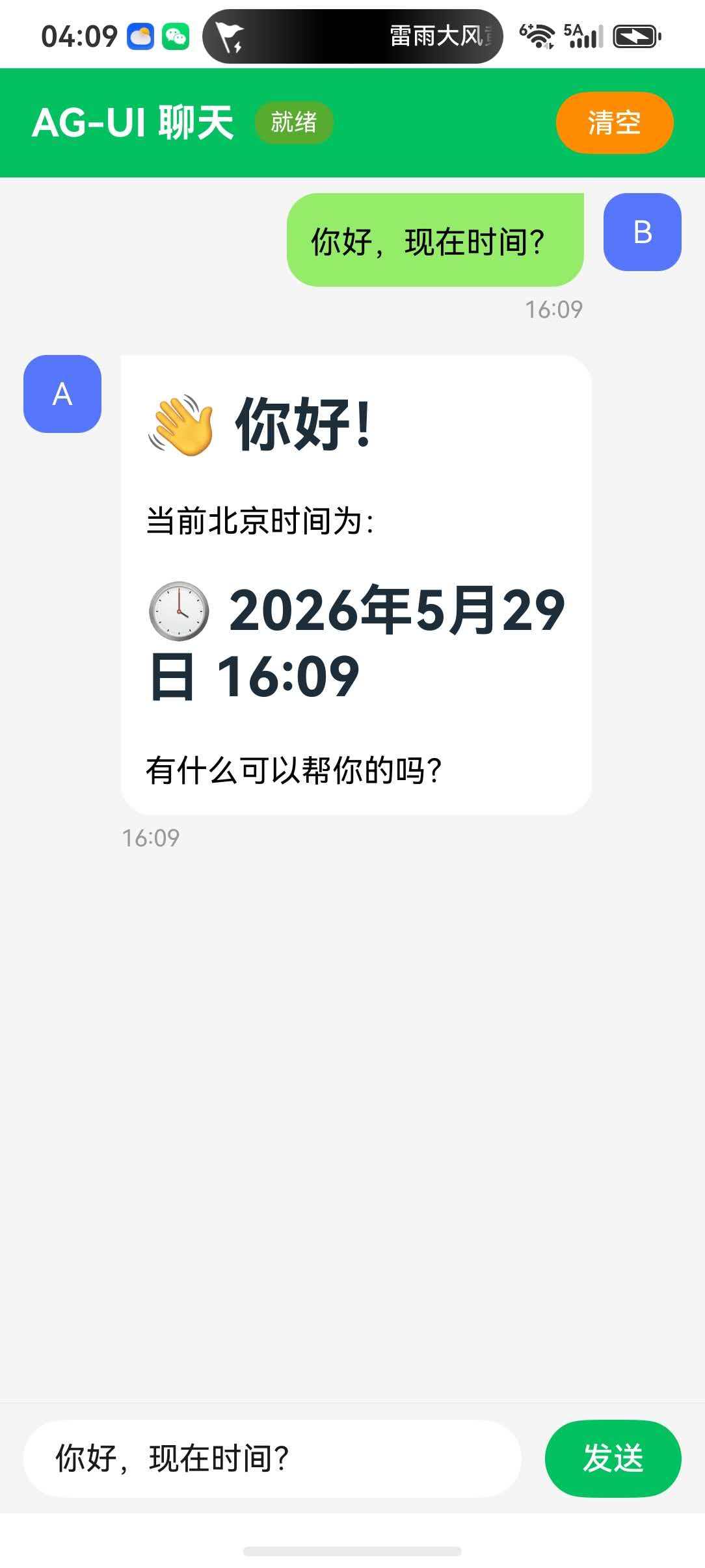
五、下一步(Day 8 预告)
- Flutter 端:基于 Android 已集成的 AGenUI SDK,实现 Dart 层 SSE 连接与 AG-UI 渲染
- 性能优化:消息列表虚拟滚动、Surface 复用、大图懒加载
- 功能扩展:历史消息持久化、多轮对话上下文、图片/文件消息
提示:
serverUrl需替换为实际后端地址,真机调试时确保网络互通- SSE 长连接在后台可能被系统断开,生产环境需实现断线重连
AGenUIContainer的key必须包含surfaceId,否则 Surface 更新不会触发重建
AGenUI代码仓库:https://github.com/AGenUI/AGenUI

讨论HarmonyOS开发技术,专注于API与组件、DevEco Studio、测试、元服务和应用上架分发等。
更多推荐
 9
9 0
0- 0


 已为社区贡献28条内容

所有评论(0)