@State装饰器介绍
·
一、前言
ArkUI 采用数据驱动视图模式,普通变量修改后页面不会自动刷新,想要数据变化同步更新界面,就要使用基础状态装饰器@State。
二、什么是 @State 装饰器
@State是组件私有响应式装饰器,仅可在@Component自定义组件内使用。被它修饰的变量会被框架监听,数据修改后,绑定该变量的 UI 会自动刷新。
三、普通变量与 @State 变量对比
1. 反面案例:普通变量无法刷新页面
@Entry
@Component
struct StateDemo2{
  private  num:number = 0
  build() {
    Column({space:30}){
      Text(`当前的数是:${this.num}`)
        .fontSize(35)
        .fontWeight(FontWeight.Bolder)

      Row({space:20}){
        Button("- 递减")
          .width('47%')
          .height(50)
          .fontSize(26)
          .onClick(()=>{
            if (this.num>0){
              this.num--
            }

          })

        Button("+ 递增")
          .width('47%')
          .height(50)
          .fontSize(26)
          .onClick(()=>{
            if (this.num<10){
              this.num++
            }
          })
      }
      .width('100%')

      Text("数值范围:0-10")
        .fontSize(16)
        .fontColor(Color.Gray)
    }
    .width('100%')
    .height('100%')
    .padding(20)
  }
}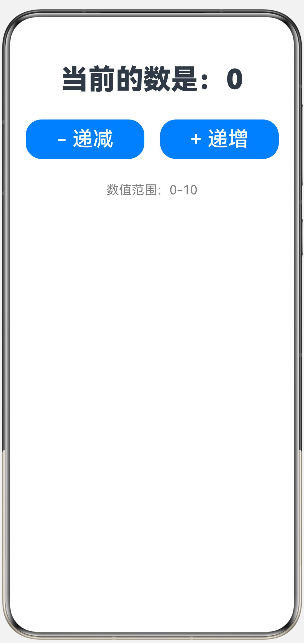
效果:点击按钮控制台数值改变,但页面文字无变化。 原因:普通变量无响应监听,框架无法感知数据改动。
2. 标准案例:@State 计数器
@Entry
@Component
struct StateDemo2{
  @State  num:number = 0
  build() {
    Column({space:30}){
      Text(`当前的数是:${this.num}`)
        .fontSize(35)
        .fontWeight(FontWeight.Bolder)

      Row({space:20}){
        Button("- 递减")
          .width('47%')
          .height(50)
          .fontSize(26)
          .onClick(()=>{
            if (this.num>0){
              this.num--
            }

          })

        Button("+ 递增")
          .width('47%')
          .height(50)
          .fontSize(26)
          .onClick(()=>{
            if (this.num<10){
              this.num++
            }
          })
      }
      .width('100%')

      Text("数值范围:0-10")
        .fontSize(16)
        .fontColor(Color.Gray)
    }
    .width('100%')
    .height('100%')
    .padding(20)
  }
}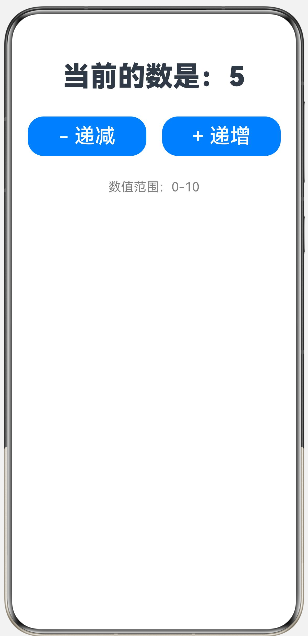
效果:点击按钮,页面数字实时同步更新。
四、@State 核心特性
- 私有状态:仅当前组件可访问,不能跨组件共享;
- 支持类型:数字、字符串、布尔、对象、数组;
- 更新规则:必须赋值修改,仅修改对象 / 数组内部属性不触发刷新。
五、使用避坑
- 只能写在 @Component 组件内部,不能全局定义;
- 变量必须赋予初始值;
- 数组 / 对象修改正确写法:
arkts
// 错误写法(不刷新)
@State arr: number[] = [1,2,3]
this.arr.push(4)

// 正确写法(重新赋值)
this.arr = [...this.arr,4]
六、适用场景
单个组件内交互:计数器、开关、弹窗显示隐藏、输入框实时文字展示。
七、总结
@State是 ArkTS 基础本地状态工具,组件内需动态变化的数据用它修饰,数据变动会自动刷新页面 UI;跨组件传值需要搭配@Prop等装饰器。

讨论HarmonyOS开发技术,专注于API与组件、DevEco Studio、测试、元服务和应用上架分发等。
更多推荐


 10
10 0
0- 0


 已为社区贡献8条内容

所有评论(0)