【鸿蒙实战】从零开发「节日倒计时」——不错过每一个重要日子
【鸿蒙实战】从零开发「节日倒计时」——不错过每一个重要日子
一、项目背景:为什么要做这个?
生活中的重要日子总是容易忘记:春节是哪天?中秋还有多久?国庆假期还有几天?
虽然手机日历可以查看,但打开日历App、切换视图、查找节日……这一系列操作太繁琐。
作为一个程序员,我的解决方案很简单:写一个App,直接告诉我下一个节日还有几天!
打开应用,一眼看到:
- 🎊 下一个节日是什么
- ⏰ 还有多少天
- 📋 全年所有节日的倒计时
这就是「节日倒计时」应用的诞生原因——简单、直观、实用。
本文将完整记录开发过程,适合鸿蒙开发初学者学习参考。
二、功能设计
2.1 核心功能
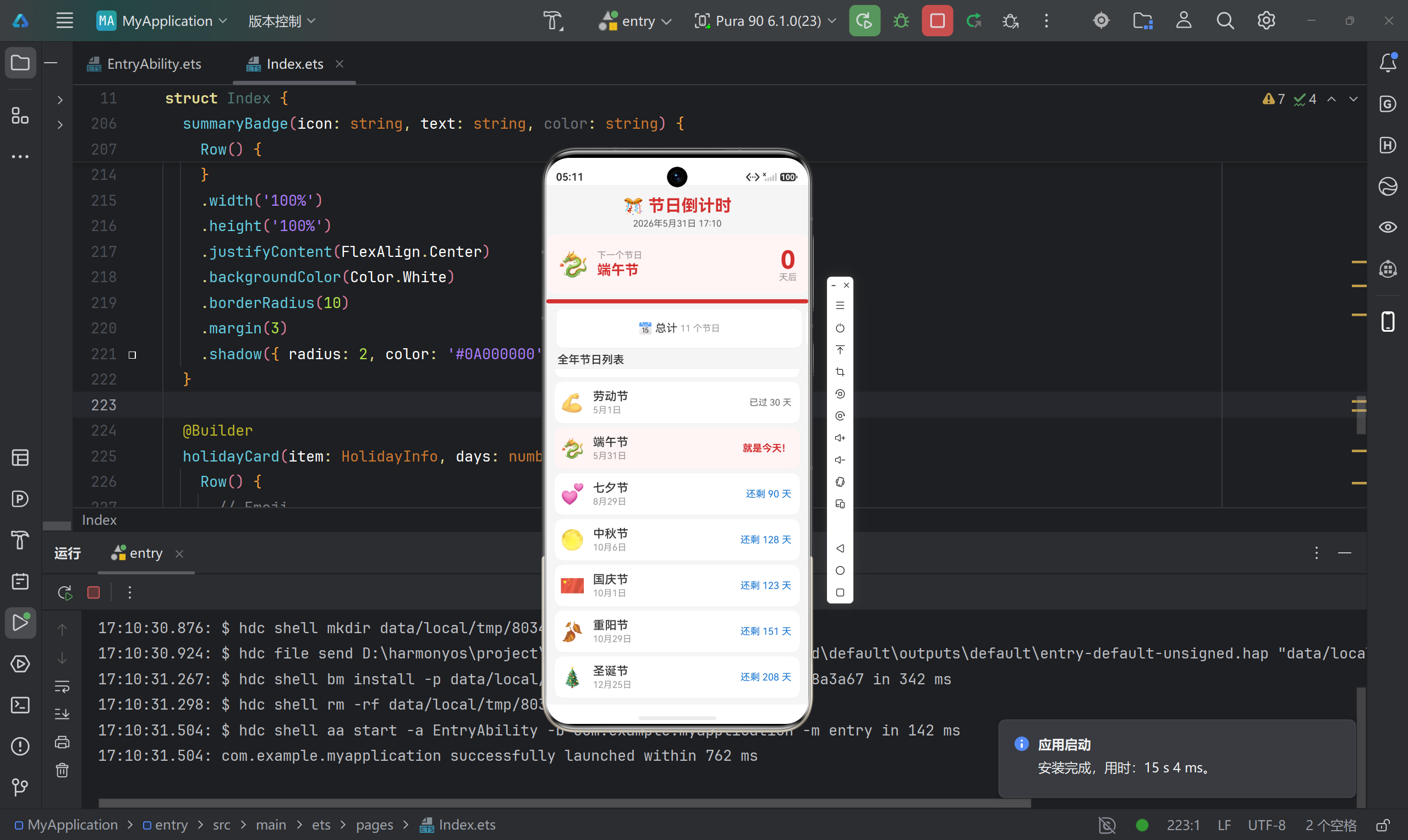
- 倒计时展示:显示距离下一个节日的剩余天数
- 节日列表:展示全年所有重要节日及其倒计时
- 实时更新:每分钟自动刷新当前时间和倒计时数据
- 醒目标识:最近的节日高亮显示
- 统计摘要:总节数、已过节数、待过节数
2.2 节日数据
涵盖11个中国主要节日:
| 节日 | 日期 | Emoji |
|---|---|---|
| 元旦 | 1月1日 | 🎉 |
| 春节 | 1月29日 | 🧨 |
| 元宵节 | 2月12日 | 🏮 |
| 清明节 | 4月4日 | 🌿 |
| 劳动节 | 5月1日 | 💪 |
| 端午节 | 5月31日 | 🐉 |
| 七夕节 | 8月29日 | 💕 |
| 中秋节 | 10月6日 | 🌕 |
| 国庆节 | 10月1日 | 🇨🇳 |
| 重阳节 | 10月29日 | 🍂 |
| 圣诞节 | 12月25日 | 🎄 |
2.3 UI设计思路
采用信息层次分明的卡片式布局:
- 顶部:标题 + 当前时间
- 中部:最近节日大卡片(核心信息区)
- 中部:统计摘要(三色徽章)
- 底部:可滚动的节日列表
配色采用红色主题(#D32F2F),传递节日喜庆氛围。
三、项目结构解析
3.1 目录结构
MyApplication/
├── AppScope/
│   ├── app.json5                 # 应用全局配置
│   └── resources/
│       └── base/
│           ├── element/string.json    # 应用名称
│           └── media/                  # 应用图标
├── entry/
│   ├── src/main/
│   │   ├── ets/
│   │   │   ├── entryability/
│   │   │   │   └── EntryAbility.ets   # 应用入口
│   │   │   └── pages/
│   │   │       └── Index.ets          # 主页面(核心代码)
│   │   ├── module.json5               # 模块配置
│   │   └── resources/
│   │       ├── base/
│   │       │   ├── element/           # 颜色、字符串资源
│   │       │   ├── media/             # 图片资源
│   │       │   └── profile/           # 页面路由配置
│   │       └── dark/                  # 深色模式资源
│   └── build-profile.json5           # 模块构建配置
└── build-profile.json5               # 应用构建配置
3.2 关键配置文件
app.json5(应用级配置):
{
  "app": {
    "bundleName": "com.example.myapplication",
    "vendor": "example",
    "versionCode": 1000000,
    "versionName": "1.0.0"
  }
}
build-profile.json5(构建配置):
{
  "app": {
    "products": [{
      "name": "default",
      "targetSdkVersion": "6.1.1(24)",
      "compatibleSdkVersion": "6.1.0(23)"
    }]
  }
}
四、核心代码实现
4.1 数据模型设计
首先定义节日信息的接口:
interface HolidayInfo {
  name: string;        // 节日名称
  month: number;       // 月份(1-12)
  day: number;         // 日期(1-31)
  emoji: string;       // 表情符号
  description: string; // 英文描述
}
这种接口定义方式让数据结构清晰,IDE 也能提供更好的代码提示。
4.2 状态变量设计
@State holidays: HolidayInfo[] = [
  { name: '元旦', month: 1, day: 1, emoji: '🎉', description: 'New Year' },
  { name: '春节', month: 1, day: 29, emoji: '🧨', description: 'Spring Festival' },
  // ... 其他节日
];

@State daysRemaining: number[] = [];      // 每个节日的剩余天数
@State nearestIndex: number = -1;          // 最近节日的索引
@State currentTime: string = '';           // 当前时间字符串
@State nearestHoliday: string = '';        // 最近节日名称
@State nearestDays: number = 0;            // 最近节日剩余天数
@State nearestEmoji: string = '';          // 最近节日Emoji
@State totalHolidays: number = 0;          // 节日总数
@State passedHolidays: number = 0;         // 已过节数

private timerId: number = -1;              // 定时器ID
状态变量设计思路:
holidays:静态数据源,存储所有节日信息daysRemaining:动态计算结果,每个节日的倒计时nearestIndex:标记最近的节日,用于UI高亮currentTime:实时显示,增加应用的"鲜活感"
4.3 生命周期管理
aboutToAppear():页面加载时
aboutToAppear(): void {
  this.calculateAll();  // 计算所有数据

  // 启动定时器,每分钟刷新
  this.timerId = setInterval(() => {
    this.calculateAll();
  }, 60000);
}
设计考量:
- 页面加载时立即计算一次,避免空白
- 定时器间隔60秒,平衡实时性和性能
aboutToDisappear():页面销毁时
aboutToDisappear(): void {
  if (this.timerId > 0) {
    clearInterval(this.timerId);
    this.timerId = -1;
  }
}
重要:定时器必须清理,否则会造成内存泄漏!
4.4 核心计算逻辑
calculateAll(): void {
  let now = new Date();
  let year = now.getFullYear();
  let month = now.getMonth() + 1;  // getMonth() 返回 0-11
  let date = now.getDate();
  let hours = now.getHours().toString().padStart(2, '0');
  let mins = now.getMinutes().toString().padStart(2, '0');
  this.currentTime = `${year}年${month}月${date}日 ${hours}:${mins}`;

  let remainDays: number[] = [];
  let nearest = -1;
  let nearestDaysVal = 99999;
  let passed = 0;

  for (let i = 0; i < this.holidays.length; i++) {
    let h = this.holidays[i];
    // 构造节日日期对象(注意月份要减1)
    let holidayDate = new Date(year, h.month - 1, h.day);

    // 计算剩余天数(向上取整)
    let diff = Math.ceil((holidayDate.getTime() - now.getTime()) / (1000 * 60 * 60 * 24));

    // 找最近的节日
    if (diff >= 0 && diff < nearestDaysVal) {
      nearestDaysVal = diff;
      nearest = i;
    }

    // 统计已过节日
    if (diff < 0) {
      passed++;
    }

    remainDays.push(diff);
  }

  // 更新状态
  this.daysRemaining = remainDays;
  this.nearestIndex = nearest;
  this.totalHolidays = this.holidays.length;
  this.passedHolidays = passed;

  if (nearest >= 0) {
    this.nearestHoliday = this.holidays[nearest].name;
    this.nearestDays = nearestDaysVal;
    this.nearestEmoji = this.holidays[nearest].emoji;
  }
}
关键技术点:
-
时间格式化:
hours.toString().padStart(2, '0') // "5" → "05" -
日期差值计算:
let diff = Math.ceil( (holidayDate.getTime() - now.getTime()) / (1000 * 60 * 60 * 24) );getTime()返回毫秒时间戳- 除以
(1000 * 60 * 60 * 24)转换为天数 Math.ceil()向上取整,保证当天显示0
-
查找最近节日:
if (diff >= 0 && diff < nearestDaysVal) {
  nearestDaysVal = diff;
  nearest = i;
}
只考虑未过的节日(
diff >= 0)
4.5 UI布局实现
4.5.1 标题区
Column() {
  Text('🎊 节日倒计时')
    .fontSize(24)
    .fontWeight(FontWeight.Bold)
    .fontColor('#FFD32F2F')

  Text(this.currentTime)
    .fontSize(13)
    .fontColor('#99000000')
    .margin({ top: 4 })
}
.width('100%')
.padding({ top: 16, bottom: 8 })
.alignItems(HorizontalAlign.Center)
实时显示当前时间,让用户感知到应用是"活着"的。
4.5.2 最近节日大卡片(核心区)
if (this.nearestIndex >= 0) {
  Column() {
    Row() {
      Text(this.nearestEmoji)
        .fontSize(36)

      Column() {
        Text('下一个节日')
          .fontSize(13)
          .fontColor('#66000000')

        Text(this.nearestHoliday)
          .fontSize(20)
          .fontWeight(FontWeight.Bold)
          .fontColor('#FFD32F2F')
          .margin({ top: 2 })
      }
      .margin({ left: 12 })
      .alignItems(HorizontalAlign.Start)

      Blank()

      Column() {
        Text(`${this.nearestDays}`)
          .fontSize(36)
          .fontWeight(FontWeight.Bold)
          .fontColor('#FFD32F2F')

        Text('天后')
          .fontSize(13)
          .fontColor('#66000000')
          .margin({ top: -4 })
      }
      .alignItems(HorizontalAlign.Center)
    }
    .width('100%')
    .padding(16)
    .backgroundColor('#FFFFF5F5')
    .borderRadius(12)
    .margin({ left: 12, right: 12, bottom: 8 })

    // 进度条
    Row() {
      Row()
        .height(6)
        .width(`${Math.max(2, 100 - (this.nearestDays / 365) * 100)}%`)
        .backgroundColor('#FFD32F2F')
        .borderRadius(3)
    }
    .width('100%')
    .height(6)
    .backgroundColor('#FFF0F0F0')
    .borderRadius(3)
    .margin({ left: 12, right: 12, bottom: 8 })
  }
}
设计亮点:
- 视觉层次:大字号显示天数(36sp),一目了然
- 信息分区:左侧节日信息,右侧倒计时,布局清晰
- 进度条:直观展示"进度感"
.width(`${Math.max(2, 100 - (this.nearestDays / 365) * 100)}%`)- 天数越少,进度条越长
Math.max(2, ...)保证最小2%宽度
4.5.3 统计摘要(三色徽章)
使用 @Builder 装饰器提取公共组件:
@Builder
summaryBadge(icon: string, text: string, color: string) {
  Row() {
    Text(icon)
      .fontSize(16)
    Text(text)
      .fontSize(13)
      .fontColor('#66000000')
      .margin({ left: 4 })
  }
  .width('100%')
  .height('100%')
  .justifyContent(FlexAlign.Center)
  .backgroundColor(Color.White)
  .borderRadius(10)
  .margin(3)
  .shadow({ radius: 2, color: '#0A000000', offsetY: 1 })
}
调用方式:
Row() {
  this.summaryBadge('📅 总计', `${this.totalHolidays} 个节日`, '#FF1976D2')
  this.summaryBadge('✅ 已过', `${this.passedHolidays} 个`, '#FF388E3C')
  this.summaryBadge('⏳ 待过', `${this.totalHolidays - this.passedHolidays} 个`, '#FFFF6F00')
}
.width('100%')
.padding({ left: 12, right: 12, bottom: 4 })
.height(60)
@Builder 的作用:
- 提取可复用的UI片段
- 类似于函数,可以接收参数
- 减少代码重复
4.5.4 节日列表
Scroll() {
  Column() {
    ForEach(this.holidays, (item: HolidayInfo, index: number) => {
      this.holidayCard(item, this.daysRemaining[index] ?? 0, index === this.nearestIndex)
    })
  }
  .width('100%')
  .padding({ left: 12, right: 12, bottom: 12 })
}
.width('100%')
.layoutWeight(1)
节日卡片实现:
@Builder
holidayCard(item: HolidayInfo, days: number, isNearest: boolean) {
  Row() {
    Text(item.emoji)
      .fontSize(28)
      .margin({ left: 8 })

    Column() {
      Text(item.name)
        .fontSize(17)
        .fontWeight(FontWeight.Medium)
        .fontColor('#FF333333')

      Text(`${item.month}月${item.day}日`)
        .fontSize(13)
        .fontColor('#66000000')
        .margin({ top: 2 })
    }
    .alignItems(HorizontalAlign.Start)
    .margin({ left: 12 })
    .layoutWeight(1)

    // 倒计时标签
    if (days > 0) {
      Text(`还剩 ${days} 天`)
        .fontSize(14)
        .fontColor(isNearest ? '#FFD32F2F' : '#FF1976D2')
        .fontWeight(isNearest ? FontWeight.Bold : FontWeight.Regular)
        .margin({ right: 12 })
    } else if (days === 0) {
      Text('就是今天!')
        .fontSize(14)
        .fontColor('#FFD32F2F')
        .fontWeight(FontWeight.Bold)
        .margin({ right: 12 })
    } else {
      Text(`已过 ${Math.abs(days)} 天`)
        .fontSize(13)
        .fontColor('#99000000')
        .margin({ right: 12 })
    }
  }
  .width('100%')
  .height(60)
  .backgroundColor(isNearest ? '#FFFFF5F5' : Color.White)
  .borderRadius(12)
  .margin({ top: 6 })
  .shadow({ radius: 2, color: '#0A000000', offsetY: 1 })
}
三态显示逻辑:
days > 0:显示"还剩 X 天"(蓝色或红色)days === 0:显示"就是今天!"(红色加粗)days < 0:显示"已过 X 天"(灰色)
高亮效果:
.backgroundColor(isNearest ? '#FFFFF5F5' : Color.White)
.fontColor(isNearest ? '#FFD32F2F' : '#FF1976D2')
.fontWeight(isNearest ? FontWeight.Bold : FontWeight.Regular)
五、遇到的坑与解决方案
5.1 坑点一:Date 对象月份从0开始
问题:设置1月1日,结果变成了12月1日。
原因:JavaScript 的 Date 对象,月份是 0-11,而不是 1-12。
错误写法:
let date = new Date(2026, 1, 1); // 实际是2月1日!
正确写法:
let holidayDate = new Date(year, h.month - 1, h.day); // 月份减1
5.2 坑点二:天数计算精度问题
问题:下午5点查看,距离明天的节日显示还有2天,实际应该还有1天。
原因:直接相除得到的是浮点数,四舍五入会有误差。
解决方案:使用 Math.ceil() 向上取整:
let diff = Math.ceil((holidayDate.getTime() - now.getTime()) / (1000 * 60 * 60 * 24));
这样当天查看明天的节日,显示"还剩1天"。
5.3 坑点三:定时器内存泄漏
问题:页面切换后,定时器仍在运行,造成不必要的CPU消耗。
解决方案:在 aboutToDisappear() 中清理:
aboutToDisappear(): void {
  if (this.timerId > 0) {
    clearInterval(this.timerId);
    this.timerId = -1;
  }
}
5.4 坑点四:ForEach 渲染优化
问题:节日列表每次刷新都重新渲染所有元素。
当前实现:直接使用 ForEach,对于11个节日影响不大。
大型列表优化建议:使用 LazyForEach + 数据源:
class HolidayDataSource implements IDataSource {
  private holidays: HolidayInfo[] = [];

  totalCount(): number {
    return this.holidays.length;
  }

  getData(index: number): HolidayInfo {
    return this.holidays[index];
  }
}

LazyForEach(this.dataSource, (item: HolidayInfo) => {
  // 渲染逻辑
}, (item: HolidayInfo) => item.name)  // 唯一键
5.5 坑点五:进度条宽度为0的情况
问题:当节日还有365天时,进度条宽度计算为0%,视觉上看不到。
解决方案:设置最小宽度:
.width(`${Math.max(2, 100 - (this.nearestDays / 365) * 100)}%`)
至少保留2%宽度,保证可见。
六、项目扩展方向
6.1 功能增强
-
农历节日:支持春节、端午、中秋等农历节日自动计算
- 使用农历转换库
- 根据年份动态计算公历日期
-
自定义节日:允许用户添加纪念日、生日等
- 使用 Preferences 持久化存储
- 支持农历/公历切换
-
节日提醒:提前N天推送通知
- 使用后台任务
- 集成推送服务
-
倒计时小组件:开发桌面小卡片
- 使用 FormExtension 能力
- 实时显示最近节日
6.2 UI优化
-
动画效果:
- 列表项渐显动画
- 天数变化时的数字滚动效果
- 使用
animateTo()实现过渡
-
主题切换:
- 利用
dark资源目录适配深色模式 - 提供多套配色方案
- 利用
-
节日详情页:
- 点击节日卡片进入详情
- 展示节日由来、习俗、祝福语
6.3 架构优化
-
数据分离:
- 节日数据移到单独的
holidays.json文件 - 方便维护和扩展
- 节日数据移到单独的
-
MVVM 模式:
- 抽取
CountdownViewModel管理业务逻辑 - 使用
@Observed+@ObjectLink管理复杂数据
- 抽取
-
网络数据:
- 从服务端获取节日数据
- 支持节日数据在线更新
七、技术要点总结
本项目虽然功能简单,但涵盖了鸿蒙原生开发的多个核心技术点:
| 技术点 | 实践应用 |
|---|---|
| 接口定义 | interface HolidayInfo 定义数据模型 |
| 状态管理 | @State 装饰器驱动UI更新 |
| 生命周期 | aboutToAppear()、aboutToDisappear() |
| 定时器 | setInterval() 实现自动刷新 |
| 日期处理 | Date 对象、时间戳计算 |
| 条件渲染 | if-else 控制不同状态显示 |
| 列表渲染 | ForEach 渲染节日列表 |
| 自定义组件 | @Builder 提取可复用UI |
| 布局容器 | Column、Row、Scroll 组合 |
| 样式设置 | 颜色、圆角、阴影等属性 |
八、附录:完整代码结构
Index.ets 核心框架
interface HolidayInfo {
  name: string;
  month: number;
  day: number;
  emoji: string;
  description: string;
}

@Entry
@Component
struct Index {
  @State holidays: HolidayInfo[] = [...];
  @State daysRemaining: number[] = [];
  @State nearestIndex: number = -1;
  @State currentTime: string = '';
  @State nearestHoliday: string = '';
  @State nearestDays: number = 0;
  @State nearestEmoji: string = '';
  @State totalHolidays: number = 0;
  @State passedHolidays: number = 0;

  private timerId: number = -1;

  aboutToAppear(): void { ... }
  aboutToDisappear(): void { ... }
  calculateAll(): void { ... }

  build() {
    Column() {
      // 标题区
      // 最近节日卡片
      // 统计摘要
      // 节日列表
    }
  }

  @Builder
  summaryBadge(icon: string, text: string, color: string) { ... }

  @Builder
  holidayCard(item: HolidayInfo, days: number, isNearest: boolean) { ... }
}
九、运行截图
十、写在最后
这个「节日倒计时」项目是我学习鸿蒙开发的又一个实战练习,从构思到完成大约花了4小时。
最大的收获:
- 深入理解了 Date 对象和日期计算
- 掌握了定时器的正确使用方式
- 学会了使用 @Builder 提取可复用组件
- 实践了条件渲染的多种场景
下一步计划:
- 添加农历节日支持
- 实现自定义节日功能
- 开发桌面小组件
如果你也是鸿蒙开发初学者,希望这篇实战记录对你有所帮助。有任何问题欢迎在评论区留言交流!

讨论HarmonyOS开发技术,专注于API与组件、DevEco Studio、测试、元服务和应用上架分发等。
更多推荐


 8
8 0
0- 0


 已为社区贡献78条内容

所有评论(0)