ArkUI 组件弹窗 登录校验弹窗 + 基础提示弹窗 案例
·
弹窗
在当前页面上层弹出浮层提示窗口;不会跳转、销毁原有页面,底层页面完整保留,专门用来做操作反馈、表单报错、消息提醒等轻量临时交互,开箱即用不用自定义布局。
核心属性
title:弹窗顶部标题文本,字符串类型,自定义弹窗大标题message:弹窗主体提示内容,支持模板字符串插值,可读取页面 @State 变量AlertDialog.show():弹窗全局弹出方法,传入配置对象即可唤起弹窗
案例1:
@Entry
@Component
struct TanChuang {
  build() {
    Column() {
      Button("弹窗")
        .width('100%')
        .height(50)
        .fontSize(20)
        .backgroundColor(0xFF4A6FA5)
        .onClick(() => {
          AlertDialog.show({
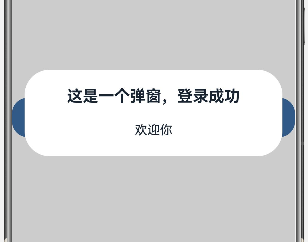
            title: "这是一个弹窗,登录成功",
            message: `欢迎你`
          })
        })
    }
    .width('100%')
    .height('100%')
    .justifyContent(FlexAlign.Center)
  }
}
展示:
案例2:
import router from '@ohos.router';
@Entry
@Component
struct Logins{
  @State username:string = ""
  build() {
    Column({space:30}){
      Text("欢迎登录")
        .fontSize(30)
        .fontWeight(FontWeight.Bold)

      TextInput({text:this.username,placeholder:"请输入账号"})
        .type(InputType.Normal)
        .width('100%')
        .height(50)
        .borderRadius(10)
        .onChange((value:string)=>{
          this.username = value
        })

      TextInput({placeholder:"请输入密码"})
        .type(InputType.Password)
        .width('100%')
        .height(50)
        .borderRadius(10)

      Row(){
        Toggle({
          type: ToggleType.Checkbox,
          isOn: true
        })

        Text("记住密码")
          .fontSize(18)
      }

      Button("登录")
        .width('100%')
        .height(50)
        .fontSize(20)
        .onClick(() => {
          if (this.username=="root") {
            router.pushUrl({
              url:'pages/ShouYe'
            })
          }else {
            AlertDialog.show({
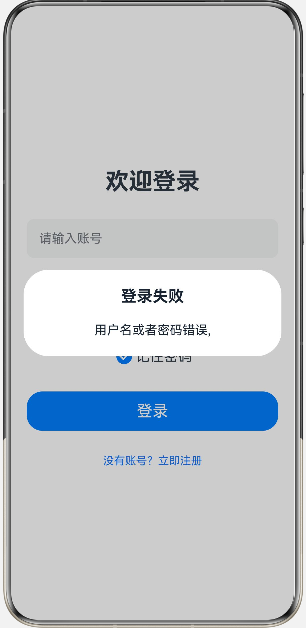
              title:"登录失败",
              message:`用户名或者密码错误,${this.username}`
            })
          }


        })

      Text("没有账号?立即注册")
        .fontSize(14)
        .fontColor(0x1677ff)
        .onClick(() => {
          router.pushUrl({
            url:'pages/Registers'
          })
        })

    }
    .width('100%')
    .height('100%')
    .padding(20)
    .justifyContent(FlexAlign.Center)
    .alignItems(HorizontalAlign.Center)
  }
}
展示:
开发使用总结
- AlertDialog 浮在当前页面之上,不会切换页面,适合临时消息提示场景;
- message 支持动态变量,非常适合表单输入校验、错误反馈这类业务;
- 弹窗关闭方式简单,点击弹窗外侧灰色遮罩区域即可自动关闭。

讨论HarmonyOS开发技术,专注于API与组件、DevEco Studio、测试、元服务和应用上架分发等。
更多推荐



 13
13 0
0- 0


 已为社区贡献8条内容

所有评论(0)