ArkUI@State,弹窗,页面路由
·
一、@State
- 作用:声明响应式状态变量,变量一旦被修改,页面绑定该变量的 UI 会自动刷新。
- 基础语法
@State 变量名:数据类型 = 初始值
- 常用场景:输入框双向绑定、开关状态切换。
二、弹窗(Toast 消息提示)
- 功能:弹出短暂文字提示,用于登录失败、表单为空等提醒
三、页面路由(页面跳转)
- 功能:从登录页跳转到首页,实现页面之间切换。
页面路由和弹窗的代码
import router from '@ohos.router';

@Entry
@Component
struct Logins{
  @State username:string = ""  //定义用户名
  @State password:string = ""  //定义密码
  build() {
    Column({space:20}){
      Text('用户登录')
        .fontSize(32)
        .fontWeight(FontWeight.Bolder)
        .margin({ top: 20, bottom: 30 })

      TextInput({text:this.username, placeholder: "请输入账号: " })
        .width(320)
        .height(52)
        .borderRadius(12)
        .fontSize(16)
        .onChange((value: string) => {
          this.username = value
        })

      TextInput({text:this.password, placeholder: "请输入密码: " })
        .type(InputType.Password)
        .width(320)
        .height(52)
        .borderRadius(12)
        .fontSize(16)
        .onChange((value:string)=>{
          this.password = value
        })

      Text("没有账号?立即注册")
        .fontSize(20)
        .fontColor(0x1677ff)
        .onClick(()=>{
          router.pushUrl({
            url:'pages/Register'  //页面路由 url:'pages/下一页的文件名'
          })
        })

      Row({space:20}) {
        Button("立即登录")
          .width(150)
          .height(52)
          .backgroundColor(0x007Dff)
          .fontSize(18)
          .borderRadius(12)
          .margin({ bottom: 80 }) //距离父容器下边缘向上留出 80 像素的距离。
          .onClick(() => {
            if (this.username == "root" && this.password == "root") {
              AlertDialog.show({
                title: "登录成功",
                message: `欢迎你,${this.username}`
              })
            }
            else {
              AlertDialog.show({
                title: "登录失败",
                message: "用户名或者密码错误"  //弹窗
              })
            }
          })
      }
    }
    .width('100%')
    .height('100%')
  }
}
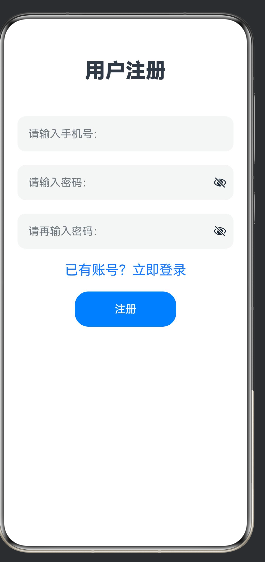
代码成功的示例图
2.在修改文件main_pages.json
{
  "src": [
    "pages/Index",
    "pages/Second",
    "pages/Logins", //第一个文件的名字
    "pages/Register", //第二个文件的名字
    "pages/RouterDemo",
    "pages/PageOne",
    "pages/diyiye",
    "pages/dierye",
    "pages/LoginRouter",
    "pages/HomePage"
  ]
}
3.第三个文件的代码
import router from '@ohos.router';

@Entry
@Component
struct Register{
  build() {
    Column({space:20}){
      Text('用户注册')
        .fontSize(30)
        .fontWeight(FontWeight.Bolder)
        .margin({top:20,bottom:30})

      TextInput({placeholder:"请输入手机号:"})
        .width(320)
        .height(52)
        .borderRadius(12)
        .fontSize(16)

      TextInput({placeholder:"请输入密码:"})
        .type(InputType.Password)
        .width(320)
        .height(52)
        .borderRadius(12)
        .fontSize(16)

      TextInput({placeholder:"请再输入密码:"})
        .type(InputType.Password)
        .width(320)
        .height(52)
        .borderRadius(12)
        .fontSize(16)

      Text("已有账号?立即登录")
        .fontSize(20)
        .fontColor(0x1677ff)
        .onClick(()=>{
          router.back({
            url:'pages/Logins' //第一个文件的名字
          })
        })

      Button('注册')
        .width(150)
        .height(52)
        .fontSize(16)
    }
    .width('100%')
    .height('100%')
  }
}

讨论HarmonyOS开发技术,专注于API与组件、DevEco Studio、测试、元服务和应用上架分发等。
更多推荐



 3
3 0
0- 0


 已为社区贡献5条内容

所有评论(0)