ArkUI相对布局介绍
概述
在应用的开发过程中,经常需要设计复杂界面,此时涉及到多个相同或不同组件之间的嵌套。如果布局组件嵌套深度过深,或者嵌套组件数过多,会带来额外的开销。如果在布局的方式上进行优化,就可以有效的提升性能,减少时间开销。
RelativeContainer是一种采用相对布局的容器,支持容器内部的子元素设置相对位置关系,适用于处理界面复杂的场景,对多个子元素进行对齐和排列。子元素可以指定兄弟元素或父容器作为锚点,基于锚点进行相对位置布局。在使用锚点时,需注意子元素的相对位置关系,以避免出现错位或遮挡的情况。下图展示了一个 RelativeContainer的概念图,图中的虚线表示位置的依赖关系。
图1 相对布局示意图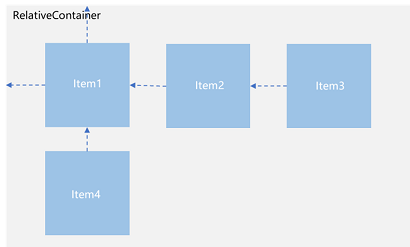
子元素并不完全是上图中的依赖关系。比如,Item4可以以Item2为依赖锚点,也可以以RelativeContainer父容器为依赖锚点。
基本概念
-
参考边界:设置当前组件的哪个边界对齐到锚点。
-
锚点:通过锚点设置当前元素基于哪个元素确定位置。
-
对齐方式:通过对齐方式,设置当前元素是基于锚点的上中下对齐,还是基于锚点的左中右对齐。
-
链:将一系列组件以首尾相连的方式对齐,可以形成一条链。通过设置链的模式,可以指定链上元素的排列方式。
-
辅助线:辅助线是在容器内虚拟出的额外水平或垂直锚点,便于统一对齐至某个偏移位置。
-
屏障:屏障是指容器内一组指定组件在特定方向上的共同最远边界,例如,一组组件下方的屏障,是指这些组件底部边缘中最底部的那个边界。
设置依赖关系
设置参考边界
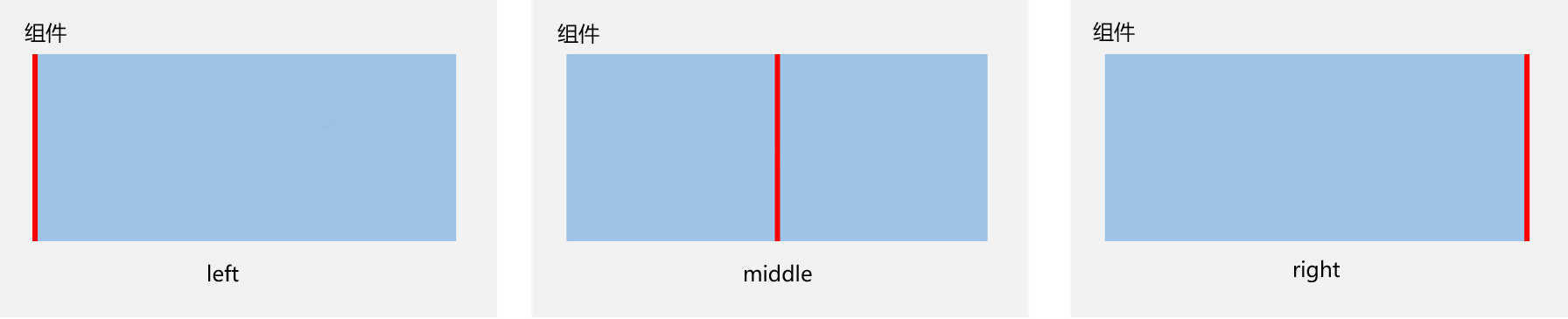
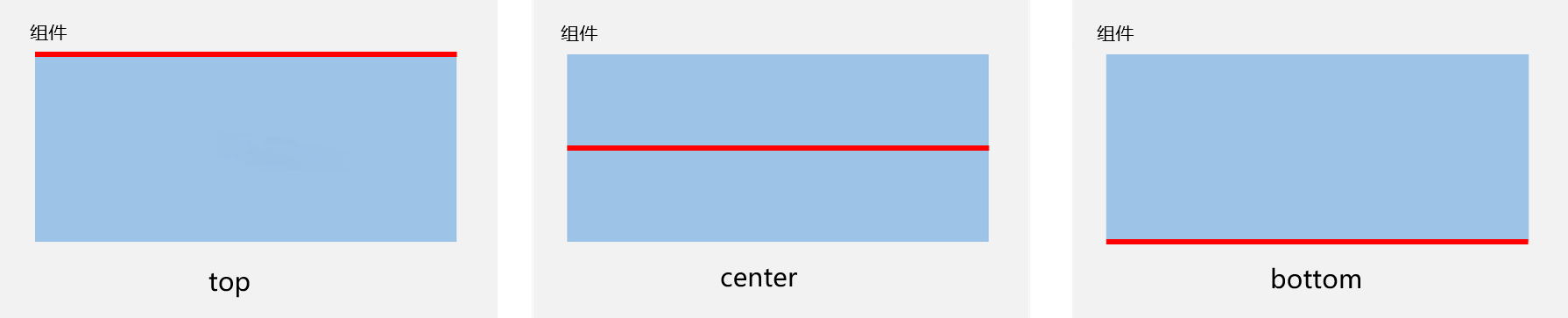
设置当前组件的哪个边界对齐到锚点。容器内子组件的参考边界区分水平方向和垂直方向。
-
在水平方向上,可以按照起始(left)、居中(middle)或尾端(right)的组件边界与锚点对齐。当设置三个边界时,仅起始(left)和居中(middle)的边界设置生效。
-
在垂直方向上,可以设置组件边界与锚点对齐,具体包括顶部(top)、居中(center)和底部(bottom)。当设置三个边界时,仅顶部(top)和居中(center)生效。
设置锚点
锚点设置涉及子元素相对于其父元素或兄弟元素的位置依赖关系。具体而言,子元素可以将其位置锚定到相对布局容器(RelativeContainer)、辅助线(guideline)、屏障(barrier)或其他子元素上。
为了准确定义锚点,RelativeContainer的子元素必须拥有唯一的组件标识(id),用于指定锚点信息。父元素RelativeContainer的标识默认为“__container__”,其他子元素的组件标识(id)则通过id属性设置。
说明
- 未设置组件标识(id)的组件虽可显示,但无法被其他组件引用为锚点。相对布局容器会为其拼接组件标识,但组件标识(id)的规律无法被应用感知。辅助线(guideline)与屏障(barrier)的组件标识(id)需确保唯一,避免与任何组件冲突。若有重复,遵循组件 > guideline > barrier 的优先级。
- 组件间设置锚点时应避免形成依赖循环(组件之间设置链除外),依赖循环将导致子组件缺乏定位基准,最终无法绘制。
-
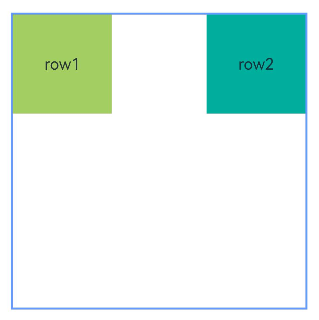
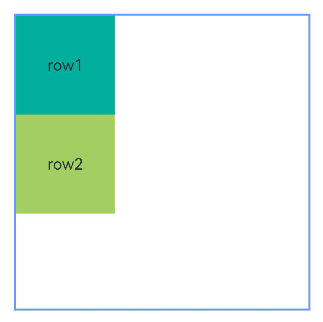
RelativeContainer父组件为锚点,__container__代表父容器的组件标识(id)。
- let alignRus: Record<string, Record<string, string | VerticalAlign | HorizontalAlign>> = {
- 'top': { 'anchor': '__container__', 'align': VerticalAlign.Top },
- 'left': { 'anchor': '__container__', 'align': HorizontalAlign.Start }
- }
- let alignRue: Record<string, Record<string, string | VerticalAlign | HorizontalAlign>> = {
- 'top': { 'anchor': '__container__', 'align': VerticalAlign.Top },
- 'right': { 'anchor': '__container__', 'align': HorizontalAlign.End }
- }
- let marginLeft: Record<string, number> = { 'left': 20 }
- let bwc: Record<string, number | string> = { 'width': 2, 'color': '#6699FF' }
- @Entry
- @Component
- struct ParentRefRelativeContainer {
- build() {
- RelativeContainer() {
- Row() {
- Text('row1')
- }
- .justifyContent(FlexAlign.Center)
- .width(100)
- .height(100)
- .backgroundColor('#a3cf62')
- .alignRules(alignRus)
- .id('row1')
- Row() {
- Text('row2')
- }
- .justifyContent(FlexAlign.Center)
- .width(100)
- .height(100)
- .backgroundColor('#00ae9d')
- .alignRules(alignRue)
- .id('row2')
- }.width(300).height(300)
- .margin(marginLeft)
- .border(bwc)
- }
- }
-
以兄弟元素为锚点。
- let alignRus001: Record<string, Record<string, string | VerticalAlign | HorizontalAlign>> = {
- 'top': { 'anchor': '__container__', 'align': VerticalAlign.Top },
- 'left': { 'anchor': '__container__', 'align': HorizontalAlign.Start }
- }
- let relConB: Record<string, Record<string, string | VerticalAlign | HorizontalAlign>> = {
- 'top': { 'anchor': 'row1', 'align': VerticalAlign.Bottom },
- 'left': { 'anchor': 'row1', 'align': HorizontalAlign.Start }
- }
- let marginLeft001: Record<string, number> = { 'left': 20 }
- let bwc001: Record<string, number | string> = { 'width': 2, 'color': '#6699FF' }
- @Entry
- @Component
- struct SiblingRefRelativeContainer {
- build() {
- RelativeContainer() {
- Row() {
- Text('row1')
- }
- .justifyContent(FlexAlign.Center)
- .width(100)
- .height(100)
- .backgroundColor('#00ae9d')
- .alignRules(alignRus001)
- .id('row1')
- Row() {
- Text('row2')
- }
- .justifyContent(FlexAlign.Center)
- .width(100)
- .height(100)
- .backgroundColor('#a3cf62')
- .alignRules(relConB)
- .id('row2')
- }.width(300).height(300)
- .margin(marginLeft001)
- .border(bwc001)
- }
- }
-
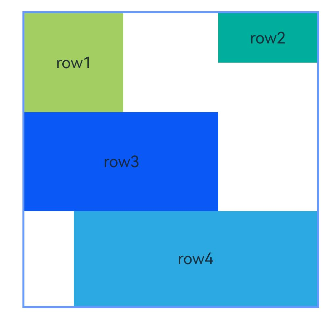
子组件锚点可以任意选择,但需注意不要相互依赖。
- @Entry
- @Component
- struct ChildRefRelativeContainer {
- build() {
- Row() {
- RelativeContainer() {
- Row() {
- Text('row1')
- }
- .justifyContent(FlexAlign.Center)
- .width(100)
- .height(100)
- .backgroundColor('#a3cf62')
- .alignRules({
- top: { anchor: '__container__', align: VerticalAlign.Top },
- left: { anchor: '__container__', align: HorizontalAlign.Start }
- })
- .id('row1')
- Row() {
- Text('row2')
- }
- .justifyContent(FlexAlign.Center)
- .width(100)
- .backgroundColor('#00ae9d')
- .alignRules({
- top: { anchor: '__container__', align: VerticalAlign.Top },
- right: { anchor: '__container__', align: HorizontalAlign.End },
- bottom: { anchor: 'row1', align: VerticalAlign.Center },
- })
- .id('row2')
- Row() {
- Text('row3')
- }
- .justifyContent(FlexAlign.Center)
- .height(100)
- .backgroundColor('#0a59f7')
- .alignRules({
- top: { anchor: 'row1', align: VerticalAlign.Bottom },
- left: { anchor: 'row1', align: HorizontalAlign.Start },
- right: { anchor: 'row2', align: HorizontalAlign.Start }
- })
- .id('row3')
- Row() {
- Text('row4')
- }.justifyContent(FlexAlign.Center)
- .backgroundColor('#2ca9e0')
- .alignRules({
- top: { anchor: 'row3', align: VerticalAlign.Bottom },
- left: { anchor: 'row1', align: HorizontalAlign.Center },
- right: { anchor: 'row2', align: HorizontalAlign.End },
- bottom: { anchor: '__container__', align: VerticalAlign.Bottom }
- })
- .id('row4')
- }
- .width(300).height(300)
- .margin({ left: 50 })
- .border({ width: 2, color: '#6699FF' })
- }
- .height('100%')
- }
- }
设置相对于锚点的对齐位置
设置了锚点之后,可以通过alignRules属性的align设置相对于锚点的对齐位置。
在水平方向上,对齐位置可以设置为HorizontalAlign.Start、HorizontalAlign.Center、HorizontalAlign.End。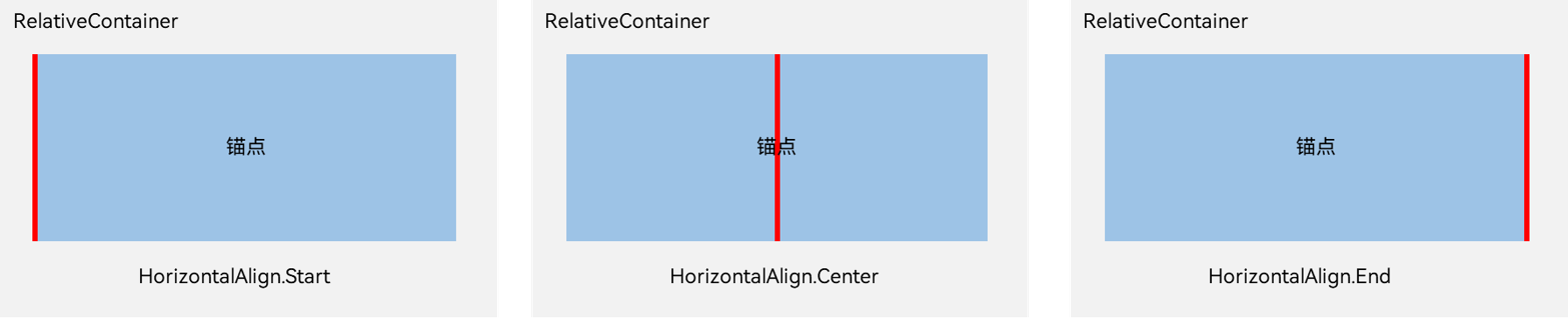
在垂直方向上,对齐位置可以设置为VerticalAlign.Top、VerticalAlign.Center、VerticalAlign.Bottom。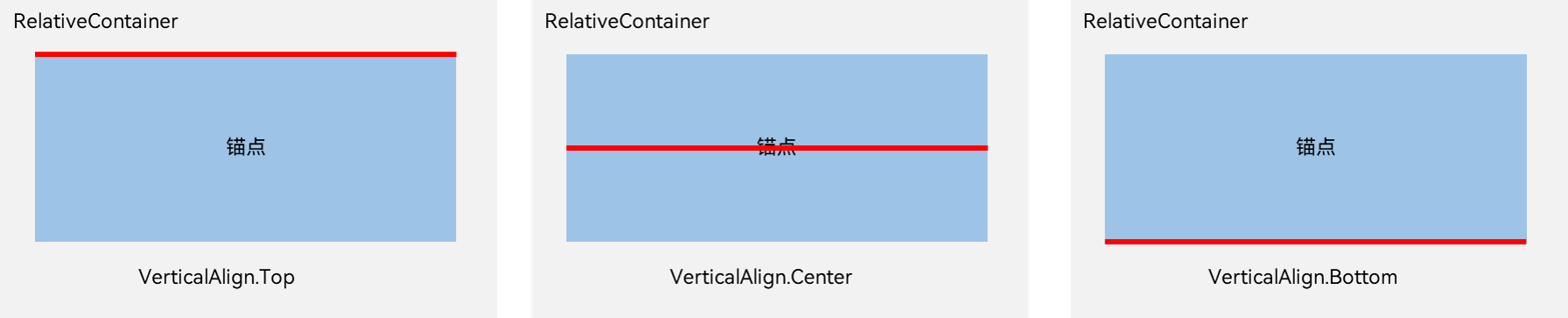
子组件位置偏移
子组件经过相对位置对齐后,可能尚未达到目标位置。开发者可根据需要设置额外偏移(offset)。当使用offset调整位置的组件作为锚点时,对齐位置为设置offset之前的位置。从API Version 11开始,新增了Bias对象,建议API Version 11及以后的版本使用bias来设置额外偏移。使用bias的示例可以参考示例4(设置偏移)。
- @Entry
- @Component
- struct ChildComponentOffsetExample {
- build() {
- Row() {
- RelativeContainer() {
- Row() {
- Text('row1')
- }
- .justifyContent(FlexAlign.Center)
- .width(100)
- .height(100)
- .backgroundColor('#a3cf62')
- .alignRules({
- top: { anchor: '__container__', align: VerticalAlign.Top },
- left: { anchor: '__container__', align: HorizontalAlign.Start }
- })
- .id('row1')
- Row() {
- Text('row2')
- }
- .justifyContent(FlexAlign.Center)
- .width(100)
- .backgroundColor('#00ae9d')
- .alignRules({
- top: { anchor: '__container__', align: VerticalAlign.Top },
- right: { anchor: '__container__', align: HorizontalAlign.End },
- bottom: { anchor: 'row1', align: VerticalAlign.Center },
- })
- .offset({
- x: -40,
- y: -20
- })
- .id('row2')
- Row() {
- Text('row3')
- }
- .justifyContent(FlexAlign.Center)
- .height(100)
- .backgroundColor('#0a59f7')
- .alignRules({
- top: { anchor: 'row1', align: VerticalAlign.Bottom },
- left: { anchor: 'row1', align: HorizontalAlign.End },
- right: { anchor: 'row2', align: HorizontalAlign.Start }
- })
- .offset({
- x: -10,
- y: -20
- })
- .id('row3')
- Row() {
- Text('row4')
- }
- .justifyContent(FlexAlign.Center)
- .backgroundColor('#2ca9e0')
- .alignRules({
- top: { anchor: 'row3', align: VerticalAlign.Bottom },
- bottom: { anchor: '__container__', align: VerticalAlign.Bottom },
- left: { anchor: '__container__', align: HorizontalAlign.Start },
- right: { anchor: 'row1', align: HorizontalAlign.End }
- })
- .offset({
- x: -10,
- y: -30
- })
- .id('row4')
- Row() {
- Text('row5')
- }
- .justifyContent(FlexAlign.Center)
- .backgroundColor('#30c9f7')
- .alignRules({
- top: { anchor: 'row3', align: VerticalAlign.Bottom },
- bottom: { anchor: '__container__', align: VerticalAlign.Bottom },
- left: { anchor: 'row2', align: HorizontalAlign.Start },
- right: { anchor: 'row2', align: HorizontalAlign.End }
- })
- .offset({
- x: 10,
- y: 20
- })
- .id('row5')
- Row() {
- Text('row6')
- }
- .justifyContent(FlexAlign.Center)
- .backgroundColor('#ff33ffb5')
- .alignRules({
- top: { anchor: 'row3', align: VerticalAlign.Bottom },
- bottom: { anchor: 'row4', align: VerticalAlign.Bottom },
- left: { anchor: 'row3', align: HorizontalAlign.Start },
- right: { anchor: 'row3', align: HorizontalAlign.End }
- })
- .offset({
- x: -15,
- y: 10
- })
- .backgroundImagePosition(Alignment.Bottom)
- .backgroundImageSize(ImageSize.Cover)
- .id('row6')
- }
- .width(300).height(300)
- .margin({ left: 50 })
- .border({ width: 2, color: '#6699FF' })
- }
- .height('100%')
- }
- }
RelativeContainerChildComponentOffset.ets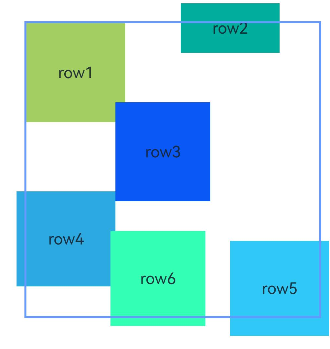
多种组件的对齐布局
Row、Column、Flex、Stack等多种布局组件,可按照RelativeContainer组件规则进行对齐排布。
- @Entry
- @Component
- struct RelativeContainerExample {
- build() {
- Row() {
- RelativeContainer() {
- Row()
- .width(100)
- .height(100)
- .backgroundColor('#a3cf62')
- .alignRules({
- top: { anchor: '__container__', align: VerticalAlign.Top },
- left: { anchor: '__container__', align: HorizontalAlign.Start }
- })
- .id('row1')
- Column()
- .width('50%')
- .height(30)
- .backgroundColor('#00ae9d')
- .alignRules({
- top: { anchor: '__container__', align: VerticalAlign.Top },
- left: { anchor: '__container__', align: HorizontalAlign.Center }
- })
- .id('row2')
- Flex({ direction: FlexDirection.Row }) {
- Text('1').width('20%').height(50).backgroundColor('#0a59f7')
- Text('2').width('20%').height(50).backgroundColor('#2ca9e0')
- Text('3').width('20%').height(50).backgroundColor('#0a59f7')
- Text('4').width('20%').height(50).backgroundColor('#2ca9e0')
- }
- .padding(10)
- .backgroundColor('#30c9f7')
- .alignRules({
- top: { anchor: 'row2', align: VerticalAlign.Bottom },
- left: { anchor: '__container__', align: HorizontalAlign.Start },
- bottom: { anchor: '__container__', align: VerticalAlign.Center },
- right: { anchor: 'row2', align: HorizontalAlign.Center }
- })
- .id('row3')
- Stack({ alignContent: Alignment.Bottom }) {
- Text('First child, show in bottom')
- .width('90%')
- .height('100%')
- .backgroundColor('#a3cf62')
- .align(Alignment.Top)
- Text('Second child, show in top').width('70%').height('60%').backgroundColor('#00ae9d').align(Alignment.Top)
- }
- .margin({ top: 5 })
- .alignRules({
- top: { anchor: 'row3', align: VerticalAlign.Bottom },
- left: { anchor: '__container__', align: HorizontalAlign.Start },
- bottom: { anchor: '__container__', align: VerticalAlign.Bottom },
- right: { anchor: 'row3', align: HorizontalAlign.End }
- })
- .id('row4')
- }
- .width(300).height(300)
- .margin({ left: 50 })
- .border({ width: 2, color: '#6699FF' })
- }
- .height('100%')
- }
- }
RelativeContainerDifferentComponentId.ets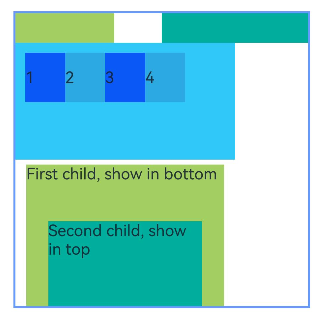
以上内容均参考于相对布局 (RelativeContainer)-构建布局-组件布局-UI开发 (ArkTS声明式开发范式)-ArkUI(方舟UI框架)-应用框架 - 华为HarmonyOS开发者
实战演示
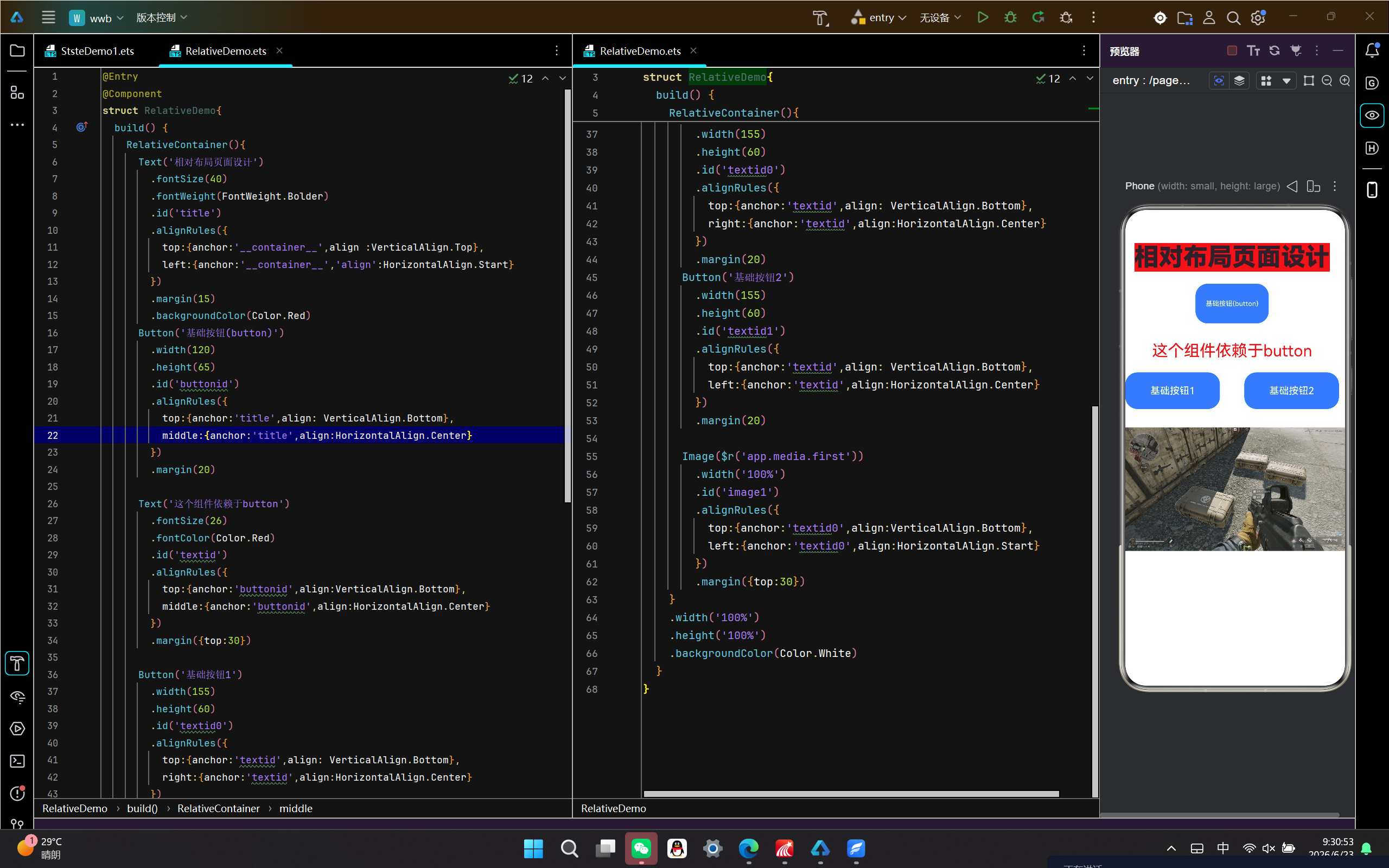

讨论HarmonyOS开发技术,专注于API与组件、DevEco Studio、测试、元服务和应用上架分发等。
更多推荐
 0
0 0
0- 0


 已为社区贡献9条内容

所有评论(0)