鸿蒙OpenHarmony【InterstitialDialogAction】元服务
InterstitialDialogAction弹框在元服务中用于在保持当前的上下文环境时,临时展示用户需关注的信息或待处理的操作,用户点击弹框的不同区域可以触发相应的动作。
说明
该组件从API Version 12开始支持。后续版本如有新增内容,则采用上角标单独标记该内容的起始版本。
导入模块
import { InterstitialDialogAction, IconStyle, TitlePosition, BottomOffset } from '@kit.ArkUI';
子组件
无
属性
不支持[通用属性]
InterstitialDialogAction
InterstitialDialogAction {
    uiContext: UIContext,
    contentNode: ComponentContent<object>,
    dialogParam: DialogParams,
    bottomOffsetType?: BottomOffset,
    constructor: (dialogOptions: DialogOptions),
    openDialog(): void,
    closeDialog(): void
}
元服务API: 从API version 12开始,该接口支持在元服务中使用。
系统能力: SystemCapability.ArkUI.ArkUI.Full
参数:
| 名称 | 类型 | 必填 | 说明 |
|---|---|---|---|
| uiContext | [UIContext] | 是 | UI上下文实例。 |
| contentNode | [ComponentContent] | 是 | 组件节点对象。 |
| dialogParam | [DialogParams] | 是 | 设置弹框的一些属性。 |
| bottomOffsetType | [BottomOffset] | 否 | 设定弹框距离窗口底部的距离类型。默认值:[BottomOffset].OFFSET_FOR_BAR。 |
| constructor | (dialogOptions: [DialogOptions]) | 是 | InterstitialDialogAction类的构造方法。 |
| openDialog | void | 是 | 设置弹框打开的接口。 |
| closeDialog | void | 是 | 设置弹框关闭的接口。 |
DialogParams
元服务API: 从API version 12开始,该接口支持在元服务中使用。
系统能力: SystemCapability.ArkUI.ArkUI.Full
设置弹框的特有属性以及默认关闭动作函数。
| 名称 | 类型 | 必填 | 说明 |
|---|---|---|---|
| dialogOptions | [DialogOptions] | 是 | 为弹框组件设置除了基础属性外的属性。 |
| defaultCloseAction | Callback | 是 | 点击弹框以及关闭按钮后执行的默认关闭行为。 |
DialogOptions
元服务API: 从API version 12开始,该接口支持在元服务中使用。
系统能力: SystemCapability.ArkUI.ArkUI.Full
设置弹框特有的属性以及提供给用户自定义的点击触发动作。
| 名称 | 类型 | 必填 | 说明 |
|---|---|---|---|
| uiContext | [UIContext] | 是 | UI上下文实例。 |
| title | [ResourceStr] | 否 | 弹框标题文本。 |
| subtitle | [ResourceStr] | 否 | 弹框副标题文本。 |
| titleColor | [ResourceStr] | [Color] | 否 |
| subtitleColor | [ResourceStr] | [Color] | 否 |
| backgroundImage | [Resource] | 否 | 弹框背景图片。 |
| foregroundImage | [Resource] | 否 | 弹框前景图片。 |
| iconStyle | [IconStyle] | 否 | 关闭按钮图标的样式(亮调或者暗调)。默认值:[IconStyle].Light |
| titlePosition | [TitlePosition] | 否 | 标题在弹框中的位置,在副标题的上方或者在副标题的下方。默认值:[TitlePosition].Top |
| onDialogClick | Callback | 否 | 点击弹框任意位置后触发的用户自定义动作。 |
| onDialogClose | Callback | 否 | 点击关闭按钮后触发的用户自定义动作。 |
IconStyle
元服务API: 从API version 12开始,该接口支持在元服务中使用。
系统能力: SystemCapability.ArkUI.ArkUI.Full
设置关闭按钮的色调样式,默认设置关闭按钮为亮色。
| 名称 | 值 | 说明 |
|---|---|---|
| DARK | 0 | 设置关闭按钮为暗色调。 |
| LIGHT | 1 | 设置关闭按钮为亮色调。默认值。 |
TitlePosition
元服务API: 从API version 12开始,该接口支持在元服务中使用。
系统能力: SystemCapability.ArkUI.ArkUI.Full
设置主副标题之间的上下相对位置,默认设置为主标题在副标题之上。
| 名称 | 值 | 说明 |
|---|---|---|
| TOP | 0 | 设置主标题位于副标题之上。默认值。 |
| BOTTOM | 1 | 设置副标题位于主标题之上。 |
BottomOffset
元服务API: 从API version 12开始,该接口支持在元服务中使用。
系统能力: SystemCapability.ArkUI.ArkUI.Full
设置不同情景模式下弹框距离底部的距离,判断依据为是否存在菜单栏,默认显示为不存在菜单栏情况下的距离。
| 名称 | 值 | 说明 |
|---|---|---|
| OFFSET_FOR_BAR | 0 | 存在菜单栏情况下与窗口底部的距离。默认值,设置后弹框距离底部88vp。 |
| OFFSET_FOR_NONE | 1 | 不存在菜单栏情况下与窗口底部的距离。设置后弹框距离底部44vp。 |
事件
不支持[通用事件]
示例
示例1
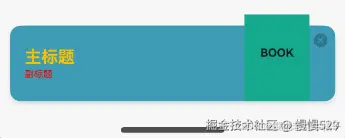
为可选属性设置相应值,用两种不同参数类型分别为主标题、副标题设置颜色值,关闭按钮设置为暗色调,
主副标题相对位置设置为主标题在副标题上方,底部距离类型设置为不存在菜单栏情况下的距离。
// ../entryability/EntryAbility
import { AbilityConstant, UIAbility, Want } from '@kit.AbilityKit';
import { hilog } from '@kit.PerformanceAnalysisKit';
import { window } from '@kit.ArkUI';
import { BusinessError } from '@kit.BasicServicesKit';

let dialogUIContext: UIContext | null = null;

export function getDialogUIContext(): UIContext | null {
  return dialogUIContext;
}

export default class EntryAbility extends UIAbility {
  onCreate(want: Want, launchParam: AbilityConstant.LaunchParam): void {
    hilog.info(0x0000, 'testTag', '%{public}s', 'Ability onCreate');
  }

  onDestroy(): void {
    hilog.info(0x0000, 'testTag', '%{public}s', 'Ability onDestroy');
  }

  onWindowStageCreate(windowStage: window.WindowStage): void {
    // Main window is created, set main page for this ability
    hilog.info(0x0000, 'testTag', '%{public}s', 'Ability onWindowStageCreate');

    windowStage.loadContent('pages/Index', (err) => {
      if (err.code) {
        hilog.error(0x0000, 'testTag', 'Failed to load the content. Cause: %{public}s', JSON.stringify(err) ?? '');
        return;
      }
      hilog.info(0x0000, 'testTag', 'Succeeded in loading the content.');
    });

    let windowClass: window.Window | undefined = undefined;
    windowStage.getMainWindow((err: BusinessError, data) => {
      let errCode: number = err.code;
      if (errCode) {
        console.error('Failed to obtain the main window. Cause: ' + JSON.stringify(err));
        return;
      }
      windowClass = data;
      console.info('Succeeded in obtaining the main window. Data: ' + JSON.stringify(data));
      dialogUIContext = windowClass.getUIContext();
    })

    //获取窗口
    windowStage.getMainWindow((err, data) => {
      if (err.code) {
        console.error('Failed to obtain the main window. Cause: ' + JSON.stringify(err));
        return;
      }
      windowClass = data;
      console.info('Succeeded in obtaining the main window. Data: ' + JSON.stringify(data));
      //设置窗口全屏
      windowClass.setWindowLayoutFullScreen(false)
    })
  }

  onWindowStageDestroy(): void {
    // Main window is destroyed, release UI related resources
    hilog.info(0x0000, 'testTag', '%{public}s', 'Ability onWindowStageDestroy');
  }

  onForeground(): void {
    // Ability has brought to foreground
    hilog.info(0x0000, 'testTag', '%{public}s', 'Ability onForeground');
  }

  onBackground(): void {
    // Ability has back to background
    hilog.info(0x0000, 'testTag', '%{public}s', 'Ability onBackground');
  }
}
// Index.ets
import { getMyUiContext } from '../entryability/EntryAbility';
import { UIContext, InterstitialDialogAction, IconStyle, TitlePosition, BottomOffset } from '@kit.ArkUI';

@Entry
@Component
struct Index {
  build() {
    Row() {
      Column() {
        Text("show dialog")
          .fontSize(50)
          .fontWeight(FontWeight.Bold)
          .onClick(() => {
            let ctx: UIContext | null = getMyUiContext();
            let interstitialDialogAction: InterstitialDialogAction = new InterstitialDialogAction({
              uiContext: ctx as UIContext,
              title: "主标题",
              subtitle: "副标题",
              titleColor: 'rgb(255, 192, 0)',
              subtitleColor: Color.Red,
              backgroundImage: $r('app.media.testBackgroundImg'),
              foregroundImage: $r('app.media.testForegroundImg'),
              iconStyle: IconStyle.DARK,
              titlePosition: TitlePosition.TOP,
              bottomOffsetType: BottomOffset.OFFSET_FOR_NONE,
              onDialogClick: () => { console.log('outer dialog click action') },
              onDialogClose: () => { console.log('outer close action') }
            });
            interstitialDialogAction.openDialog();
          })
      }
      .width('100%')
    }
    .height('100%')
    .backgroundColor('rgba(0, 0, 0, 0.1)')
  }
}
示例2
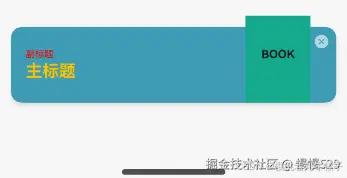
为可选属性设置相应值,用两种不同参数类型分别为主标题,副标题设置颜色值,关闭按钮设置为亮色调,主副标题相对位置设置为主标题在副标题下方,底部距离类型设置为存在菜单栏情况下的距离。
// ../entryability/EntryAbility
import { AbilityConstant, UIAbility, Want } from '@kit.AbilityKit';
import { hilog } from '@kit.PerformanceAnalysisKit';
import { window } from '@kit.ArkUI';
import { BusinessError } from '@kit.BasicServicesKit';

let dialogUIContext: UIContext | null = null;

export function getDialogUIContext(): UIContext | null {
  return dialogUIContext;
}

export default class EntryAbility extends UIAbility {
  onCreate(want: Want, launchParam: AbilityConstant.LaunchParam): void {
    hilog.info(0x0000, 'testTag', '%{public}s', 'Ability onCreate');
  }

  onDestroy(): void {
    hilog.info(0x0000, 'testTag', '%{public}s', 'Ability onDestroy');
  }

  onWindowStageCreate(windowStage: window.WindowStage): void {
    // Main window is created, set main page for this ability
    hilog.info(0x0000, 'testTag', '%{public}s', 'Ability onWindowStageCreate');

    windowStage.loadContent('pages/Index', (err) => {
      if (err.code) {
        hilog.error(0x0000, 'testTag', 'Failed to load the content. Cause: %{public}s', JSON.stringify(err) ?? '');
        return;
      }
      hilog.info(0x0000, 'testTag', 'Succeeded in loading the content.');
    });

    let windowClass: window.Window | undefined = undefined;
    windowStage.getMainWindow((err: BusinessError, data) => {
      let errCode: number = err.code;
      if (errCode) {
        console.error('Failed to obtain the main window. Cause: ' + JSON.stringify(err));
        return;
      }
      windowClass = data;
      console.info('Succeeded in obtaining the main window. Data: ' + JSON.stringify(data));
      dialogUIContext = windowClass.getUIContext();
    })

    //获取窗口
    windowStage.getMainWindow((err, data) => {
      if (err.code) {
        console.error('Failed to obtain the main window. Cause: ' + JSON.stringify(err));
        return;
      }
      windowClass = data;
      console.info('Succeeded in obtaining the main window. Data: ' + JSON.stringify(data));
      //设置窗口全屏
      windowClass.setWindowLayoutFullScreen(false)
    })
  }

  onWindowStageDestroy(): void {
    // Main window is destroyed, release UI related resources
    hilog.info(0x0000, 'testTag', '%{public}s', 'Ability onWindowStageDestroy');
  }

  onForeground(): void {
    // Ability has brought to foreground
    hilog.info(0x0000, 'testTag', '%{public}s', 'Ability onForeground');
  }

  onBackground(): void {
    // Ability has back to background
    hilog.info(0x0000, 'testTag', '%{public}s', 'Ability onBackground');
  }
}
// Index.ets
import { getMyUiContext } from '../entryability/EntryAbility';
import { UIContext, InterstitialDialogAction, IconStyle, TitlePosition, BottomOffset } from '@kit.ArkUI';

@Entry
@Component
struct Index {
  build() {
    Row() {
      Column() {
        Text("show dialog")
          .fontSize(50)
          .fontWeight(FontWeight.Bold)
          .onClick(() => {
            let ctx: UIContext | null = getMyUiContext();
            let interstitialDialogAction: InterstitialDialogAction = new InterstitialDialogAction({
              uiContext: ctx as UIContext,
              title: "主标题",
              subtitle: "副标题",
              titleColor: 'rgb(255, 192, 0)',
              subtitleColor: Color.Red,
              backgroundImage: $r('app.media.testBackgroundImg'),
              foregroundImage: $r('app.media.testForegroundImg'),
              iconStyle: IconStyle.LIGHT,
              titlePosition: TitlePosition.BOTTOM,
              bottomOffsetType: BottomOffset.OFFSET_FOR_BAR,
              onDialogClick: () => { console.log('outer dialog click action') },
              onDialogClose: () => { console.log('outer close action') }
            });
            interstitialDialogAction.openDialog();
          })
      }
      .width('100%')
    }
    .height('100%')
    .backgroundColor('rgba(0, 0, 0, 0.1)')
  }
}

讨论HarmonyOS开发技术,专注于API与组件、DevEco Studio、测试、元服务和应用上架分发等。
更多推荐



 28
28 0
0- 0


 已为社区贡献4条内容

所有评论(0)