

1.TLS双向认证
在上一篇文章 鸿蒙网络编程系列7-TLS安全数据传输单向认证示例中,演示了单向认证的方式,也就是客户端需要验证服务端的数字证书,而服务端不需要验证客户端的数字证书,这能满足大部分业务场景,但是,在一些高安全性需求的场景下,服务端也需要确保客户端是可信的,这就要求双向认证,也就是除了客户端验证服务端证书外,服务端也需要验证客户端的数字证书。
要实现双向的认证,就需要服务端在握手时提出客户端的数字证书认证需求,以ECDHE算法的握手过程为例,在第二次握手时,需要服务端发送Certificate Request消息给客户端,表明是双向认证的,在第三次握手时,客户端发送Certificate消息给服务端,其中就包含证书信息。
2.TLS双向认证通讯示例
本文将实现一个双向认证的示例,应用运行后的界面如图所示:
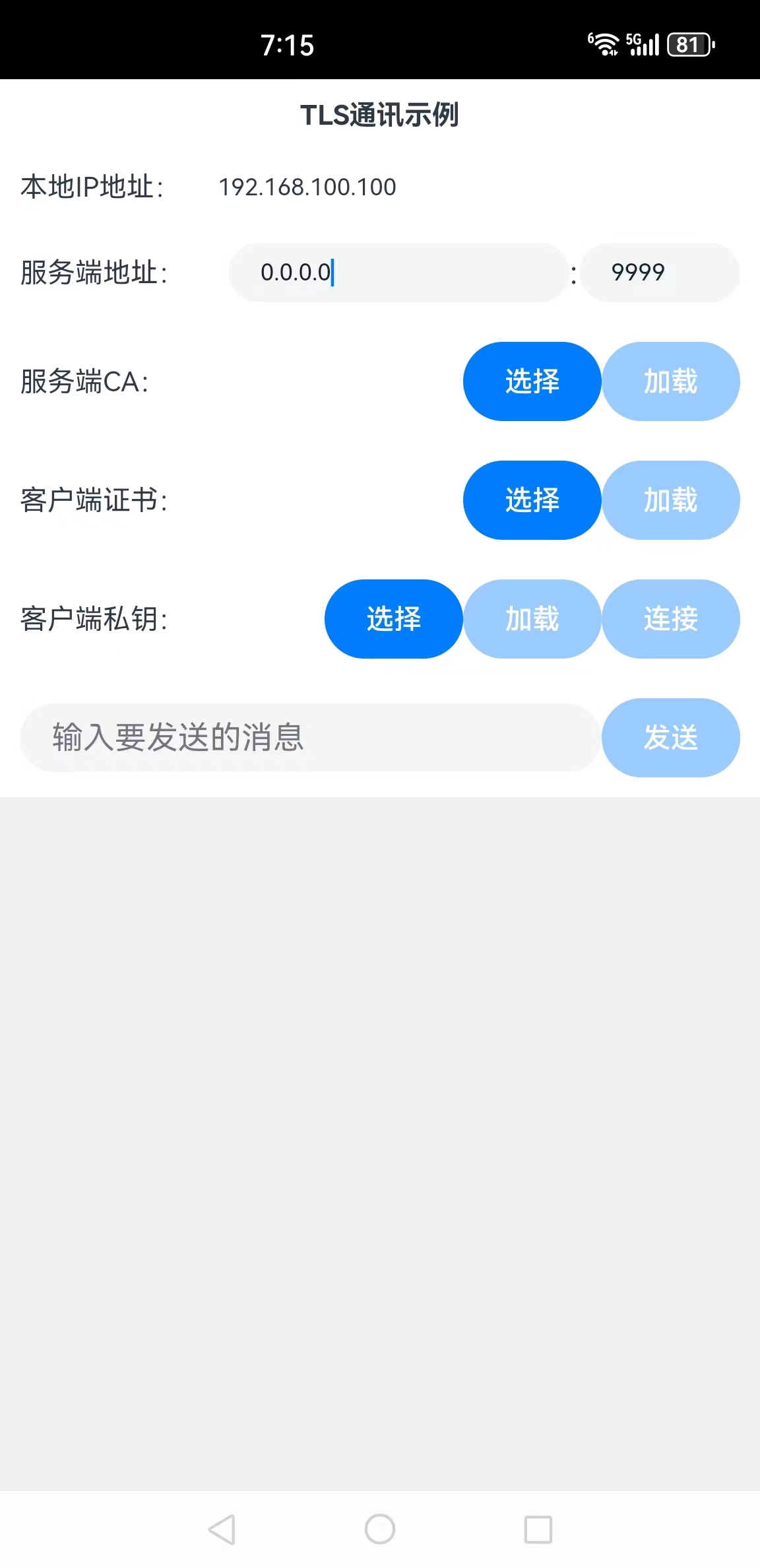
在这个应用里,用户可以选择服务端的CA文件,作为验证服务端证书有效性的依据;还需要选择客户端证书文件和客户端私钥文件,用来执行服务端对客户端的认证。这三个文件都选择并加载后,就可以单击“连接”按钮连接服务端了,连接成功后可以发送消息给服务端。
下面详细介绍创建该应用的步骤。
步骤1:创建Empty Ability项目。
步骤2:在module.json5配置文件加上对权限的声明:
"requestPermissions": [
{
"name": "ohos.permission.INTERNET"
},
{
"name": "ohos.permission.GET_WIFI_INFO"
}
]
这里分别添加了访问互联网和访问WIFI信息的权限。
步骤3:在Index.ets文件里添加如下的代码:
import socket from '@ohos.net.socket';
import wifiManager from '@ohos.wifiManager';
import systemDateTime from '@ohos.systemDateTime';
import util from '@ohos.util';
import picker from '@ohos.file.picker';
import fs from '@ohos.file.fs';
import common from '@ohos.app.ability.common';

//执行TLS通讯的对象
let tlsSocket = socket.constructTLSSocketInstance()

//说明:本地的IP地址不是必须知道的,绑定时绑定到IP:0.0.0.0即可,显示本地IP地址的目的是方便对方发送信息过来
//本地IP的数值形式
let ipNum = wifiManager.getIpInfo().ipAddress
//本地IP的字符串形式
let localIp = (ipNum >>> 24) + '.' + (ipNum >> 16 & 0xFF) + '.' + (ipNum >> 8 & 0xFF) + '.' + (ipNum & 0xFF);

//服务端ca证书文件地址
let caFileUri = ''

//客户端证书文件地址
let certFileUri = ''

//客户端私钥文件地址
let keyFileUri = ''

@Entry
@Component
struct Index {
  //连接、通讯历史记录
  @State msgHistory: string = ''
  //要发送的信息
  @State sendMsg: string = ''
  //服务端IP地址
  @State serverIp: string = "0.0.0.0"
  //服务端端口
  @State serverPort: number = 9999
  //是否可以加载CA
  @State caCanLoad: boolean = false
  //是否已加载CA
  @State caLoaded: boolean = false
  //是否可以加载证书
  @State certCanLoad: boolean = false
  //是否已加载证书
  @State certLoaded: boolean = false
  //是否可以加载私钥
  @State keyCanLoad: boolean = false
  //是否已加载私钥
  @State keyLoaded: boolean = false
  //是否可以发送消息
  @State canSend: boolean = false
  //服务端证书
  @State ca: string = ``
  //客户端证书
  @State cert: string = ``
  //客户端私钥
  @State privateKey: string = ``
  scroller: Scroller = new Scroller()

  build() {
    Row() {
      Column() {
        Text("TLS通讯示例")
          .fontSize(14)
          .fontWeight(FontWeight.Bold)
          .width('100%')
          .textAlign(TextAlign.Center)
          .padding(10)

        Flex({ justifyContent: FlexAlign.Start, alignItems: ItemAlign.Center }) {
          Text("本地IP地址:")
            .width(100)
            .fontSize(14)
            .flexGrow(0)
          Text(localIp)
            .width(110)
            .fontSize(12)
            .flexGrow(1)

        }.width('100%')
        .padding(10)

        Flex({ justifyContent: FlexAlign.Start, alignItems: ItemAlign.Center }) {
          Text("服务端地址:")
            .fontSize(14)
            .width(90)
            .flexGrow(1)

          TextInput({ text: this.serverIp })
            .onChange((value) => {
              this.serverIp = value
            })
            .width(110)
            .fontSize(12)
            .flexGrow(4)

          Text(":")
            .width(5)
            .flexGrow(0)

          TextInput({ text: this.serverPort.toString() })
            .type(InputType.Number)
            .onChange((value) => {
              this.serverPort = parseInt(value)
            })
            .fontSize(12)
            .flexGrow(2)
            .width(50)
        }
        .width('100%')
        .padding(10)

        Flex({ justifyContent: FlexAlign.Start, alignItems: ItemAlign.Center }) {
          Text("服务端CA:")
            .fontSize(14)
            .width(90)
            .flexGrow(1)

          Button("选择")
            .onClick(() => {
              this.selectCA()
            })
            .width(70)
            .fontSize(14)

          Button("加载")
            .onClick(() => {
              this.loadCA()
            })
            .enabled(this.caCanLoad)
            .width(70)
            .fontSize(14)
        }
        .width('100%')
        .padding(10)

        Flex({ justifyContent: FlexAlign.Start, alignItems: ItemAlign.Center }) {
          Text("客户端证书:")
            .fontSize(14)
            .width(90)
            .flexGrow(1)

          Button("选择")
            .onClick(() => {
              this.selectCert()
            })
            .width(70)
            .fontSize(14)

          Button("加载")
            .onClick(() => {
              this.loadCert()
            })
            .enabled(this.caCanLoad)
            .width(70)
            .fontSize(14)
        }
        .width('100%')
        .padding(10)

        Flex({ justifyContent: FlexAlign.Start, alignItems: ItemAlign.Center }) {
          Text("客户端私钥:")
            .fontSize(14)
            .width(90)
            .flexGrow(1)

          Button("选择")
            .onClick(() => {
              this.selectKey()
            })
            .width(70)
            .fontSize(14)

          Button("加载")
            .onClick(() => {
              this.loadKey()
            })
            .enabled(this.caCanLoad)
            .width(70)
            .fontSize(14)

          Button("连接")
            .onClick(() => {
              this.connect2Server()
            })
            .enabled(this.caLoaded && this.keyLoaded && this.certLoaded)
            .width(70)
            .fontSize(14)
        }
        .width('100%')
        .padding(10)

        Flex({ justifyContent: FlexAlign.Start, alignItems: ItemAlign.Center }) {
          TextInput({ placeholder: "输入要发送的消息" }).onChange((value) => {
            this.sendMsg = value
          })
            .width(200)
            .flexGrow(1)

          Button("发送")
            .enabled(this.canSend)
            .width(70)
            .fontSize(14)
            .flexGrow(0)
            .onClick(() => {
              this.sendMsg2Server()
            })
        }
        .width('100%')
        .padding(10)

        Scroll(this.scroller) {
          Text(this.msgHistory)
            .textAlign(TextAlign.Start)
            .padding(10)
            .width('100%')
            .backgroundColor(0xeeeeee)
        }
        .align(Alignment.Top)
        .backgroundColor(0xeeeeee)
        .height(300)
        .flexGrow(1)
        .scrollable(ScrollDirection.Vertical)
        .scrollBar(BarState.On)
        .scrollBarWidth(20)
      }
      .width('100%')
      .justifyContent(FlexAlign.Start)
      .height('100%')
    }
    .height('100%')
  }

  //发送消息到服务端
  sendMsg2Server() {
    tlsSocket.send(this.sendMsg + "\r\n")
      .then(async () => {
        this.msgHistory += "我:" + this.sendMsg + await getCurrentTimeString() + "\r\n"
      })
      .catch((e) => {
        this.msgHistory += '发送失败' + e.message + "\r\n";
      })
  }

  //绑定本地地址
  async bind2LocalAddress() {
    //本地地址
    let localAddress = { address: "0.0.0.0", family: 1 }

    await tlsSocket.bind(localAddress)
      .then(() => {
        this.msgHistory += 'bind success' + "\r\n";
      })
      .catch((e) => {
        this.msgHistory += 'bind fail ' + e.message + "\r\n";
      })

    //收到消息时的处理
    tlsSocket.on("message", async (value) => {
      let msg = buf2String(value.message)
      let time = await getCurrentTimeString()
      this.msgHistory += "服务端:" + msg + time + "\r\n"
      this.scroller.scrollEdge(Edge.Bottom)
    })
  }

  //选择CA证书文件
  selectCA() {
    let documentPicker = new picker.DocumentViewPicker();
    documentPicker.select().then((result) => {
      if (result.length > 0) {
        caFileUri = result[0]
        this.msgHistory += "select file: " + caFileUri + "\r\n";
        this.caCanLoad = true
      }
    }).catch((e) => {
      this.msgHistory += 'DocumentViewPicker.select failed ' + e.message + "\r\n";
    });
  }

  //选择客户端证书文件
  selectCert() {
    let documentPicker = new picker.DocumentViewPicker();
    documentPicker.select().then((result) => {
      if (result.length > 0) {
        certFileUri = result[0]
        this.msgHistory += "select file: " + certFileUri + "\r\n";
        this.certCanLoad = true
      }
    }).catch((e) => {
      this.msgHistory += 'DocumentViewPicker.select failed ' + e.message + "\r\n";
    });
  }

  //选择私钥文件
  selectKey() {
    let documentPicker = new picker.DocumentViewPicker();
    documentPicker.select().then((result) => {
      if (result.length > 0) {
        keyFileUri = result[0]
        this.msgHistory += "select file: " + keyFileUri + "\r\n";
        this.keyCanLoad = true
      }
    }).catch((e) => {
      this.msgHistory += 'DocumentViewPicker.select failed ' + e.message + "\r\n";
    });
  }

  //加载CA文件内容
  loadCA() {
    try {
      this.ca = this.readStringFromFile(caFileUri)
      this.caLoaded = true
    }
    catch (e) {
      this.msgHistory += 'readText failed ' + e.message + "\r\n";
    }
  }

  //加载私钥文件内容
  loadKey() {
    try {
      this.privateKey = this.readStringFromFile(keyFileUri)
      this.keyLoaded = true
    }
    catch (e) {
      this.msgHistory += 'readText failed ' + e.message + "\r\n";
    }
  }

  //加载客户端证书文件内容
  loadCert() {
    try {
      this.cert = this.readStringFromFile(certFileUri)
      this.certLoaded = true
    }
    catch (e) {
      this.msgHistory += 'readText failed ' + e.message + "\r\n";
    }
  }

  //从文件读取字符串内容
  readStringFromFile(fileUri: string): string {
    let buf = new ArrayBuffer(1024 * 4);
    let file = fs.openSync(fileUri, fs.OpenMode.READ_ONLY);
    let readLen = fs.readSync(file.fd, buf, { offset: 0 });
    let result = buf2String(buf.slice(0, readLen))
    fs.closeSync(file);
    return result
  }

  //连接服务端
  async connect2Server() {
    //绑定本地地址
    await this.bind2LocalAddress()

    //服务端地址
    let serverAddress = { address: this.serverIp, port: this.serverPort, family: 1 }
    //tls选项
    let opt: socket.TLSSecureOptions = {
      ca: [this.ca],
      cert: this.cert,
      key: this.privateKey
    }

    await tlsSocket.connect({ address: serverAddress, secureOptions: opt })
      .then(() => {
        this.msgHistory = 'connect success ' + "\r\n";
        this.canSend = true
      })
      .catch((e) => {
        this.msgHistory = 'connect fail ' + e.message + "\r\n";
      })
  }
}

//同步获取当前时间的字符串形式
async function getCurrentTimeString() {
  let time = ""
  await systemDateTime.getDate().then(
    (date) => {
      time = date.getHours().toString() + ":" + date.getMinutes().toString()
        + ":" + date.getSeconds().toString()
    }
  )
  return "[" + time + "]"
}

//ArrayBuffer转utf8字符串
function buf2String(buf: ArrayBuffer) {
  let msgArray = new Uint8Array(buf);
  let textDecoder = util.TextDecoder.create("utf-8");
  return textDecoder.decodeWithStream(msgArray)
}- 1.
- 2.
- 3.
- 4.
- 5.
- 6.
- 7.
- 8.
- 9.
- 10.
- 11.
- 12.
- 13.
- 14.
- 15.
- 16.
- 17.
- 18.
- 19.
- 20.
- 21.
- 22.
- 23.
- 24.
- 25.
- 26.
- 27.
- 28.
- 29.
- 30.
- 31.
- 32.
- 33.
- 34.
- 35.
- 36.
- 37.
- 38.
- 39.
- 40.
- 41.
- 42.
- 43.
- 44.
- 45.
- 46.
- 47.
- 48.
- 49.
- 50.
- 51.
- 52.
- 53.
- 54.
- 55.
- 56.
- 57.
- 58.
- 59.
- 60.
- 61.
- 62.
- 63.
- 64.
- 65.
- 66.
- 67.
- 68.
- 69.
- 70.
- 71.
- 72.
- 73.
- 74.
- 75.
- 76.
- 77.
- 78.
- 79.
- 80.
- 81.
- 82.
- 83.
- 84.
- 85.
- 86.
- 87.
- 88.
- 89.
- 90.
- 91.
- 92.
- 93.
- 94.
- 95.
- 96.
- 97.
- 98.
- 99.
- 100.
- 101.
- 102.
- 103.
- 104.
- 105.
- 106.
- 107.
- 108.
- 109.
- 110.
- 111.
- 112.
- 113.
- 114.
- 115.
- 116.
- 117.
- 118.
- 119.
- 120.
- 121.
- 122.
- 123.
- 124.
- 125.
- 126.
- 127.
- 128.
- 129.
- 130.
- 131.
- 132.
- 133.
- 134.
- 135.
- 136.
- 137.
- 138.
- 139.
- 140.
- 141.
- 142.
- 143.
- 144.
- 145.
- 146.
- 147.
- 148.
- 149.
- 150.
- 151.
- 152.
- 153.
- 154.
- 155.
- 156.
- 157.
- 158.
- 159.
- 160.
- 161.
- 162.
- 163.
- 164.
- 165.
- 166.
- 167.
- 168.
- 169.
- 170.
- 171.
- 172.
- 173.
- 174.
- 175.
- 176.
- 177.
- 178.
- 179.
- 180.
- 181.
- 182.
- 183.
- 184.
- 185.
- 186.
- 187.
- 188.
- 189.
- 190.
- 191.
- 192.
- 193.
- 194.
- 195.
- 196.
- 197.
- 198.
- 199.
- 200.
- 201.
- 202.
- 203.
- 204.
- 205.
- 206.
- 207.
- 208.
- 209.
- 210.
- 211.
- 212.
- 213.
- 214.
- 215.
- 216.
- 217.
- 218.
- 219.
- 220.
- 221.
- 222.
- 223.
- 224.
- 225.
- 226.
- 227.
- 228.
- 229.
- 230.
- 231.
- 232.
- 233.
- 234.
- 235.
- 236.
- 237.
- 238.
- 239.
- 240.
- 241.
- 242.
- 243.
- 244.
- 245.
- 246.
- 247.
- 248.
- 249.
- 250.
- 251.
- 252.
- 253.
- 254.
- 255.
- 256.
- 257.
- 258.
- 259.
- 260.
- 261.
- 262.
- 263.
- 264.
- 265.
- 266.
- 267.
- 268.
- 269.
- 270.
- 271.
- 272.
- 273.
- 274.
- 275.
- 276.
- 277.
- 278.
- 279.
- 280.
- 281.
- 282.
- 283.
- 284.
- 285.
- 286.
- 287.
- 288.
- 289.
- 290.
- 291.
- 292.
- 293.
- 294.
- 295.
- 296.
- 297.
- 298.
- 299.
- 300.
- 301.
- 302.
- 303.
- 304.
- 305.
- 306.
- 307.
- 308.
- 309.
- 310.
- 311.
- 312.
- 313.
- 314.
- 315.
- 316.
- 317.
- 318.
- 319.
- 320.
- 321.
- 322.
- 323.
- 324.
- 325.
- 326.
- 327.
- 328.
- 329.
- 330.
- 331.
- 332.
- 333.
- 334.
- 335.
- 336.
- 337.
- 338.
- 339.
- 340.
- 341.
- 342.
- 343.
- 344.
- 345.
- 346.
- 347.
- 348.
- 349.
- 350.
- 351.
- 352.
- 353.
- 354.
- 355.
- 356.
- 357.
- 358.
- 359.
- 360.
- 361.
- 362.
- 363.
- 364.
- 365.
- 366.
- 367.
- 368.
- 369.
- 370.
- 371.
- 372.
- 373.
- 374.
- 375.
- 376.
- 377.
- 378.
- 379.
- 380.
- 381.
- 382.
- 383.
- 384.
- 385.
- 386.
- 387.
- 388.
- 389.
- 390.
- 391.
- 392.
- 393.
- 394.
步骤4:编译运行,可以使用模拟器或者真机。
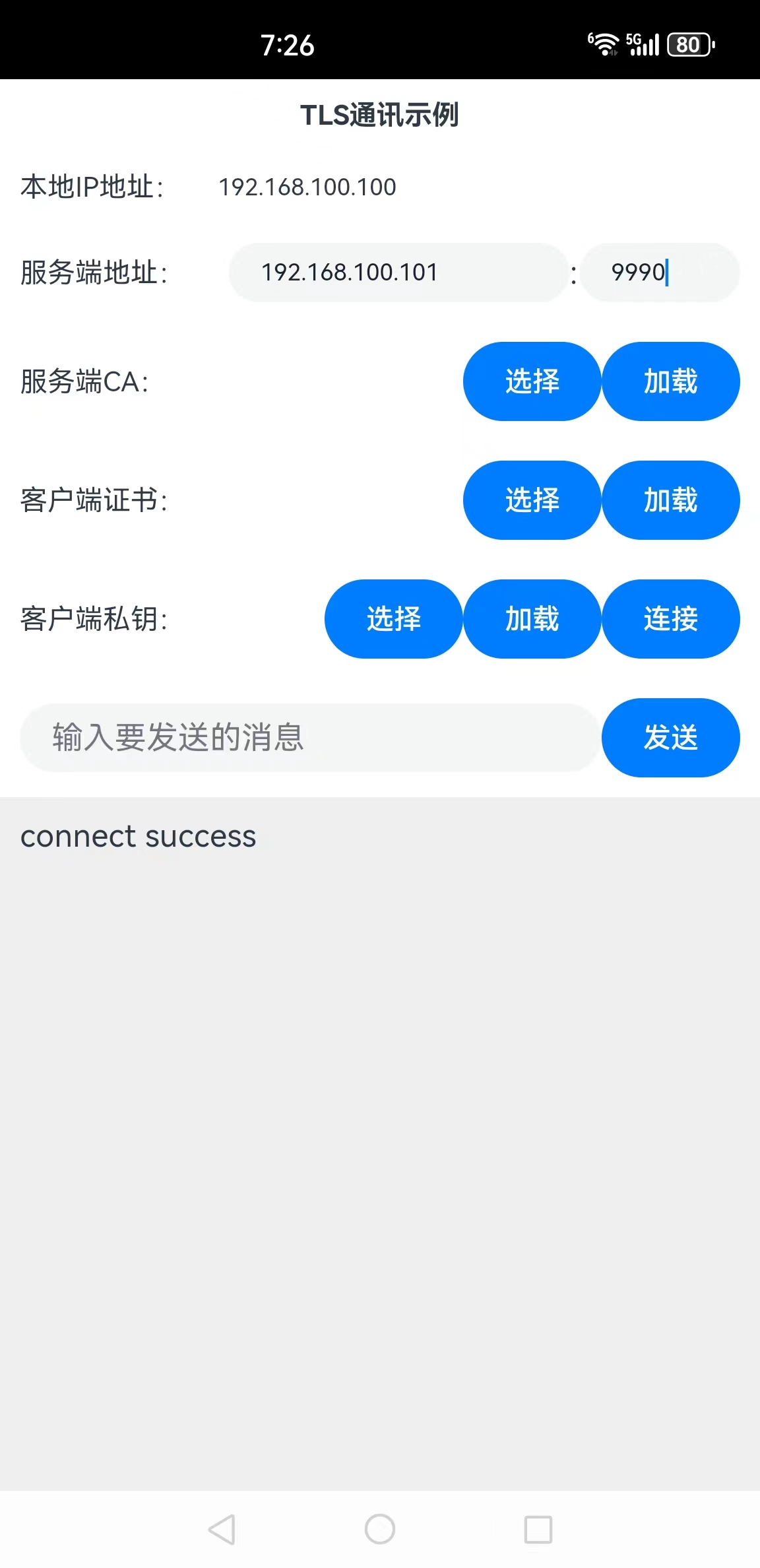
步骤5:加载服务端CA、客户端证书、客户端私钥文件,当然需要确保服务端已经启动了,然后配置服务端地址,在单击“连接”按钮执行连接,如图所示:
连接成功后,如果在服务端监听,可以看到如下的连接过程信息:
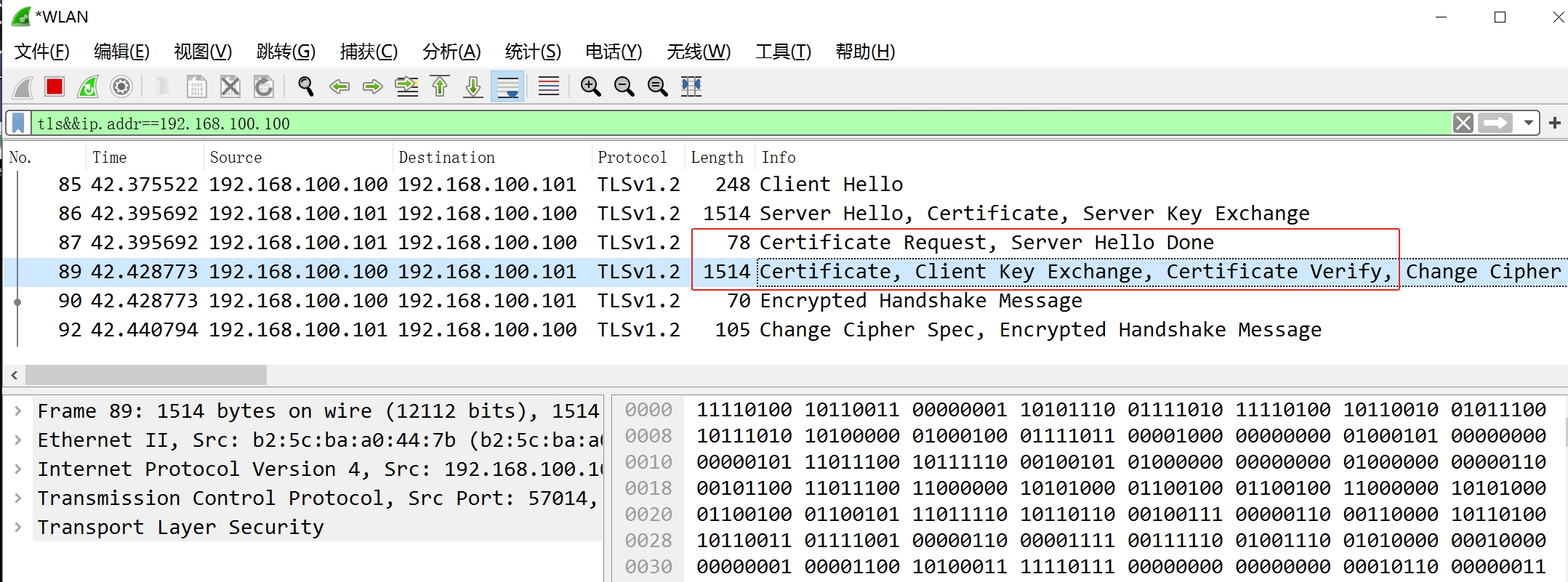
其中,使用框线标出的即是服务端发送给客户端的认证请求信息以及客户端发送给服务端的证书信息。
步骤6:输入要发送的信息,单击“发送”按钮即可发送信息到服务端,如下图所示:
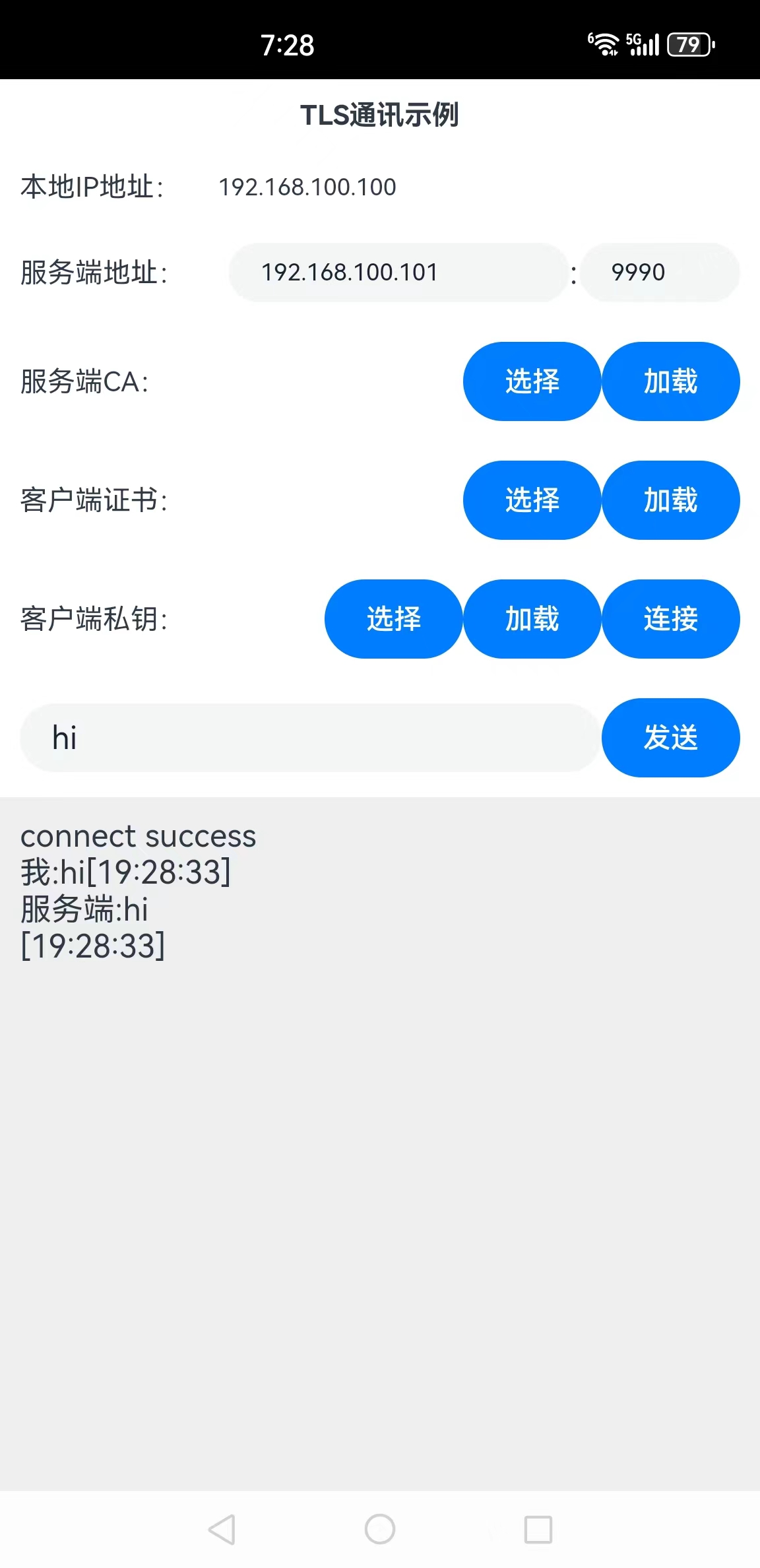
这样就完成了TLS双向认证消息发送应用的编写。
(本文作者原创,除非明确授权禁止转载)
本文码云源码地址: https://gitee.com/zl3624/harmonyos_network_samples/tree/master/code/tls/Tls2Way
本系列码云源码地址: https://gitee.com/zl3624/harmonyos_network_samples




 已为社区贡献141条内容

所有评论(0)