《移动端自动化:Appium架构》
Appium架构深潜——从协议解析到驱动扩展
当我们启动一个简单的Appium测试脚本时,背后是一场精密的协议翻译与系统级交互的盛宴。理解这个过程,就能解锁移动自动化的真正力量。
一、架构全景:翻译家的多层舞台

Appium的架构就像一座精密的翻译工厂,每个环节都在执行关键转换:
- 协议转换层:将WebDriver请求转换为平台原生指令
- 代理服务层:在设备上运行的实际执行者
- 原生绑定层:通过平台SDK与操作系统通信
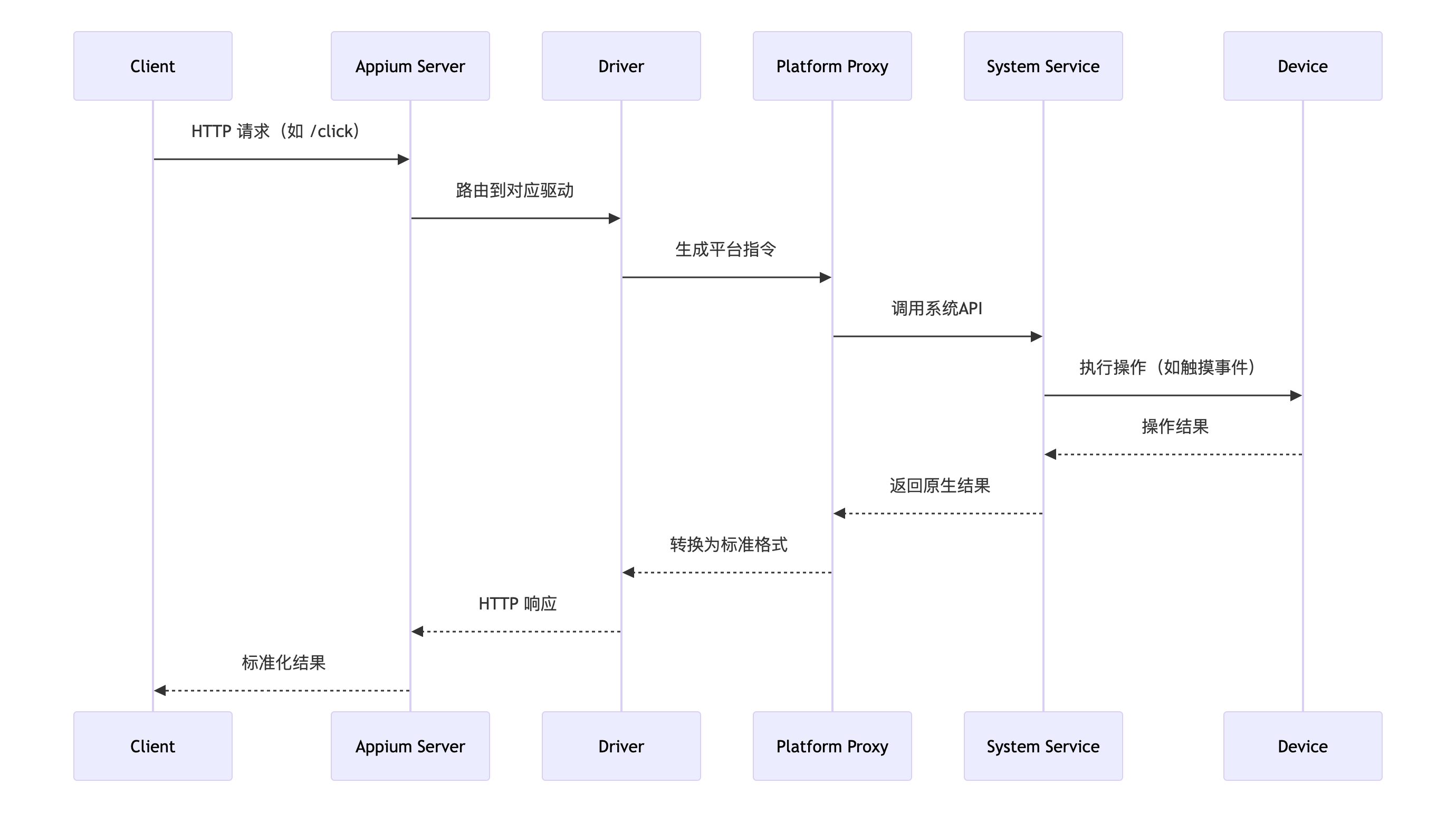
当我们执行一条简单的click()命令时,它需要经过7层协议转换和3次跨进程通信才能最终在设备上执行。
二、协议深潜:HTTP到系统调用的奥秘
WebDriver协议的生命周期
创建会话的协议解析:
POST /session HTTP/1.1
{
  "capabilities": {
    "platformName": "Android",
    "appium:automationName": "UiAutomator2",
    "appium:appPackage": "com.example.app"
  }
}
在Appium服务端,这个请求经历的关键过程:
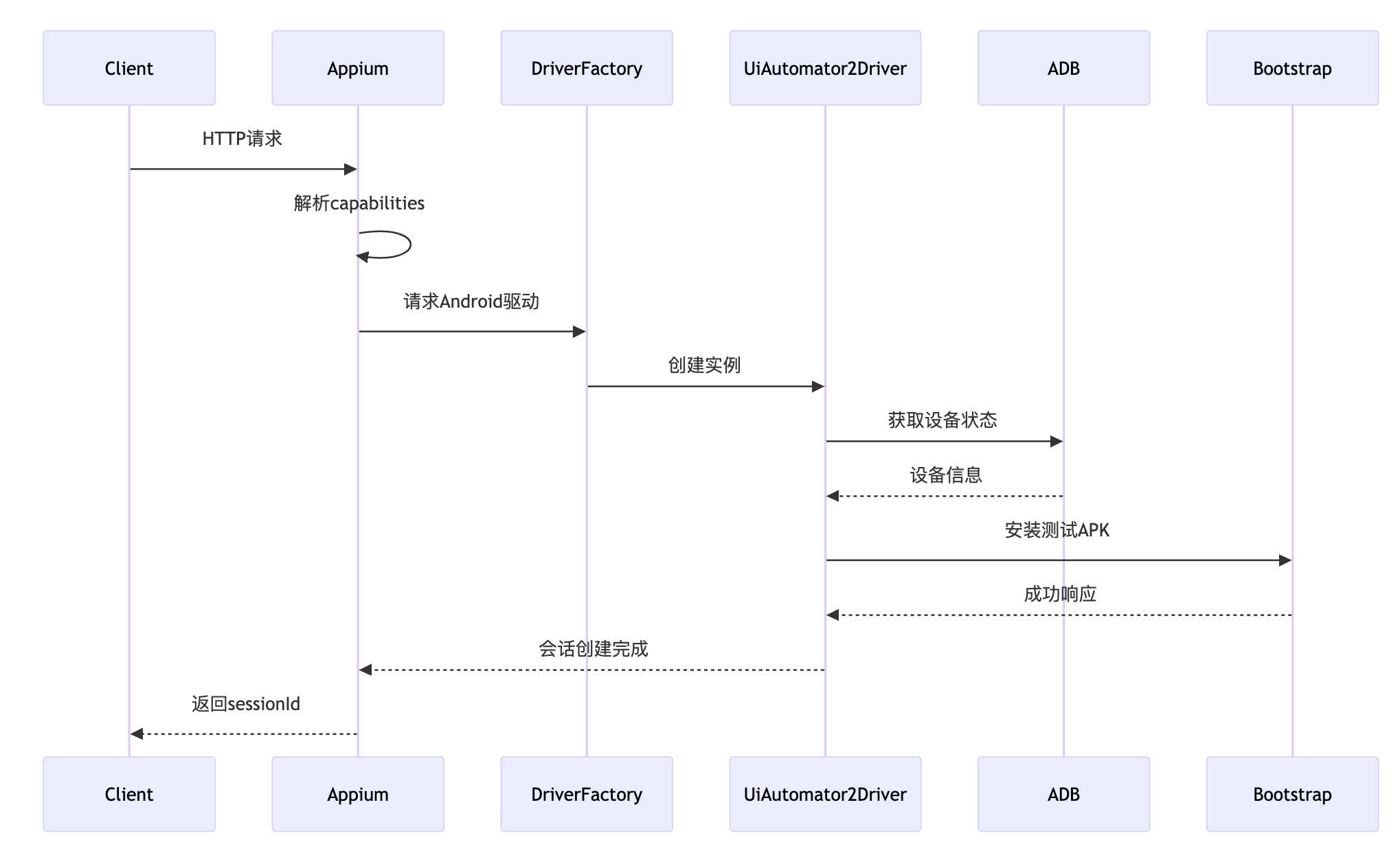
指令翻译的艺术(以点击操作为例)
# Python客户端指令
element.click()
↓ 通过WebDriver协议发送
POST /session/{sessionId}/element/{elementId}/click HTTP/1.1
↓ Appium转译为UiAutomator2协议
{
  "strategy": "xpath",
  "selector": "//android.widget.Button",
  "action": "click"
}
↓ Android设备上的测试代理执行
UiObject button = device.findObject(new UiSelector().xpath("//android.widget.Button"));
button.click();
三、驱动架构:可扩展的基石
1. Appium的驱动架构模式
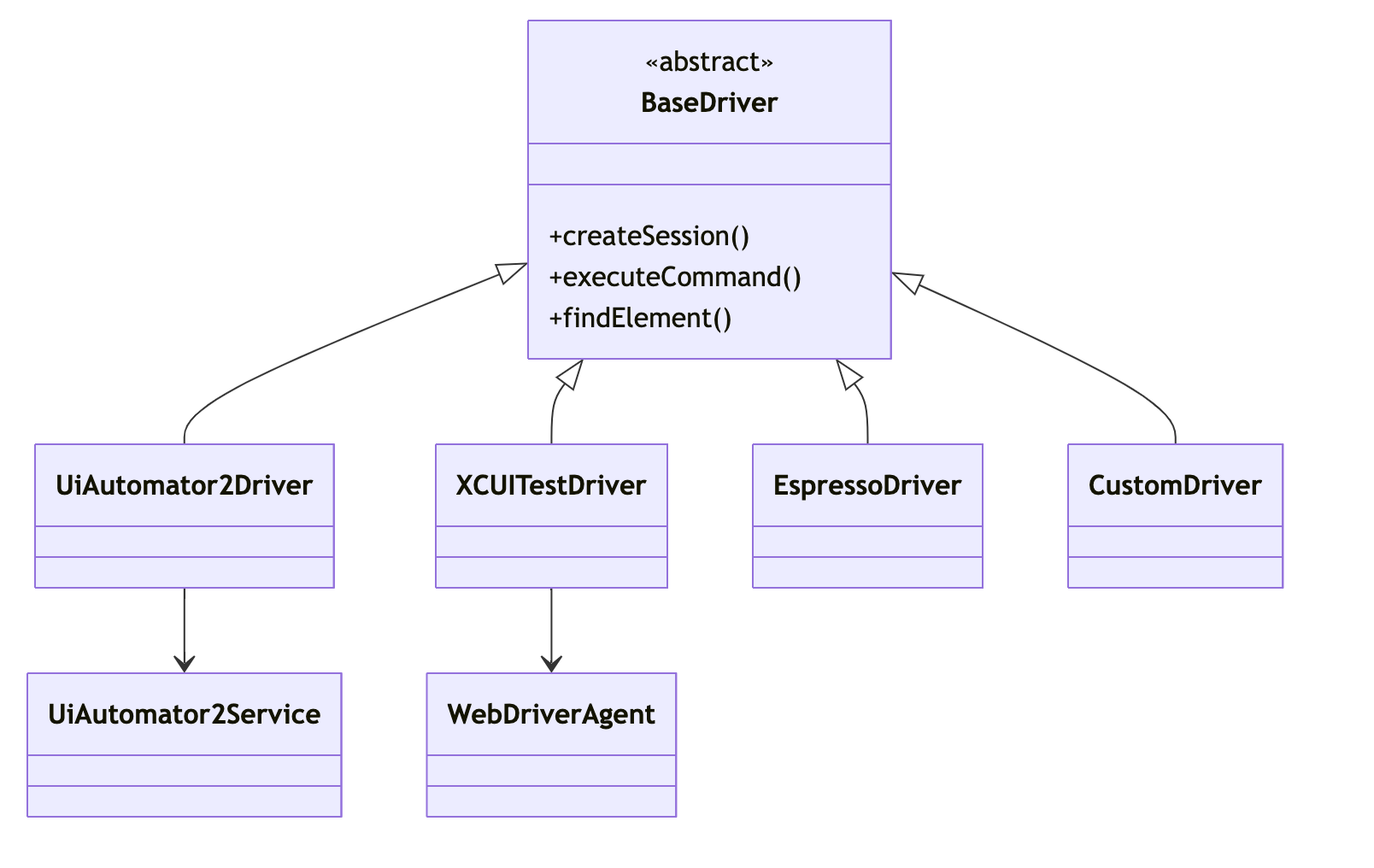
2. 驱动架构的本质
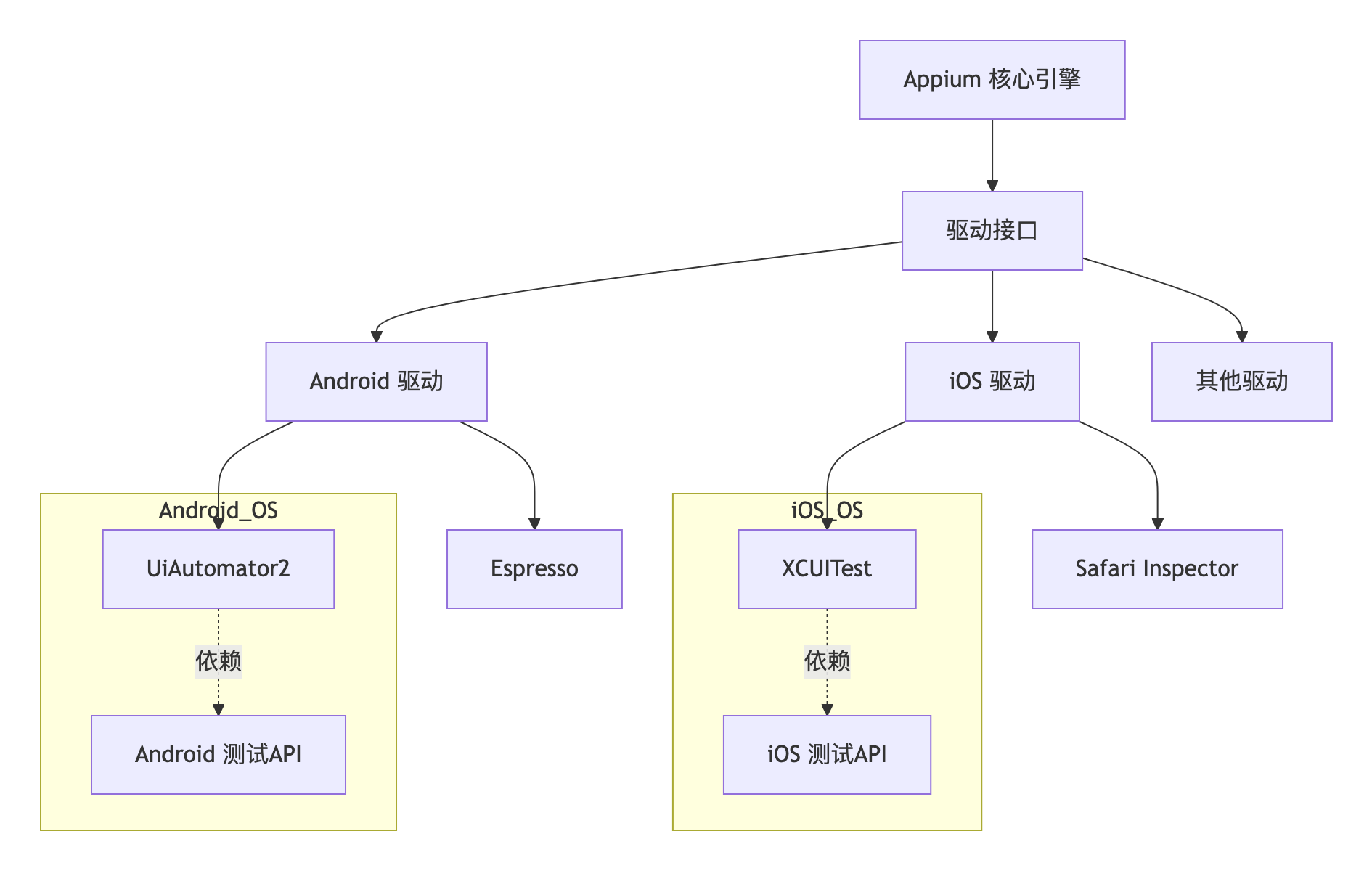
关键关系说明:
- Appium 驱动由 Appium 社区开发维护
-
- 官方驱动存储库:https://github.com/appium/appium
- 每个驱动有独立代码包(如
appium-uiautomator2-driver)
- 依赖系统原生测试能力
-
- Android 驱动建立在系统级 API(如 UiAutomation 服务)
- iOS 驱动基于 XCUITest(Apple 官方测试框架)
- 非操作系统组成部分
-
- 驱动是安装在 Appium 上的插件,而非 OS 原生功能
- 可自由增删驱动(如
appium driver install uiautomator2)
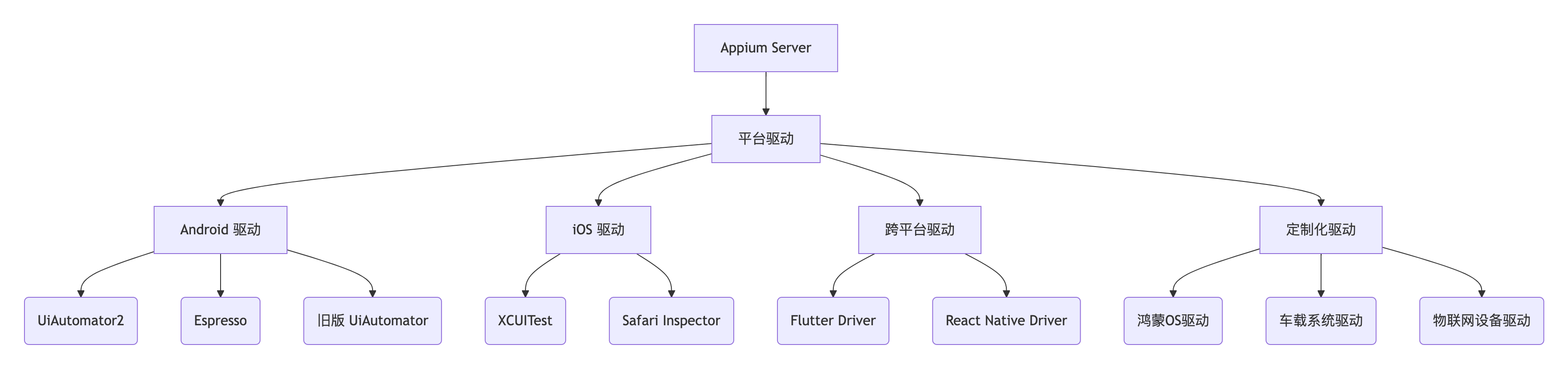
驱动选型决策矩阵
|
场景 |
Android 推荐 |
iOS 推荐 |
跨平台推荐 |
|
原生应用高速测试 |
Espresso |
XCUITest |
- |
|
多应用交互 |
UiAutomator2 |
XCUITest+ |
Appium |
|
WebView 混合应用 |
Chromedriver |
Safari |
混合驱动 |
|
Flutter/RN 应用 |
Flutter Driver |
Flutter Driver |
专用驱动 |
|
系统级操作(通知/权限) |
UiAutomator2 |
越狱方案 |
不适用 |
|
车机/物联网设备 |
定制驱动 |
定制驱动 |
定制驱动 |
3. 构建自定义驱动:鸿蒙OS实例
步骤1:创建驱动骨架
class HarmonyOSDriver extends BaseDriver {
  static newMethodTimeout = 30000;

  constructor(opts = {}, shouldValidateCaps = true) {
    super(opts, shouldValidateCaps);

    // 鸿蒙特定能力声明
    this.desiredCapConstraints = {
      app: {
        presence: true,
        isString: true
      },
      deviceId: {
        presence: true,
        isString: true
      }
    };
  }
}
步骤2:实现会话管理
async createSession(caps) {
  try {
    // 验证设备连接
    const device = await this.verifyHarmonyDevice(caps.deviceId);

    // 安装测试代理
    await this.installBootstrap(device);

    // 启动测试服务
    this.harmonyService = new HarmonyService(device);
    await this.harmonyService.start();

    return await super.createSession(caps);
  } catch (e) {
    this.log.error(`鸿蒙会话创建失败: ${e.message}`);
    throw e;
  }
}
步骤3:实现核心命令
async findElement(strategy, selector) {
  // 将Appium定位策略转换为鸿蒙定位策略
  const hmSelector = this.mapSelector(strategy, selector);

  const response = await this.harmonyService.sendCommand({
    action: 'findElement',
    selector: hmSelector,
    strategy: 'accessibility'
  });

  if (!response.elementId) {
    throw new Error('元素未找到');
  }

  return {
    ELEMENT: response.elementId,
    selector,
    strategy
  };
}
四、性能优化:破解协议瓶颈
Appium性能瓶颈热点图
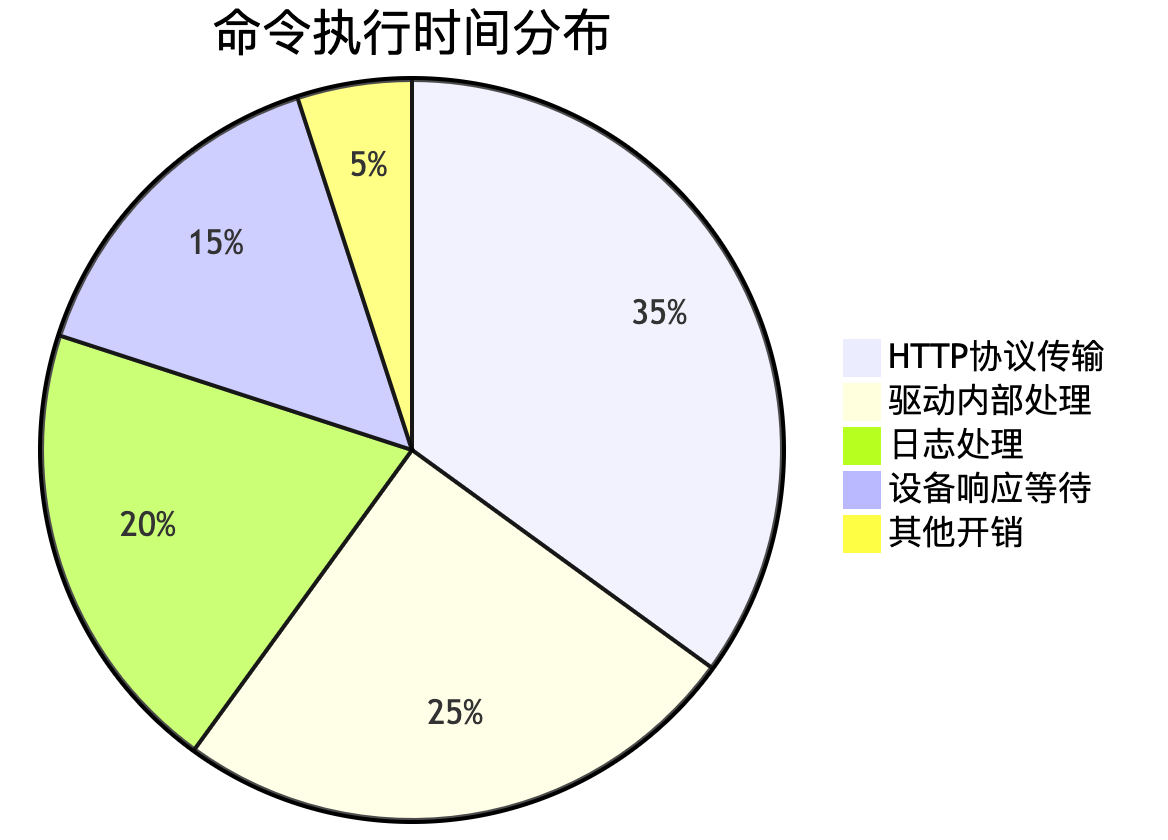
关键优化策略
1. 协议压缩优化
// 在Appium服务端添加消息压缩
server.use(compressMiddleware({
  threshold: 1024, // 大于1KB时压缩
  level: zlib.constants.Z_BEST_SPEED
}));
2. 设备通信通道复用
// 在Android测试代理中维护连接池
public class ConnectionPool {
  private static final Map<SessionId, SocketHolder> connections = new ConcurrentHashMap<>();

  public static Socket getConnection(SessionId sessionId) {
    if (!connections.containsKey(sessionId)) {
      Socket socket = new Socket();
      // 建立持久连接
      connections.put(sessionId, new SocketHolder(socket));
    }
    return connections.get(sessionId).getSocket();
  }
}
3. XPath加速策略
function optimizeXPath(xpath) {
  // 将复杂表达式拆解为多个简单步骤
  // 示例://*[contains(@text,'登录')] => //*[@resource-id='login_btn']
  return xpath.replace(
    /\[\s*contains\s*\(@([\w-]+)\s*,\s*'([^']*)'\s*\)\s*\]/g,
    `[@$1='$2']`
  );
}
五、企业级实践:支付系统的驱动定制
安全键盘输入的挑战
金融App通常使用定制安全键盘,传统自动化方式失效。我们通过扩展驱动解决:
class SecureInputDriver extends UIAutomator2Driver {
  async setSecureText(elementId, text) {
    const element = this.getElement(elementId);

    // 1. 获取键盘类型
    const keyboardType = await this.getKeyboardType();

    switch(keyboardType) {
      case 'numeric':
        await this.tapNumericKeys(text);
        break;
      case 'qwerty':
        await this.tapQwertyKeys(text);
        break;
      case 'custom':
        // 2. 通过OCR识别键位
        const positions = await this.ocrDetectKeys();
        await this.tapByPositions(text, positions);
        break;
    }
  }

  async tapNumericKeys(text) {
    // 直接控制底层输入系统
    for (const char of text) {
      const keyCode = this.mapCharToKeyCode(char);
      await this.adb.shell(`input keyevent KEYCODE_${keyCode}`);
    }
  }
}
性能对比数据
|
操作类型 |
标准方案耗时(ms) |
定制驱动耗时(ms) |
提升幅度 |
|
文本输入 |
2300 ± 500 |
650 ± 150 |
72% ↑ |
|
指纹验证 |
不适用 |
1200 ± 300 |
新增功能 |
|
刷脸认证 |
不适用 |
4500 ± 800 |
新增功能 |
六、未来进化:AI赋能的下一代引擎
智能定位预言模型
def predict_locator(context):
    # 使用页面结构特征进行预测
    features = extract_features(context['screenshot'],
                              context['layout'])
    model = load_model('locator_predictor.h5')
    predictions = model.predict([features])

    # 返回建议的定位策略
    return {
        'strategy': predictions[0]['best_strategy'],
        'selector': generate_selector(predictions)
    }
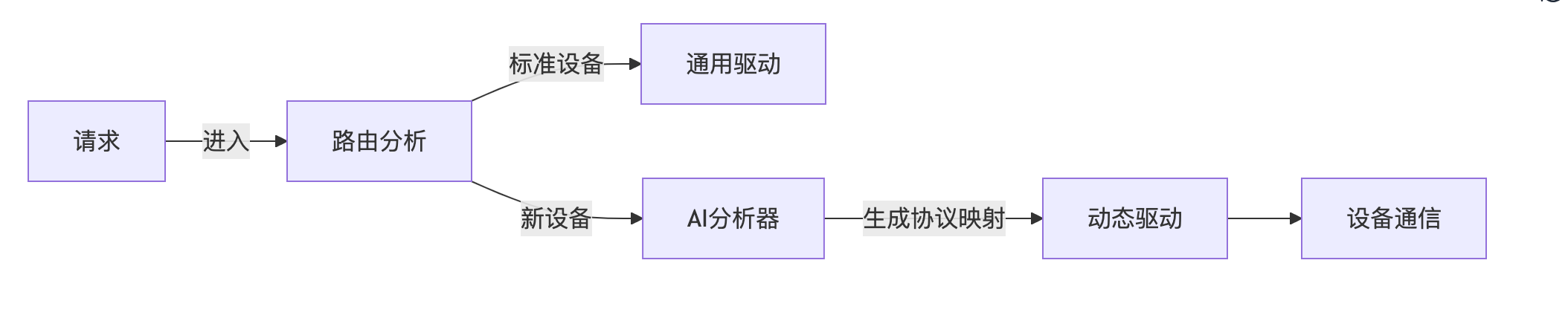
自适应设备协议
结语:成为测试架构师
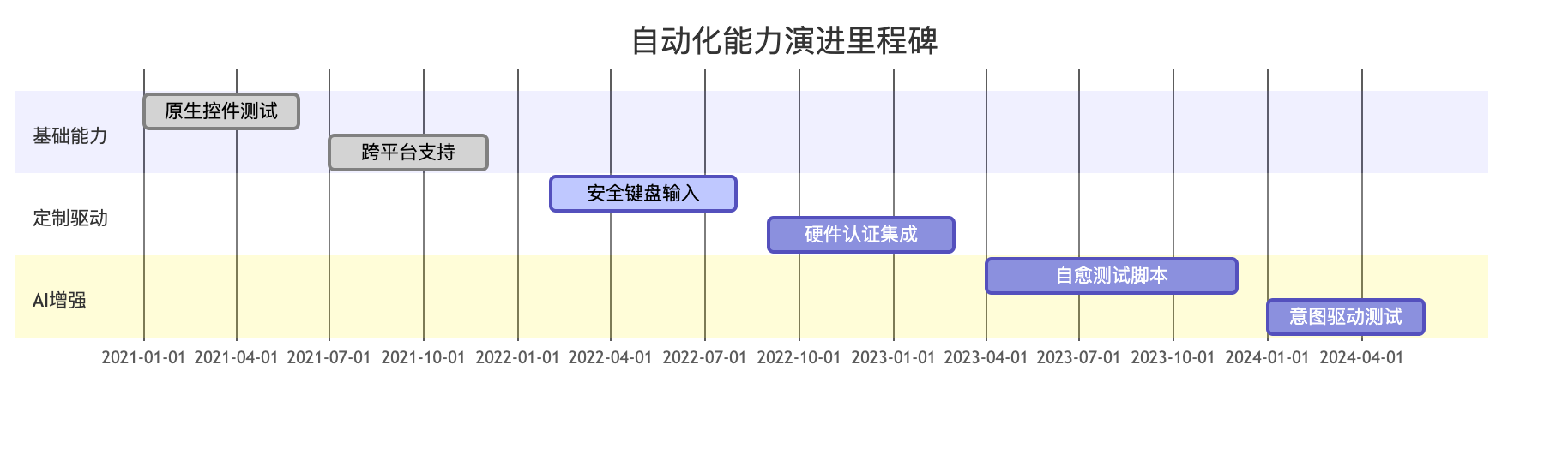
当某支付平台团队深度定制Appium后:
- 覆盖了98%的特殊安全控件操作
- 将跨境支付测试速度提升6倍
- 首次实现硬件级生物认证自动化
理解Appium的架构本质,就拥有了驾驭移动自动化的钥匙。这不仅是技术能力的跃升,更是测试工程师向架构师转型的必经之路——当你能扩展工具的边界,就能定义测试的未来。

讨论HarmonyOS开发技术,专注于API与组件、DevEco Studio、测试、元服务和应用上架分发等。
更多推荐



 27
27 0
0- 0


 已为社区贡献1条内容

所有评论(0)