【Flutter x HarmonyOS 6】训练页面的逻辑实现
之前我们聊了训练页面的 UI 设计,这篇深入看看训练页面的逻辑实现。
训练功能的核心是让用户规划每周训练目标,并追踪完成进度。这篇我们从数据模型、控制器、编辑器、进度追踪四个层面逐一拆解。
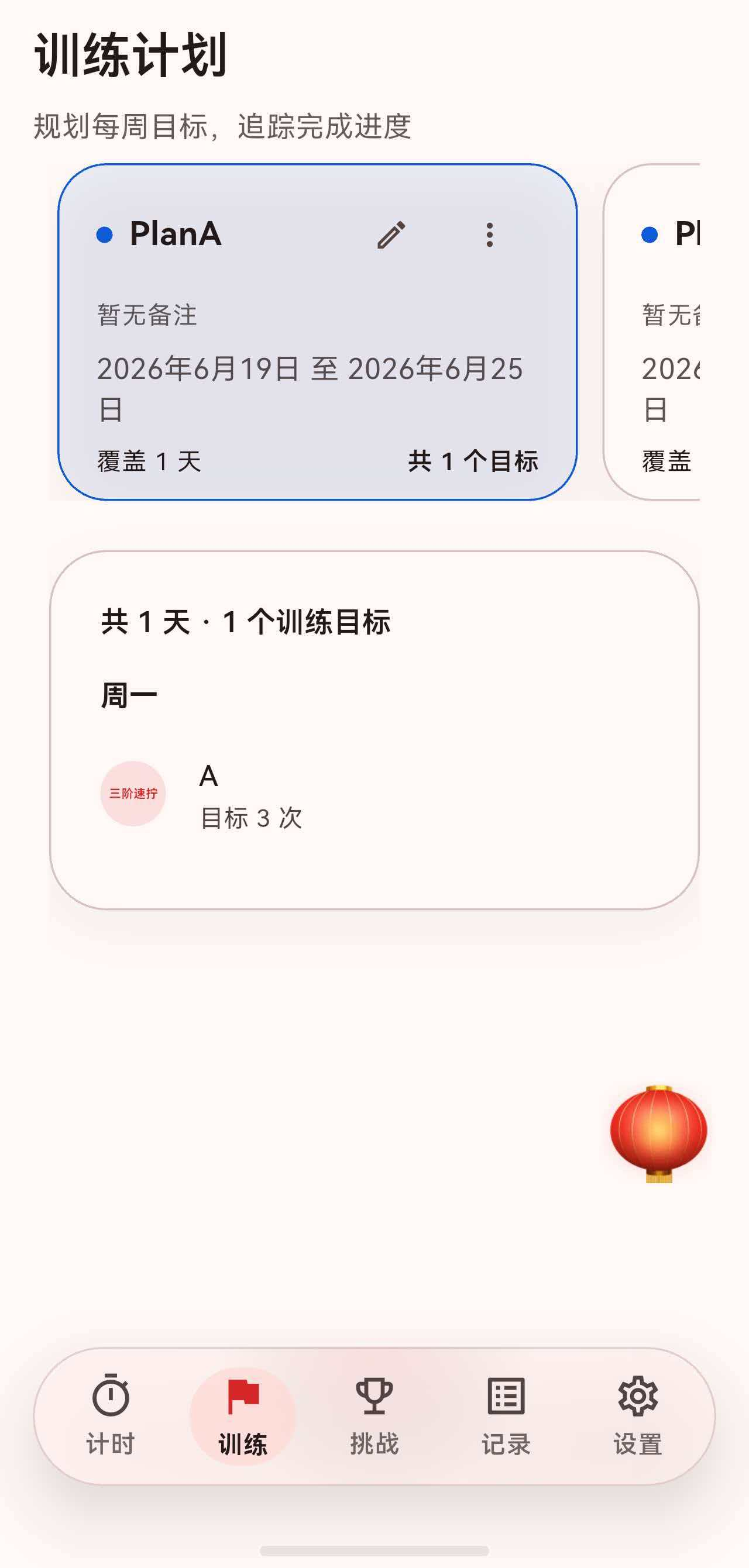
一、数据模型
训练功能涉及三个核心数据模型,形成层级关系:
TrainingPlan
  └── TrainingDayGoal (1~7 个,对应周一到周日)
        └── TrainingSessionGoal (0~N 个,每天的训练目标)
1.1 TrainingPlan:训练计划
class TrainingPlan {
  const TrainingPlan({
    required this.id,
    required this.name,
    required this.createdAt,
    required this.dayGoals,
    this.startDate,
    this.endDate,
    this.colorValue = defaultColor,
    this.isArchived = false,
    this.note = '',
  });

  static const int defaultColor = 0xFF0E5AD7;

  final String id;
  final String name;
  final DateTime createdAt;
  final DateTime? startDate;
  final DateTime? endDate;
  final int colorValue;
  final bool isArchived;
  final String note;
  final List<TrainingDayGoal> dayGoals;
}
计划包含:
- 基本信息:名称、备注、颜色。
- 时间范围:开始日期、结束日期(可选)。
- 每日目标:
dayGoals列表。 - 归档状态:
isArchived。
1.2 计划状态判断
bool get hasDateRange => startDate != null || endDate != null;

bool get isExpired {
  if (endDate == null) return false;
  return _dateOnly(endDate!).isBefore(_dateOnly(DateTime.now()));
}

bool get isUpcoming {
  if (startDate == null) return false;
  return _dateOnly(startDate!).isAfter(_dateOnly(DateTime.now()));
}

bool isActiveOn(DateTime date) {
  final target = _dateOnly(date);
  if (startDate != null && _dateOnly(startDate!).isAfter(target)) return false;
  if (endDate != null && _dateOnly(endDate!).isBefore(target)) return false;
  return true;
}
三种状态:
- 已过期(
isExpired):结束日期在今天之前。 - 未开始(
isUpcoming):开始日期在今天之后。 - 进行中:既不过期也未开始。
isActiveOn 判断某个日期是否在计划周期内,用于进度追踪。
1.3 TrainingDayGoal:每日目标
class TrainingDayGoal {
  const TrainingDayGoal({
    required this.weekday,
    required this.sessions,
  }) : assert(weekday >= 1 && weekday <= 7, 'weekday 需为 1~7');

  final int weekday; // 1 = 周一, 7 = 周日
  final List<TrainingSessionGoal> sessions;
}
weekday 使用 1~7 对应周一到周日,与 Dart 的 DateTime.weekday 一致。
1.4 TrainingSessionGoal:单次训练目标
class TrainingSessionGoal {
  const TrainingSessionGoal({
    required this.id,
    required this.title,
    required this.event,
    required this.targetCount,
    this.expectedAverageDuration,
    this.note = '',
  });

  final String id;
  final String title;
  final WcaEvent event;
  final int targetCount;
  final Duration? expectedAverageDuration;
  final String note;
}
每个目标包含:
- 训练项目(如三阶魔方)。
- 目标次数(如 20 次)。
- 预期平均时间(可选,用于设定训练节奏)。
二、TrainingPlansController
TrainingPlansController 是训练页面的核心控制器:
class TrainingPlansController extends ChangeNotifier {
  TrainingPlansController(this.repository);

  final TrainingPlanRepository repository;

  bool _isInitializing = false;
  bool _isInitialized = false;
  List<TrainingPlan> _plans = const <TrainingPlan>[];
  String? _selectedPlanId;

  bool get isInitialized => _isInitialized;
  bool get isInitializing => _isInitializing;
  List<TrainingPlan> get plans => _plans;
}
2.1 初始化
Future<void> initialize() async {
  if (_isInitializing) return;
  _isInitializing = true;
  notifyListeners();
  await _loadPlans();
  _isInitializing = false;
  _isInitialized = true;
  notifyListeners();
}
初始化时设置 _isInitializing 标志,UI 可以据此显示加载状态。双重 notifyListeners() 分别通知"开始加载"和"加载完成"。
2.2 加载计划
Future<void> _loadPlans({String? selectPlanId}) async {
  final plans = repository.fetchPlans();
  _plans = plans;
  if (plans.isEmpty) {
    _selectedPlanId = null;
    return;
  }
  if (selectPlanId != null) {
    _selectedPlanId = selectPlanId;
    return;
  }
  final hasSelection = _selectedPlanId != null &&
      plans.any((plan) => plan.id == _selectedPlanId);
  if (!hasSelection) {
    _selectedPlanId = plans.first.id;
  }
}
加载逻辑:
- 从 Repository 获取所有计划。
- 如果指定了
selectPlanId,选中该计划(用于新建后自动选中)。 - 否则检查当前选中是否还有效,无效则选中第一个。
2.3 选中计划
TrainingPlan? get selectedPlan {
  if (_plans.isEmpty) return null;
  if (_selectedPlanId == null) return _plans.first;
  try {
    return _plans.firstWhere((plan) => plan.id == _selectedPlanId);
  } catch (_) {
    return _plans.first;
  }
}

void selectPlan(String planId) {
  if (_selectedPlanId == planId) return;
  _selectedPlanId = planId;
  notifyListeners();
}
selectedPlan 的容错处理:如果没有选中或选中无效,返回第一个计划。
2.4 快速创建计划
Future<TrainingPlan?> createQuickPlan(String name) async {
  final plan = await repository.createPlan(
    name: name.isEmpty ? '未命名计划' : name.trim(),
  );
  await _loadPlans(selectPlanId: plan.id);
  notifyListeners();
  return plan;
}
快速创建只指定名称,不配置每日目标。创建后自动选中新计划。
2.5 删除计划
Future<void> deletePlan(String planId) async {
  await repository.deletePlan(planId);
  if (_selectedPlanId == planId) {
    _selectedPlanId = null;
  }
  await _loadPlans();
  notifyListeners();
}
删除后清除选中状态,_loadPlans 会自动选中第一个可用计划。
2.6 归档计划
Future<void> toggleArchive(String planId, {required bool archive}) async {
  await repository.toggleArchive(planId, archive: archive);
  await _loadPlans();
  notifyListeners();
}
三、TrainingPlanRepository
3.1 双 Box 设计
Repository 管理两个 Hive Box:
class TrainingPlanRepository {
  static const String _plansBoxName = 'training_plans';
  static const String _progressBoxName = 'training_progress';

  Box<Map<dynamic, dynamic>>? _plansBox;
  Box<Map<dynamic, dynamic>>? _progressBox;
}
training_plans:存储训练计划。training_progress:存储训练进度。
3.2 ID 生成
String _generateId(String prefix) {
  final timestamp = DateTime.now().microsecondsSinceEpoch;
  final randomBits = _random.nextInt(1 << 20)
      .toRadixString(16)
      .padLeft(5, '0');
  return '${prefix}_${timestamp}_$randomBits';
}
ID 格式:前缀_时间戳_随机数,如 plan_1700000000_1a2b3。时间戳保证有序,随机数防碰撞。
3.3 删除计划的级联清理
Future<void> deletePlan(String planId) async {
  final box = _ensurePlansBox();
  await box.delete(planId);

  // 同时删除该计划的所有进度记录
  final progressBox = _ensureProgressBox();
  final keysToDelete = <dynamic>[];
  for (var i = 0; i < progressBox.length; i++) {
    final value = progressBox.getAt(i);
    if (value == null) continue;
    if (value['planId'] == planId) {
      keysToDelete.add(progressBox.keyAt(i));
    }
  }
  await progressBox.deleteAll(keysToDelete);
}
删除计划时,级联删除关联的进度记录,避免孤立数据。
3.4 进度查询
List<TrainingProgressEntry> fetchProgressEntries({
  String? planId,
  DateTime? start,
  DateTime? end,
}) {
  final box = _ensureProgressBox();
  final entries = <TrainingProgressEntry>[];
  for (var i = 0; i < box.length; i++) {
    final raw = box.getAt(i);
    if (raw == null) continue;
    final entry = TrainingProgressEntry.fromMap(raw);
    if (planId != null && entry.planId != planId) continue;
    if (start != null && entry.recordedAt.isBefore(start)) continue;
    if (end != null && entry.recordedAt.isAfter(end)) continue;
    entries.add(entry);
  }
  entries.sort((a, b) => a.recordedAt.compareTo(b.recordedAt));
  return entries;
}
支持按计划、时间范围过滤进度记录。
四、训练计划编辑器
4.1 编辑器状态管理
class _TrainingPlanEditorPageState
    extends State<TrainingPlanEditorPage> {
  late final bool _isNew = widget.plan == null;
  late final TextEditingController _nameController;
  late final TextEditingController _noteController;
  late Map<int, List<TrainingSessionGoal>> _daySessions;
  DateTime? _startDate;
  DateTime? _endDate;
  int _colorValue = TrainingPlan.defaultColor;
  bool _isSaving = false;
编辑器用 Map<int, List<TrainingSessionGoal>> 管理每日目标,key 是 weekday(1~7)。
4.2 初始化每日目标
Map<int, List<TrainingSessionGoal>> _initDaySessions(
    List<TrainingDayGoal> goals) {
  final map = <int, List<TrainingSessionGoal>>{
    for (var weekday = 1; weekday <= 7; weekday++)
      weekday: <TrainingSessionGoal>[],
  };
  for (final goal in goals) {
    map[goal.weekday] = List<TrainingSessionGoal>.from(goal.sessions);
  }
  return map;
}
初始化时先创建 7 个空列表,再将已有目标填入对应日期。
4.3 添加训练目标
Future<void> _addSession(int weekday) async {
  final result = await _showSessionEditor();
  if (result == null) return;
  setState(() {
    final list = _daySessions[weekday] ?? <TrainingSessionGoal>[];
    list.add(result.copyWith(id: _generateSessionId()));
    _daySessions[weekday] = List<TrainingSessionGoal>.from(list);
  });
}
通过底部表单 _SessionEditorSheet 收集用户输入,返回 TrainingSessionGoal 对象。
4.4 复制到其他日期
Future<void> _copyDayToOthers(int fromWeekday) async {
  final source = _daySessions[fromWeekday] ?? const <TrainingSessionGoal>[];
  if (source.isEmpty) {
    _showSnack('该日暂无可复制的目标');
    return;
  }
  final result = await _showCopyDialog(fromWeekday);
  if (result == null || result.targets.isEmpty) return;

  setState(() {
    for (final target in result.targets) {
      final cloned = _cloneSessions(source);
      if (result.append) {
        final existing = List<TrainingSessionGoal>.from(
            _daySessions[target] ?? const <TrainingSessionGoal>[]);
        existing.addAll(cloned);
        _daySessions[target] = existing;
      } else {
        _daySessions[target] = cloned;
      }
    }
  });
}
复制逻辑支持两种模式:
- 覆盖:替换目标日期的所有目标。
- 追加:在目标日期已有目标后添加。
4.5 填充全周
Future<void> _showFillWeekDialog() async {
  final result = await showDialog<_FillWeekConfig>(...);
  if (result == null) return;

  final source = _daySessions[result.referenceWeekday] ??
      const <TrainingSessionGoal>[];
  if (source.isEmpty) {
    _showSnack('${_weekdayLabel(result.referenceWeekday)}暂无可复制的目标');
    return;
  }

  setState(() {
    for (var weekday = 1; weekday <= 7; weekday++) {
      if (result.append) {
        final existing = List<TrainingSessionGoal>.from(
            _daySessions[weekday] ?? const <TrainingSessionGoal>[]);
        existing.addAll(_cloneSessions(source));
        _daySessions[weekday] = existing;
      } else {
        _daySessions[weekday] = _cloneSessions(source);
      }
    }
  });
}
"填充全周"功能让用户选择一个参考日,将其目标复制到周一到周日。
4.6 保存逻辑
Future<void> _handleSave() async {
  final name = _nameController.text.trim();
  if (name.isEmpty) {
    _showSnack('请输入计划名称');
    return;
  }
  if (_startDate != null &&
      _endDate != null &&
      _endDate!.isBefore(_startDate!)) {
    _showSnack('结束日期不能早于开始日期');
    return;
  }

  final dayGoals = _buildDayGoals();

  setState(() => _isSaving = true);
  try {
    final repository = context.read<TrainingPlanRepository>();
    late final TrainingPlan savedPlan;

    if (_isNew) {
      savedPlan = await repository.createPlan(
        name: name,
        note: _noteController.text.trim(),
        startDate: _startDate,
        endDate: _endDate,
        colorValue: _colorValue,
        dayGoals: dayGoals,
      );
    } else {
      final plan = widget.plan!;
      savedPlan = plan.copyWith(
        name: name,
        note: _noteController.text.trim(),
        startDate: _startDate,
        endDate: _endDate,
        colorValue: _colorValue,
        dayGoals: dayGoals,
      );
      await repository.upsertPlan(savedPlan);
    }

    if (!mounted) return;
    Navigator.of(context).pop(savedPlan.id);
  } catch (error) {
    _showSnack('保存失败:$error');
  } finally {
    if (mounted) {
      setState(() => _isSaving = false);
    }
  }
}
保存时的校验:
- 名称不能为空。
- 结束日期不能早于开始日期。
新建和编辑的区别:
- 新建:调用
repository.createPlan()。 - 编辑:使用
copyWith更新已有计划,调用repository.upsertPlan()。
4.7 构建每日目标
List<TrainingDayGoal> _buildDayGoals() {
  final goals = <TrainingDayGoal>[];
  _daySessions.forEach((weekday, sessions) {
    if (sessions.isEmpty) return;  // 跳过没有目标的日期
    goals.add(
      TrainingDayGoal(
        weekday: weekday,
        sessions: sessions
            .map((session) => TrainingSessionGoal(
                  id: session.id,
                  title: session.title,
                  event: session.event,
                  targetCount: session.targetCount,
                  expectedAverageDuration: session.expectedAverageDuration,
                  note: session.note,
                ))
            .toList(growable: false),
      ),
    );
  });
  return goals;
}
保存时只包含有目标的日期,空日期不生成 TrainingDayGoal。
五、训练进度追踪
5.1 TrainingProgressEntry
class TrainingProgressEntry {
  const TrainingProgressEntry({
    required this.id,
    required this.planId,
    required this.sessionId,
    required this.recordedAt,
    required this.completedCount,
    this.completedDuration,
    this.note = '',
    this.metTarget = false,
  });

  final String id;
  final String planId;
  final String sessionId;
  final DateTime recordedAt;
  final int completedCount;
  final Duration? completedDuration;
  final String note;
  final bool metTarget;
}
进度记录关联:
planId:属于哪个计划。sessionId:属于计划中的哪个训练目标。completedCount:完成了多少次。completedDuration:总耗时。metTarget:是否达标。
5.2 创建进度记录
Future<TrainingProgressEntry> createProgressEntry({
  required String planId,
  required String sessionId,
  required DateTime recordedAt,
  required int completedCount,
  Duration? completedDuration,
  String note = '',
  bool metTarget = false,
}) async {
  final entry = TrainingProgressEntry(
    id: _generateId('progress'),
    planId: planId,
    sessionId: sessionId,
    recordedAt: recordedAt,
    completedCount: completedCount,
    completedDuration: completedDuration,
    note: note,
    metTarget: metTarget,
  );
  await upsertProgressEntry(entry);
  return entry;
}
metTarget 由调用方根据 completedCount >= session.targetCount 判断。
六、序列化与反序列化
6.1 TrainingPlan 序列化
Map<String, dynamic> toMap() {
  return <String, dynamic>{
    'id': id,
    'name': name,
    'createdAt': createdAt.toIso8601String(),
    'startDate': startDate?.toIso8601String(),
    'endDate': endDate?.toIso8601String(),
    'colorValue': colorValue,
    'isArchived': isArchived,
    'note': note,
    'dayGoals': dayGoals.map((goal) => goal.toMap()).toList(),
  };
}

factory TrainingPlan.fromMap(Map<dynamic, dynamic> map) {
  final rawGoals = map['dayGoals'] as List<dynamic>? ?? const <dynamic>[];
  return TrainingPlan(
    id: map['id'] as String? ?? '',
    name: map['name'] as String? ?? '训练计划',
    createdAt: DateTime.tryParse(map['createdAt'] as String? ?? '') ?? DateTime.now(),
    startDate: DateTime.tryParse(map['startDate'] as String? ?? ''),
    endDate: DateTime.tryParse(map['endDate'] as String? ?? ''),
    colorValue: map['colorValue'] as int? ?? defaultColor,
    isArchived: map['isArchived'] as bool? ?? false,
    note: map['note'] as String? ?? '',
    dayGoals: rawGoals
        .whereType<Map<dynamic, dynamic>>()
        .map(TrainingDayGoal.fromMap)
        .toList(growable: false),
  );
}
嵌套的 dayGoals 通过递归调用 toMap / fromMap 完成序列化。fromMap 中使用 ?? 默认值 的模式,确保旧版本数据兼容。
七、总结
这篇我们深入梳理了训练页面的逻辑实现:
- 数据模型:三层嵌套结构——TrainingPlan → TrainingDayGoal → TrainingSessionGoal,计划状态通过日期自动判断。
- TrainingPlansController:管理计划列表和选中状态,初始化时双重通知加载状态,选中逻辑带容错处理。
- TrainingPlanRepository:双 Box 设计(计划 + 进度),删除计划时级联清理进度记录,ID 生成使用时间戳 + 随机数。
- 计划编辑器:Map<int, List> 管理每日目标,支持复制到其他日期和填充全周,保存时校验名称和日期。
- 进度追踪:TrainingProgressEntry 记录完成次数、耗时、是否达标,支持按计划和时间范围查询。
- 序列化:嵌套 toMap/fromMap 递归序列化,fromMap 使用默认值兼容旧版本数据。
训练页面的逻辑实现,体现了"计划即数据"的设计理念:计划是数据的快照,进度是数据的追加,两者通过 ID 关联但独立存储。

讨论HarmonyOS开发技术,专注于API与组件、DevEco Studio、测试、元服务和应用上架分发等。
更多推荐


 52
52 0
0- 0


 已为社区贡献3条内容

所有评论(0)