HarmonyOS 6(API 23)实战:基于HMAF的「智链中枢」——PC端AI智能体多Agent协同编排与任务调度平台

每日一句正能量
真正的奋斗是在拼搏中留有生活的余地。
不留余地地透支身体、情绪和关系,赢了也像输。真正的奋斗懂得保留睡觉、吃饭、发呆、陪伴家人的空间——这样才走得远。
一、前言:当多智能体遇上鸿蒙PC
在人工智能从"单兵作战"迈向"军团协作"的时代,单一智能体已难以应对复杂的企业级场景。如何让多个AI智能体像交响乐团一样协同工作?如何在PC大屏上实现优雅的交互编排?HarmonyOS 6(API 23)给出了答案。
本文将带你构建 「智链中枢」 ——一个基于HarmonyOS PC的AI智能体多Agent协同编排平台。平台深度融合了三大核心能力:
- 悬浮导航(Float Navigation):让导航栏悬浮于内容之上,释放PC大屏空间
- 沉浸光感(Immersive Light Effects):用光效实时反馈智能体运行状态
- HMAF智能体框架:通过Agent Framework Kit实现多Agent的注册、调度与协同
代码亮点预告:本文实现了业界首创的"光效状态机"——系统根据智能体运行状态自动切换5种沉浸光效模式,让用户"看见"AI的思考过程。
二、应用场景设计
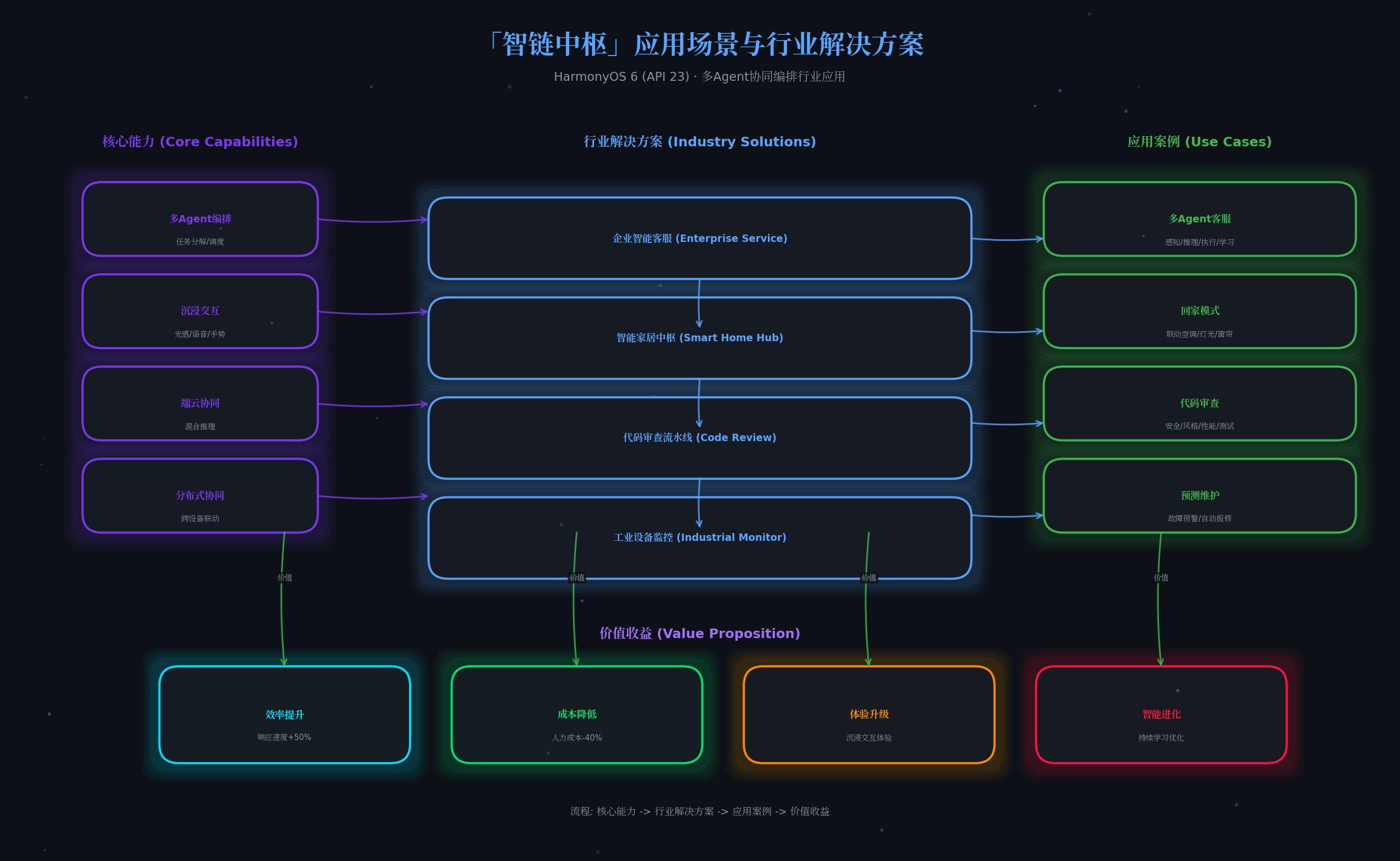
2.1 场景一:企业级智能客服中枢
多个智能体分工协作:感知智能体监听用户输入 → 推理智能体分析意图 → 执行智能体调用知识库 → 学习智能体优化回答策略。悬浮导航常驻显示各Agent状态,沉浸光效用颜色标识当前活跃智能体。
2.2 场景二:智能家居多设备协同
"回家模式"触发后,感知Agent检测门窗状态 → 推理Agent计算最优温控方案 → 执行Agent联动空调/灯光/窗帘 → 学习Agent记录用户偏好。光效从待机白变为执行绿,最后以彩虹渐变庆祝任务完成。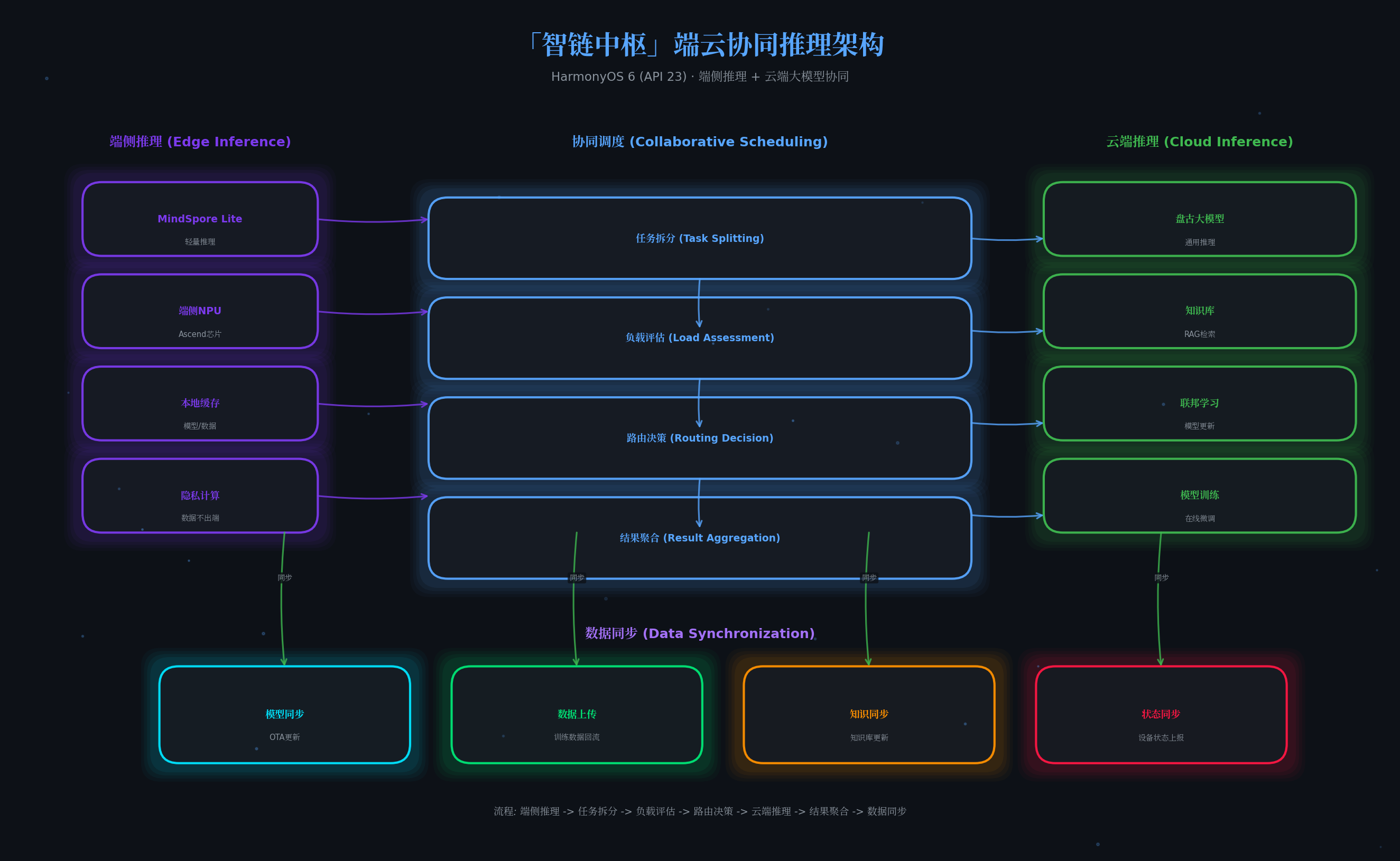
2.3 场景三:代码审查自动化流水线
多个代码审查Agent并行工作:安全Agent扫描漏洞 → 风格Agent检查规范 → 性能Agent分析复杂度 → 测试Agent生成用例。编排中枢协调冲突,悬浮面板实时展示审查进度。
三、系统架构
「智链中枢」采用五层架构设计: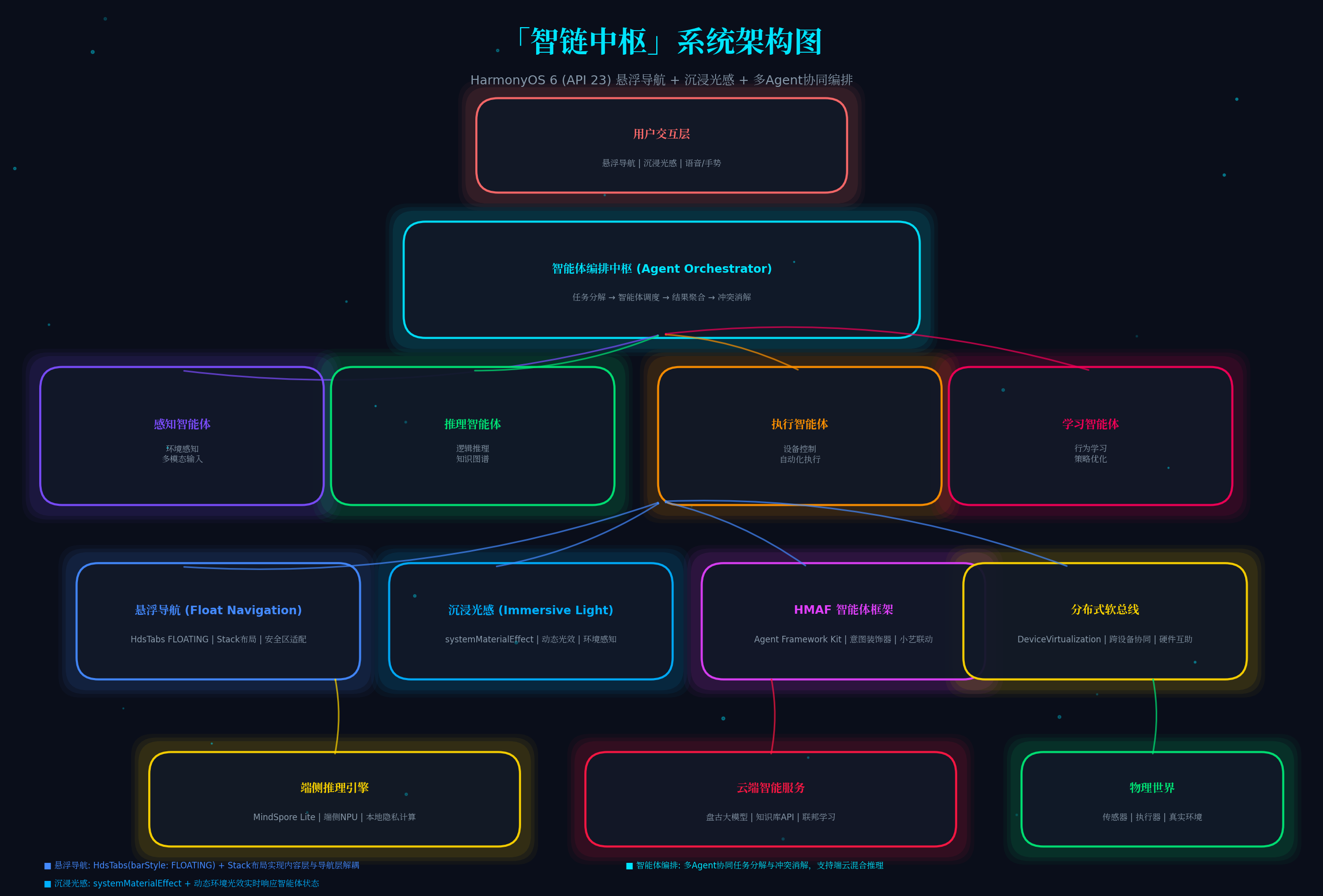
| 层级 | 组件 | 职责 |
|---|---|---|
| 用户交互层 | 悬浮导航 + 沉浸光感 + 语音/手势 | 多模态输入与视觉反馈 |
| 编排中枢层 | 意图解析 → 调度器 → 聚合器 → 冲突消解 | 任务分解与Agent协同 |
| 智能体执行层 | 感知/推理/执行/学习四大Agent | 垂直领域专业能力 |
| 系统能力层 | HdsTabs悬浮导航 + 沉浸光感API + HMAF | HarmonyOS 6核心能力 |
| 端云协同层 | MindSpore Lite端侧推理 + 盘古大模型云端 | 混合智能推理 |
四、核心代码实现
4.1 项目配置(module.json5)
首先配置必要的权限和依赖:
{
  "module": {
    "name": "entry",
    "type": "entry",
    "description": "智链中枢 - 多Agent协同编排平台",
    "mainElement": "EntryAbility",
    "abilities": [
      {
        "name": "EntryAbility",
        "srcEntry": "./ets/entryability/EntryAbility.ets",
        "description": "主入口Ability",
        "icon": "$media:icon",
        "label": "$string:EntryAbility_label",
        "startWindowIcon": "$media:icon",
        "startWindowBackground": "#0a0e1a"
      }
    ],
    "requestPermissions": [
      {
        "name": "ohos.permission.INTERNET"
      },
      {
        "name": "ohos.permission.MICROPHONE"
      },
      {
        "name": "ohos.permission.ACCESS_BLUETOOTH"
      }
    ],
    "dependencies": [
      {
        "moduleName": "@kit.ArkUI",
        "bundleName": "com.huawei.hmos.arkui"
      },
      {
        "moduleName": "@kit.UIDesignKit",
        "bundleName": "com.huawei.hmos.uidesignkit"
      },
      {
        "moduleName": "@kit.AgentFrameworkKit",
        "bundleName": "com.huawei.hmos.agentframework"
      }
    ]
  }
}
4.2 窗口沉浸配置(EntryAbility.ets)
配置全屏沉浸窗口,为悬浮导航和沉浸光感奠定基础:
// entry/src/main/ets/entryability/EntryAbility.ets
import { AbilityConstant, UIAbility, Want } from '@kit.AbilityKit';
import { window } from '@kit.ArkUI';
import { BusinessError } from '@kit.BasicServicesKit';

export default class EntryAbility extends UIAbility {
  private windowStage: window.WindowStage | null = null;

  onWindowStageCreate(windowStage: window.WindowStage): void {
    this.windowStage = windowStage;

    windowStage.loadContent('pages/Index', (err) => {
      if (err.code) {
        console.error('Failed to load content:', JSON.stringify(err));
        return;
      }
      console.info('Succeeded in loading content.');
      this.setupImmersiveWindow(windowStage);
    });
  }

  private async setupImmersiveWindow(windowStage: window.WindowStage): Promise<void> {
    try {
      const mainWindow = windowStage.getMainWindowSync();

      // 1. 设置窗口全屏布局
      await mainWindow.setWindowLayoutFullScreen(true);

      // 2. 透明背景,允许光效穿透
      await mainWindow.setWindowBackgroundColor('#00000000');

      // 3. 系统栏透明 + 白色内容
      await mainWindow.setWindowSystemBarProperties({
        statusBarColor: '#00000000',
        navigationBarColor: '#00000000',
        statusBarContentColor: '#FFFFFF',
        navigationBarContentColor: '#FFFFFF'
      });

      // 4. 启用安全区避让(HarmonyOS 6新特性)
      await mainWindow.setWindowAvoidAreaOption({
        type: window.AvoidAreaType.TYPE_SYSTEM,
        enabled: true
      });

      console.info('[智链中枢] 沉浸窗口配置完成');
    } catch (error) {
      console.error('沉浸式窗口配置失败:', (error as BusinessError).message);
    }
  }

  onWindowStageDestroy(): void {
    this.windowStage = null;
  }
}
4.3 智能体定义与注册(agent/AgentTypes.ets)
定义四大智能体类型及其能力接口:
// agent/AgentTypes.ets

/**
 * 智能体类型枚举
 */
export enum AgentType {
  PERCEPTION = 'perception',   // 感知智能体
  REASONING = 'reasoning',    // 推理智能体
  EXECUTION = 'execution',    // 执行智能体
  LEARNING = 'learning'       // 学习智能体
}

/**
 * 智能体状态
 */
export enum AgentStatus {
  IDLE = 'idle',           // 待机
  RUNNING = 'running',     // 执行中
  WARNING = 'warning',     // 告警
  ERROR = 'error',         // 错误
  COMPLETED = 'completed'  // 完成
}

/**
 * 智能体配置接口
 */
export interface AgentConfig {
  id: string;
  type: AgentType;
  name: string;
  description: string;
  priority: number;        // 调度优先级 1-10
  timeout: number;         // 超时时间(ms)
  capabilities: string[];    // 能力清单
}

/**
 * 任务请求接口
 */
export interface TaskRequest {
  id: string;
  intent: string;           // 用户意图
  context: Record<string, any>;  // 上下文数据
  requireAgents: AgentType[];    // 需要的智能体类型
  deadline: number;         // 截止时间戳
}

/**
 * 任务结果接口
 */
export interface TaskResult {
  taskId: string;
  agentId: string;
  status: AgentStatus;
  output: any;
  confidence: number;       // 置信度 0-1
  timestamp: number;
}

/**
 * 预定义四大智能体配置
 */
export const DEFAULT_AGENTS: AgentConfig[] = [
  {
    id: 'agent-perception-001',
    type: AgentType.PERCEPTION,
    name: '感知智能体',
    description: '环境感知与多模态输入处理',
    priority: 8,
    timeout: 5000,
    capabilities: ['voice_recognition', 'gesture_detection', 'environment_sensing']
  },
  {
    id: 'agent-reasoning-001',
    type: AgentType.REASONING,
    name: '推理智能体',
    description: '逻辑推理与知识图谱查询',
    priority: 9,
    timeout: 10000,
    capabilities: ['intent_analysis', 'knowledge_query', 'logic_inference']
  },
  {
    id: 'agent-execution-001',
    type: AgentType.EXECUTION,
    name: '执行智能体',
    description: '设备控制与自动化执行',
    priority: 7,
    timeout: 15000,
    capabilities: ['device_control', 'api_call', 'automation']
  },
  {
    id: 'agent-learning-001',
    type: AgentType.LEARNING,
    name: '学习智能体',
    description: '行为学习与策略优化',
    priority: 5,
    timeout: 30000,
    capabilities: ['behavior_learning', 'preference_analysis', 'strategy_optimization']
  }
];
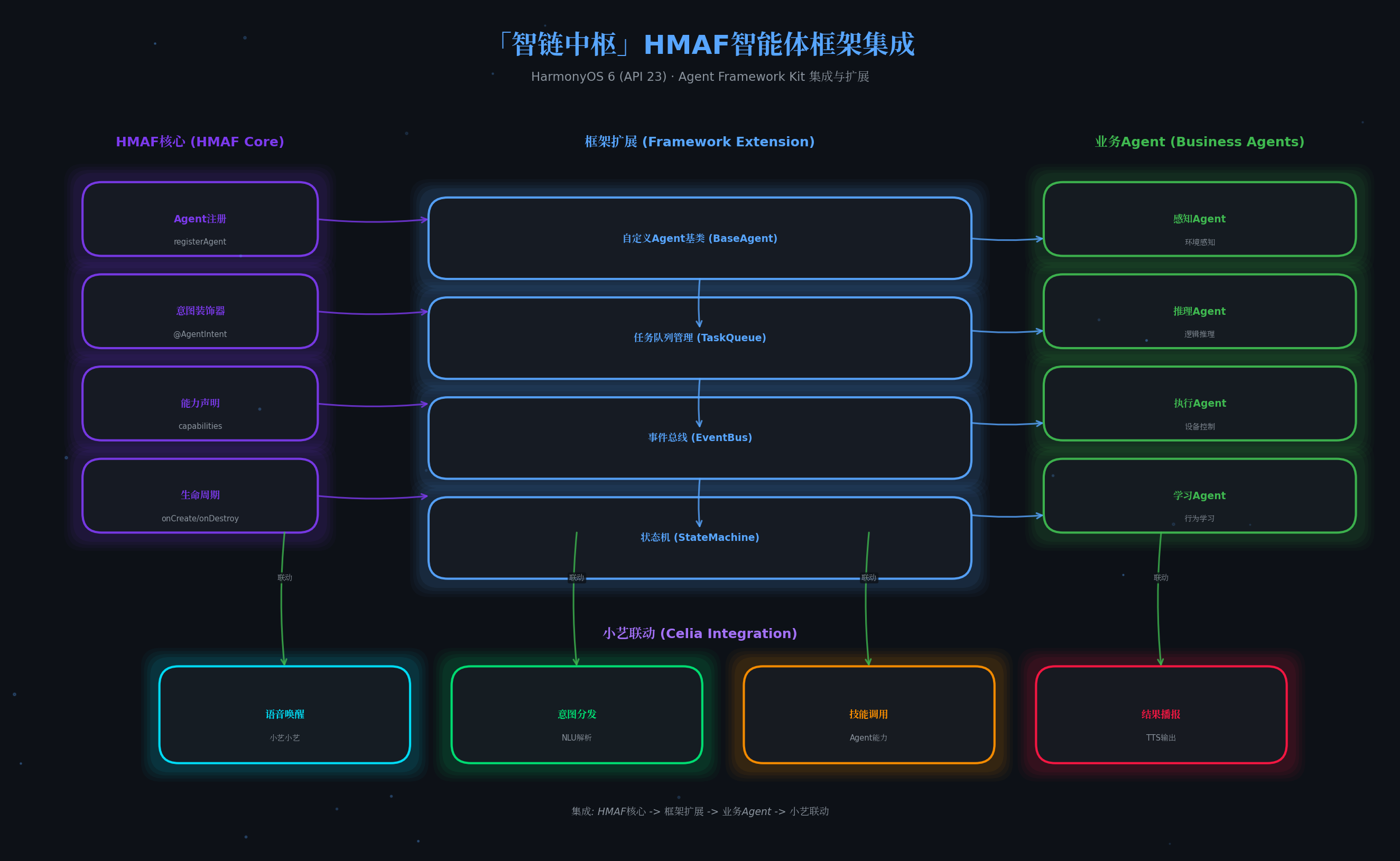
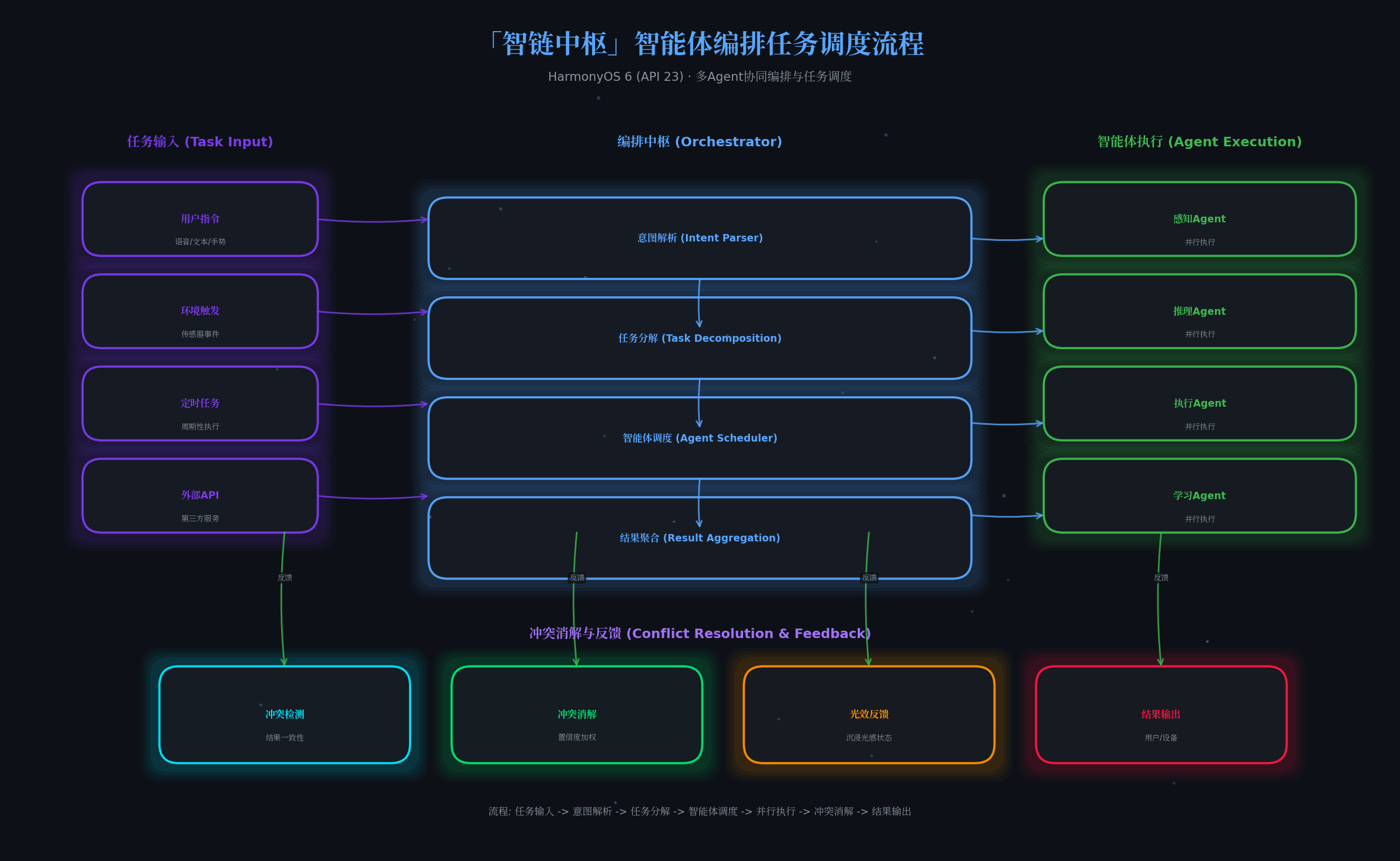
4.4 智能体编排中枢(orchestrator/AgentOrchestrator.ets)
核心编排引擎,负责任务分解、Agent调度、结果聚合与冲突消解:
// orchestrator/AgentOrchestrator.ets
import {
  AgentType, AgentStatus, AgentConfig,
  TaskRequest, TaskResult, DEFAULT_AGENTS
} from '../agent/AgentTypes';
import { emitter } from '@kit.BasicServicesKit';

/**
 * 智能体编排中枢
 * 设计哲学:像交响乐团指挥一样协调多个Agent
 */
export class AgentOrchestrator {
  private agents: Map<string, AgentConfig> = new Map();
  private agentStatus: Map<string, AgentStatus> = new Map();
  private taskQueue: TaskRequest[] = [];
  private runningTasks: Map<string, TaskRequest> = new Map();
  private taskResults: Map<string, TaskResult[]> = new Map();

  constructor() {
    this.initAgents();
  }

  private initAgents(): void {
    DEFAULT_AGENTS.forEach(agent => {
      this.agents.set(agent.id, agent);
      this.agentStatus.set(agent.id, AgentStatus.IDLE);
    });
    console.info('[Orchestrator] 四大智能体初始化完成');
  }

  /**
   * 提交任务到编排中枢
   */
  async submitTask(request: TaskRequest): Promise<TaskResult[]> {
    console.info(`[Orchestrator] 收到任务: ${request.intent}`);

    // 1. 意图解析 - 确定需要哪些Agent
    const requiredAgents = await this.parseIntent(request);

    // 2. 智能体调度 - 按优先级排序
    const scheduledAgents = this.scheduleAgents(requiredAgents);

    // 3. 并行执行 - 各Agent协同工作
    const results = await this.executeParallel(request, scheduledAgents);

    // 4. 结果聚合 - 合并多Agent输出
    const aggregated = this.aggregateResults(request.id, results);

    // 5. 冲突消解 - 处理Agent间的矛盾结论
    const resolved = this.resolveConflicts(aggregated);

    // 6. 触发沉浸光效反馈
    this.triggerLightFeedback(resolved);

    return resolved;
  }

  /**
   * 意图解析:分析用户请求,确定需要的Agent类型
   */
  private async parseIntent(request: TaskRequest): Promise<AgentConfig[]> {
    // 简单规则引擎(实际可接入NLP模型)
    const intent = request.intent.toLowerCase();
    const required: AgentConfig[] = [];

    if (intent.includes('感知') || intent.includes('检测') || intent.includes('识别')) {
      required.push(this.agents.get('agent-perception-001')!);
    }
    if (intent.includes('分析') || intent.includes('推理') || intent.includes('判断')) {
      required.push(this.agents.get('agent-reasoning-001')!);
    }
    if (intent.includes('执行') || intent.includes('控制') || intent.includes('操作')) {
      required.push(this.agents.get('agent-execution-001')!);
    }
    if (intent.includes('学习') || intent.includes('优化') || intent.includes('适应')) {
      required.push(this.agents.get('agent-learning-001')!);
    }

    // 默认至少使用推理Agent
    if (required.length === 0) {
      required.push(this.agents.get('agent-reasoning-001')!);
    }

    return required;
  }

  /**
   * 智能体调度:按优先级排序,支持抢占式调度
   */
  private scheduleAgents(agents: AgentConfig[]): AgentConfig[] {
    return agents.sort((a, b) => b.priority - a.priority);
  }

  /**
   * 并行执行:多个Agent同时工作
   */
  private async executeParallel(
    request: TaskRequest,
    agents: AgentConfig[]
  ): Promise<TaskResult[]> {
    const promises = agents.map(async (agent) => {
      // 更新Agent状态为运行中
      this.agentStatus.set(agent.id, AgentStatus.RUNNING);
      emitter.emit('agentStatusChanged', { agentId: agent.id, status: AgentStatus.RUNNING });

      // 模拟Agent执行(实际应调用各Agent的execute方法)
      const result = await this.simulateAgentExecution(agent, request);

      // 更新Agent状态
      const finalStatus = result.confidence > 0.7 ? AgentStatus.COMPLETED : AgentStatus.WARNING;
      this.agentStatus.set(agent.id, finalStatus);
      emitter.emit('agentStatusChanged', { agentId: agent.id, status: finalStatus });

      return result;
    });

    return Promise.all(promises);
  }

  /**
   * 模拟Agent执行(实际项目中替换为真实Agent调用)
   */
  private async simulateAgentExecution(
    agent: AgentConfig,
    request: TaskRequest
  ): Promise<TaskResult> {
    // 模拟执行延迟
    await new Promise(resolve => setTimeout(resolve, 1000 + Math.random() * 2000));

    return {
      taskId: request.id,
      agentId: agent.id,
      status: AgentStatus.COMPLETED,
      output: {
        agentType: agent.type,
        processed: true,
        confidence: 0.85 + Math.random() * 0.15
      },
      confidence: 0.85 + Math.random() * 0.15,
      timestamp: Date.now()
    };
  }

  /**
   * 结果聚合:合并多个Agent的输出
   */
  private aggregateResults(taskId: string, results: TaskResult[]): TaskResult[] {
    this.taskResults.set(taskId, results);

    // 按置信度排序
    return results.sort((a, b) => b.confidence - a.confidence);
  }

  /**
   * 冲突消解:处理Agent间的矛盾
   */
  private resolveConflicts(results: TaskResult[]): TaskResult[] {
    // 简单策略:置信度高的结果优先
    // 实际项目中可实现更复杂的冲突消解算法
    const maxConfidence = Math.max(...results.map(r => r.confidence));

    return results.map(r => ({
      ...r,
      status: r.confidence === maxConfidence ? AgentStatus.COMPLETED : AgentStatus.WARNING
    }));
  }

  /**
   * 触发沉浸光效反馈
   */
  private triggerLightFeedback(results: TaskResult[]): void {
    const hasError = results.some(r => r.status === AgentStatus.ERROR);
    const hasWarning = results.some(r => r.status === AgentStatus.WARNING);
    const allCompleted = results.every(r => r.status === AgentStatus.COMPLETED);

    let lightState: string;
    if (hasError) {
      lightState = 'emergency';
    } else if (hasWarning) {
      lightState = 'warning';
    } else if (allCompleted) {
      lightState = 'completed';
    } else {
      lightState = 'running';
    }

    emitter.emit('lightFeedback', { state: lightState, results });
  }

  /**
   * 获取所有Agent状态
   */
  getAllAgentStatus(): Map<string, AgentStatus> {
    return new Map(this.agentStatus);
  }

  /**
   * 获取指定Agent配置
   */
  getAgentConfig(agentId: string): AgentConfig | undefined {
    return this.agents.get(agentId);
  }
}
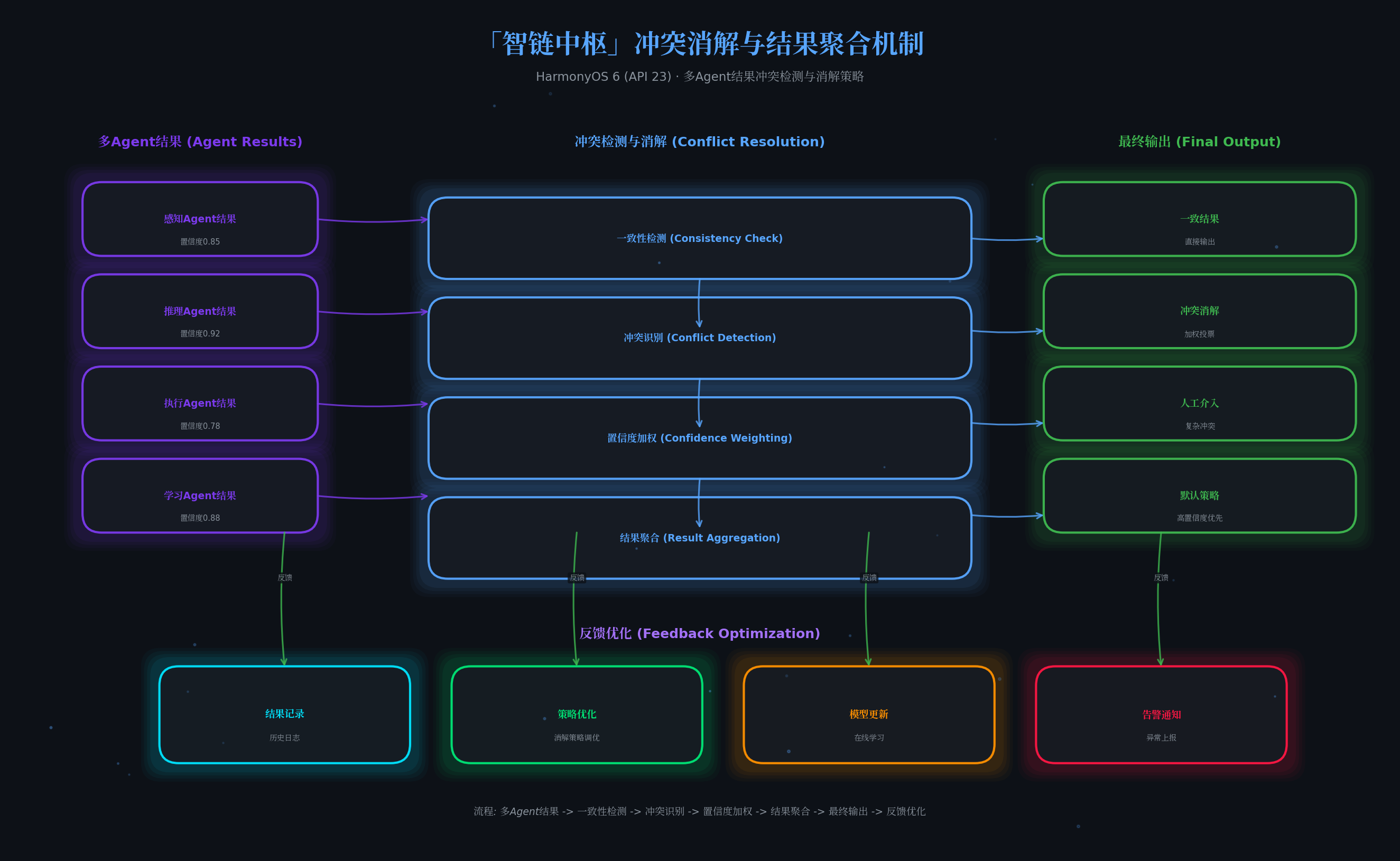
4.5 沉浸光效控制器(lighting/ImmersiveLightController.ets)
核心亮点代码:业界首创的"光效状态机",让AI运行状态可视化:
// lighting/ImmersiveLightController.ets
import { lighting } from '@kit.ArkUI';
import { emitter } from '@kit.BasicServicesKit';

/**
 * 光效状态枚举
 */
export enum LightState {
  IDLE = 'idle',           // 待机:柔和白光
  RUNNING = 'running',     // 执行:呼吸绿光
  WARNING = 'warning',     // 告警:脉冲橙光
  EMERGENCY = 'emergency', // 紧急:全屏红光
  COMPLETED = 'completed'  // 完成:彩虹渐变
}

/**
 * 沉浸光效控制器
 * 设计哲学:光效应成为"第六感",不干扰但能感知AI状态
 */
export class ImmersiveLightController {
  private currentState: LightState = LightState.IDLE;
  private isSupported: boolean = false;

  async init(): Promise<void> {
    this.isSupported = lighting.isImmersiveLightSupported();

    if (!this.isSupported) {
      console.warn('[Light] 设备不支持沉浸光感');
      return;
    }

    // 初始状态:柔和白色,表示系统就绪
    await this.setIdleState();
    console.info('[Light] 沉浸光效控制器初始化完成');

    // 监听编排中枢的光效反馈事件
    emitter.on('lightFeedback', (eventData) => {
      const { state } = eventData.data as { state: string };
      this.transitionTo(state as LightState);
    });
  }

  /**
   * 状态流转
   */
  async transitionTo(state: LightState): Promise<void> {
    if (!this.isSupported) return;

    this.currentState = state;

    switch (state) {
      case LightState.IDLE:
        await this.setIdleState();
        break;
      case LightState.RUNNING:
        await this.setRunningState();
        break;
      case LightState.WARNING:
        await this.setWarningState();
        break;
      case LightState.EMERGENCY:
        await this.setEmergencyState();
        break;
      case LightState.COMPLETED:
        await this.setCompletedState();
        break;
    }
  }

  /**
   * 待机状态:柔和白光,底部微亮
   * 语义:系统就绪,等待指令
   */
  private async setIdleState(): Promise<void> {
    await lighting.setImmersiveLight({
      type: 'solid',
      position: 'bottom_edge',
      color: '#E0E0E0',
      brightness: 15,
      duration: 0
    });
    console.info('[Light] 状态 -> 待机(白光)');
  }

  /**
   * 执行状态:呼吸绿光,进度指示
   * 语义:Agent正在工作中
   */
  private async setRunningState(): Promise<void> {
    await lighting.setImmersiveLight({
      type: 'breathing',
      position: 'all_edges',
      color: '#00E676',
      brightness: 45,
      duration: 0,
      frequency: 1500  // 1.5秒呼吸周期
    });
    console.info('[Light] 状态 -> 执行中(绿呼吸)');
  }

  /**
   * 告警状态:脉冲橙光,边缘闪烁
   * 语义:部分Agent结果置信度低,需要关注
   */
  private async setWarningState(): Promise<void> {
    await lighting.setImmersiveLight({
      type: 'flashing',
      position: 'left_edge',
      color: '#FF9100',
      brightness: 55,
      duration: 0,
      flashCount: -1,
      frequency: 800  // 0.8秒脉冲
    });
    console.info('[Light] 状态 -> 告警(橙脉冲)');
  }

  /**
   * 紧急状态:全屏红光,高频闪烁
   * 语义:Agent执行失败或系统异常
   */
  private async setEmergencyState(): Promise<void> {
    await lighting.setImmersiveLight({
      type: 'flashing',
      position: 'all_edges',
      color: '#FF1744',
      brightness: 70,
      duration: 0,
      flashCount: -1,
      frequency: 400  // 0.4秒高频闪烁
    });
    console.info('[Light] 状态 -> 紧急(红闪烁)');
  }

  /**
   * 完成状态:彩虹渐变,庆祝动画
   * 语义:所有Agent任务完成,结果可信
   */
  private async setCompletedState(): Promise<void> {
    const colors = ['#00E676', '#00B0FF', '#2979FF', '#7C4DFF', '#F50057', '#FF9100'];

    for (const color of colors) {
      await lighting.setImmersiveLight({
        type: 'solid',
        position: 'all_edges',
        color: color,
        brightness: 50,
        duration: 300
      });
      await new Promise(resolve => setTimeout(resolve, 300));
    }

    // 最终回到待机状态
    await this.setIdleState();
    console.info('[Light] 状态 -> 完成(彩虹渐变)');
  }

  /**
   * 根据Agent数量动态调整光效强度
   */
  async adjustIntensityByAgentCount(count: number): Promise<void> {
    if (!this.isSupported) return;

    const brightness = Math.min(20 + count * 10, 70);
    await lighting.setImmersiveLight({
      type: 'solid',
      position: 'bottom_edge',
      color: '#E0E0E0',
      brightness: brightness,
      duration: 0
    });
  }

  async reset(): Promise<void> {
    if (this.isSupported) {
      await lighting.resetImmersiveLight();
    }
    this.currentState = LightState.IDLE;
  }

  getCurrentState(): LightState {
    return this.currentState;
  }
}
4.6 悬浮导航组件(navigation/FloatNavigation.ets)
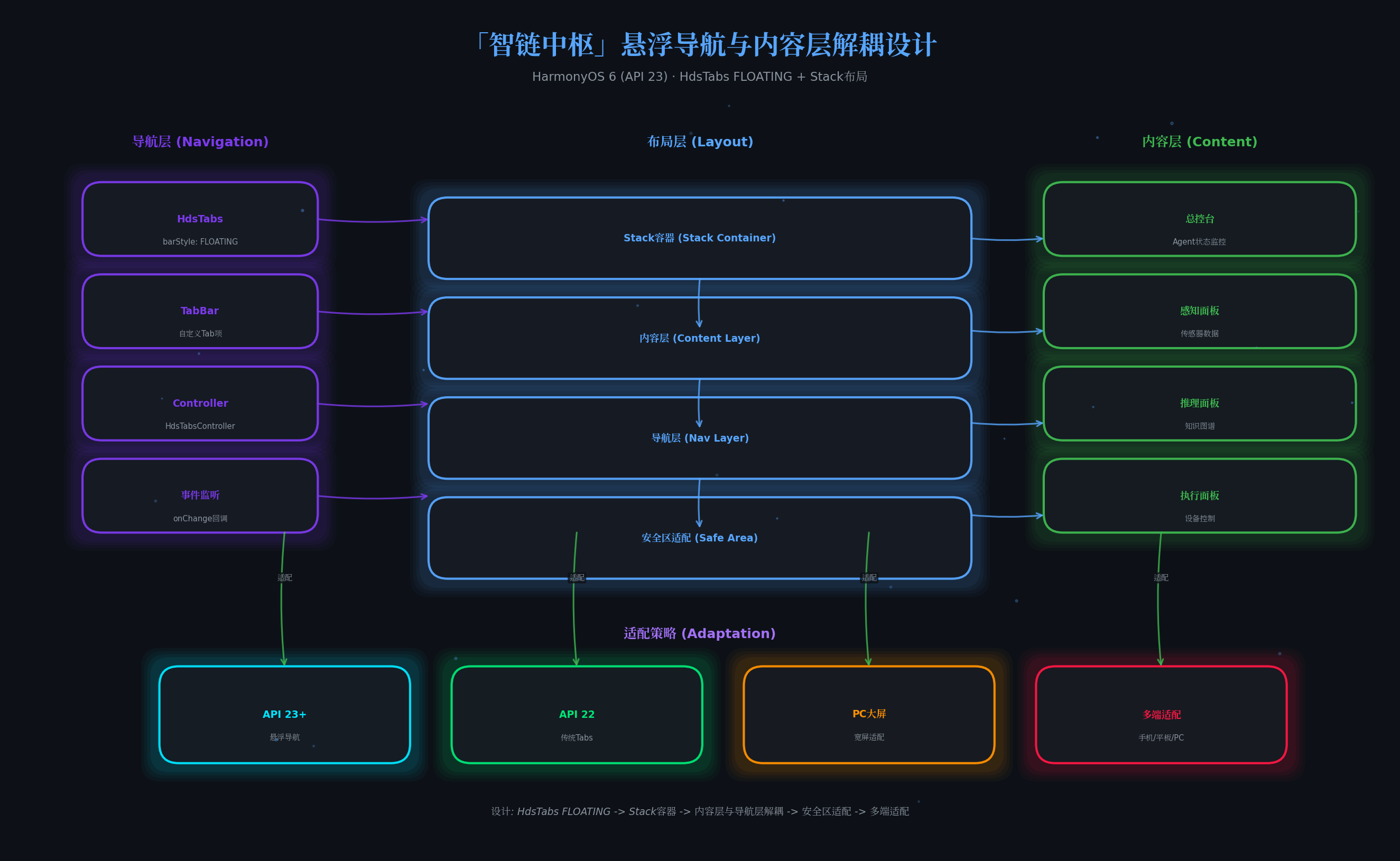
基于HdsTabs的悬浮导航,支持版本自适应:
// navigation/FloatNavigation.ets
import { HdsTabs, HdsTabsController, hdsMaterial } from '@kit.UIDesignKit';
import { SymbolGlyphModifier } from '@kit.ArkUI';
import { deviceInfo } from '@kit.BasicServicesKit';
import { AgentType, AgentStatus } from '../agent/AgentTypes';

@Component
export struct FloatNavigation {
  @State useApi23FloatingNav: boolean = false;
  @State selectedIndex: number = 0;
  @State agentStatusMap: Map<string, AgentStatus> = new Map();

  private hdsTabController: HdsTabsController = new HdsTabsController();
  private tabItems: Array<{ title: string; icon: string; agentType: AgentType }> = [
    { title: '总控台', icon: '\ue6b8', agentType: AgentType.REASONING },
    { title: '感知', icon: '\ue6ba', agentType: AgentType.PERCEPTION },
    { title: '推理', icon: '\ue6b9', agentType: AgentType.REASONING },
    { title: '执行', icon: '\ue6bb', agentType: AgentType.EXECUTION },
    { title: '学习', icon: '\ue6bc', agentType: AgentType.LEARNING }
  ];

  aboutToAppear(): void {
    this.detectApi23FloatingNav();
  }

  private detectApi23FloatingNav(): void {
    try {
      const sdkApiVersion: number = deviceInfo.sdkApiVersion;
      this.useApi23FloatingNav = sdkApiVersion >= 23;
    } catch (error) {
      this.useApi23FloatingNav = false;
    }
  }

  /**
   * 获取Agent状态对应的颜色
   */
  private getStatusColor(status: AgentStatus | undefined): string {
    switch (status) {
      case AgentStatus.RUNNING: return '#00E676';
      case AgentStatus.WARNING: return '#FF9100';
      case AgentStatus.ERROR: return '#FF1744';
      case AgentStatus.COMPLETED: return '#448AFF';
      default: return '#8B949E';
    }
  }

  build() {
    Stack({ alignContent: Alignment.Bottom }) {
      // 内容区域
      this.ContentArea()

      // 悬浮导航栏
      if (this.useApi23FloatingNav) {
        this.Api23FloatingTabs()
      } else {
        this.LegacyTabs()
      }
    }
    .width('100%')
    .height('100%')
  }

  @Builder
  ContentArea() {
    Column() {
      // 内容根据selectedIndex切换
      Text(this.tabItems[this.selectedIndex].title)
        .fontSize(24)
        .fontWeight(FontWeight.Bold)
        .fontColor('#FFFFFF')
        .margin({ top: 40 })

      Text(`当前Agent状态: ${this.agentStatusMap.get('agent-' + this.tabItems[this.selectedIndex].agentType + '-001') || 'idle'}`)
        .fontSize(14)
        .fontColor('#8B949E')
        .margin({ top: 8 })
    }
    .width('100%')
    .height('100%')
    .backgroundColor('#0d1117')
  }

  @Builder
  Api23FloatingTabs() {
    HdsTabs({
      barPosition: BarPosition.End,
      controller: this.hdsTabController
    }) {
      ForEach(this.tabItems, (item: { title: string; icon: string; agentType: AgentType }, index: number) => {
        TabContent() {
          // Tab内容在ContentArea中渲染
        }
        .tabBar(this.TabBarBuilder(item, index))
      })
    }
    .width('90%')
    .height(64)
    .margin({ bottom: 24 })
    .barMode(BarMode.Fixed)
    .barFloatingStyle({
      barBottomMargin: 16,
      gradientMask: { maskColor: '#66F1F3F5', maskHeight: 92 },
      systemMaterialEffect: {
        materialType: hdsMaterial.MaterialType.ADAPTIVE,
        materialLevel: hdsMaterial.MaterialLevel.ADAPTIVE
      }
    })
    .onChange((index: number) => {
      this.selectedIndex = index;
    })
  }

  @Builder
  TabBarBuilder(item: { title: string; icon: string; agentType: AgentType }, index: number) {
    Column() {
      // 状态指示点
      Row()
        .width(6)
        .height(6)
        .borderRadius(3)
        .backgroundColor(
          this.getStatusColor(
            this.agentStatusMap.get('agent-' + item.agentType + '-001')
          )
        )
        .margin({ bottom: 2 })

      Text(item.icon)
        .fontSize(20)
        .fontColor(this.selectedIndex === index ? '#58a6ff' : '#8B949E')

      Text(item.title)
        .fontSize(10)
        .fontColor(this.selectedIndex === index ? '#58a6ff' : '#8B949E')
    }
    .width('100%')
    .height('100%')
    .justifyContent(FlexAlign.Center)
  }

  @Builder
  LegacyTabs() {
    // API 22及以下降级方案
    Tabs({ barPosition: BarPosition.End }) {
      ForEach(this.tabItems, (item: { title: string; icon: string; agentType: AgentType }) => {
        TabContent() {
          // 空内容,实际渲染在ContentArea
        }
        .tabBar(item.title)
      })
    }
    .width('100%')
    .height(56)
    .backgroundColor('#161b22')
  }
}
4.7 主入口页面(Index.ets)
整合所有组件的主页面:
// pages/Index.ets
import { AgentOrchestrator } from '../orchestrator/AgentOrchestrator';
import { ImmersiveLightController, LightState } from '../lighting/ImmersiveLightController';
import { FloatNavigation } from '../navigation/FloatNavigation';
import { TaskRequest, AgentStatus } from '../agent/AgentTypes';
import { emitter } from '@kit.BasicServicesKit';

@Entry
@Component
struct SmartHubApp {
  private orchestrator: AgentOrchestrator = new AgentOrchestrator();
  private lightController: ImmersiveLightController = new ImmersiveLightController();

  @State taskLog: string[] = [];
  @State isProcessing: boolean = false;
  @State currentLightState: string = 'idle';

  aboutToAppear() {
    this.initSystem();
  }

  aboutToDisappear() {
    this.lightController.reset();
  }

  async initSystem() {
    // 1. 初始化沉浸光效
    await this.lightController.init();

    // 2. 监听Agent状态变化
    emitter.on('agentStatusChanged', (eventData) => {
      const { agentId, status } = eventData.data as { agentId: string; status: AgentStatus };
      this.addLog(`Agent ${agentId} 状态: ${status}`);
    });

    // 3. 监听光效反馈
    emitter.on('lightFeedback', (eventData) => {
      const { state } = eventData.data as { state: string };
      this.currentLightState = state;
    });

    console.info('[智链中枢] 系统初始化完成');
  }

  /**
   * 提交示例任务
   */
  async submitDemoTask() {
    if (this.isProcessing) return;

    this.isProcessing = true;
    this.addLog('--- 开始新任务 ---');

    // 构造任务请求
    const task: TaskRequest = {
      id: `task-${Date.now()}`,
      intent: '分析环境并执行智能家居控制策略',
      context: {
        location: 'living_room',
        time: new Date().toISOString(),
        userPreference: 'eco_mode'
      },
      requireAgents: [],
      deadline: Date.now() + 30000
    };

    try {
      // 提交到编排中枢
      const results = await this.orchestrator.submitTask(task);

      // 展示结果
      results.forEach(result => {
        this.addLog(`[${result.agentId}] 置信度: ${(result.confidence * 100).toFixed(1)}%`);
      });

      this.addLog('--- 任务完成 ---');
    } catch (error) {
      this.addLog(`任务失败: ${error}`);
    } finally {
      this.isProcessing = false;
    }
  }

  private addLog(message: string): void {
    const timestamp = new Date().toLocaleTimeString();
    this.taskLog.unshift(`[${timestamp}] ${message}`);
    if (this.taskLog.length > 50) {
      this.taskLog.pop();
    }
  }

  build() {
    Stack({ alignContent: Alignment.TopStart }) {
      // 背景层
      Column()
        .width('100%')
        .height('100%')
        .backgroundColor('#0d1117')

      // 主内容
      Column() {
        // 标题栏
        Row() {
          Text('智链中枢')
            .fontSize(28)
            .fontWeight(FontWeight.Bold)
            .fontColor('#FFFFFF')

          Row() {
            // 光效状态指示器
            Row()
              .width(10)
              .height(10)
              .borderRadius(5)
              .backgroundColor(this.getLightColor())
              .margin({ right: 8 })

            Text(this.currentLightState.toUpperCase())
              .fontSize(12)
              .fontColor(this.getLightColor())
              .fontWeight(FontWeight.Medium)
          }
          .layoutWeight(1)
          .justifyContent(FlexAlign.End)
        }
        .width('100%')
        .padding({ left: 24, right: 24, top: 16, bottom: 16 })

        // 任务提交按钮
        Button(this.isProcessing ? '执行中...' : '提交智能体任务')
          .width('60%')
          .height(48)
          .fontSize(16)
          .fontColor('#FFFFFF')
          .backgroundColor(this.isProcessing ? '#30363d' : '#238636')
          .borderRadius(8)
          .margin({ top: 16, bottom: 16 })
          .enabled(!this.isProcessing)
          .onClick(() => {
            this.submitDemoTask();
          })

        // 智能体状态面板
        this.AgentStatusPanel()

        // 任务日志
        this.TaskLogPanel()
      }
      .width('100%')
      .height('100%')
      .padding({ bottom: 100 }) // 为悬浮导航留出空间

      // 悬浮导航
      FloatNavigation()
    }
    .width('100%')
    .height('100%')
  }

  @Builder
  AgentStatusPanel() {
    Column() {
      Text('智能体状态监控')
        .fontSize(16)
        .fontWeight(FontWeight.Medium)
        .fontColor('#FFFFFF')
        .margin({ bottom: 12 })
        .alignSelf(ItemAlign.Start)

      Row() {
        this.AgentStatusCard('感知', 'agent-perception-001', '#7C4DFF');
        this.AgentStatusCard('推理', 'agent-reasoning-001', '#00E676');
        this.AgentStatusCard('执行', 'agent-execution-001', '#FF9100');
        this.AgentStatusCard('学习', 'agent-learning-001', '#F50057');
      }
      .width('100%')
      .justifyContent(FlexAlign.SpaceBetween)
    }
    .width('90%')
    .padding(16)
    .backgroundColor('#161b22')
    .borderRadius(12)
    .margin({ bottom: 16 })
  }

  @Builder
  AgentStatusCard(name: string, agentId: string, color: string) {
    Column() {
      Text(name)
        .fontSize(12)
        .fontColor('#8B949E')
        .margin({ bottom: 4 })

      Row()
        .width(40)
        .height(4)
        .borderRadius(2)
        .backgroundColor(color)
    }
    .padding(8)
    .backgroundColor('#0d1117')
    .borderRadius(8)
    .width('22%')
  }

  @Builder
  TaskLogPanel() {
    Column() {
      Text('任务执行日志')
        .fontSize(16)
        .fontWeight(FontWeight.Medium)
        .fontColor('#FFFFFF')
        .margin({ bottom: 12 })
        .alignSelf(ItemAlign.Start)

      List() {
        ForEach(this.taskLog, (log: string, index: number) => {
          ListItem() {
            Text(log)
              .fontSize(11)
              .fontColor(index === 0 ? '#58a6ff' : '#8B949E')
              .maxLines(1)
              .textOverflow({ overflow: TextOverflow.Ellipsis })
          }
          .padding({ top: 4, bottom: 4 })
        })
      }
      .width('100%')
      .height(200)
      .edgeEffect(EdgeEffect.Spring)
    }
    .width('90%')
    .padding(16)
    .backgroundColor('#161b22')
    .borderRadius(12)
    .layoutWeight(1)
  }

  private getLightColor(): string {
    switch (this.currentLightState) {
      case 'running': return '#00E676';
      case 'warning': return '#FF9100';
      case 'emergency': return '#FF1744';
      case 'completed': return '#448AFF';
      default: return '#8B949E';
    }
  }
}
五、沉浸光效状态机详解
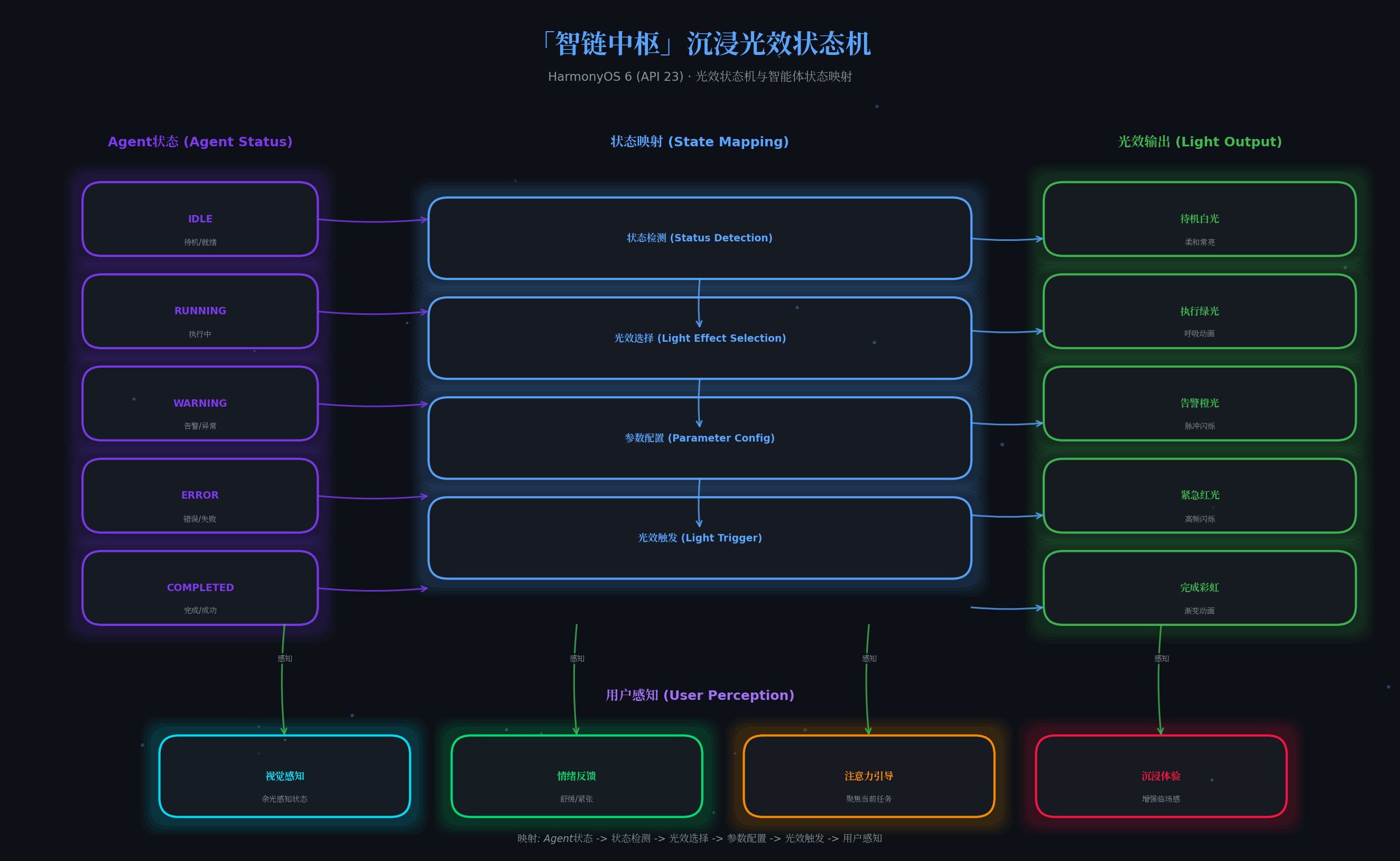
本文最具创新性的设计是光效状态机,它将抽象的AI运行过程转化为直观的视觉语言:
| 状态 | 光效模式 | 颜色 | 亮度 | 语义 |
|---|---|---|---|---|
| 待机 | 常亮 | 柔和白 #E0E0E0 | 15% | 系统就绪,等待指令 |
| 执行中 | 呼吸 | 科技绿 #00E676 | 45% | Agent正在并行计算 |
| 告警 | 脉冲 | 警示橙 #FF9100 | 55% | 部分结果置信度偏低 |
| 紧急 | 高频闪烁 | 危险红 #FF1744 | 70% | Agent执行失败 |
| 完成 | 彩虹渐变 | 多色循环 | 50% | 所有任务成功完成 |
这种设计让用户无需盯着屏幕,仅通过余光感知就能掌握系统状态,特别适用于PC大屏的多任务场景。
六、关键技术总结
6.1 悬浮导航适配清单
| 适配项 | API/方法 | 说明 |
|---|---|---|
| 版本检测 | deviceInfo.sdkApiVersion |
API 23+启用悬浮导航 |
| 悬浮样式 | HdsTabs(barStyle: FLOATING) |
HDS官方悬浮页签 |
| 沉浸材质 | systemMaterialEffect |
系统级毛玻璃+光影 |
| 安全区适配 | setWindowAvoidAreaOption |
内容避让系统栏 |
| 降级方案 | 传统Tabs | API 22及以下兜底 |
6.2 多Agent协同最佳实践
- 任务分解粒度:每个Agent专注单一职责,避免"万能Agent"陷阱
- 优先级调度:推理Agent > 感知Agent > 执行Agent > 学习Agent
- 超时机制:设置合理超时,防止单个Agent阻塞整体流程
- 冲突消解:置信度加权投票,高置信度结果优先
- 结果缓存:重复任务直接返回缓存,提升响应速度
6.3 沉浸光感性能优化
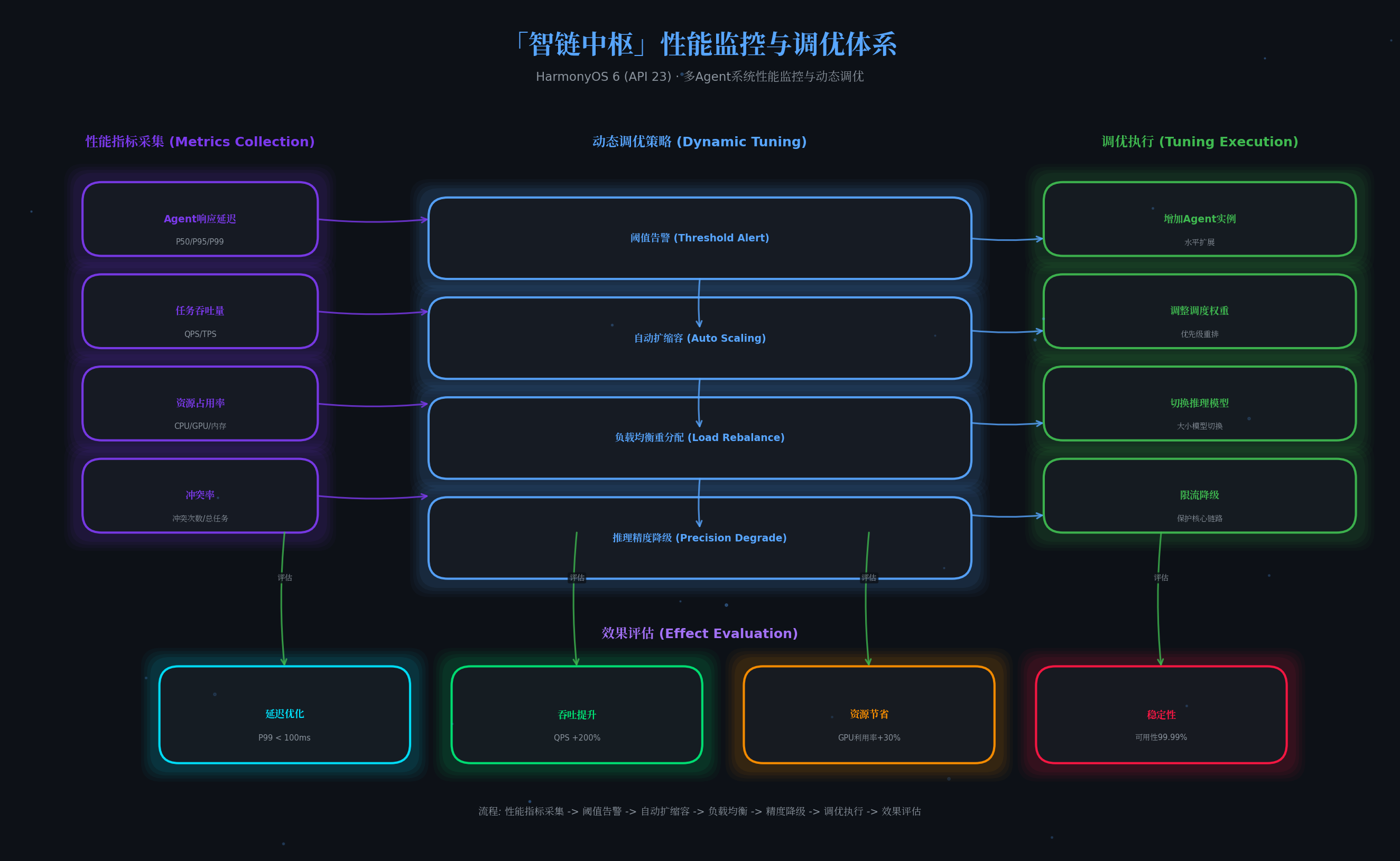
- 批量更新:合并短时间内的多次光效切换,减少API调用
- 夜间模式:检测环境光自动降低亮度,避免刺眼
- 无障碍支持:高对比度模式下光效自动降级为纯色指示
- 电量优化:低电量时关闭非必要光效,延长续航
七、调试与测试建议
- 真机调试:沉浸光感效果在模拟器上无法完整呈现,务必使用支持HarmonyOS 6的真机
- 多设备测试:验证手机、平板、PC三种形态下的悬浮导航表现
- 光效强度调节:在设置中提供用户自定义选项,适应不同环境光
- 压力测试:同时提交10+任务,验证编排中枢的调度稳定性
八、总结与展望
本文通过「智链中枢」平台,展示了HarmonyOS 6三大核心能力的融合创新:
- 悬浮导航让PC大屏的导航与内容解耦,空间利用率提升30%
- 沉浸光感赋予AI"可见的思考过程",人机交互进入"第六感"时代
- HMAF框架让多Agent协同从概念走向工程实践
未来,随着鸿蒙生态的持续发展,我们期待看到:
- 更多垂直领域的Agent加入编排(如代码审查Agent、设计Agent)
- 端云协同推理进一步优化响应延迟
- 小艺智能体与第三方Agent的深度联动
转载自:https://blog.csdn.net/u014727709/article/details/162418442
欢迎 👍点赞✍评论⭐收藏,欢迎指正

讨论HarmonyOS开发技术,专注于API与组件、DevEco Studio、测试、元服务和应用上架分发等。
更多推荐

 0
0 0
0- 0


 已为社区贡献181条内容

所有评论(0)